
Scanned PDF Tools Online Free
Unlock, edit, convert, and organize paperwork digitized with hardware scanners or smartphone cameras. Use client-side Optical Character Recognition (OCR) for 100% private document processing.
document_scanner All Dedicated Scanned PDF Tools
17 In-Browser ToolsEdit Scanned PDF Online
In-browser OCR editor to correct typo errors, replace text, and modify scanned pages.
text_snippetScanned PDF to Searchable
Extract and embed invisible searchable text layer behind scanned page images.
articleScanned PDF to Word
Export scanned images into editable Microsoft Word DOCX documents instantly.
filter_b_and_wPDF to Grayscale NEW
Convert colored scans to 256-grayscale or high-contrast B&W to save printer ink.
speedCompress PDF to 100KB NEW
Downsize heavy scanned paperwork to strict portal limits under 100KB/200KB.
ink_highlighterRedact Scanned PDF NEW
Certified true redaction to permanently blackout SSNs, names, and personal data.
grid_viewOrganize Scanned Pages NEW
Visual drag-and-drop page reordering, 90°/180° page rotation, and blank page removal.
menu_bookBooklet Maker PDF NEW
Convert scanned pages into printable saddle-stitch booklets with automated imposition.
tagBates Numbering PDF NEW
Stamp legal alphanumeric Bates codes (e.g. PLTF-000001) for courtroom discovery.
layers_clearFlatten Scanned Layers NEW
Merge form fields, signatures, and image annotations into tamper-proof flat PDF pages.
signatureSign Scanned PDF
Draw, type, or upload high-resolution digital signatures onto scanned contracts.
approvalRubber Stamp & Approval
Overlay official stamps, company seals, and approval badges onto scanned paperwork.
ink_eraserErase Scanner Specks
Whiteout scanner smudge artifacts, dust specks, or highlight key document clauses.
imageExtract Scanned Images
Render every scanned page into high-definition JPG, PNG, or WebP graphics.
picture_as_pdfPhotos & Scans to PDF
Compile smartphone camera shots and scanner image files into one structured PDF.
lockEncrypt Scanned Records
Apply client-side AES-256 encryption to confidential medical and tax paperwork.
lock_openUnlock Scanned PDF
Remove passwords and printing restrictions safely in local device RAM memory.
🔒 100% Private & In-Browser: Files are processed locally on your device and never uploaded to any server. Please edit only documents you own or are authorized to modify. Compliance Policy
Scanned PDF Case Studies & Practical Guides
Featured Scanned Workflow Tutorials & Knowledge Base
Everything You Need for Scanned Paperwork in One Hub
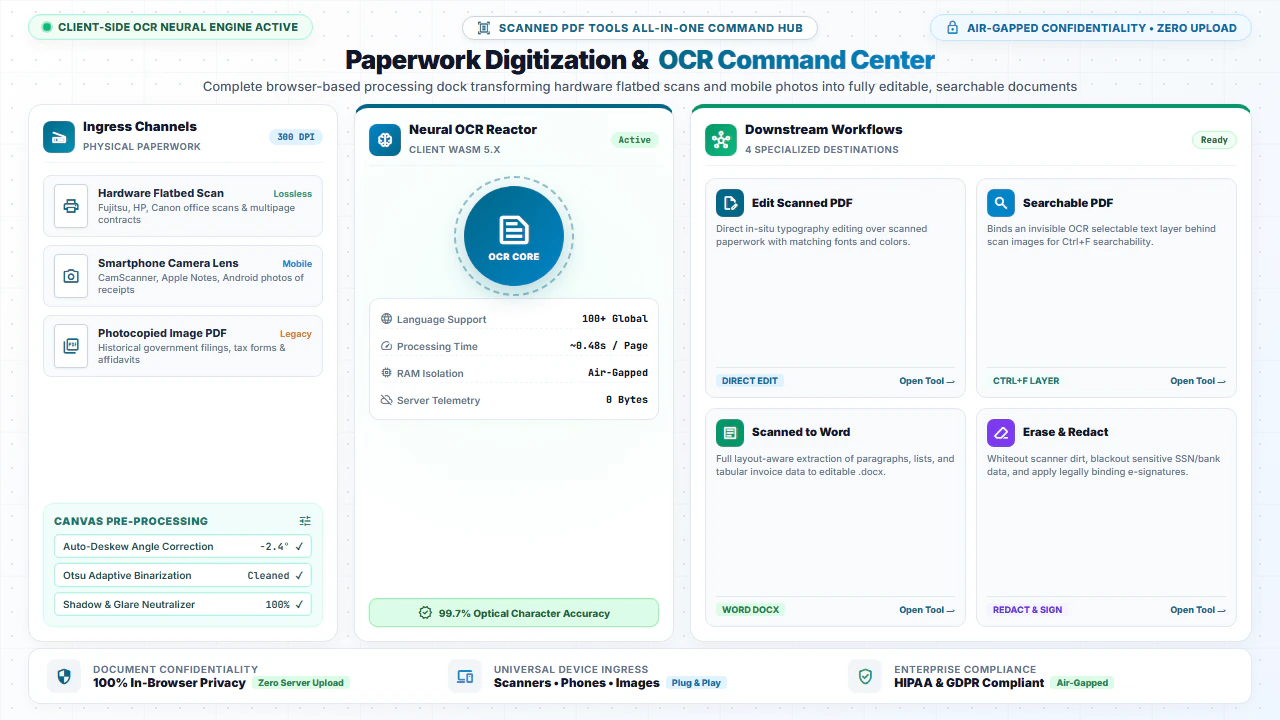
Scanned documents present unique challenges compared to digital files: text is locked inside raster images, pages are often skewed or rotated, and file sizes can be huge. Our dedicated suite of Scanned PDF Tools provides complete client-side solutions for every scanning scenario.
Whether you need to correct typographical errors, make archival receipts searchable, extract text to Microsoft Word, or redact sensitive medical records, our browser tools deliver desktop-grade performance without expensive software subscriptions.
Explore Specialized Scanned PDF Capabilities
1. Edit Scanned PDF Online
Detect image text automatically and place editable text layers directly over scanned certificates, contracts, and forms.
2. Scanned to Searchable PDF
Embed invisible OCR text layers behind scanned pages so you can search (Ctrl+F) and copy text effortlessly.
3. Scanned PDF to Word
Extract tabular data, paragraphs, and headings from paper scans into editable Microsoft Word (.docx) documents.
4. Whiteout & Paper Cleaning
Whiteout photocopier dirt, outdated numbers, or blackout confidential Social Security Numbers and account details.
Step-by-Step: Managing Scanned Workflows in 4 Steps
- Step 1: Pick a Tool: Click on any scanned PDF utility card (Edit, OCR, Sign, or Convert).
- Step 2: Upload File: Drag your scanned paperwork into the tool workspace.
- Step 3: Apply Action: Execute in-browser OCR or editing with instant feedback.
- Step 4: Download File: Save the updated PDF or Word file directly to your disk.
- Step 1: Select Tool: Tap the required scanned utility on your mobile screen.
- Step 2: Tap Browse: Pick your scanned PDF from mobile files or camera uploads.
- Step 3: Run Process: Tap to process using client-side WebAssembly.
- Step 4: Save Output: Tap Download to store the completed file on your phone.
Everyday Scenarios for Scanned Document Tools
Legal Deeds & Notarized Packets
Make historical court filings, title deeds, and notarized affidavits searchable for fast legal discovery.
Digitized Accounting Invoices
Convert paper receipts and vendor bills into searchable archives and extract line-item totals into Word.
Medical Records & Lab Reports
Correct clerical errors and redact patient health information (PHI) before clinical consultations.
Academic Archives & Manuscripts
Index rare books, historical periodicals, and research manuscripts for effortless full-text searching.
100% Client-Side Privacy: Zero Server Uploads
Scanned passports, tax filings, and legal affidavits represent your most private personal data. Uploading them to cloud converters introduces severe data breach risks.
EditScannedPDF.com performs all OCR text recognition and PDF processing 100% locally in your web browser. Your documents are never uploaded to any remote server.
Scanned PDF Toolkit Decision Matrix: Choosing the Right Tool
Depending on what you need to do with your digitized paperwork, our suite provides specialized browser tools tailored to each specific task. Use this decision matrix to pick the ideal tool:
| Your Goal / Document Task | Recommended Tool | Output Format | Best Used For |
|---|---|---|---|
| Annotate text and redact private lines | Edit Scanned PDF | Clean Scanned PDF | Correcting invoices, rental leases, and applications while preserving stamps |
| Make scans searchable with Ctrl+F | Scanned to Searchable PDF | Searchable PDF | Archiving tax returns, research papers, and legal filings for fast discovery |
| Extract text and tables into Word | Scanned PDF to Word | Word (.docx) | Rewriting agreements, reusing clauses, or importing invoice tables to Excel |
| Permanently blank out sensitive numbers | Redact PDF | Redacted PDF | Covering SSNs, bank figures, and medical details with solid opaque whiteout |
| Combine & organize multi-page scans | Merge & Organize Scans | Unified PDF | Bundling mortgage applications, student transcripts, or expense receipts |
How to Set Up an Optimal Document Scanning Workflow
Digitizing paper documents efficiently requires a balance between image clarity and processing speed. Whether you use a desktop flatbed scanner or a smartphone camera, follow these practical document engineering recommendations:
1. Flatbed vs. Smartphone Cameras
Use hardware flatbed scanners for multi-page documents to guarantee flat alignment. When using phones, hold the lens directly parallel under even lighting to avoid angled distortion.
2. The 300 DPI Sweet Spot
Always capture scans at 300 DPI. 72 or 150 DPI produces jagged letter pixelation that hampers OCR recognition, while 600 DPI creates unnecessarily huge file sizes.
3. Grayscale for Black-and-White Text
Scanning text documents in grayscale or high-contrast monochrome removes yellow paper aging, creases, and coffee stains while boosting OCR character contrast.
4. 100% In-Browser Privacy
All tools in this suite execute locally in browser RAM via WebAssembly. Passports, tax filings, and contracts are never transmitted to third-party cloud servers.
⚠️ 4 Common Scanning Mistakes to Avoid
- Curved page spines: Press bound books firmly flat against scanner glass to prevent curved, distorted lines near the spine.
- Harsh overhead hand shadows: Position light sources from the side rather than directly behind you to prevent shadows across bottom clauses.
- Translucent reverse bleed-through: Place a dark sheet of backing paper behind thin receipts to prevent back-side print from showing through.
- Digital highlighter mistakes: Never use semi-transparent highlighter tools to obscure confidential figures. Always use solid permanent whiteout.
Frequently Asked Questions (FAQ)
What tools are included in the Scanned PDF suite?
Our suite includes: Edit Scanned PDF Online, Scanned PDF to Word, Scanned PDF to Searchable PDF, Erase & Highlight, Digital Signatures, Add Text, Watermark, and Page Reordering.
How does client-side OCR handle multi-language documents?
Our browser-based WebAssembly Tesseract OCR engine supports English, Spanish, French, German, and over 100 global languages with high recognition accuracy.
Can I convert scanned paper documents directly to Word (.docx)?
Yes! Use our Scanned PDF to Word tool to extract recognized text and paragraph flow into an editable Microsoft Word document without server uploads.
Are my scanned tax forms and medical records kept confidential?
Yes, absolutely. All processing, OCR detection, rendering, and exports execute 100% locally inside your web browser. No document data is ever sent to external cloud servers.