
Redact PDF Online Free — 100% Private Blackout Tool
Permanently redact sensitive Social Security numbers, bank account figures, medical codes, and personal addresses from PDF files. Our true redaction engine bakes blackout boxes into visual pixels and obliterates underlying digital text streams with zero server uploads.
Select or Drop PDF to Redact
Files process 100% in local browser memory (RAM). Zero cloud uploads.
🔒 100% Private & In-Browser: Files are processed locally on your device and never uploaded to any server. Please edit only documents you own or are authorized to modify. Compliance Policy
How to Redact PDF Documents & Sanitize Metadata in 4 Simple Steps
Follow this tutorial to permanently blackout confidential numbers, personal data, and strip hidden tracking metadata from any PDF:
- Step 1: Open Your PDF in Client-Side Memory: Click Select PDF file or drag and drop your document directly into the redaction studio. The file is loaded securely into local RAM with zero server transmission.
- Step 2: Draw Blackout or Whiteout Redaction Boxes: Choose Blackout (solid black fill) or Whiteout (clean white fill), then click and drag over sensitive Social Security numbers, bank accounts, or names on each page.
- Step 3: Enable Metadata & XMP Sanitization: Verify that Wipe PDF Metadata & XMP Streams is checked to completely remove document author information, revision history, and software fingerprints.
- Step 4: Redact, Preview, and Download: Click Redact & Download PDF to bake your visual redactions and permanently purge digital text streams. Review your document in the zoomable preview modal and download the certified file.
Step-by-Step PDF Redaction Guides & Practical Tutorials
Learn compliance protocols and practical procedures for redacting sensitive documents before sharing:
Why True Redaction Requires Purging Digital Text Streams (Not Just Black Boxes)
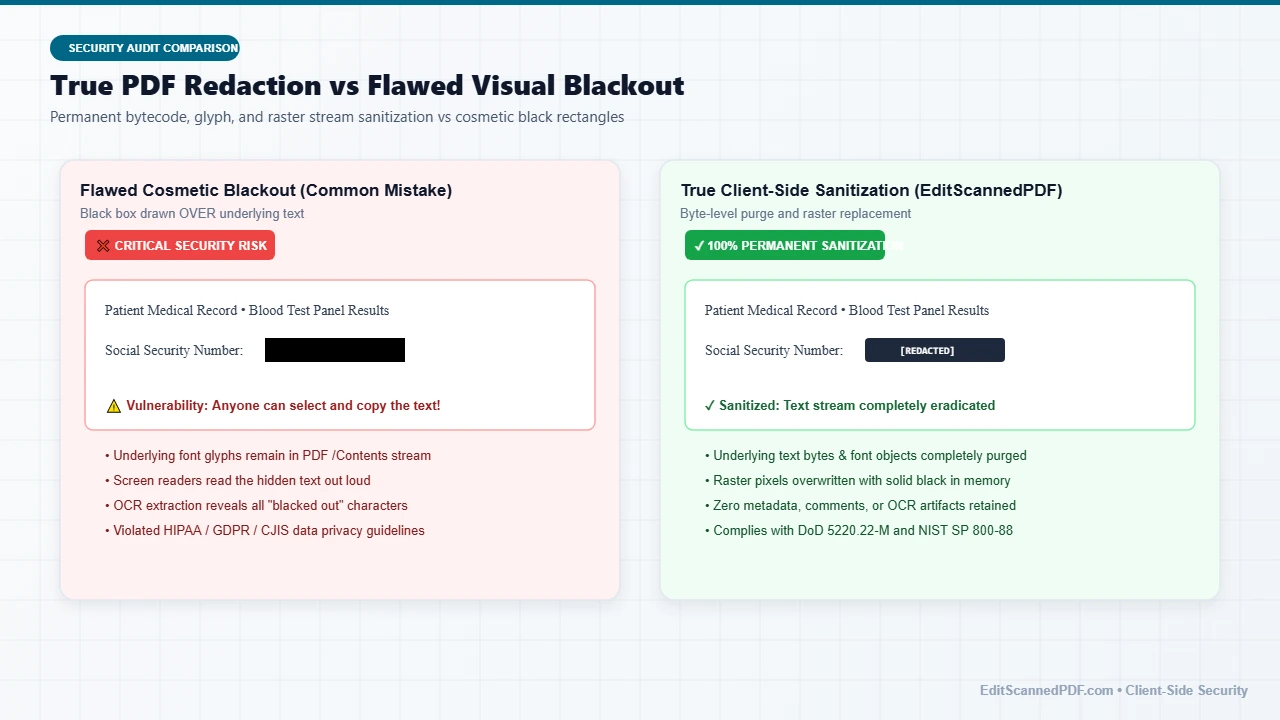
Drawing a superficial black shape over confidential numbers in standard office software does not protect your data. If the underlying digital text layer is not sanitized, anyone can press Ctrl+A, copy the clipboard, paste it into Notepad, or run automated OCR to instantly read the "blacked out" information.
1. The Superficial Blackout Trap
Most basic PDF viewers draw an overlay shape as a visual layer. The original character codes remain fully intact in the file's binary stream, allowing adversaries, opposing counsel, and web scrapers to extract the hidden text trivially.
2. True Digital Stream Sanitization
EditScannedPDF rasterizes redacted page sectors into static pixels and deletes original PDF Contents and Annots object streams. Underlying words, numbers, and bookmarks are permanently purged from the document structure.
3. Complete Metadata & XMP Scrubbing
Hidden metadata often leaks file creators, corporate networks, and exact timestamps. Our metadata sanitizer purges Title, Author, Subject, Keywords, Creator, and embedded XMP streams for total anonymity.
4. Zero Cloud Exposure
Because redaction runs 100% inside your client-side browser memory, sensitive Social Security numbers, confidential financial identifiers, and private personal records never travel across external networks or third-party servers.
High-Stakes Redaction Scenarios & Compliance Standards
When sharing sensitive documents with landlords, lenders, employers, or courts, protecting confidential identifiers is critical to prevent identity theft and regulatory non-compliance:
- IRS Form 1040, W-2 & 1099 Tax Documents: Blackout full 9-digit Social Security Numbers (SSN), Employer Identification Numbers (EIN), and dependent information before submitting proof-of-income to rental agencies or mortgage brokers.
- Bank Statements & Financial Ledgers: Conceal bank account numbers, routing numbers, and unrelated transaction histories while preserving proof of deposit balances and monthly income totals.
- Passports, Driver's Licenses & National IDs: Redact Machine Readable Zone (MRZ) barcodes, national identification numbers, and home addresses when submitting identity verification to online services.
- HIPAA Healthcare & Medical Records: Permanently scrub the 18 Protected Health Information (PHI) identifiers, including patient medical record numbers, prescription barcodes, and doctor notes for legal reviews or academic research.
Redaction Tool Comparison: In-Browser vs. Cloud Upload vs. Paid Desktop
| Feature | EditScannedPDF Redact | Adobe Acrobat Pro | Smallpdf / Cloud Tools |
|---|---|---|---|
| Price | 100% Free Forever | $19.99 / month subscription | $12 / month (limited free trials) |
| Data Privacy & Storage | Zero Uploads (100% Client RAM) | Local software (cloud sync default) | Uploaded to remote cloud servers |
| True Stream Sanitization | Yes (Purges Contents & Annots) | Yes (Dedicated redaction module) | Varies (Many only draw overlays) |
| Metadata & XMP Purge | Built-in 1-Click Sanitizer | Requires manual "Sanitize" tool | Rarely included |
| Installation & Account | Instant Web Browser (No Sign-Up) | Heavy desktop download & login | Account login and usage gates |
Frequently Asked Questions
Does this tool perform true digital redaction or just draw a black box over text?
EditScannedPDF performs certified True Redaction. Unlike basic drawing programs that only place a superficial black rectangle over text, our engine bakes the redaction boxes into rasterized pixels and permanently deletes the underlying PDF digital Contents streams and annotations. Redacted text cannot be highlighted, selected, copied, or extracted with OCR.
Can redacted text be uncovered or searched with Ctrl+F?
No. Because the underlying text objects and character streams are purged from the PDF document structure on redacted areas, search tools, screen readers, and text scrapers cannot detect or reveal the redacted information.
What hidden metadata is sanitized when 'Wipe PDF Metadata' is enabled?
Enabling metadata sanitization completely wipes the Document Information Dictionary (Title, Author, Subject, Keywords, Creator, Producer, CreationDate, and ModDate) as well as embedded XMP XML streams and PieceInfo software metadata.
Are my tax returns, bank records, and medical files uploaded to any server?
Never. All PDF parsing, canvas rendering, stream sanitization, and PDF rebuilding happen 100% inside your local web browser memory (RAM) via WebAssembly and JavaScript. Zero bytes are uploaded to remote cloud servers.
What is the difference between Blackout Box and Whiteout Box modes?
Blackout applies a solid black rectangle, which is the standard protocol for legal discovery, court filings, and FOIA releases to show that data was redacted. Whiteout applies a clean white fill, ideal for removing errors, signatures, or unwanted headers cleanly without visible black bars.
Does redacting one page affect selectable text on other pages?
Pages with redactions have their redacted zones permanently purged while preserving searchable non-redacted text. Pages without redaction boxes maintain their original digital text stream integrity while benefiting from sitewide metadata sanitization.
Is this redaction tool compliant with HIPAA, GDPR, and court filing standards?
Yes. Because no data leaves your workstation or smartphone, it satisfies strict HIPAA physical and technical safeguard rules, GDPR Article 32 confidentiality guidelines, and federal court e-filing privacy requirements for redactions.