
JPG to PDF Online Free
Combine JPG, PNG, and WebP images into a single polished PDF document right inside your browser. Perfect for phone photos, receipts, identity documents, and artwork with 100% private in-browser execution.
Only edit documents that you own or are legally authorized to modify. Do not use this website to alter documents for fraud, misrepresentation, identity misuse, or any illegal purpose. You are fully responsible for how you use edited documents; Edit Scanned PDF is not responsible for unlawful or unauthorized use. Read More
You can convert JPG, PNG, and camera photos into a clean, multi-page PDF document online for free using EditScannedPDF.com JPG to PDF Converter. Combine phone camera photos of receipts, book pages, or certificates into a single organized PDF with customized page orientation and margins—processed 100% locally in browser memory.
How Image to PDF Conversion Works
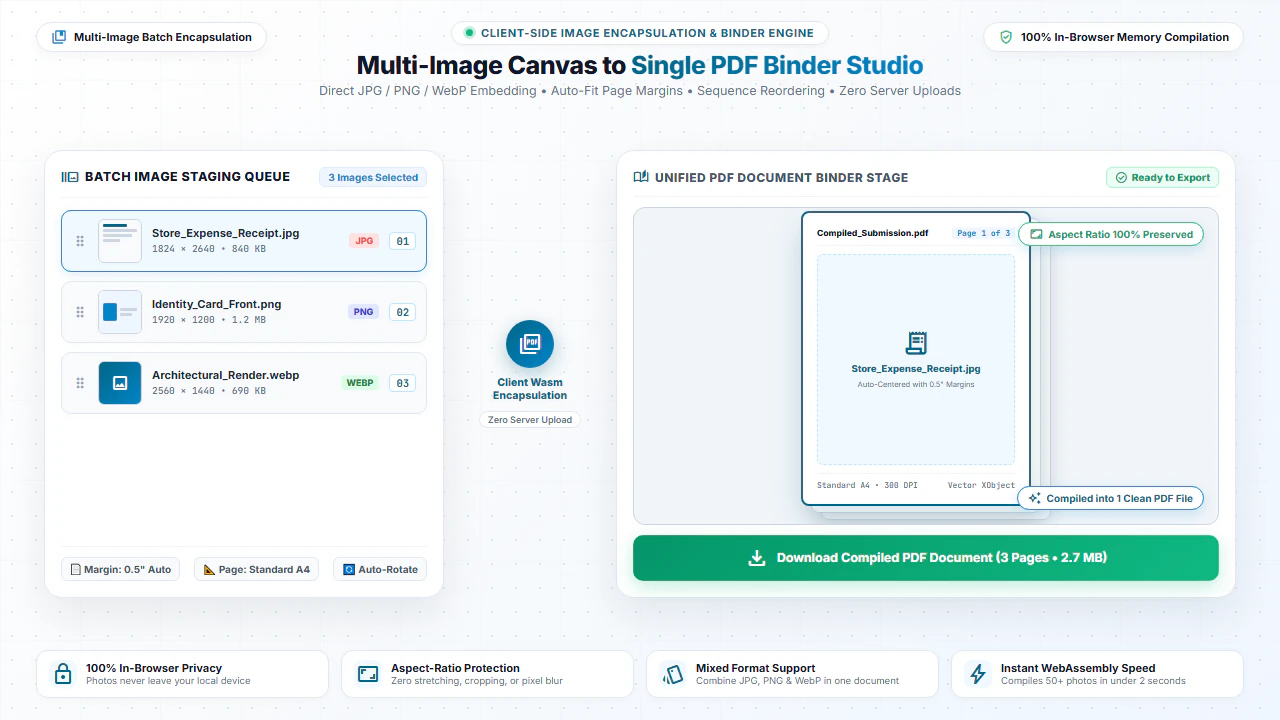
When you convert images to PDF, each picture is embedded inside a standardized PDF canvas container. The tool preserves original aspect ratios, applies clean page margins, and encapsulates high-resolution raster data directly into standard PDF XObjects.
The resulting document can be opened seamlessly across all PDF viewers, printers, and operating systems without compatibility issues or distortion.
Broad Image Format Support
JPG / JPEG Photos
Seamlessly pack camera snapshots, mobile phone pictures, and scanned photo sheets.
PNG Screenshots & Graphics
Preserve sharp line art, charts, UI screenshots, and logos with crisp alpha channel handling.
Modern WebP Images
Combine modern lightweight WebP image formats downloaded from websites and messaging apps.
Multi-Image Batch Binding
Select multiple images at once to generate a multi-page document in your selected order.
Step-by-Step: Convert Images to PDF in 4 Steps
- Step 1: Choose Your Photos: Click Choose Images or drag multiple JPG/PNG photos into the upload zone.
- Step 2: Auto-Fitting Dimensions: The client-side embedder automatically scales images to standard document dimensions.
- Step 3: Compile Multipage PDF: Click Convert Images to PDF to bind photos into a clean document.
- Step 4: Download PDF: Download your finalized PDF file instantly with zero watermarks or loss of sharpness.
- Step 1: Tap to Select: Tap Choose Images and pick photos directly from your Camera Roll or Gallery.
- Step 2: Multi-Select Support: Choose multiple photos to combine into a single multipage document.
- Step 3: Process on Smartphone: Tap Convert Images to PDF to process everything directly on your mobile device.
- Step 4: Save & Share: Save the resulting PDF file to your phone or share instantly via messaging apps.
Everyday Use Cases for Image to PDF Conversion
Expense Reports & Receipts
Snap photos of store receipts and compile them into a unified PDF expense claim for reimbursement.
Identity Verification Documents
Combine front and back photos of driver licenses, national IDs, and passports into one submission file.
Homework & Assignments
Photograph handwritten assignment pages and submit a clean single-file PDF to school portals.
Design & Photography Portfolios
Bundle high-resolution photography proofs, sketches, and digital artwork into a sharable portfolio.
100% Private: In-Browser Processing Guarantee
Your photos may contain sensitive information like passport numbers, private addresses, or financial transactions. Unlike other online converters that upload your photos to cloud servers, EditScannedPDF.com compiles your PDF 100% locally in your web browser memory.
No photos or document bytes are ever uploaded to any server. Your personal files remain confidential and secure on your device.
Comparison: EditScannedPDF vs. Traditional Cloud Tools
Understanding how our in-browser WebAssembly architecture protects your sensitive documents compared to legacy cloud PDF converters:
Enterprise-Grade In-Browser Security Architecture
When working with sensitive contracts, financial spreadsheets, medical records, or identity credentials, uploading files to third-party web servers introduces major cybersecurity risks. EditScannedPDF solves this fundamental vulnerability by executing all PDF compilation, vector synthesis, and cryptographic operations directly inside your device's browser memory using WebAssembly.
Your documents never travel across the internet, are never indexed on remote hard drives, and leave zero data footprint behind once you close your browser tab. Experience complete operational privacy built from the ground up to satisfy modern corporate security protocols.
Frequently Asked Questions (FAQ)
How do I combine multiple photos into a single PDF document?
Select multiple JPG, PNG, or WebP image files in the tool above. Our converter arranges each picture sequentially on consecutive pages and packages them into a clean, unified PDF file.
Can I convert photos taken from my smartphone camera?
Yes! You can upload high-resolution camera photos of receipts, homework sheets, contracts, or certificates directly from your mobile device or desktop.
Can I edit the text inside the generated PDF later?
Yes. Once your PDF is created, you can open it in our Scanned PDF Editor to perform OCR text detection and edit or replace text seamlessly.
Is my privacy guaranteed during image conversion?
Yes. The entire image-to-PDF embedding is computed 100% inside your browser using client-side JavaScript. No images or files are ever sent to external cloud servers.