
Edit Normal PDF Online Free
Modify digital, computer-generated PDFs directly in your web browser. Add text boxes, format typography, draw annotations, insert e-signatures, white out old paragraphs, and save clean high-resolution files with 100% private in-browser processing.
Choose any digital PDF file to launch the interactive editor immediately.
Only edit documents that you own or are legally authorized to modify. Do not use this website to alter documents for fraud, misrepresentation, identity misuse, or any illegal purpose. You are fully responsible for how you use edited documents; Edit Scanned PDF is not responsible for unlawful or unauthorized use. Read More
Helpful Guides & Tutorials
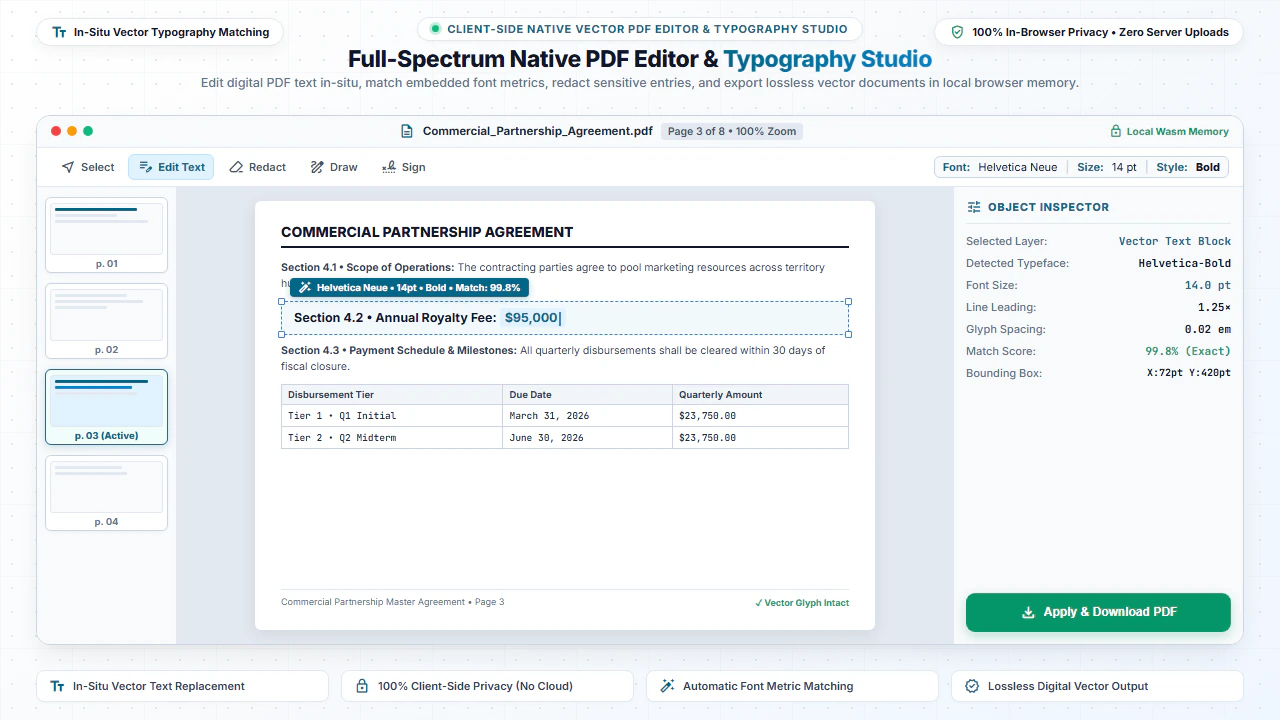
You can edit born-digital vector PDFs online for free with instant rendering using EditScannedPDF.com Normal PDF Editor. Modify native PDF text, annotate paragraphs, insert images, and sign agreements directly in your browser without altering document layout or uploading files to remote servers.
What is a Normal PDF vs. a Scanned PDF?
Understanding how your PDF was created is crucial for choosing the right editing tool:
- Normal (Digital / Vector) PDFs: Created digitally from computer software such as Microsoft Word (Save as PDF), Google Docs, commercial desktop software InDesign, Excel, or web browsers. They contain real vector character streams and embedded font glyphs. Text can be searched, highlighted, and copied effortlessly.
- Scanned (Raster / Image) PDFs: Created when physical paper paperwork is scanned with a flatbed scanner or photographed with a phone camera. The PDF contains no real text—only a flat picture. These files require our specialized Scanned PDF OCR Editor.
When you open a normal digital PDF in our editor, you benefit from sharp vector rendering, instant text alignment, and crystal-clear typography matching.
How to Edit Normal Digital PDFs in 4 Easy Steps
- Step 1: Open Your PDF: Click Select PDF file or drag your digital document into the window.
- Step 2: Select Action: Choose from Add Text, Draw, Add Image, or Highlight in the editor toolbar.
- Step 3: Modify Page: Click anywhere on the canvas to place text boxes, fill forms, or draw signatures.
- Step 4: Download PDF: Click Download PDF to save your modified document instantly.
- Step 1: Tap to Select: Tap Select PDF file to open your document from mobile storage.
- Step 2: Choose Mobile Tool: Tap the editing tool you need (Text, Draw, or Highlight).
- Step 3: Add Notes or Form Data: Tap on the document page to type or annotate.
- Step 4: Save to Device: Tap Download PDF to save the updated document.
Top Features for Digital PDF Editing
Typography & Text Boxes
Insert clean text with custom font families, font sizes, colors, and line alignments.
E-Signatures & Stamps
Draw handwritten signatures, type cursive scripts, or upload formal corporate stamp images.
Drawing & Annotation
Highlight important clauses, draw arrows, circle key terms, and add freehand sketches.
Precision Whiteout / Redaction
Erase typos or confidential financial data with color-matched overlay rectangles.
Page Organizer
Insert new pages, delete unwanted pages, rotate upside-down pages, or duplicate sheets.
Watermark & Branding
Protect intellectual property by applying semi-transparent draft or confidential watermarks.
Why Use a Browser-Based PDF Editor Instead of Heavy Desktop Software?
Heavy desktop applications like Paid Desktop Software often require multi-gigabyte downloads, complex installations, and recurring monthly subscriptions. For day-to-day document edits, a lightweight web editor is significantly more practical:
- Instant Access: No downloads, no updates, and no waiting. Open the URL and begin editing in seconds.
- Universal Compatibility: Works seamlessly across Windows 10/11, macOS, Linux, ChromeOS, iPadOS, and Android.
- Zero Cost: Complete access to full editing capabilities without paywalls or daily task limits.
- Absolute Privacy: Because our tool processes files locally using HTML5 WebAssembly, your confidential files are never sent to remote cloud servers.
Common Everyday Uses for Normal PDF Editing
Business Contracts & NDAs
Fill in party names, effective dates, payment milestones, and append legal signatures.
Rental & Lease Agreements
Complete tenant details, update rental fees, and initial each clause effortlessly.
Invoices & Billing Quotes
Update line item pricing, fix customer billing addresses, and add paid stamps.
Job Applications & Resumes
Update contact information, fix employment dates, and adjust layout spacing.
Comparison: EditScannedPDF vs. Traditional Cloud Tools
Understanding how our in-browser WebAssembly architecture protects your sensitive documents compared to legacy cloud PDF converters:
Enterprise-Grade In-Browser Security Architecture
When working with sensitive contracts, financial spreadsheets, medical records, or identity credentials, uploading files to third-party web servers introduces major cybersecurity risks. EditScannedPDF solves this fundamental vulnerability by executing all PDF compilation, vector synthesis, and cryptographic operations directly inside your device's browser memory using WebAssembly.
Your documents never travel across the internet, are never indexed on remote hard drives, and leave zero data footprint behind once you close your browser tab. Experience complete operational privacy built from the ground up to satisfy modern corporate security protocols.
Frequently Asked Questions (FAQ)
What is a normal PDF compared to a scanned PDF?
A normal PDF (also known as a digital or vector PDF) is generated directly by software like Microsoft Word, Google Docs, or Canva. It contains real selectable text streams, font definitions, and vector graphics. A scanned PDF, on the other hand, is merely a photo of a piece of paper saved inside a PDF wrapper.
Can I edit existing text in a normal digital PDF?
Yes! In Normal PDF mode, you can select existing text, add new text layers, erase old content, and insert custom annotations directly in your web browser.
Are my files uploaded to your servers when editing normal PDFs?
No. EditScannedPDF.com processes your PDF 100% locally inside your browser memory using HTML5 Canvas and JavaScript. Your confidential files never leave your device.
Can I add electronic signatures to digital contracts?
Yes. You can draw your signature with a mouse or touchscreen, type your name using a stylized handwriting font, or upload a PNG image of your physical signature.
Is there any software installation required?
No software or plugins are required. Our editor works instantly in all major browsers including Chrome, Edge, Safari, Firefox, and Opera on Windows, Mac, Chromebook, and mobile devices.