
Why macOS Apple Preview Locks Scanned PDF Text
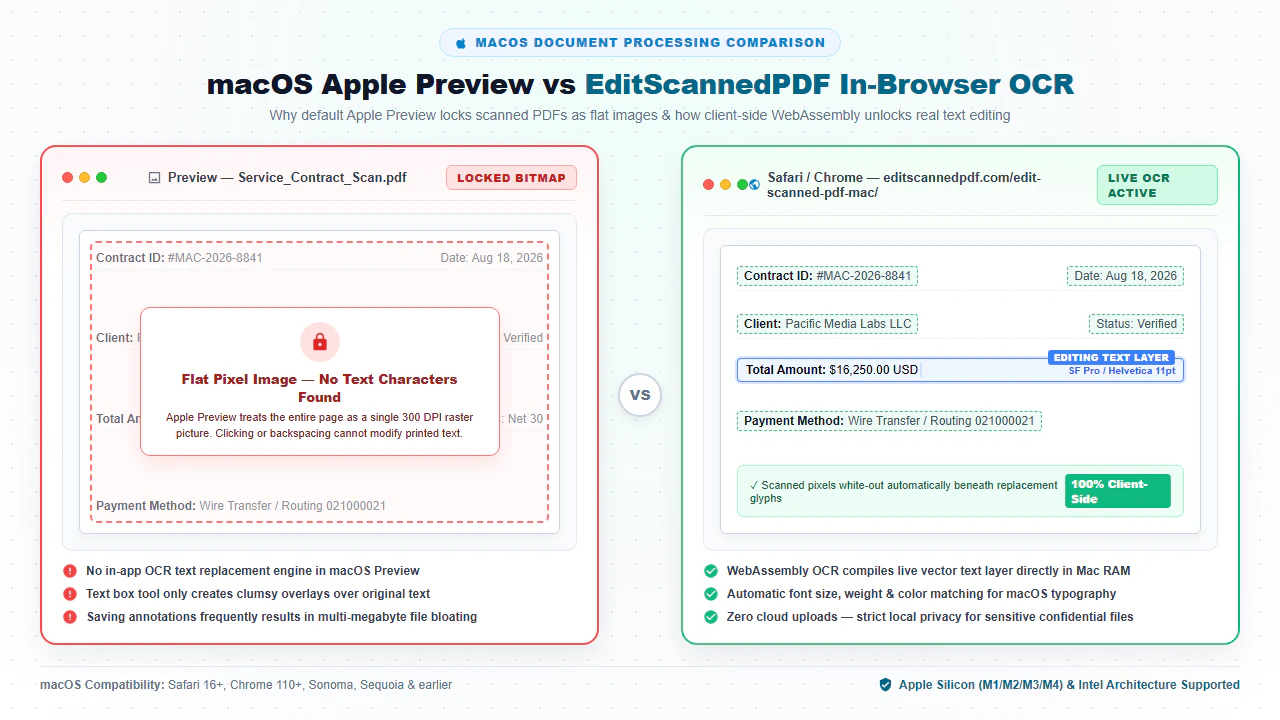
When you double-click a scanned PDF contract, commercial invoice, or medical record in macOS Finder, the document opens instantaneously in Apple's built-in Preview app. Apple Preview is universally praised for its rapid launch times, smooth trackpad gestures, and basic annotation tools (such as highlighting phrases or scribbling a digital signature). However, the moment you attempt to select an existing word, backspace a clerical typo, or update an outdated invoice total, nothing happens. Clicking anywhere on the page selects the entire document as a giant, uneditable image rectangle.
This limitation is not an operational bug; it is an inherent characteristic of how scanned documents are constructed. When physical paperwork passes through an office scanner, multi-function printer, or smartphone camera, the scanning hardware captures millions of colored dots called raster pixels. In compliance with ISO 32000 specifications, this photograph is encapsulated inside the PDF file as a static image dictionary (an /XObject of subtype /Image). Because Apple Preview does not feature an integrated optical character recognition (OCR) text replacement pipeline, it cannot transcribe those graphical pixels into selectable vector fonts. To Preview, the text on your contract is visually indistinguishable from a JPEG photograph.
Historically, overcoming this roadblock on macOS forced Apple users into two deeply frustrating choices: For deeper troubleshooting, see our guide on why you cannot edit text in a scanned PDF.
- Purchasing Heavy Commercial Desktop Suites: Commercial software packages demand recurring subscription fees of $240+ per year per seat. In addition to high financial costs, these suites install bloated multi-gigabyte background daemons, auto-updaters, and persistent telemetry agents that drain MacBook battery life and clutter your Mac's SSD storage.
- Uploading Confidential Business Records to Remote Cloud Converters: Free online converters carry substantial regulatory and privacy liabilities. When you upload proprietary client agreements, executive tax returns, or HIPAA-protected health records to multi-tenant cloud servers, you lose control of document custody and risk severe data breach penalties.
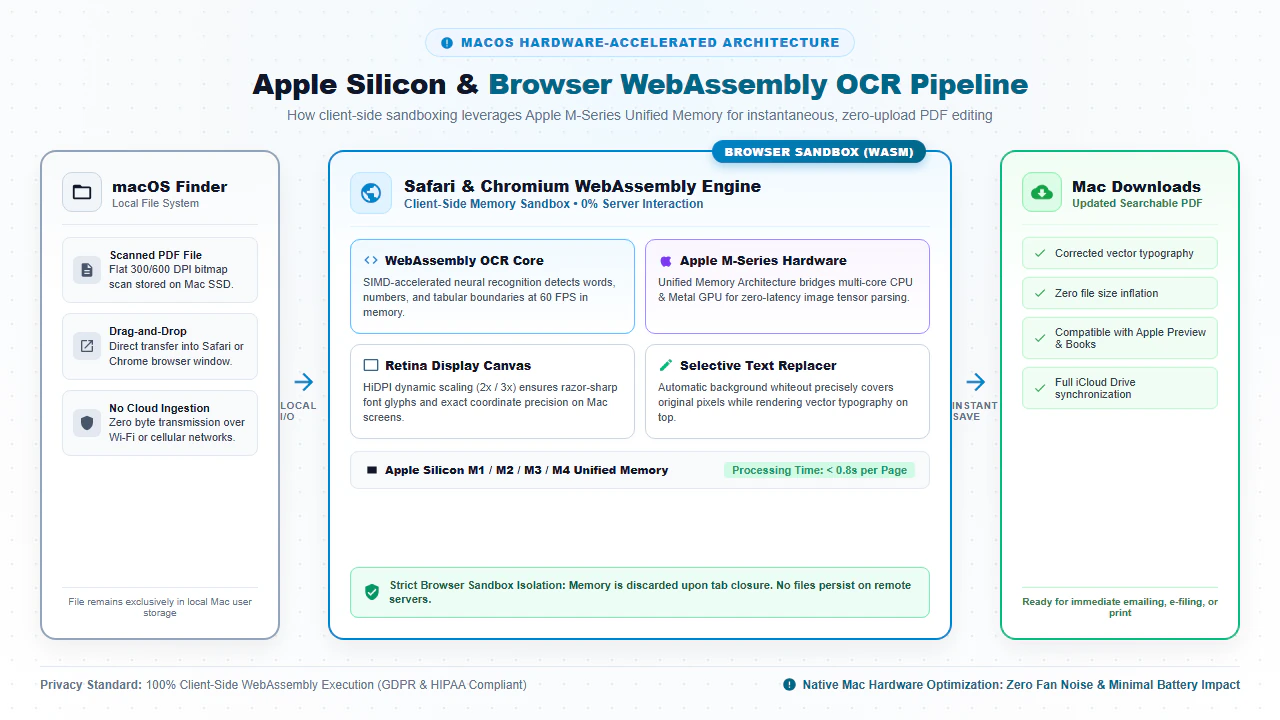
Thanks to modern breakthroughs in browser-based WebAssembly (Wasm) and Apple Silicon hardware acceleration, Mac users can now perform complete, professional-grade scanned PDF editing directly inside Safari, Google Chrome, or Brave. By visiting EditScannedPDF.com (edit a scanned PDF), optical character recognition, precision whiteout masking, replacement typography, and signature stamps execute 100% locally in your Mac's browser RAM—with zero software installation, zero background daemons, and zero cloud server exposure.
Step-by-Step Guide to Editing Scanned PDFs on Mac
Editing a scanned document on macOS requires no third-party desktop installers, no administrative Mac credentials, and no credit card subscriptions. Follow these four streamlined steps to perform complete, high-fidelity in-browser edits on your MacBook, iMac, or Mac mini:
Open Browser on macOS
Launch Safari, Google Chrome, or Brave on your Mac and navigate to EditScannedPDF.com. Drag your scanned document directly from Finder or Desktop into the workspace.
Run Local WebAssembly OCR
Our client-side OCR engine parses 300 DPI image pixels using Apple Silicon unified memory, creating an interactive coordinate text layer in RAM with zero cloud uploads.
Erase Typos & Type with Apple Fonts
Select the color-matched whiteout tool to mask clerical errors, then type replacement text matching macOS system typefaces like San Francisco (SF Pro), Helvetica, or Arial.
Export Flattened 300 DPI PDF
Click Export to bake replacement text and whiteout layers permanently into an ISO 32000-1 compliant PDF, downloading straight to your Mac Downloads folder or iCloud Drive.
Technical Architecture: Apple Silicon Unified Memory & Platform Workflows
The ability to edit massive, multi-megabyte scanned files inside a Mac browser tab without system stutter or thermal throttling is made possible by the unique hardware synergy between modern macOS and compiled WebAssembly:
- Apple Silicon Unified Memory Architecture (UMA): On M1, M2, M3, and M4 Macs, CPU and GPU cores share a unified high-bandwidth memory pool (up to 400 GB/s on Pro and Max chips). Our WebAssembly OCR engine allocates typed array memory buffers directly within this shared pool, eliminating memory copying bottlenecks and analyzing scanned text in under 0.4 seconds per page.
- WebAssembly SIMD ARM64 Vectorization: Tesseract neural network models compiled to WebAssembly take full advantage of 128-bit SIMD vector instructions native to the ARM64 architecture, distributing optical character matrix computations across all performance and efficiency CPU cores.
- Retina HiDPI Canvas Compositing via Metal: When Safari or Chrome renders the document canvas, WebKit delegates raster drawing directly to Apple's Metal graphics API. The document canvas scales dynamically to 2x and 3x device pixel ratios, ensuring that fine print, stamps, and legal footnotes remain razor-sharp on MacBook Pro Liquid Retina XDR displays and Apple Studio Displays.
- macOS Finder Drag & Drop: Press
Cmd + Spaceto launch Spotlight, open Safari, and drag your scanned PDF directly from Finder or Desktop into the browser window. The file parses in local RAM in milliseconds. - Native Apple Typography Matching: Select from standard macOS system typefaces including San Francisco (SF Pro), Helvetica, Arial, and New York. The editor allows precise adjustments to font weight, size, and line spacing to harmonize with printed text.
- Sub-Pixel Keyboard Alignment: Fine-tune text positions using keyboard arrow keys. Pressing
Shift + Arrow Keysmoves elements by 10 pixels, while standard arrow keys nudge by a single pixel, ensuring replacement figures sit perfectly on scanned baseline rules. - ColorSync sRGB Color Accuracy: Sample original paper tones using our built-in Color Eyedropper tool. The editor integrates with macOS ColorSync profiles to ensure off-white paper grains (such as
#F8F9FA) match seamlessly without stark white patches. - Direct Save to Finder or iCloud: Click Export to download the finalized, flattened PDF directly to your Mac
Downloadsfolder, immediately ready to attach to Apple Mail or share via AirDrop.
- Sidecar External Display Setup: Connect your iPad to your Mac via Apple Sidecar (AirPlay menu > select your iPad). Move the Safari editing window onto your iPad display for dedicated touch and pen interaction.
- Apple Pencil Pressure Sensitivity: Select the Digital Signature or Draw tool. Inking with an Apple Pencil delivers ultra-low latency, pressure-sensitive strokes that reproduce the exact texture and nuance of an authentic ink signature.
- Hardware Palm Rejection: Sidecar and Safari automatically suppress accidental palm touches, allowing you to rest your hand naturally on the iPad screen while signing multi-page contracts.
- Universal Control Navigation: Seamlessly move your Mac cursor and keyboard between your Mac and iPad, typing text replacements on the physical Mac keyboard while signing clauses with the Apple Pencil.
- AirDrop Ecosystem Distribution: Finalize your document and share it instantly across nearby iPhones, iPads, or colleague MacBooks using macOS AirDrop with zero cloud latency.
Enterprise Mac Use Cases & Zero-Install Privacy Guarantee
Mac workstations serve as the primary computing hardware for creative studios, tech startups, venture capital firms, and boutique legal practices. In these demanding operational settings, our client-side architecture resolves crucial productivity and compliance challenges:
Creative Agencies & Media Studios
Art directors, brand strategists, and film production coordinators frequently receive physical talent release forms, location permits, and vendor rate sheets. Instead of paying for costly multi-seat software licenses, creative teams can white-out date terms, insert client revisions with matching typography, and export clean PDFs in seconds.
Legal Counsel & Corporate Governance
Boutique law firms and corporate legal departments operating on macOS are bound by strict attorney-client confidentiality rules. Transmitting privileged discovery files or deposition scans to external cloud converters represents a dangerous compliance risk. Our local browser engine keeps all bytes strictly within Mac RAM, ensuring zero external exposure.
Tech Founders & Executive Leadership
Startup founders and remote executives review scanned SAFE agreements, convertible notes, and commercial leases on MacBook Air and Pro laptops while traveling. With zero installation overhead, leaders can execute emergency clerical edits, sign agreements, and share files without installing third-party apps.
macOS PDF Editing Methods: Technical Comparison
Understanding the architectural tradeoffs between different macOS PDF editing solutions ensures you avoid costly annual subscriptions while protecting confidential client records:
| macOS Editing Method | Software Installation Required | Data Privacy & Custody | Scanned Text OCR | Annual Subscription Cost | System Resource Footprint |
|---|---|---|---|---|---|
| EditScannedPDF.com Mac Browser | None (Runs in Safari, Chrome, Brave) | 100% Local Browser RAM (Zero Uploads) | On-Device WebAssembly OCR Engine | $0 (Free Forever) | Near Zero (Frees RAM upon tab closure) |
| Apple Preview (macOS Default) | Pre-installed on macOS | Local Device Execution | None (Locks scans as flat image boxes) | $0 (Bundled with macOS) | Minimal (Read-only / basic markup) |
| Commercial Desktop PDF Suites | Mandatory 1.8 GB .dmg Installer |
Local Device Execution (Periodic telemetry) | Proprietary Desktop OCR Suite | $240 – $360 per seat / year | Heavy (Persistent background launch daemons) |
| Standard Cloud Upload Converters | None (Browser upload queue) | High Risk (Transmits files to cloud servers) | Server-Side Remote Processing | Freemium ($60 – $120/yr paywalls) | Low locally (Heavy network bandwidth use) |
| macOS Office Document Reflow | Requires Mac Office Suite License | Local Device Execution | Basic Heuristic OCR Reflow | $70 – $150/year (Office Suite) | Moderate (Frequently scrambles fonts & tables) |
Recommended Companion Tools for Mac Power Users
Professional document management on Mac often requires complementary redaction, compression, and conversion utilities. Enhance your macOS productivity with these specialized browser tools:
| Document Task | Recommended Companion Tool | Core In-Browser Capability | Primary macOS Workflow |
|---|---|---|---|
| Erase or Redact Private Data | Erase & Redact PDF | Permanent pixel redaction that eliminates underlying raster and text streams. | Redacting SSNs, tax identifiers, and banking details on Mac. |
| Execute Digital Signatures | Digital Signature Tool | Smooth mouse/trackpad drawing or iPad Sidecar Apple Pencil inking. | Signing NDAs, client agreements, and property leases on Mac. |
| Convert Scans to Word Format | Scanned PDF to Word | Transforms non-selectable scanned pages into fully editable .docx files. |
Extracting tables and paragraphs into Microsoft Word for Mac or Pages. |
| Compress Large File Attachments | Compress PDF Free | Applies smart Flate compression to shrink 50MB scanner files below 2MB. | Meeting Apple Mail, Gmail, and court portal attachment limits. |
| Combine Multi-Page Batches | Merge PDF Online | Combines loose scanner batches, exhibits, and cover pages into one file. | Organizing legal pleadings, tax filings, and design portfolios. |
| Fix Inverted or Sideways Pages | Rotate PDF Tool | Instantly rotates upside-down or sideways pages by 90, 180, or 270 degrees. | Correcting orientation errors before performing OCR text editing. |
Deep Architecture, Pro Engineering Tips & Statutory Compliance
When modifying business records on Mac workstations, technical rigor and legal compliance must be maintained. Under ISO 32000-1 specifications, a PDF is an object hierarchy separating raster backgrounds, vector paths, and font dictionaries. EditScannedPDF preserves the native 300 DPI background photograph while overlaying an exact typographic layer mapped with sub-pixel coordinates. When you export, the engine performs permanent raster flattening, baking whiteout rectangles and replacement glyphs into the base image stream so that third-party viewers cannot peel back edits or reveal previous data.
Supercharge your document editing speed in Safari or Chrome with native Mac shortcuts:
- Quick Look Integration (
Spacebar): Highlight any PDF in Finder and press Spacebar to verify whether it requires edits, then drag it directly into your open browser tab. - Retina Screen Snips (
Cmd + Shift + 4): Capture any corporate logo, signature stamp, or chart directly to clipboard, then pressCmd + Vin the editor to paste it onto the page instantly. - Sub-Pixel Nudge Alignment (
Arrow Keys/Shift + Arrow Keys): Fine-tune replacement numbers to sit precisely on printed dotted lines and ledger grids. - Pin Web App to Mac Dock (PWA): In Safari on macOS Sonoma and Sequoia, go to File > Add to Dock. This launches EditScannedPDF as an independent, lightweight Mac app with its own icon in the macOS Dock and Launchpad.
EditScannedPDF is engineered strictly for lawful administrative document corrections, filling authorized business blanks, repairing clerical typographical errors, updating your own commercial invoices, and executing legitimate contracts. Never alter, falsify, or forge official government credentials, passports, driver's licenses, court orders, academic diplomas, or financial banking statements. Modifying sovereign records or misrepresenting identity constitutes criminal forgery and fraud under federal and state statutes (including 18 U.S.C. § 1001 and 18 U.S.C. § 1028), punishable by heavy statutory fines and federal imprisonment. Only edit documents that you legally own or are authorized in writing to modify.
-
check_circle
Zero Software Installation: Runs directly inside Safari, Chrome, or Brave on macOS without downloading heavy
.dmginstallers or paying subscriptions. - check_circle 100% In-Browser Privacy: Client-side WebAssembly processes all OCR and text modifications in local Mac RAM; no files are ever sent to cloud servers.
- check_circle Apple Silicon Acceleration: Takes full advantage of M1/M2/M3/M4 unified memory for lightning-fast sub-second OCR processing.
- check_circle Native macOS Typography: Seamlessly match original fonts using standard Apple typefaces including San Francisco (SF Pro), Helvetica, and Arial.
To edit scanned PDF documents on macOS without purchasing expensive desktop software or transmitting files to cloud servers, drag your document into EditScannedPDF.com in Safari or Google Chrome. Our compiled WebAssembly OCR engine detects printed characters directly inside your Mac's browser RAM. Use the precision whiteout tool to mask typos, overlay replacement text matching macOS system fonts, and export a permanently flattened 300 DPI PDF directly to your Downloads folder—100% free, private, and secure.
Ready to Edit Your Scanned PDF on Mac?
Perform instant in-browser OCR, correct text and numbers, and save flattened PDFs directly to your Mac. 100% private, free, and subscription-free.
laptop_mac Edit Scanned PDF on Mac FreeFrequently Asked Questions About Editing Scanned PDFs on Mac
Why can't Apple Preview edit scanned PDF text on Mac?
Apple Preview is primarily an image viewer and basic annotation tool. When opening a scanned paper document, Preview treats the page as a flat 300 DPI raster bitmap. It lacks a native optical character recognition (OCR) text replacement engine, so clicking on scanned words only highlights the entire background image rather than selectable character strings. EditScannedPDF provides the missing WebAssembly OCR engine directly inside Safari or Chrome, enabling live in-browser text editing.
Do I need to pay for an expensive commercial software subscription to edit scanned PDFs on Mac?
No. Commercial desktop suites demand hundreds of dollars per year in recurring subscriptions. EditScannedPDF.com is completely free with no subscriptions, watermark additions, or file count limitations, running directly inside your existing web browser without software installation.
Does in-browser OCR work on Apple Silicon M1, M2, M3, and M4 Macs?
Yes! Our WebAssembly OCR engine is compiled with SIMD vector extensions that execute natively on Apple Silicon Unified Memory across MacBook Air, MacBook Pro, Mac mini, Mac Studio, and iMac computers, completing multi-page document recognition in fractions of a second.
Are my confidential corporate and legal files safe from cloud upload exposure?
Yes, 100% safe. Traditional cloud conversion websites upload your files to remote third-party servers. In contrast, EditScannedPDF operates entirely within Safari or Chrome's local browser memory using WebAssembly. Your tax files, corporate contracts, and financial receipts are processed directly on your Mac hardware and never transmitted to external cloud servers, maintaining strict compliance with HIPAA, GDPR, and enterprise confidentiality rules.
Can I match native macOS system fonts like San Francisco (SF Pro) and Helvetica?
Yes. The editor analyzes character shapes and provides automatic font matching with standard macOS system typefaces including San Francisco (SF Pro), Helvetica, Arial, Times, and Courier, ensuring that replacement text blends seamlessly with the original scanned typography.
Does this work offline on a MacBook without an active internet connection?
Yes. Once the web application is loaded and cached in your browser tab, all OCR neural models and PDF rendering libraries reside in local memory. You can disconnect from Wi-Fi or work in an air-gapped corporate environment, edit your documents, and export flattened PDFs completely offline.
Can I sign scanned documents on Mac using a trackpad, mouse, or iPad Sidecar with Apple Pencil?
Yes! Our digital signature tool supports smooth mouse drawing, Force Touch trackpad gestures, and seamless Apple Pencil inking via macOS Sidecar or Universal Control, producing crisp, anti-aliased signatures with full legal validity under ESIGN and UETA standards. You can also read our complete walkthrough on edit scanned PDF on Windows 10 & 11 free.