
Edit Scanned PDF Without Uploading — 100% Browser Privacy
The Hidden Privacy Risks of Cloud-Based PDF Editors
Every business day, millions of individuals, legal professionals, and corporate executives upload confidential scanned documents to "free" online PDF editors. These documents contain our society's most sensitive information: signed tax returns (Form 1040) with unredacted Social Security numbers, confidential patient health records protected by HIPAA, sealed litigation exhibits, commercial lease agreements, bank statements, and passport scans.
What most users fail to realize is that traditional online PDF editors are severe data privacy hazards. Behind simple drag-and-drop web interfaces lies an invasive client-server architecture:
- Remote File Transmission & Intermediate Caching: When you upload a PDF to a typical cloud utility, the entire file is transmitted across the open internet to a remote server. The remote server stores the file on local disk drives, creates unencrypted temporary cache files in
/tmpdirectories, and retains copies for hours or days. - Subpoena Vulnerability & Third-Party Access: Files stored on remote commercial servers can be subpoenaed, intercepted by hostile network actors, or exposed by misconfigured cloud storage buckets (such as publicly readable Amazon S3 containers).
- Privilege Waivers & Regulatory Penalties: For attorneys, uploading client files to third-party cloud servers risks waiving attorney-client privilege under ABA Model Rule 1.6. For medical providers and corporate officers, uploading patient or financial records triggers severe statutory fines under HIPAA and the EU General Data Protection Regulation (GDPR).
The Solution: True Client-Side In-Browser Execution. At EditScannedPDF.com (scanned PDF editor), we pioneered a zero-knowledge architecture built on modern WebAssembly (WASM). Your PDF is parsed, decoded, edited, and rendered entirely within your local web browser's memory sandbox. Zero bytes of document data are ever transmitted across the internet. Privacy is mathematically guaranteed by the architecture itself.
4 Steps to Edit Scanned PDFs Privately in Your Browser (Step-by-Step)
You do not need to install costly desktop software or compromise your confidentiality with cloud upload utilities. With EditScannedPDF.com, you can securely process any scanned document in four simple steps:
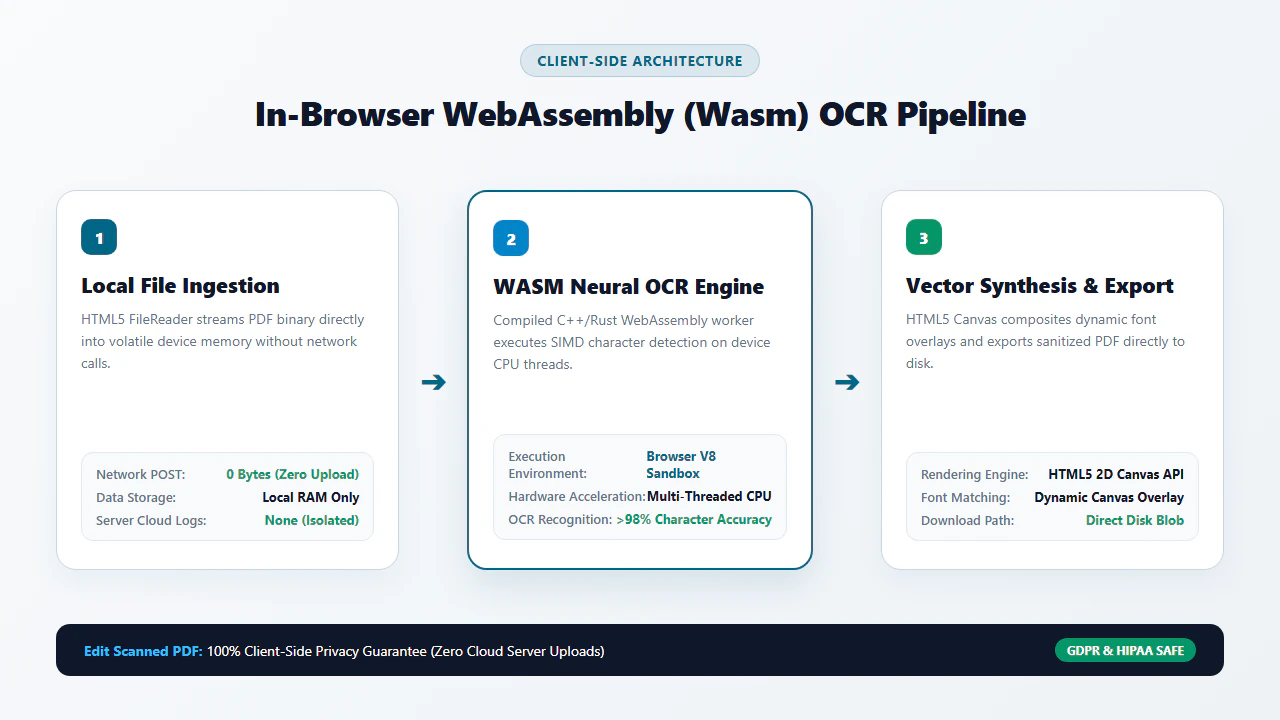
Open the editor and drag your confidential PDF into the workspace. The file loads directly into volatile device memory with zero outbound network traffic.
The local WebAssembly engine analyzes document raster pixels, recognizing character glyphs and reconstructing text lines entirely on your local CPU.
Correct text, redact confidential bank numbers, or insert digital signatures on the HTML5 canvas without transmitting data to external servers.
Click Download to assemble and save your finalized, publication-ready PDF directly to your device. When you close the browser tab, memory is wiped instantly.
How In-Browser WebAssembly OCR Works Without Cloud Uploads
How can an ordinary web browser perform optical character recognition, text baseline detection, and binary PDF reconstruction without a massive server farm? The answer lies in modern high-performance browser standards: WebAssembly (WASM) and SIMD (Single Instruction, Multiple Data) acceleration.
When you visit EditScannedPDF.com, your browser downloads a compact, pre-compiled binary WebAssembly module containing an optimized C++ OCR and PDF manipulation engine. Once initialized, the engine operates within a secure, sandboxed thread. It interfaces with the browser's HTML5 Canvas API and JavaScript TypedArrays to parse raster scan pixels directly from your device's memory bus. The browser CPU performs matrix convolution, noise filtering, and glyph segmentation locally at native hardware speeds.
- Multi-Threaded Hardware Acceleration: Open Chrome, Edge, Firefox, or Safari on Windows, macOS, or Linux. Drag multi-gigabyte discovery bundles or tax forms into the editor. The engine harnesses multi-core CPU threads via Web Workers to decode 300 DPI scans with zero latency.
- In-Memory Text Modification & Redaction: Use precision canvas editing tools to overwrite numbers, correct typos, or black out confidential Social Security numbers with cryptographic permanency.
- Offline Air-Gap Operational Capability: Disconnect your Ethernet cable or disable Wi-Fi. The editor continues to execute all OCR, text editing, and PDF rendering operations 100% offline.
- Instant Local File Assembly: Export your finalized PDF in under 800 milliseconds. The binary PDF structure is assembled directly in RAM and passed to the browser's download manager with zero network upload lag.
- Zero-Install Mobile Browser Sandbox: Navigate to EditScannedPDF.com inside Safari on iOS/iPadOS or Chrome on Android. No app installation, Apple ID login, or paid app store licenses required.
- Touch-Optimized Local File Ingestion: Select confidential medical records or bank statements directly from the Files app, iCloud Drive, or local device storage.
- 0 MB Cellular Data Consumption: Because documents are processed entirely in device RAM, multi-page PDFs never consume your cellular mobile data plan or battery bandwidth during processing.
- Secure Direct Portal Sharing: Save the sanitized PDF directly to your device or transmit it via secure messaging without intermediate cloud server exposure.
Enterprise Zero-Trust Scenarios, Regulatory Compliance & Privacy Guarantee
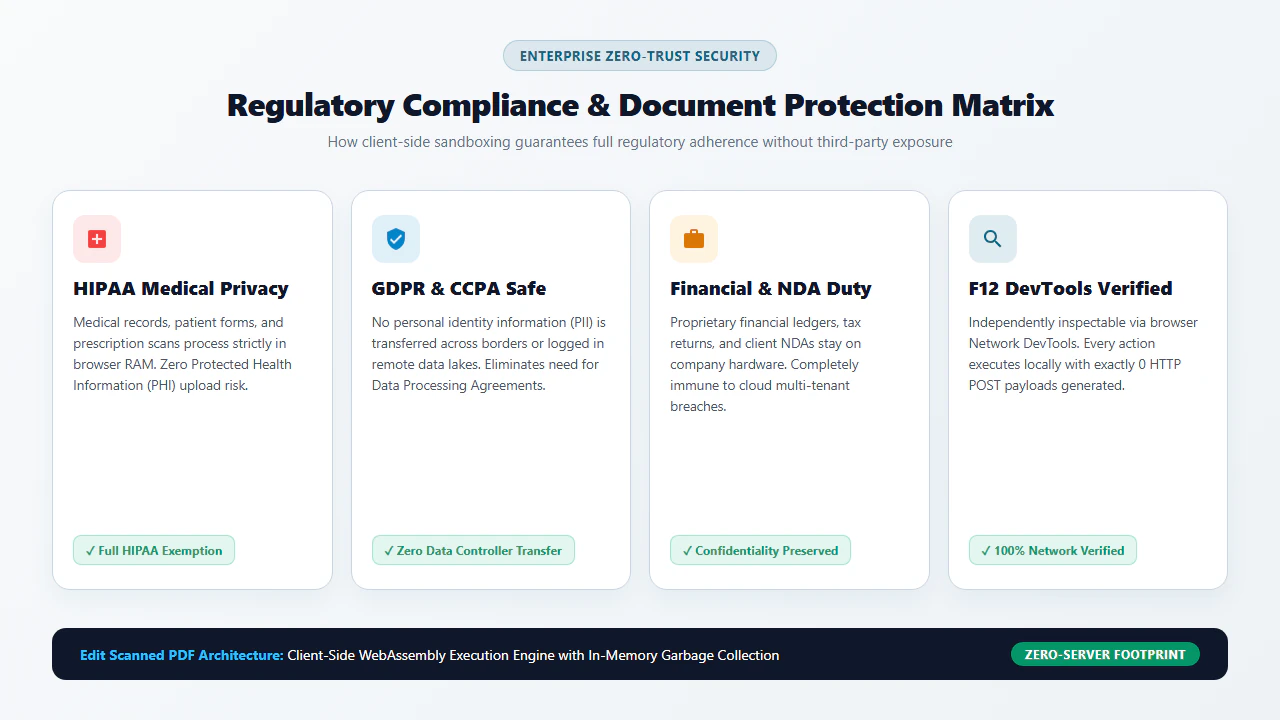
In high-compliance industries, uploading confidential client documents to external web servers is an automatic violation of regulatory mandates. Client-side browser processing solves these legal dilemmas:
1. Healthcare Providers & Protected Health Information (HIPAA)
Under the Health Insurance Portability and Accountability Act (HIPAA), covered entities and business associates face severe statutory fines (up to $50,000 per violation under 45 CFR § 164.402) if protected health information (PHI) is transmitted to third-party cloud servers without an executed Business Associate Agreement (BAA). Client-side processing ensures PHI never touches an external server, keeping healthcare organizations fully compliant by design.
2. Legal Discovery & Attorney-Client Privilege Protection
Under Rule 1.6 of the ABA Model Rules of Professional Conduct, attorneys have an affirmative duty to prevent the inadvertent disclosure of confidential client confidences. Transmitting unredacted trial exhibits, trade secrets, or client tax returns to cloud conversion websites risks waiving evidentiary privilege. EditScannedPDF.com guarantees complete confidentiality under work-product doctrines.
3. Financial Institutions, M&A Due Diligence & GDPR Mandates
Under Article 25 of the General Data Protection Regulation (GDPR), organizations must implement "Data Protection by Design and by Default." When processing sensitive employee payroll records, merger term sheets, or financial audits, client-side WebAssembly eliminates the concept of an external "Data Processor," keeping data entirely within the controller's custody.
At EditScannedPDF.com, privacy is not a marketing promise; it is mathematically enforced by browser architecture. Your files never leave your computer.
- Zero Cloud Uploads: Files remain on your hardware; processing executes via in-memory WebAssembly.
- Strict Regulatory Alignment: Satisfies HIPAA Security Rules, GDPR Article 25, CCPA, and ABA Model Rule 1.6.
- Instant Volatile RAM Purge: When you close the browser tab, all allocated memory is completely and permanently wiped.
Client-Side WebAssembly vs. Cloud PDF Converters Comparison Matrix
Below is an architectural and security comparison between client-side in-browser WebAssembly processing, commercial cloud converters, and heavy desktop software suites:
Recommended Companion Privacy & Document Security Tools
True document security requires a defense-in-depth workflow. Combine our client-side editor with these zero-upload companion utilities to achieve full document lifecycle protection:
Zero-Trust Engineering Deep Dive: Memory Sandboxing & Legal Standards
From an information security and computer science perspective, the security model of EditScannedPDF.com is rooted in the Principle of Least Privilege and Zero-Trust Architecture:
Inside the web browser, the WebAssembly virtual machine executes within a memory-isolated sandbox. The module cannot access the client filesystem directly; it can only read the specific file buffer selected by the user via the HTML5 File API. Furthermore, all image rasterization, OCR feature extraction, and PDF object generation take place in linear memory (WebAssembly.Memory). When processing concludes or the browser tab is closed, the host process terminates and operating system memory reclamation immediately shreds the volatile RAM allocations.
You do not have to take our privacy claims on faith. You can independently verify our zero-upload architecture using your browser's Developer Tools. Press F12 (or right-click anywhere and select Inspect), switch to the Network tab, and drag a large multi-megabyte PDF into the editor. You will see that zero HTTP POST requests, WebSocket payloads, or telemetry packets containing file data are transmitted. The document is processed 100% locally.
Under federal and international statutes—including the Health Insurance Portability and Accountability Act (HIPAA), the Gramm-Leach-Bliley Act (GLBA), and the General Data Protection Regulation (GDPR)—unauthorized transmission of non-public personal information (NPI) to third-party cloud servers constitutes a legally actionable data breach. Corporate employees and legal counsel face severe statutory fines and breach notification requirements if confidential customer records are uploaded to unvetted cloud utilities. Utilizing verified client-side in-browser processing completely eliminates third-party transmission liability.
- check_circle 100% Client-Side WebAssembly: Process and edit scanned PDFs directly in your local browser RAM without uploading sensitive files to cloud servers.
- check_circle Zero Cloud Transmission: Verifiable in DevTools Network tab with zero outbound HTTP POST requests and zero server caching.
- check_circle Offline Operational Capability: Works completely offline without an active internet connection once the page is cached.
- check_circle Enterprise Compliance: Fully aligned with HIPAA Security Rules, GDPR Article 25, CCPA, and ABA Model Rule 1.6 ethics.
To edit, redact, or stamp scanned PDF documents without uploading them to cloud servers, use the private online scanned PDF editor free. Built on WebAssembly, it executes all OCR, graphic editing, and PDF compiling directly inside local device memory—eliminating data breach risks, satisfying strict HIPAA/GDPR rules, and keeping your files 100% private.
Edit Scanned PDFs With 100% Privacy Now
Protect your confidential records from cloud interception and server logging. Edit your scanned documents privately with zero installation and zero cloud uploads.
document_scanner Start Editing PDF With 100% Privacy FreeFrequently Asked Questions About Zero-Upload PDF Editing
Do traditional online PDF editors upload my documents to their cloud servers?
Yes. The vast majority of conventional online PDF tools require you to transmit your entire document payload to remote cloud servers. Those servers parse, modify, and store your files on temporary disk drives (often retained for hours or days), exposing private tax records, legal briefs, and health histories to data breach and intercept risks.
How does client-side in-browser PDF editing work without a server?
EditScannedPDF.com leverages WebAssembly (WASM) and modern HTML5 APIs. The compiled PDF rendering engine and neural OCR models execute directly inside your browser sandbox using your computer's local CPU and RAM. Your document never leaves your machine, and no network packets containing document content are transmitted.
Is client-side PDF editing safe for HIPAA, GDPR, and confidential financial documents?
Yes. Because EditScannedPDF.com operates entirely within local browser memory with zero server uploads, no data transfer to a third-party processor occurs. This eliminates data breach liability under HIPAA, satisfies GDPR Article 25 (Privacy by Design), and preserves attorney-client privilege under ABA Model Rule 1.6.
Can I edit scanned PDFs offline without an active internet connection?
Yes. Once the web application is loaded in your browser, the WebAssembly engine resides in local browser cache. You can completely disconnect your Wi-Fi or enable Airplane Mode, and all document viewing, text editing, redaction, and PDF compilation will continue to function seamlessly offline.
What happens to my document when I close the browser tab?
When you close the browser tab or navigate away, the operating system and browser garbage collector instantly purge the allocated volatile memory (RAM). There are no residual temporary files, server logs, or cached copies left behind anywhere on the internet.
How can I independently verify that no files are being uploaded from my browser?
You can verify our zero-upload architecture using your browser's built-in Developer Tools. Press F12 (or right-click and choose Inspect), navigate to the Network tab, and load your PDF. You will observe zero outbound HTTP POST, PUT, or WebSocket requests containing your document data.
Are there file size limits when processing documents locally in memory?
Unlike cloud services that impose arbitrary 15 MB to 50 MB paywalls, EditScannedPDF.com is limited only by your device's available local RAM. Modern computers and smartphones can effortlessly process multi-hundred-page documents and high-resolution 300 DPI legal discovery bundles without restriction.