
Add Image & Stamp to PDF Online Free
Insert company logos, approval stamps, official seals, ID photos, and graphics into digital or scanned PDF files directly in your web browser with 100% private in-browser processing.
Choose a scanned or normal PDF to open the interactive editor with Image & Stamp ready.
Only edit documents that you own or are legally authorized to modify. Do not use this website to alter documents for fraud, misrepresentation, identity misuse, or any illegal purpose. You are fully responsible for how you use edited documents; Edit Scanned PDF is not responsible for unlawful or unauthorized use. Read More
How Browser-Based PDF Image Stamping Works
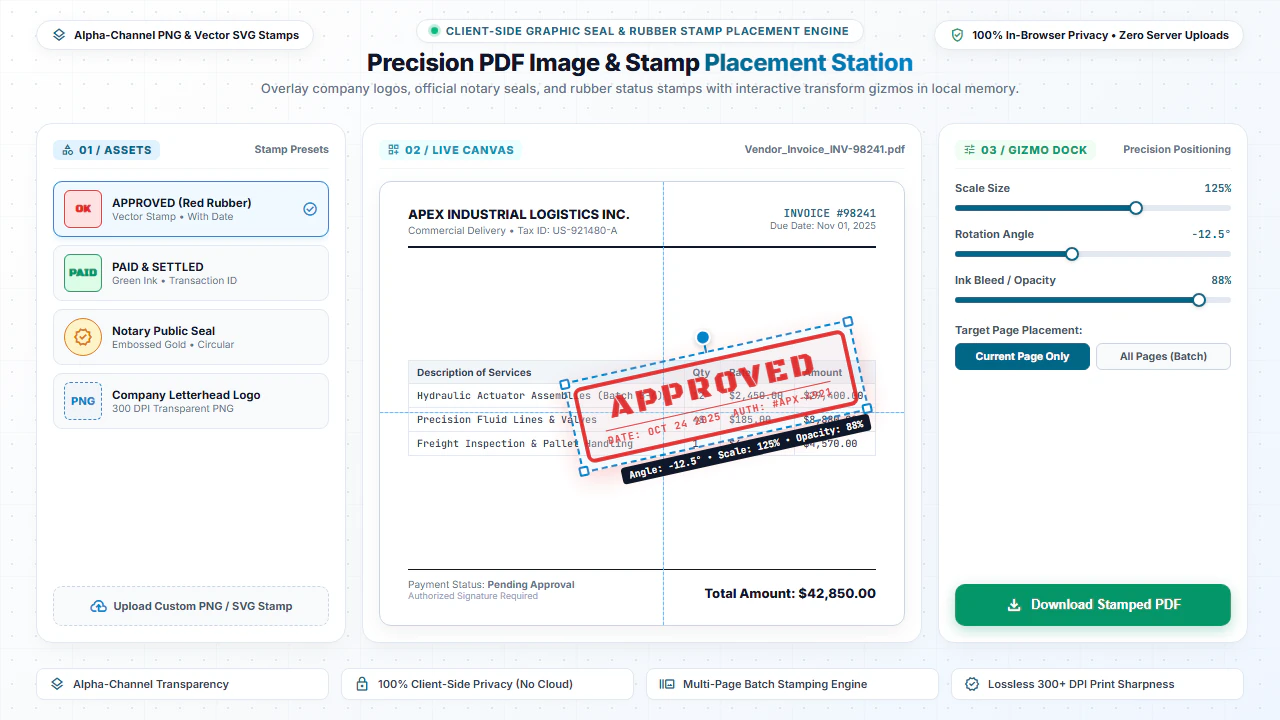
Adding an image or stamp to a PDF injects an XObject image resource dictionary into the target page stream. Our editor lets you upload any PNG, JPG, or SVG image, scale it visually, and position it with pinpoint precision.
Our unique All-Page Sync Engine allows you to apply a stamp once and replicate it across all 50+ pages automatically. If you adjust dimensions or move the stamp on one page, the entire document syncs seamlessly.
Step-by-Step: How to Add Images & Stamps in 4 Steps
- Step 1: Load PDF File: Click Browse to open your scanned or digital PDF document.
- Step 2: Upload Stamp Graphic: Select your transparent company seal, signature stamp, or PNG logo.
- Step 3: Adjust Positioning: Drag, scale, and adjust opacity to align with the approval block.
- Step 4: Save & Export: Click Download PDF to export your stamped document instantly.
- Step 1: Tap to Open: Select your PDF from your mobile device files or cloud storage.
- Step 2: Pick Stamp Photo: Tap Add Image and select your logo or stamp from your gallery.
- Step 3: Position & Resize: Drag the image on screen and resize using intuitive touch gestures.
- Step 4: Download PDF: Tap Download PDF to save the stamped file to your smartphone.
Everyday Scenarios for PDF Images & Stamps
Accounts Payable & Invoices
Stamp "PAID" with transaction IDs and approval dates on vendor billing slips and receipts.
Corporate Letterheads & Proposals
Insert high-resolution company logos onto proposals, executive letters, and whitepapers.
Notary & Official Seals
Place transparent scanned notary seals, commissioner stamps, and legal verifications.
ID Cards & Passport Photos
Insert passport-size headshot photographs into employment applications and student forms.
100% Client-Side Privacy: No Server Uploads
Official seals, corporate trademarks, and passport photos are sensitive assets. Uploading them to cloud converters creates identity theft and IP exposure risks.
EditScannedPDF.com renders and embeds all image stamps 100% locally in your web browser. Your files are never uploaded to any remote server.
Comparison: EditScannedPDF vs. Traditional Cloud Tools
Understanding how our in-browser WebAssembly architecture protects your sensitive documents compared to legacy cloud PDF converters:
Enterprise-Grade In-Browser Security Architecture
When working with sensitive contracts, financial spreadsheets, medical records, or identity credentials, uploading files to third-party web servers introduces major cybersecurity risks. EditScannedPDF solves this fundamental vulnerability by executing all PDF compilation, vector synthesis, and cryptographic operations directly inside your device's browser memory using WebAssembly.
Your documents never travel across the internet, are never indexed on remote hard drives, and leave zero data footprint behind once you close your browser tab. Experience complete operational privacy built from the ground up to satisfy modern corporate security protocols.
Frequently Asked Questions (FAQ)
What image formats can I insert into a PDF?
Our editor supports transparent PNG, high-resolution JPEG/JPG, and WebP image formats. Transparent PNGs are recommended for corporate logo stamps and official seals.
Can I automatically sync an image stamp across every page in a PDF?
Yes! You can place a stamp once and click 'Apply to All Pages'. If you resize, reposition, or adjust opacity on one page, the change updates simultaneously across all pages.
Can I insert photo stamps into scanned paper documents?
Yes! Images and stamps layer seamlessly over scanned image PDFs and digital vector documents with pixel-perfect alignment.
Are my uploaded photos or company logos saved on your servers?
No. The entire stamping engine executes 100% locally in your web browser memory. Your images and documents are never uploaded to any external server.