
Duplicate PDF Pages Online Free (Clone & Copy Pages)
Duplicate and copy pages in any PDF file online for free. Clone individual pages, replicate templates, and duplicate multiple pages in scanned paperwork, contracts, certificates, and multi-entry invoices directly in your browser with zero limits and 100% client-side privacy.
Select any scanned or standard PDF to instantly clone, copy, and duplicate pages without creating an account.
Only edit documents that you own or are legally authorized to modify. Do not use this website to alter documents for fraud, misrepresentation, identity misuse, or any illegal purpose. You are fully responsible for how you use edited documents; Edit Scanned PDF is not responsible for unlawful or unauthorized use. Read More
How to Duplicate a Page in a PDF in 3 Simple Steps
- Step 1: Upload Your PDF: Click "Duplicate Scanned PDF Page" or "Duplicate Normal PDF Page" above to open your document securely in your browser.
- Step 2: Select the Target Page & Click Duplicate: Scroll to the page you want to copy in the thumbnail sidebar and click the Duplicate Page tool. An exact twin of that page is created instantly right after the original.
- Step 3: Customize Cloned Text & Download: Modify names, numbers, or dates on the duplicated page without affecting the source page, then click "Download PDF" to save your clean, watermark-free file.
- Step 1: Tap to Select: Open your PDF file from your mobile device or cloud drive.
- Step 2: Tap Target Page & Duplicate: Tap the page thumbnail you want to copy and select Duplicate Page.
- Step 3: Save to Device: Edit or reorder the cloned page as needed and tap Download PDF to save it directly to your phone.
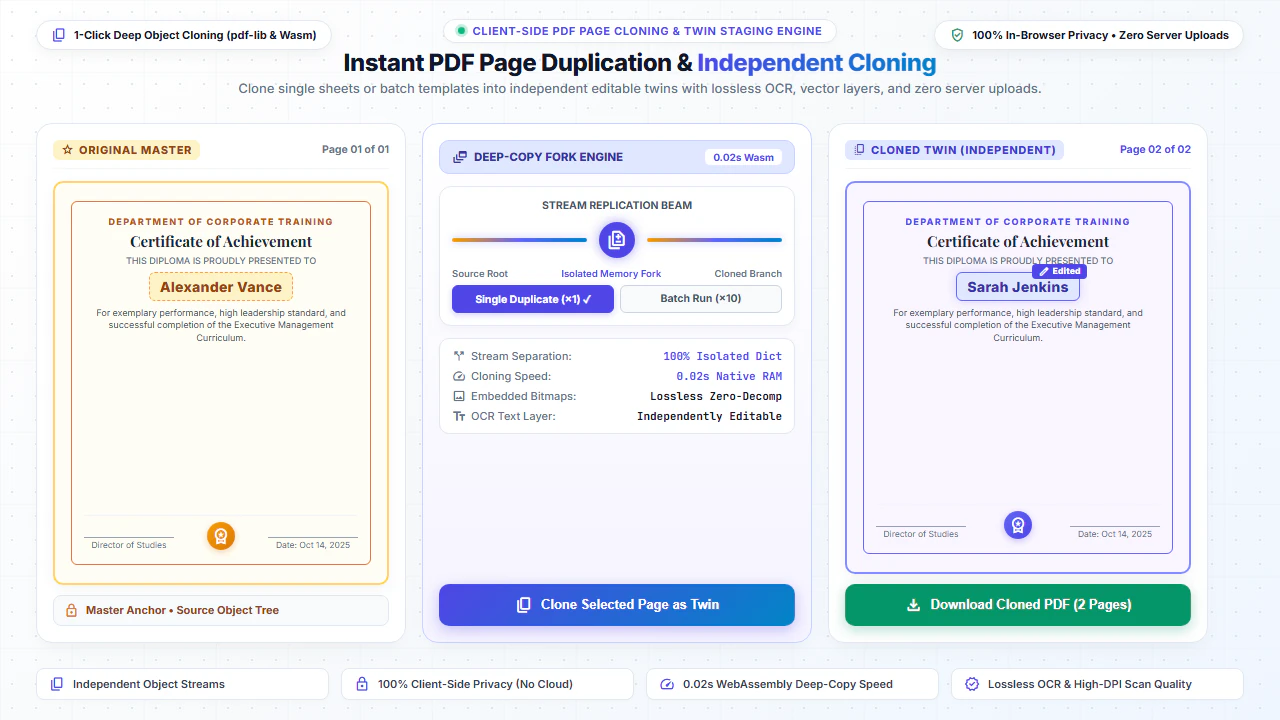
Key Advantages of In-Browser PDF Page Duplication
Instant Template Cloning
Reuse pre-formatted invoice tables, evaluation rubrics, and certificate designs without having to recreate complex layouts from scratch.
Independent Cloned Page Editing
Each duplicated page receives its own independent object stream. Modify text, numbers, signatures, and dates on the clone without changing the original page.
Full Scanned & OCR Image Support
Clone high-resolution scanned paper forms, contracts, and image PDFs with 100% fidelity, crisp font rendering, and intact OCR layers.
Unlimited Multi-Page Duplication
Duplicate pages repeatedly to build 10, 20, or 50-page document batches, then reorder them effortlessly via drag-and-drop.
Everyday Scenarios for PDF Page Duplication
Multiple Recipient Certificates
Clone a graduation, training, or achievement award certificate 50 times and quickly update the recipient name on each sheet.
Multi-Item Invoices & Receipts
Duplicate billing sheets when client line items exceed a single page, keeping headers, tables, and company branding identical.
Tenant Rental Lease Agreements
Replicate signature acknowledgment and disclosure annexures for multi-tenant housing agreements and corporate leases.
Quality & Vehicle Checklists
Clone safety inspection forms, vehicle checklists, and building audit sheets for each individual room or unit being inspected.
Duplicating Pages in Scanned PDFs vs Digital PDFs
Many online PDF editors fail when duplicating scanned documents because they cannot handle large embedded raster bitmaps or they corrupt character coordinates. EditScannedPDF.com is engineered specifically for scanned documents.
Our client-side PDF engine performs a lossless deep-copy of the underlying image bitmaps, vector paths, color profiles, and OCR text overlays. You can erase sections of the cloned scan, type new text with matching typography, and export crisp, high-resolution pages suitable for legal, commercial, and banking submissions.
100% Client-Side Privacy: Your Documents Never Leave Your Device
Official certificates, invoice runs, financial statements, and tenant lease templates contain confidential financial and personal information. Traditional cloud converters upload your private files to remote servers where they may be logged or cached.
EditScannedPDF.com duplicates and modifies your PDFs 100% locally in your web browser memory using WebAssembly and pdf-lib. No document data is ever sent over the internet. You get absolute confidentiality and zero risk of data leaks.
Comparison: EditScannedPDF vs. Traditional Cloud Tools
Understanding how our in-browser WebAssembly architecture protects your sensitive documents compared to legacy cloud PDF converters:
Enterprise-Grade In-Browser Security Architecture
When working with sensitive contracts, financial spreadsheets, medical records, or identity credentials, uploading files to third-party web servers introduces major cybersecurity risks. EditScannedPDF solves this fundamental vulnerability by executing all PDF compilation, vector synthesis, and cryptographic operations directly inside your device's browser memory using WebAssembly.
Your documents never travel across the internet, are never indexed on remote hard drives, and leave zero data footprint behind once you close your browser tab. Experience complete operational privacy built from the ground up to satisfy modern corporate security protocols.
Frequently Asked Questions (FAQ)
How do I duplicate a single page in a PDF document?
Upload your PDF to EditScannedPDF.com, select the page you want to copy, and click 'Duplicate Page'. An exact clone is created right after the original page, which you can edit independently.
Can I edit the duplicated page without altering the original page?
Yes! The duplicated page is given its own isolated object dictionary. You can change text, modify names and numbers, erase sections, or add new signatures on the clone without affecting the master page.
Does page duplication work on scanned PDFs and image-only documents?
Yes! Our engine faithfully duplicates scanned pages, raster images, font embeddings, and OCR text layers with 100% original quality and zero compression loss.
Can I duplicate multiple pages or create multiple copies of a template?
Yes, you can click Duplicate Page multiple times to create 5, 10, or 20 copies of any template (e.g., certificates, multi-item invoices, or rent receipts) in one single document.
How do I move or reorder duplicated pages in the PDF?
You can use our thumbnail sidebar to drag and drop pages into your preferred order, or delete unwanted pages using the Insert/Delete page tool.
Are my confidential files uploaded to any servers?
No. All duplication and editing happens 100% locally inside your web browser memory. Your sensitive files and personal records are never uploaded to our servers or stored anywhere.