
The Challenge of Converting Scanned PDFs to Word & Software Limitations
Every business day, millions of legal assistants, accounting professionals, university researchers, and medical administrative staff receive scanned PDF files: signed commercial agreements, historical lease contracts, vendor invoices, academic research archives, and government tax returns. In order to update clauses, draft legal briefs, calculate expense line items, or correct outdated figures, these professionals need to edit the document in Microsoft Word.
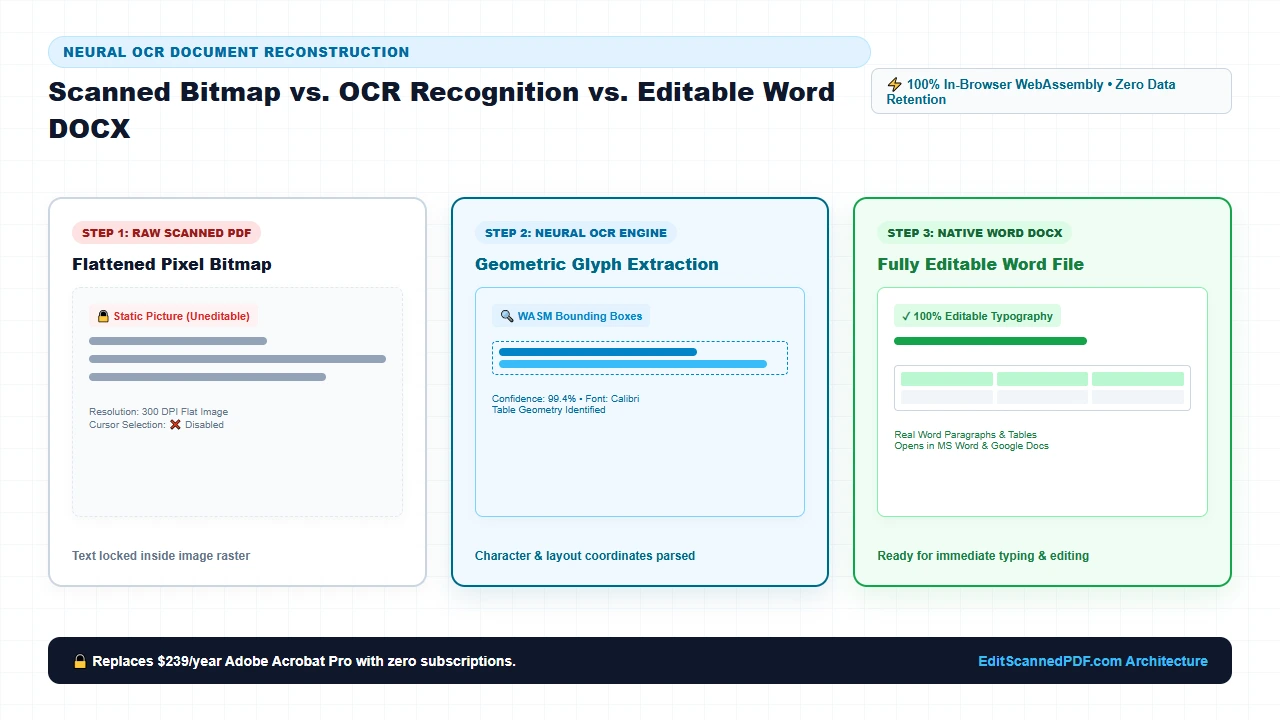
Yet, when attempting to convert a scanned document using standard software tools, users encounter an infuriating, universal failure mode: the resulting Word document contains an uneditable, static picture. Users click on a paragraph hoping to edit text, only to discover that the word processor treats the entire page as a locked floating graphic. Selecting individual sentences is impossible, running spell-check yields zero results, and modifying a single misspelled surname requires retyping the entire multi-page document by hand. With our scanned PDF editor, everything runs locally in your browser with zero file uploads.
This failure stems from a fundamental technical distinction between digital vector PDFs and raster scanned PDFs:
- Digital Vector PDFs: Generated directly from software like Word, Google Docs, or desktop publishing suites. These documents contain distinct character glyph codes, TrueType font references, and coordinate positioning streams (such as PDF
TjandTJoperators). Extracting text from a vector PDF is straightforward because the ASCII or Unicode characters already exist in the file. - Raster Scanned PDFs: Created when an optical scanner, multifunction photocopier, or smartphone camera photographs a physical paper sheet. The PDF does not contain digital typography; instead, it contains only an image container dictionary (XObject
/Subtype /Image) holding a flat two-dimensional grid of pixels. To your computer, a 20-page legal agreement is indistinguishable from a high-resolution JPEG photograph of a brick wall.
When standard conversion utilities encounter a scanned PDF, they lack the intelligence to recognize letter shapes. They simply wrap the raw image stream inside a blank OpenXML container. To transform dead picture pixels into genuine, reflowable, selectable Microsoft Word typography, your workflow requires neural Optical Character Recognition (OCR) combined with geometric layout reconstruction.
Unfortunately, most solutions available on the web today present severe operational and security drawbacks:
- Exorbitant Software Licensing Paywalls: Traditional commercial desktop suites demand recurring annual subscriptions of $180 to $300 per seat simply to unlock OCR conversion modules. For small legal practices, non-profit institutions, and independent consultants, paying monthly licenses for occasional document conversion is an unjustifiable financial burden.
- Critical Cloud Privacy & Data Leakage Hazards: Generic online converters require uploading your entire multi-page file to external multi-tenant cloud servers. Transmitting confidential attorney-client privilege memos, sensitive payroll records, or HIPAA-governed patient charts across public network endpoints exposes organizations to severe data breaches, corporate espionage, and regulatory penalties.
- Disastrous Formatting & Broken Tables: Primitive free converters that do include OCR frequently fail at layout geometry. They dump extracted text into a single continuous column, destroying multi-column brochures, splitting tabular balance sheets into fragmented gibberish, and stripping away font size hierarchies.
True operational productivity demands a conversion engine that delivers flawless layout preservation with 100% client-side data privacy. By executing compiled WebAssembly (Wasm) OCR neural pipelines directly inside your web browser, convert scanned PDF to Word online free bridges the physical-digital divide. You can now transform scanned paper records into fully editable, formatted Microsoft Word documents instantly—with zero cloud uploads, zero software installation, and zero paywalls.
Step-by-Step Guide to Convert Scanned PDF to Word Online
Converting a locked, scanned PDF into a pristine, fully editable Microsoft Word (.docx) document requires no desktop installation, no elevated workstation permissions, and no user registration. Follow these four straightforward steps directly in your modern web browser:
Open Scanned PDF in Converter
Navigate to EditScannedPDF.com and open the Scanned PDF to Word tool. Drag and drop your scanned multi-page contract, invoice, or research paper directly into the browser canvas.
Configure OCR Language & Layout
Select your primary document language and enable automated tabular grid detection. The engine analyzes character glyphs and detects multi-column alignments automatically.
Execute Client-Side Neural OCR
Our compiled WebAssembly pipeline traces baseline typography, segments paragraphs, reconstructs table cells, and synthesizes native OpenXML code entirely in local device RAM.
Download Formatted Word DOCX
Click export to download an authentic Microsoft Word document. Open the file in Word, Google Docs, or LibreOffice to edit text, adjust table figures, and reformat styles freely.
Technical Architecture: Neural OCR & OpenXML (.docx) Reconstruction
Generating a high-fidelity Microsoft Word file from a scanned PDF is an intricate computer vision and document compiler challenge. Unlike simplistic text-scraping tools, our browser-based engine executes a four-phase architectural pipeline designed to bridge pixel bitmaps and structured XML document trees:
Phase 1: High-DPI Image Pre-processing & Binarization
Raw scan images frequently suffer from analog optical imperfections: paper texture yellowing, uneven lighting, skew angles, bleed-through ink from double-sided printing, and copier dust specks. Before character recognition begins, our WebAssembly image processing pipeline applies:
- Adaptive Sauvola & Otsu Binarization: Evaluates local pixel neighborhoods to calculate dynamic luminance thresholds. This isolates faint pencil handwriting and faded dot-matrix print while filtering out gray paper backgrounds.
- Radon & Hough Transform Deskewing: Analyzes horizontal text line gradients to detect rotational tilt (skew). The engine rotates the canvas by sub-degree fractions to ensure baseline text sits at an exact 0.0-degree horizontal axis.
- Morphological Opening & Despeckling: Removes isolated pixel clusters smaller than 3x3 pixels, eliminating scanner glass dust and paper fiber artifacts that could otherwise be misidentified as punctuation marks.
Phase 2: Neural Character Recognition & Bounding Box Geometry
Once a pristine binary matrix is established, the neural OCR engine extracts character glyphs using a Convolutional Recurrent Neural Network (CRNN) paired with Connectionist Temporal Classification (CTC):
- Glyph Feature Extraction: The convolutional layers scan structural geometry—identifying loops, ascenders, descenders, crossbars, and serifs.
- Linguistic Beam Search: The recurrent layers evaluate character sequences against integrated vocabulary dictionaries, differentiating easily confused glyph pairs (such as the numeral
1, uppercaseI, lowercasel, and vertical pipe|) based on contextual semantic probability. - Spatial Coordinate Bounding Boxes: Each recognized word is assigned a precise bounding box coordinate
(x, y, width, height)and typographical baseline position relative to the 72 DPI PDF point coordinate system.
Phase 3: Tabular Grid Reconstruction & Layout Segmentation
The single greatest weakness of legacy OCR converters is tabular layout destruction. When a document contains a balance sheet, financial statement, or invoice table, naive converters output disconnected rows of floating text. Our engine applies advanced Recursive XY-Cut and Morphological Line Kernel filtering:
- Horizontal & Vertical Rule Detection: Identifies long linear pixel runs to detect table boundaries, cell separator lines, and outer borders.
- Virtual Grid Matrix Synthesis: Computes the intersections of column lines and row baselines to establish a structural grid. The engine calculates cell rowspans and colspans, mapping multi-column headers accurately.
- Text-to-Cell Assignment: Maps recognized word bounding boxes into their respective grid coordinates. Numerical figures are aligned with right-justification tags, while descriptive labels retain left-aligned formatting.
Phase 4: Native OpenXML (ISO/IEC 29500) DOCX Synthesis
A modern .docx file is not a binary file; it is an archival ZIP package containing structured XML documents according to the Microsoft OpenXML specification. Rather than generating bloated intermediate HTML, our engine synthesizes raw XML nodes in memory:
word/document.xmlGeneration: Wraps detected text in genuine paragraph (<w:p>) and run (<w:r>) elements with matched font families (Calibri, Times New Roman, Arial) and point sizes.- Table XML Serialization: Encodes detected grids as native Word table elements (
<w:tbl>), table rows (<w:tr>), and table cells (<w:tc>) with explicit cell widths (<w:tcW>) and borders (<w:tcBorders>). - Binary Package Assembly: Compiles
[Content_Types].xml,_rels/.rels, andword/styles.xmlinto a deflated PKZip stream, producing a standards-compliant document that opens cleanly in any modern word processor without warnings or format recovery prompts.
Optimized High-Throughput Desktop Conversion
When working on Windows 10/11, macOS, or Linux desktop workstations, our converter leverages multi-core CPU architectures using Web Workers and SIMD (Single Instruction, Multiple Data) WebAssembly extensions. This architecture enables:
- Multi-Page Parallel OCR: Large 50-page contracts and archival reports are segmented across multiple background threads, processing multiple pages simultaneously without freezing your browser interface.
- Hardware-Accelerated Canvas Rendering: Utilizes your dedicated GPU via WebGL to accelerate binarization, morphological filtering, and deskewing routines on high-resolution 600 DPI scans.
- Direct File System Drag-and-Drop: Drag scanned files directly from Windows File Explorer or macOS Finder into the browser, convert in seconds, and save the resulting
.docxdirectly into your local working directory.
Responsive On-the-Go Mobile & Tablet Scanning
Converting scanned documents on an iPhone, iPad, or Android device is fully supported without downloading invasive third-party apps from mobile app stores. Key mobile capabilities include:
- Camera Scan to Word: Snap a photo of a physical agreement, invoice, or whiteboard outline using your smartphone camera, and convert it directly into an editable Word document in Mobile Safari or Chrome.
- Memory-Constrained Stream Processing: Specifically optimized to operate within mobile browser memory limits (preventing iOS Jetsam memory watchdog terminations) by processing pages in sequential streaming buffers.
- Zero Cellular Data Upload: Because all OCR algorithms execute inside the device's local mobile browser engine, converting a heavy 30MB scanned PDF consumes exactly 0 KB of cellular upload bandwidth.
Enterprise Administrative Use Cases & Zero-Upload Privacy Guarantee
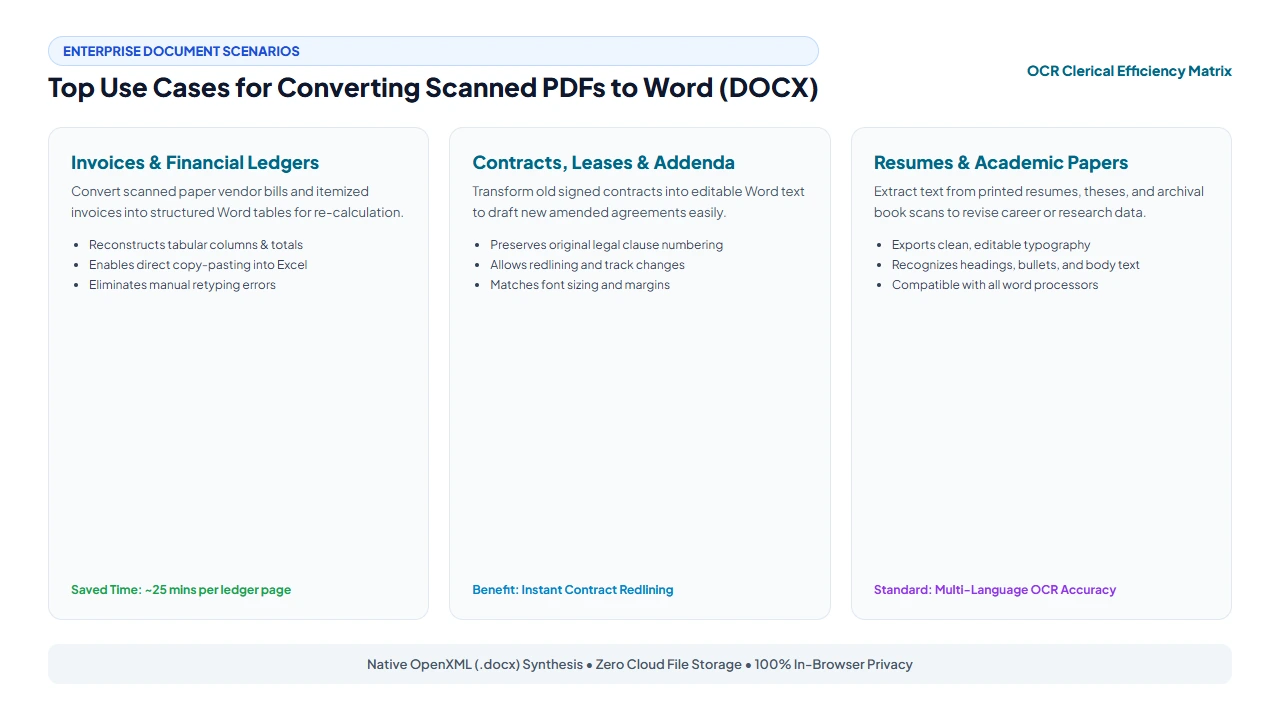
The ability to transform static raster scans into fully editable Word documents is a vital capability across diverse enterprise, legal, academic, and financial sectors:
1. Legal Casework, Discovery & Contract Redrafting
Litigation attorneys and paralegals frequently receive scanned discovery productions, legacy lease agreements, and third-party contracts in locked PDF format. Retyping a 40-page contract by hand introduces clerical errors and consumes valuable billable hours. By converting the scanned PDF to Word, legal teams can:
- Instantly edit indemnification clauses, payment terms, and warranty covenants using Microsoft Word Track Changes.
- Extract testimony transcripts, declarations, and court orders into legal brief templates without manual rekeying.
- Preserve original paragraph numbering hierarchies and indented statutory citations.
2. Human Resources, Onboarding & Resume Digitization
HR departments often maintain physical paper files for employee certifications, signed non-disclosure agreements, and paper employment applications. Scanning these documents to Word allows recruiters and personnel coordinators to:
- Convert paper job applications into structured digital candidate profiles within internal HRIS databases.
- Update company-wide policy handbooks and onboarding manuals originally stored only as legacy printouts.
- Extract resume work histories and educational credentials into standardized corporate evaluation matrices.
3. Academic Research, Archival Transcription & Book Restoration
Scholars, university professors, and historical archivists frequently work with scanned out-of-print books, scholarly journal papers, and historical manuscripts. Converting scanned materials to Word allows researchers to:
- Extract complex quotes and historical citations directly into dissertation drafts and academic papers.
- Digitize legacy research studies and tabular statistical datasets for re-analysis in modern spreadsheet software.
- Reformat archaic typography and small font sizes into clean, accessible documents for visually impaired students.
Scanned PDF to Word Conversion Methods: Technical Comparison
Organizations have several alternative approaches when converting scanned documents into editable formats. The table below provides an objective engineering comparison between client-side WebAssembly conversion, commercial desktop suites, generic cloud upload converters, and manual clerical retyping:
| Comparison Dimension | EditScannedPDF (Client-Side Wasm) | Commercial Desktop Suites | Generic Cloud Upload Converters | Manual Clerical Retyping |
|---|---|---|---|---|
| Processing Architecture | Client-side WebAssembly in local browser memory | Native compiled desktop executable | Remote multi-tenant cloud server clusters | Human manual transcription in word processor |
| Data Privacy & Security | 100% Private (Zero byte transmission off-device) | High (Local disk processing) | Severe Risk (Files uploaded and cached on remote servers) | Moderate (Human exposure to confidential text) |
| Cost & Licensing | 100% Free (No subscriptions or registrations) | Expensive ($180–$300/user/year subscription paywalls) | Freemium traps (2 free pages, then $15/mo paywalls) | Extremely High ($20–$40/hour labor costs) |
| Tabular Grid Preservation | Automated geometric edge & cell matrix mapping | Advanced table parsing | Poor (Tables break into unaligned floating text runs) | Accurate but manually labor-intensive |
| Conversion Speed | Instant (1–3 seconds per page in local RAM) | Fast (Local processing) | Slow (Queue delays, network upload/download lag) | Extremely Slow (15–30 minutes per page) |
| Installation & Setup | Zero installation (Works instantly in modern browsers) | Heavy (Multi-gigabyte downloads, admin rights required) | Zero installation (Requires web access & email signup) | Zero software installation |
Recommended Companion Tools for Document Workflows
Scanned PDF to Word conversion is frequently part of a broader document management and redaction pipeline. To optimize your scanned file preparation and post-conversion assembly, explore these privacy-first companion utilities on EditScannedPDF.com:
| Tool Name | Primary Capability | Workflow Recommendation |
|---|---|---|
| Edit Scanned PDF Online | Direct in-browser text erasing and typing on scans | Use when you only need to change a single date or name without generating a full Word file. |
| Scanned PDF to Searchable PDF | Dual-layer OCR embedding invisible text behind scans | Ideal for creating court-compliant CM/ECF filings and searchable digital archives. |
| Erase & Highlight PDF | Color-matched pixel whiteout and permanent redaction | Blackout sensitive Social Security numbers and bank routing codes before converting. |
| Rotate PDF Pages | Lossless 90, 180, and 270-degree page reorientation | Correct upside-down or sideways pages before executing OCR for maximum accuracy. |
| Compress PDF Document | Intelligent DPI downsampling and image stream optimization | Reduce bulky 50MB scanner files down to email-friendly sizes under 2MB. |
| Merge PDF Files | Combine multiple scanned sheets into a single document | Stitch loose single-page scans into one continuous file before batch converting to Word. |
Deep Architecture, Pro Engineering Tips & Statutory Compliance
Understanding the internal engineering specifications of document compilation allows technical users to achieve maximum OCR fidelity while maintaining strict evidentiary and regulatory compliance.
ISO 32000-1 Raster Dicts vs. ECMA-376 OpenXML Standards
Under the ISO 32000-1 PDF specification, a scanned page is represented by an indirect dictionary containing an /XObject reference with a /Filter entry (typically /DCTDecode for JPEG or /FlateDecode for lossless PNG/TIFF). The document content stream contains a simple transformation matrix (cm) and an invoke operator (Do) that paints the raw bitmap across the page coordinates.
In contrast, Microsoft OpenXML (standardized as ECMA-376 and ISO/IEC 29500) models a document as an explicit hierarchical tree:
- The root element
<w:document>contains the document body<w:body>. - Paragraphs are defined by
<w:p>, containing paragraph properties<w:pPr>(defining line spacing, alignment, and indentation) and text runs<w:r>. - Text runs contain formatting properties
<w:rPr>(defining font family<w:rFonts>, size<w:sz>, bold<w:b/>, and italics<w:i/>) wrapping the actual text node<w:t>.
Our client-side engine translates the spatial pixel coordinates of the raster image directly into these precise OpenXML XML nodes, ensuring seamless compatibility across word processing platforms.
To achieve near-flawless OCR recognition and eliminate character misreads (such as confusing "cl" with "d" or "rn" with "m"), always configure your physical scanner to 300 DPI (Dots Per Inch) in 8-bit Grayscale mode. Scanning in 72 DPI or 150 DPI produces jagged, pixelated letter stems that confuse neural feature extractors. Conversely, scanning in 1200 DPI generates massive multi-gigabyte memory footprints without providing additional typographical signal. A clean 300 DPI grayscale scan provides the optimal balance of sharp edge gradients and rapid WebAssembly processing speed.
Converting scanned documents to editable Microsoft Word files is a lawful and standard administrative workflow under the Fair Use doctrine (17 U.S.C. § 107) for internal archiving, academic research, clerical correction, and legal casework. However, users must be aware that modifying signed legal contracts, financial instruments, government licenses, or educational diplomas without explicit legal authorization constitutes criminal document forgery under federal and state statutes, including 18 U.S.C. § 1001 (False Statements) and 18 U.S.C. § 1028 (Fraud in connection with identification documents). Always ensure you possess lawful authority before distributing modified copies of third-party agreements.
- check_circle Pixel-to-Text Neural OCR: Scanned PDFs contain flat image pixels, requiring neural OCR to synthesize real Microsoft Word typography rather than simple file extension renames.
- check_circle 100% Client-Side Privacy: All OCR processing and OpenXML (.docx) packaging run inside your browser's local RAM—no files are ever uploaded to cloud servers.
- check_circle Tabular Grid Reconstruction: Geometric line kernel analysis detects table rules, preserving columns, rows, and cell numbers in native Word table elements.
- check_circle Universal OpenXML Compatibility: Exported .docx documents open seamlessly in Microsoft Word, Google Docs, Apple Pages, and LibreOffice with zero formatting errors.
Transform flat, uneditable scanned PDFs into fully formatted, selectable Microsoft Word (DOCX) documents with 100% private in-browser WebAssembly OCR. Preserves complex multi-column tables, font styling hierarchies, and paragraph alignment with zero software installation, zero account sign-ups, and zero file uploads.
Ready to Convert Your Scanned PDF to an Editable Word Doc?
Experience fast, client-side WebAssembly OCR. Convert contracts, invoices, and research papers into formatted Word files in seconds with zero cloud uploads.
article Start Free Scanned PDF to Word ConversionFrequently Asked Questions About Converting Scanned PDF to Word
Why do standard PDF to Word converters output an uneditable image in Word?
Standard converters only extract pre-existing digital vector text streams. In a scanned PDF, there is no digital text stream—only a flat raster bitmap of pixels. Basic tools merely embed that raw picture into an empty Word document. EditScannedPDF.com executes neural Optical Character Recognition (OCR) directly in your browser to analyze pixel clusters, decode character glyphs, and reconstruct authentic, selectable Microsoft Word paragraphs.
Will the converted Word document keep tables, borders, and layout formatting?
Yes. Our engine performs connected-component analysis and geometric grid detection to locate intersecting horizontal and vertical vector rules. When a tabular structure is recognized, the converter generates native Microsoft OpenXML table elements (w:tbl, w:tr, w:tc) with preserved column spans and padding, ensuring that numbers align cleanly instead of breaking into disarranged text runs.
Do I need to purchase an expensive software subscription to convert scanned PDFs to Word?
No. While traditional commercial desktop suites demand costly subscriptions of $15 to $20 per month just to access OCR conversion capabilities, EditScannedPDF.com provides enterprise-grade OCR document conversion 100% free with zero subscriptions, account registrations, or paywalls.
Are my confidential contracts or tax returns uploaded to an external cloud server?
No, never. All OCR character recognition, layout reconstruction, and Word DOCX package compilation run entirely inside your local device's web browser using compiled WebAssembly. Your confidential financial reports, legal agreements, and personal tax returns never leave your device's memory, ensuring total compliance with privacy regulations like HIPAA and GDPR.
Can I open and edit the converted Word file in Google Docs, Pages, or LibreOffice?
Yes. The generated file conforms strictly to the international ISO/IEC 29500 (ECMA-376) OpenXML (.docx) standard. You can seamlessly open, edit, format, and share the resulting file in Microsoft Word, Google Docs, Apple Pages, LibreOffice Writer, WPS Office, and any mobile office suite.
What scan resolution (DPI) produces the most accurate OCR text recognition?
For near-perfect character recognition accuracy exceeding 99%, documents should ideally be scanned between 300 DPI and 400 DPI in 8-bit grayscale or crisp black-and-white. Clean optical contrast between text glyphs and background paper eliminates optical noise, ensuring pristine typography and layout fidelity.
How can I fix minor OCR typos or formatting anomalies after downloading the Word file?
Because our converter generates native, fully editable Word OpenXML typography, correcting any minor character misreads is as easy as typing in any word processor. Simply open the .docx file in Microsoft Word or Google Docs, run standard spell-check, or use Find and Replace to update dates, names, or numerical figures instantly.