
PDF Booklet Maker Online Free — Make Foldable Booklets
Transform standard single-page documents into professional double-sided foldable booklets, compact 2-in-1 lecture note sheets, or 4-in-1 slide handouts. Everything processes 100% privately in your browser memory via native PDF vector Form XObjects with zero loss in print sharpness.
Drag & Drop Your PDF Document Here
Or click below to browse files from your computer or phone
Step 2: Choose Imposition Layout Mode
Select how pages will be paired and arranged on each printed sheet
All pages have been compiled in browser RAM with 100% vector resolution.
🔒 100% Private & In-Browser: Files are processed locally on your device and never uploaded to any server. Please edit only documents you own or are authorized to modify. Compliance Policy
The Definitive Guide to In-Browser PDF Booklet Creation & N-Up Printing
Printing multi-page documents as individual single-sided pages consumes excessive paper, inflates shipping weight, and produces unwieldy stacks of loose sheets. Professional publishers, commercial print shops, and corporate document centers utilize page imposition—the mathematical rearranging of pages before printing so that when folded down the center spine, the pages appear in natural, sequential order.
With EditScannedPDF Booklet Maker, you do not need expensive desktop publishing software like Adobe InDesign, Acrobat Pro, or commercial imposition RIPs. Our WebAssembly engine performs mathematical sheet imposition, N-up pairing, and Form XObject vector embedding directly in your browser memory with zero server uploads.
Real-World Printing Scenarios
1. Pocket Books, Poetry Chapbooks & Novellas
Self-publishers and authors can transform single-column manuscripts into elegant pocket-sized booklets on standard A4 or US Letter paper. Fold down the spine and staple along the crease with a long-reach stapler to produce reading copies.
2. Theater Playbills & Event Programs
Event organizers, community theaters, weddings, and memorial services require bi-fold programs that guests can easily hold in one hand. Saddle-stitch imposition guarantees front and back covers enclose the interior schedule perfectly.
3. Church Bulletins & Sunday Service Guides
Churches and non-profit organizations print weekly bulletins containing liturgy, hymns, and announcements. With our 4-page booklet mode, an 8-page or 12-page service guide requires only 2 or 3 double-sided sheets of paper.
4. Academic Lecture Notes & Slide Handouts
College students and instructors can condense 100-slide presentation decks into 25 four-up handout sheets or compact 2-in-1 study notes, cutting paper and binder footprint by up to 75% while keeping diagrams crystal clear.
How to Print a Booklet from PDF on a Home Duplex Printer
Step-by-step instructions for duplex settings (Flip on Short Edge vs Long Edge), single-sided printer workarounds, folding, and saddle-stitch stapling.
Step-by-Step Tutorial: How to Create and Print Your Booklet
Stage 1: Open Your PDF in Browser RAM
Click 'Select PDF Document' or drop your file into the upload zone. PDF.js loads the document locally into device memory without sending any data over the internet.
Stage 2: Select Your Imposition Layout Mode
Choose Foldable Booklet for nested double-sided books, 2-in-1 Side-by-Side for landscape reading sheets, or 4-in-1 Grid Handout for presentation slides. The sheet count estimator immediately displays your paper savings.
Stage 3: Configure Target Paper Size, Guidelines & Borders
Choose between International A4 and North American US Letter paper. Keep the center fold guideline enabled to see exactly where to crease or staple, and toggle page borders for crisp boundary margins.
Stage 4: Generate Imposed Document & Print Duplex
Click 'Generate Printable Booklet'. Once compiled, open the document in your preferred viewer. In your printer dialog, enable Two-Sided (Duplex) printing and select 'Flip on Short Edge'. Fold the printed sheets down the center spine!
Booklet Binding Margins, Gutter Alignment & Paper Creep Compensation
Imposing multi-page PDFs into folded saddle-stitch booklets requires careful attention to physical binding geometry. When folding a stack of 8, 16, or 32 sheets of paper down the spine, the inner sheets naturally protrude further outward than the outer cover—a physical phenomenon known in commercial printing as paper creep.
Gutter Margins & Saddle-Stitch Spacing
Our in-browser imposition engine preserves generous central gutter margins so that staple lines and spine stitching never swallow paragraph text, page numbers, or musical scores.
Duplex Printing Orientation (Flip on Short Edge)
When sending your imposed booklet PDF to a standard office double-sided (duplex) printer, always select 'Flip on Short Edge' (landscape duplex). This ensures the back of every sheet aligns right-side up when folded down the center.
Paper & Printing Cost Savings Calculator
See how much physical paper and commercial toner you save on a typical 100-page document:
Tool Comparison: EditScannedPDF vs. Paid Imposition Software
Compare our 100% private in-browser booklet maker with costly desktop software and subscription websites:
Frequently Asked Questions
How does saddle-stitch booklet imposition work, and why are pages out of order on the sheet?
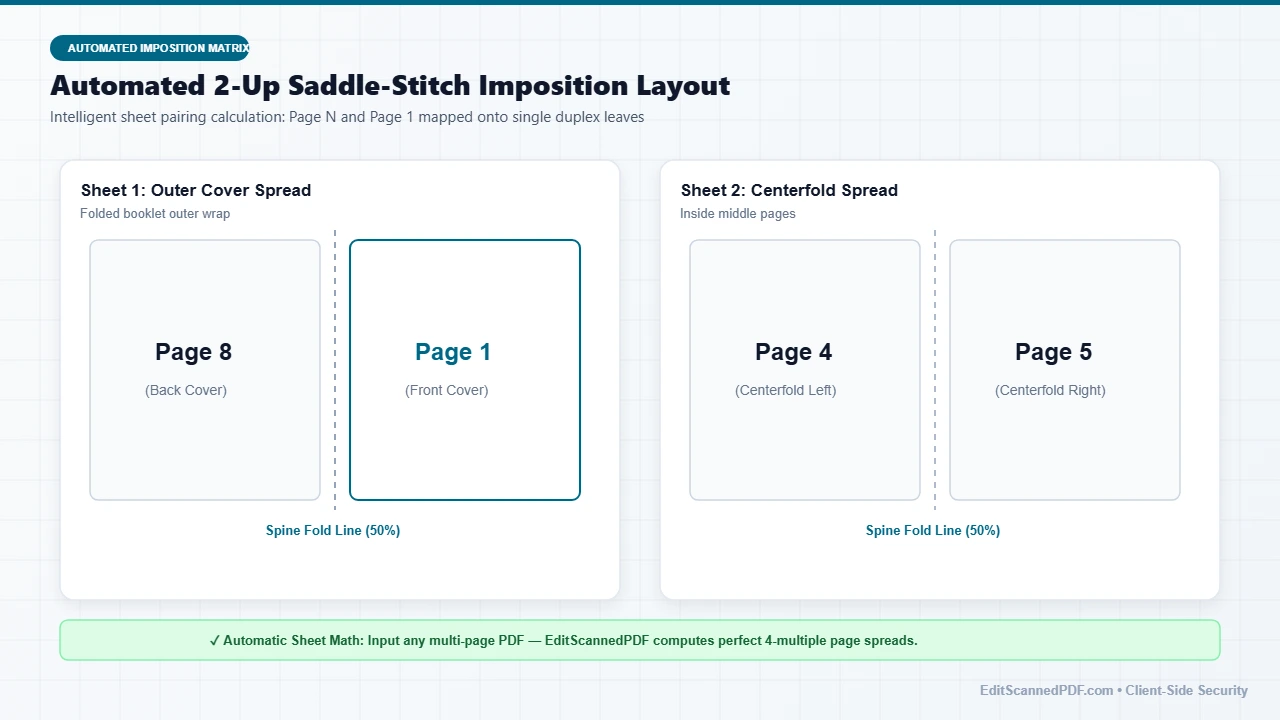
In a saddle-stitch booklet, sheets are folded in half down the center spine and stapled together. Because the outermost sheet wraps around all inside sheets, the front cover (Page 1) and back cover (Last Page) must share the same physical sheet. Our mathematical imposition engine calculates the exact sheet pairings so that after double-sided printing and folding down the spine, the pages read consecutively in perfect sequential order (1, 2, 3, 4...).
What duplex printing setting must I select in my printer dialog (Flip on Short Edge vs Long Edge)?
When printing a booklet on landscape paper, you must select 'Flip on Short Edge' (sometimes called Short-Edge Binding or Tablet orientation) in your printer properties dialog. This ensures that the back side of each sheet prints upright relative to the front side. If you choose 'Flip on Long Edge', the back pages will appear upside down when folded.
What happens if my PDF page count is not a multiple of 4 in booklet mode?
A physical booklet sheet folded in half creates exactly 4 pages (2 on front, 2 on back). Therefore, any saddle-stitch booklet requires a total page count that is a multiple of 4. If your PDF has 6 pages, our engine automatically calculates the nearest multiple of 4 (8 pages) and pads the remaining 2 slots with clean blank pages so your booklet closes and folds naturally.
Does converting to booklet or 2-up blur or pixelate my text and diagrams?
No. Unlike tools that rasterize pages into compressed JPEG images, our client-side engine embeds each original PDF page as a native PDF Form XObject vector stream. All fonts, crisp typography, vector lines, and high-resolution images maintain 100% loss-free vector sharpness regardless of how closely you zoom.
What is the difference between 2-in-1 Side-by-Side and Foldable Booklet mode?
2-in-1 Side-by-Side simply places consecutive pages next to each other on a landscape sheet (Page 1 & 2 on Sheet 1, Page 3 & 4 on Sheet 2). It is ideal for reading college notes, articles, and legal briefs. Foldable Booklet mode mathematically reorders pages across nested sheets so they can be folded down the center spine and read like a bound book.
Are my confidential contracts, manuscripts, or financial reports uploaded to any server?
Never. All page restructuring, vector embedding, and PDF compilation take place 100% locally in your web browser memory (RAM) using PDF-lib and WebAssembly. Zero bytes leave your device, ensuring total privacy and strict compliance with HIPAA, GDPR, and non-disclosure agreements.
Can I print on standard US Letter or International A4 paper sizes?
Yes. Our Booklet Studio allows you to switch between International standard A4 (297 x 210 mm) and North American US Letter (11 x 8.5 inches). The engine automatically recalculates aspect ratios and margins so your document fits your printer trays with zero clipping.