
Organize PDF Pages Online Free — Reorder & Sort Pages
Reorder mixed-up smartphone scans, remove accidental blank scanner sheets from loan dossiers, rotate upside-down contract pages, and duplicate sheets visually. Everything processes 100% locally in your browser with zero cloud uploads.
Select or Drop PDF Document Here
Visual thumbnail cards render instantly in browser RAM • Zero server uploads
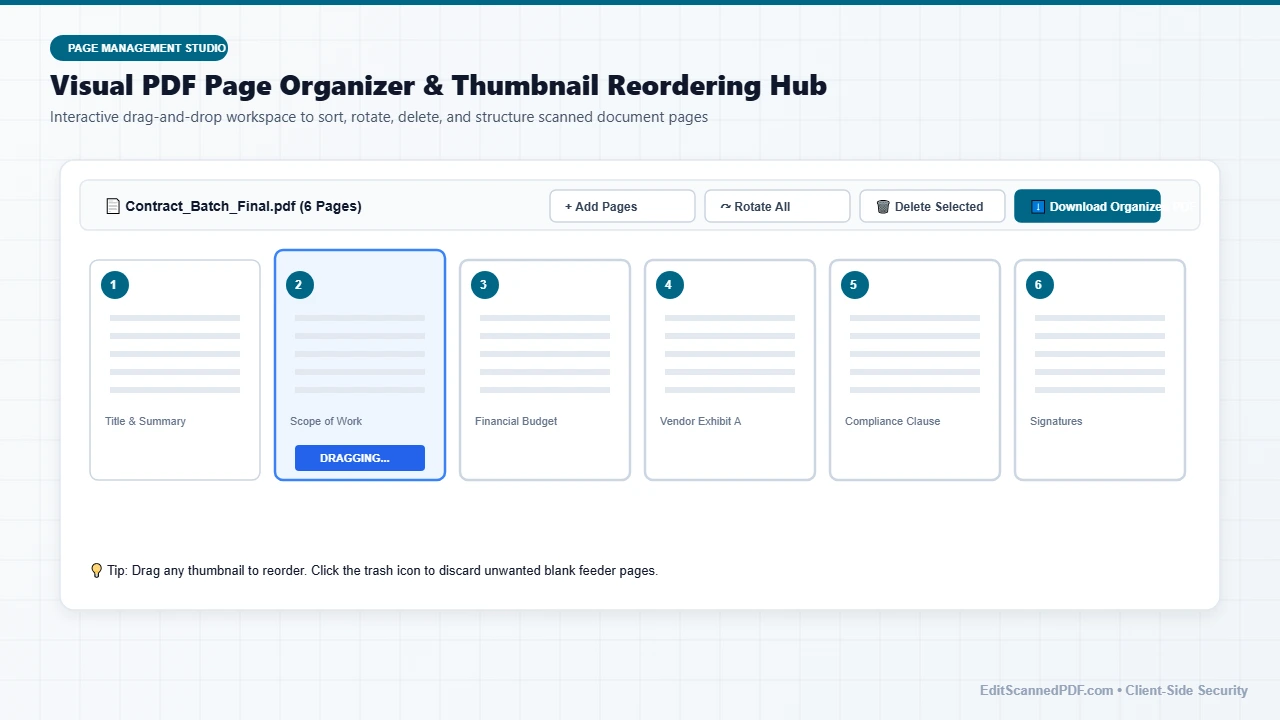
Interactive Page Organizer Studio
🎉 Your PDF Pages Have Been Successfully Reorganized!
🔒 100% Private & In-Browser: Files are processed locally on your device and never uploaded to any server. Please edit only documents you own or are authorized to modify. Compliance Policy
Real-World PDF Page Organizing & Sequence Management Scenarios
Whether you are dealing with automated scanner feed jams, mixed-up mobile photo captures, or strict legal filings, disordered PDF pages create delays and portal rejections. Our browser-based page organizer solves everyday workflow problems with visual clarity:
Mixed-Up Smartphone Camera Scans
When photographing multi-page contracts, invoices, or academic lecture notes on a phone, pages often capture out of chronological order or with sideways orientation. Drag cards visually to restore proper sequence and rotate flipped photos in seconds.
Removing Accidental Blank Scanner Sheets
Office multi-function printers and automatic document feeders (ADF) frequently inject accidental blank pages into scanned mortgage packages, tax returns, and loan applications. Delete unwanted sheets with one click to keep your file clean and concise.
Fixing Upside-Down Legal Exhibits
Legal court filings and commercial leases cannot be submitted with inverted verification stamps or rotated signature addendums. Rotate single target pages by 90° or 180° clockwise without altering the rest of your pagination structure.
Visa & Employment Dossier Assembly
Immigration portals (USCIS, UKVI, Schengen) and university admissions require credentials in exact order: Cover letter, Passport, Resume, Degree Certificates, and Transcripts. Duplicate pages or insert white divider sheets to match strict embassy checklists.
Legal Document Bundling, Court Electronic Indexing & Trial Dossiers
Attorneys, paralegals, mortgage loan processors, and title agents frequently compile dozens of separate scanned records—including deed filings, title commitments, sworn affidavits, bank statements, and exhibits—into a unified PDF bundle.
Purging Accidental Blank Pages
High-speed automatic sheet feeders frequently scan blank trailing pages or separator sheets. Court electronic filing systems and automated mortgage underwriting bots flag unexpected blank pages as missing evidence. Our visual grid allows deleting errant blank sheets with a single click.
Mixed-Orientation Realignment
Complex real estate loan packets frequently contain landscape financial balance sheets mixed with portrait agreements. Rotate sideways sheets 90° directly inside the document stream without having to split and re-merge external files.
How to Reorder, Rotate, and Organize PDF Pages in 4 Easy Steps
Follow our comprehensive step-by-step workflow to reorganize your document sequence locally in browser RAM:
-
Step 1: Open Your Scanned or Digital PDF in Browser RAM
Click Select PDF file or drag your document into the upload zone. PDF.js loads the file into device memory and renders crisp 150px thumbnail previews for each page. Zero files are sent to remote web servers.
-
Step 2: Drag, Rotate, Duplicate, or Delete Pages in Visual Grid
Grab any page card to drag it to a new location. Use individual card buttons to rotate single pages clockwise, duplicate important pages, or delete unneeded pages with immediate automatic renumbering.
-
Step 3: Insert Blank Separator Sheets or Batch-Rotate Pages
Need to flip all pages or add divider sheets? Use the global toolbar buttons to Rotate All (90°), Add Blank Page, or select multiple cards to perform bulk deletions in a single click.
-
Step 4: Assemble Document & Download Instant Organized PDF
Click Organize & Download PDF. Our PDF-lib WebAssembly engine creates the final document with all page rotations and sequences applied, ready for instant download and verification in our zoomable preview modal.
Tool Comparison: EditScannedPDF vs. Paid Alternatives
Compare our 100% private in-browser page organizer with expensive commercial PDF suites:
Frequently Asked Questions
How does visual drag-and-drop PDF page organizing work in EditScannedPDF?
When you select a PDF, PDF.js renders crisp thumbnail previews of every page directly inside your browser memory. You can visually drag page cards to swap their positions, rotate individual sheets by 90 degrees, clone pages, or delete unneeded pages with instantaneous live renumbering.
Are my confidential contracts and financial records uploaded to any remote server?
Never. All page rendering, thumbnail generation, reordering, and PDF assembly occur 100% client-side in your device RAM using WebAssembly and PDF-lib. Zero bytes of your document are ever transmitted across the internet, guaranteeing complete compliance with privacy standards like HIPAA and GDPR.
Can I rotate individual upside-down pages without affecting the rest of the document?
Yes. Each page card features an independent Rotate button that turns only that specific page by 90 degrees clockwise (0°, 90°, 180°, 270°). You can fix a single sideways invoice or upside-down contract page without altering the orientation of the other pages.
How do I delete accidental blank pages produced by automated scanner document feeders?
Simply click the delete trash icon on any page card to immediately remove it from your document sequence. The remaining pages will automatically re-number sequentially in real time.
Can I duplicate pages or insert blank separator sheets into my PDF?
Yes. Clicking the duplicate icon on any card creates an exact clone of that page placed immediately after it with independent rotation controls. You can also click Add Blank Page in the top toolbar to insert clean white divider sheets.
Is there a page count limit or file size restriction when organizing multi-page PDFs?
No. Because processing is performed entirely in your browser using local device hardware, there are no artificial 3-task daily limits, subscription paywalls, or document size caps. You can organize large reports, legal dossiers, and architectural blueprints for free.
Will organizing, rotating, or deleting pages damage my document's searchable text layer or digital forms?
No. Our assembly engine copies underlying PDF content streams without rasterization. All digital text layers, OCR data, vector graphics, embedded fonts, and interactive form structures are preserved with lossless fidelity.