
Split Scanned PDF Online Free
Break large multipage scanned documents, feeder scanner batches, and combined paper files into individual PDFs or custom page ranges. Fast, 100% private, and processed directly in your browser.
Only edit documents that you own or are legally authorized to modify. Do not use this website to alter documents for fraud, misrepresentation, identity misuse, or any illegal purpose. You are fully responsible for how you use edited documents; Edit Scanned PDF is not responsible for unlawful or unauthorized use. Read More
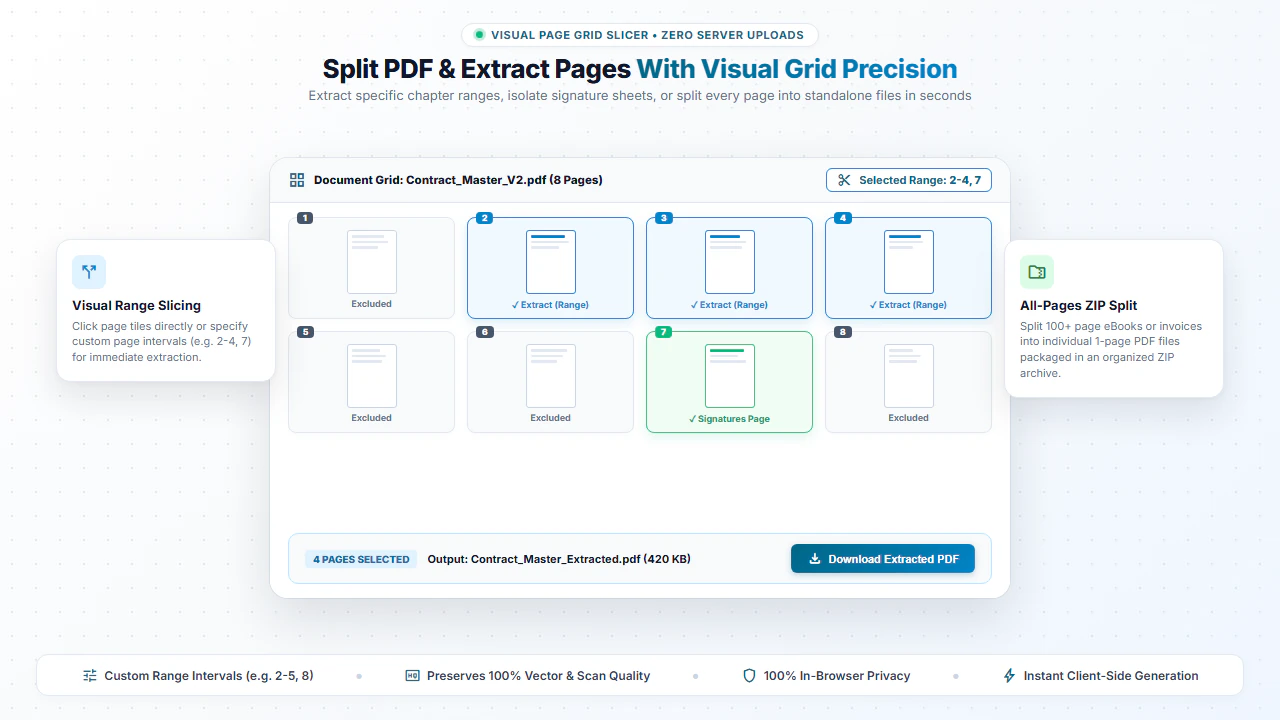
To split a multipage scanned PDF into individual files or extract custom page ranges (like pages 1-3, 5), use EditScannedPDF.com Scanned PDF Splitter. It processes everything locally in your browser with zero server uploads.
How PDF Splitting & Page Extraction Works
A PDF file consists of an internal catalog of page tree dictionaries, font objects, and content streams. When you split a PDF, our browser-based utility parses the internal page structure and extracts only the desired page nodes into a brand-new, clean PDF container.
Because the vector definitions, fonts, and high-resolution images are transferred directly into the new container without rasterization, there is zero loss of visual clarity or text sharpness. You get pristine, high-fidelity files ready for sharing or submission.
Two Splitting Modes Tailored to Your Needs
Mode 1: Custom Page Range Extraction
Ideal for: Extracting specific chapters, signing pages, or receipts from a massive multi-page file.
How to use: Specify page numbers or ranges like 1-3, 7, 10-15. The tool will output a single new PDF containing only those selected pages in your requested order.
Mode 2: Split Every Page to Separate PDFs
Ideal for: Batch processing bulk invoices, certificates, tax forms, or scanned receipts.
How to use: Leave the range field blank. The tool will automatically break down the document into individual 1-page PDF files and package them into a convenient ZIP archive.
Step-by-Step: How to Split PDF Files in 4 Easy Steps
- Step 1: Choose or Drag & Drop: Click Choose PDF or drag your multipage document into the splitting area.
- Step 2: Set Page Range: Enter page numbers like
1-3,5or leave empty to separate all pages into a ZIP. - Step 3: Split in Memory: Click Split PDF to extract pages locally in browser RAM within milliseconds.
- Step 4: Download Extracted Files: Save your targeted PDF pages or ZIP archive directly to your desktop.
- Step 1: Select Document: Tap Choose PDF and select your document from Files, iCloud, or Google Drive.
- Step 2: Enter Desired Pages: Type the page numbers you need for your application or portal submission.
- Step 3: Process on Device: Tap Split PDF to extract the exact pages directly on your mobile processor.
- Step 4: Save to Phone: Tap Download to save the extracted PDF pages directly to your device storage.
Everyday Scenarios Where Splitting PDFs Saves Time
Legal Contracts & Closing Briefs
Extract signature pages or specific addendums from 100-page master agreements for client review.
Academic Books & Study Notes
Separate lengthy textbook chapters into individual weekly reading modules for students.
Financial Statements & Tax Filings
Pull out specific quarterly revenue schedules or W-2 attachments without sharing entire financial books.
Medical Records & Lab Reports
Extract only the relevant diagnostic report page to submit to insurance providers.
Zero-Upload Security: Keep Your Confidential Documents Safe
Conventional online PDF editors send your confidential contracts, medical histories, and bank statements to remote cloud servers for splitting. This creates unnecessary security risks and potential data privacy violations.
EditScannedPDF.com executes all splitting calculations 100% locally in your web browser. No files, metadata, or byte streams are uploaded to any server. Your information stays strictly on your personal device at all times.
Comparison: EditScannedPDF vs. Traditional Cloud Tools
Understanding how our in-browser WebAssembly architecture protects your sensitive documents compared to legacy cloud PDF converters:
Enterprise-Grade In-Browser Security Architecture
When working with sensitive contracts, financial spreadsheets, medical records, or identity credentials, uploading files to third-party web servers introduces major cybersecurity risks. EditScannedPDF solves this fundamental vulnerability by executing all PDF compilation, vector synthesis, and cryptographic operations directly inside your device's browser memory using WebAssembly.
Your documents never travel across the internet, are never indexed on remote hard drives, and leave zero data footprint behind once you close your browser tab. Experience complete operational privacy built from the ground up to satisfy modern corporate security protocols.
Frequently Asked Questions (FAQ)
How do I split a bulk scanned batch into separate single-page invoices?
Upload your multipage scanned PDF and leave the page range empty to extract every single page as a standalone PDF, or specify ranges like 1-2, 3-5 to separate distinct documents.
Can I delete blank scanner feeder pages while splitting?
Yes. Enter only the valid page numbers you wish to keep, and all unwanted blank or erroneous scanned sheets will be omitted from the output.
Does splitting preserve the original scan quality and OCR text?
Yes. The tool extracts pages at their exact original resolution and retains all underlying OCR text layers without degradation.
Are my sensitive scanned medical or tax records kept private?
Absolutely. All extraction happens in client-side WebAssembly and JavaScript. No document is ever sent across the internet.