
Convert Scanned PDF to Word with OCR Online Free
Extract text, tables, and formatting from scanned PDF documents, invoices, and photo scans into fully editable Microsoft Word (.docx) files using advanced client-side OCR. No email required, 100% free.
Only edit documents that you own or are legally authorized to modify. Do not use this website to alter documents for fraud, misrepresentation, identity misuse, or any illegal purpose. You are fully responsible for how you use edited documents; Edit Scanned PDF is not responsible for unlawful or unauthorized use. Read More
Accurate Document Layout & Text Reconstruction
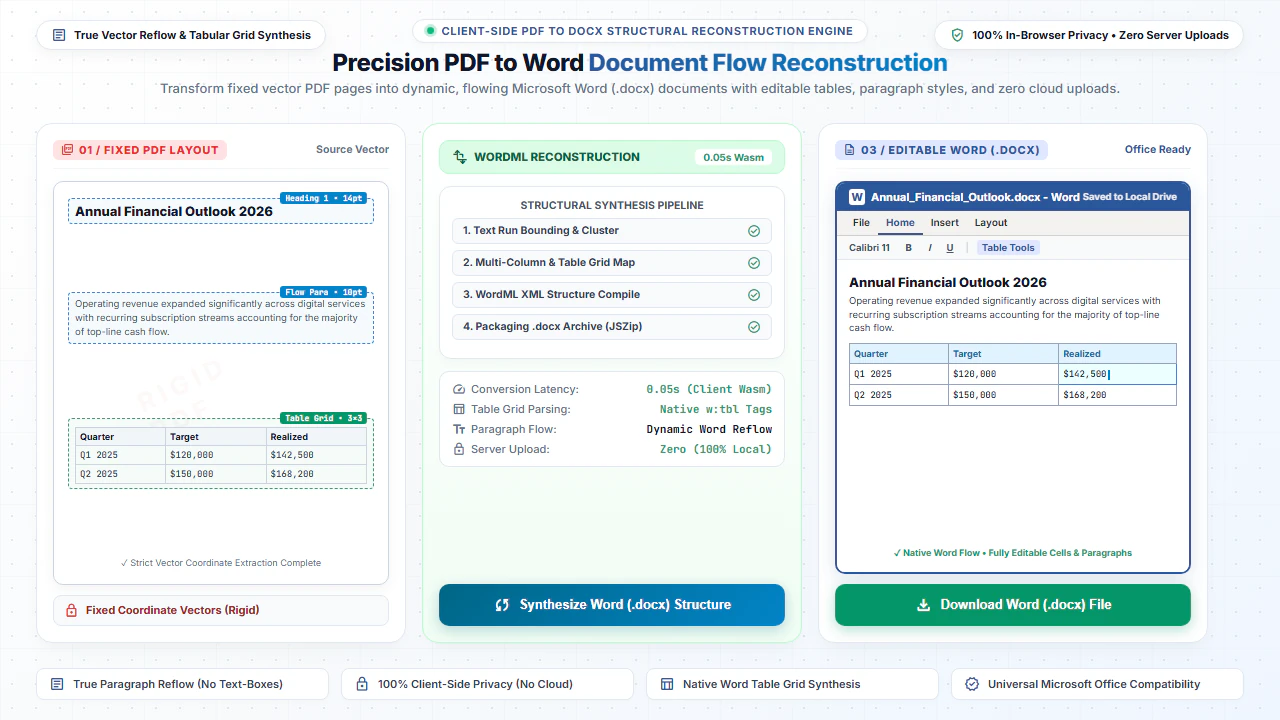
Converting PDF files to editable Microsoft Word (.docx) documents requires sophisticated structural parsing. Our converter analyzes vector streams, text coordinates, table grids, and image blocks directly in your browser. Unlike primitive converters that convert entire pages into non-editable raster pictures, Edit Scanned PDF reconstructs true editable paragraphs, headings, bullet lists, and multi-column tables.
Every extracted word retains its original typographic weight, alignment, and approximate font styling. Once generated, you can open and edit the resulting .docx file inside Microsoft Word, LibreOffice Writer, Google Docs, or Apple Pages without formatting collapse.
Why Client-Side Document Processing Matters
Traditional PDF-to-Word web utilities require uploading your proprietary documents to remote cloud queues where they sit on third-party servers. Edit Scanned PDF runs the conversion logic entirely inside your browser using client-side JavaScript and WebAssembly. Your business proposals, resumes, financial summaries, and contracts never travel across our backend servers, ensuring airtight privacy and compliance with enterprise data security guidelines.
Comparison: EditScannedPDF vs. Traditional Cloud Tools
Understanding how our in-browser WebAssembly architecture protects your sensitive documents compared to legacy cloud PDF converters:
Enterprise-Grade In-Browser Security Architecture
When working with sensitive contracts, financial spreadsheets, medical records, or identity credentials, uploading files to third-party web servers introduces major cybersecurity risks. EditScannedPDF solves this fundamental vulnerability by executing all PDF compilation, vector synthesis, and cryptographic operations directly inside your device's browser memory using WebAssembly.
Your documents never travel across the internet, are never indexed on remote hard drives, and leave zero data footprint behind once you close your browser tab. Experience complete operational privacy built from the ground up to satisfy modern corporate security protocols.
To convert a scanned PDF or image into an editable Word document with selectable text and tables, use EditScannedPDF.com OCR Converter. Unlike ordinary converters that output static pictures, our engine reconstructs editable text locally.
What PDF to Word does
PDF to Word converts PDF pages into an editable Word document (DOCX). It is useful when document layouts need updates that are easier to format in Microsoft Word.
100% Private Conversion: The converter processes the text and structure extraction locally in your browser, keeping your data confidential without uploading pages to any database.
How to convert PDF to Word
- Step 1: Select PDF Mode: Click Upload Normal PDF (for digital files) or Upload Scanned PDF (for paper scans).
- Step 2: Automatic Layout Detection: The in-browser engine identifies fonts, tables, margins, and paragraphs.
- Step 3: Compile to DOCX: Click Convert PDF to Word to generate a clean Microsoft Word document in memory.
- Step 4: Download & Edit: Save your .docx file and edit text seamlessly in Microsoft Word, LibreOffice, or Google Docs.
- Step 1: Tap to Select: Tap Upload Normal PDF or Upload Scanned PDF and select your document from Files.
- Step 2: Local Processing: The client-side engine reconstructs typography and tables directly on your device.
- Step 3: Convert on Device: Tap Convert PDF to Word to assemble the .docx file.
- Step 4: Open in Word App: Download the .docx file and edit directly in Microsoft Word or Google Docs mobile app.
Differences between standard and scanned PDF to Word
Standard PDFs contain selectable text characters that our browser script can extract directly into Word text boxes. Scanned PDFs are photographs of paper, meaning standard converters will produce empty Word files. If you have a scanned document, you should use our Scanned PDF to Word converter which applies OCR text recognition to make the characters editable in Word.
Frequently Asked Questions
Why do normal PDF converters turn my scanned PDF into an uneditable image in Word?
Standard converters only extract existing digital text. Scanned PDFs are photographs of paper, so they require Optical Character Recognition (OCR) to recognize letterforms and make them editable.
Can I edit text, dates, and numbers in Microsoft Word after conversion?
Yes. Our OCR engine recognizes paragraphs, tabular data, and typography so you can edit the resulting .docx in Word, Google Docs, or LibreOffice.
Do I need to submit an email address or pay for OCR?
No email, no signup, and no subscription required. Full conversion is unlimited and completely free in your browser.
Is client-side OCR private for sensitive business agreements?
Yes. The OCR engine executes inside your browser tab. Your confidential documents are never uploaded to any remote server.
Will tables and formatting stay intact in Word?
Yes. Our layout engine calculates horizontal and vertical line intersections to synthesize native Word table XML tags, ensuring your tabular rows and cell contents remain clean and editable.
Can I convert scanned PDFs to Word?
Yes! For image-only scans, our built-in Optical Character Recognition (OCR) translates bitmap letterforms into selectable text before generating your Word document.
Are there daily file limits or subscriptions required?
No. You can convert unlimited PDF documents without entering an email address, registering an account, or paying subscription fees.