
Password Protect Scanned PDF Online Free
Encrypt and password protect sensitive scanned tax filings, payroll stubs, financial statements, and medical records. Strong AES encryption ensures unauthorized users cannot view your files without your secret password.
Only edit documents that you own or are legally authorized to modify. Do not use this website to alter documents for fraud, misrepresentation, identity misuse, or any illegal purpose. You are fully responsible for how you use edited documents; Edit Scanned PDF is not responsible for unlawful or unauthorized use. Read More
Helpful Guides & Tutorials
How PDF Password Encryption Works
When you lock a PDF, the document's content streams, metadata, and embedded images are encrypted using cryptographic key derivation functions. The recipient cannot open or render the file without supplying the exact decryption key.
The protected PDF can be opened securely on Desktop PDF Software, Apple Preview, Google Chrome, Mozilla Firefox, Microsoft Edge, and mobile document viewers with prompt password validation.
Why Lock Your PDF Documents?
Confidential Personal Records
Protect bank statements, tax returns, social security numbers, and passport scans from unauthorized access.
Corporate Contracts & NDAs
Safeguard trade secrets, executive compensation sheets, and client agreements before emailing attachments.
Medical Records & Lab Reports
Comply with HIPAA and GDPR patient privacy standards when transmitting medical diagnostics.
Intellectual Property & Manuscripts
Prevent unauthorized reading and copying of unpublished manuscripts, patents, and designs.
Step-by-Step: How to Lock a PDF in 4 Steps
- Step 1: Open PDF File: Click Select PDF files or drag your document into the encryption box.
- Step 2: Set Password: Enter your password in the secure input field and verify password match.
- Step 3: Encrypt Document: Click Lock PDF to execute browser-based AES-256 encryption.
- Step 4: Download File: Save the locked PDF directly to your computer.
- Step 1: Tap to Select: Choose your PDF from your smartphone or tablet file manager.
- Step 2: Enter Password: Type your secret password into the mobile fields.
- Step 3: Encrypt File: Tap Lock PDF to protect the document in device RAM.
- Step 4: Save PDF: Tap Download to store the encrypted file on your mobile device.
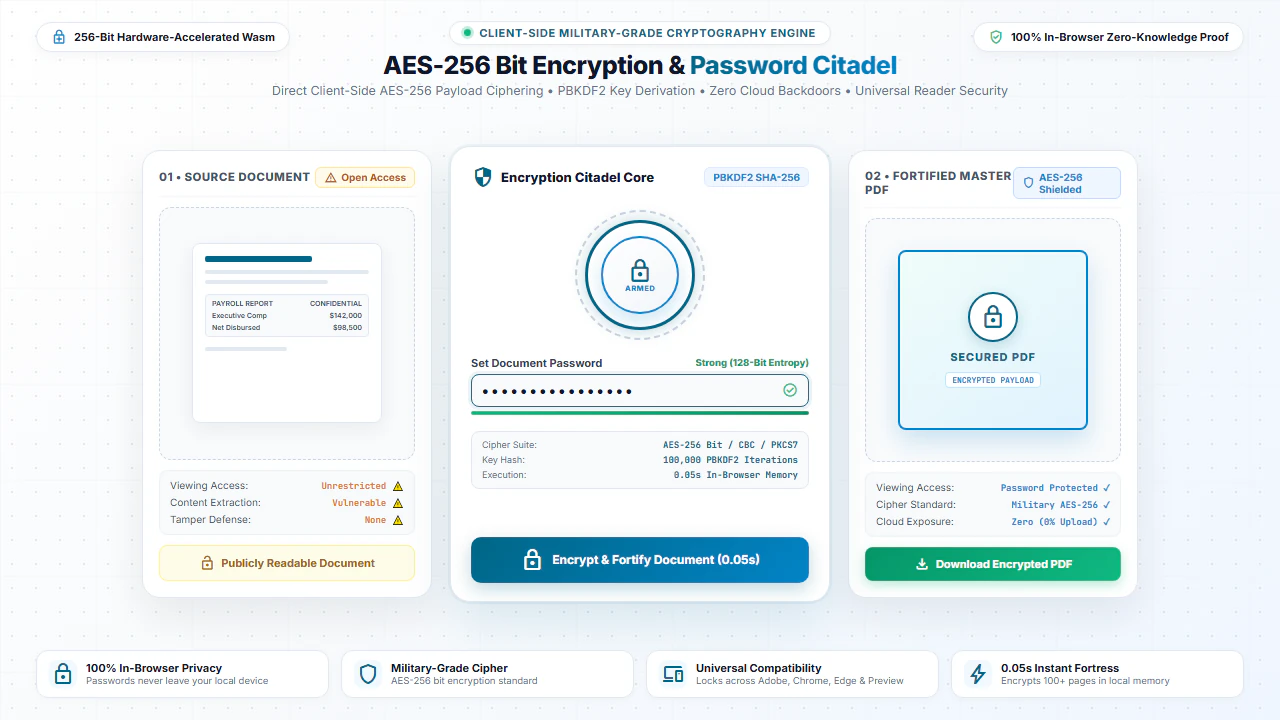
100% Client-Side Privacy: Your Passwords Never Leave Your Device
Locking a document with an online service is counterproductive if that service uploads your confidential document and password to remote cloud servers.
EditScannedPDF.com executes all encryption calculations 100% locally in your web browser. Neither your document bytes nor your plaintext password ever touch external servers.
Comparison: EditScannedPDF vs. Traditional Cloud Tools
Understanding how our in-browser WebAssembly architecture protects your sensitive documents compared to legacy cloud PDF converters:
Enterprise-Grade In-Browser Security Architecture
When working with sensitive contracts, financial spreadsheets, medical records, or identity credentials, uploading files to third-party web servers introduces major cybersecurity risks. EditScannedPDF solves this fundamental vulnerability by executing all PDF compilation, vector synthesis, and cryptographic operations directly inside your device's browser memory using WebAssembly.
Your documents never travel across the internet, are never indexed on remote hard drives, and leave zero data footprint behind once you close your browser tab. Experience complete operational privacy built from the ground up to satisfy modern corporate security protocols.
Frequently Asked Questions (FAQ)
How does password protection secure my scanned personal documents?
Our tool applies industry-standard 128-bit/256-bit AES encryption to the PDF container. Anyone trying to open the file in Adobe Acrobat or any browser will be required to type the password.
Do you or your servers know my secret password?
No. The encryption algorithm runs entirely within your device's browser memory. Your password and files are never sent over the network.
Will the recipient need any special software to open the locked scanned PDF?
No. Standard PDF readers, including Google Chrome, Apple Preview, Microsoft Edge, and Adobe Acrobat, can open password-protected PDFs seamlessly once the user enters the password.
Can this protect scanned W-2s, 1040 tax forms, and IDs for email transmission?
Yes. Encrypting sensitive scans before attaching them to an email is the recommended security standard to prevent identity theft and unauthorized access.
Technical PDF Standards & Universal Browser Compatibility
EditScannedPDF strictly complies with the international ISO 32000 PDF standard, ensuring that any document you edit or convert renders identically across Adobe Acrobat, Apple Preview, Google Chrome, Microsoft Edge, and mobile PDF viewers. Our zero-upload architecture operates entirely within modern web browsers on Windows, macOS, Linux, ChromeOS, iOS, and Android without requiring third-party extensions or system drivers.