
How to Prepare Scanned PDF for Court E-Filing (CM/ECF & State Court PDF/A Standards)
1. Federal CM/ECF and State Court E-Filing Mandates
Electronic court filing systems across federal district courts (Case Management/Electronic Case Files, or CM/ECF) and state appellate divisions enforce rigorous technical mandates for uploaded documents. Submitting a scanned PDF that fails to meet exact court specifications risks immediate rejection by the electronic clerk, potential missed jurisdictional deadlines, and order-to-show-cause sanctions.
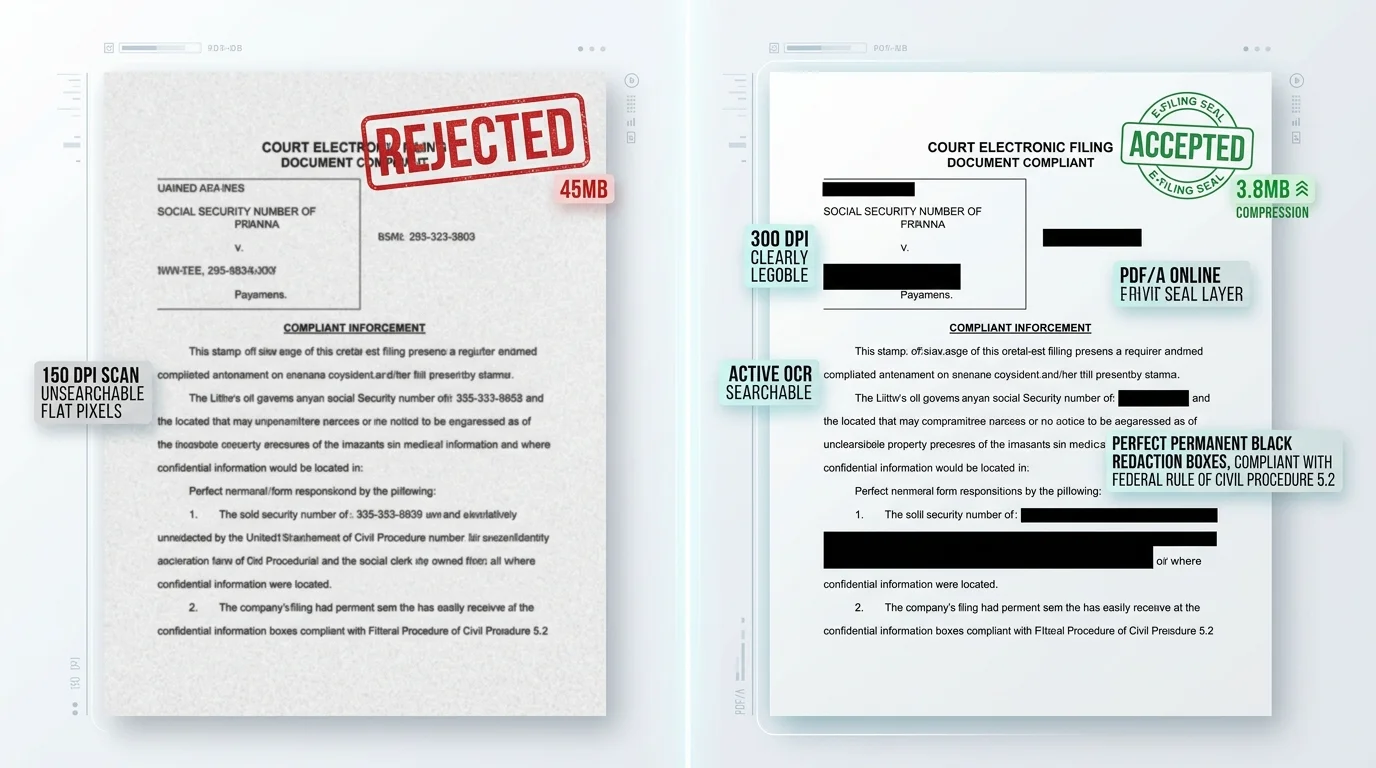
Judicial filing systems require electronic filings to adhere to specific standardizations: documents must be submitted in PDF or PDF/A format, contain no dynamic active scripting or external hyperlink dependencies, meet minimum optical resolution benchmarks (standard 300 DPI), and comply with strict per-file attachment size caps (typically between 20MB and 35MB). Scanned evidentiary exhibits must also include searchable optical text recognition (OCR) layers and continuous sequential numbering.
2. PDF/A Archival, Bates Stamping & Searchable OCR Rules
Courts reject standard desktop scans when they lack long-term preservation architecture. Under ISO 19005 standards, PDF/A compliance guarantees that legal briefs, declarations, and exhibits can be accurately rendered decades in the future without relying on external system fonts or dynamic operating system plugins.
For evidentiary discovery productions, litigators must apply consecutive Bates numbering—a standardized alphanumeric tracking system that marks every page of motion exhibits with a unique identifier (such as COURT-EFILING-000001). In addition, court local rules mandate that scanned paper documents must undergo 300 DPI text OCR so judges and opposing counsel can conduct full-text searches and copy verbatim excerpts directly into court orders.
3. 4-Step Workflow for Court-Approved PDF Submissions
Follow this verified four-stage workflow to produce fully compliant judicial filings:
Inspect & Flatten Court Pleadings and Exhibits
Merge all annotations, digital signatures, and form fields into the static document canvas. Flattening eliminates viewer discrepancies between judge and counsel monitors.
Apply OCR Text Recognition at 300 DPI
Run optical character recognition to build an invisible text layer over the scan. This enables judges to search text, highlight quotes, and verify citations via Ctrl+F.
Add Sequential Bates Numbering to Bottom Margins
Apply consistent, non-overlapping Bates numbering across all exhibits. Maintain a continuous numbering sequence across multi-volume document productions.
Convert to PDF/A-1b & Validate File Size Limits
Export as a PDF/A compliant file and verify size against court local rules (e.g. under 25MB). If necessary, apply gentle compression to stay within portal caps.
4. E-Filing Portal Constraints vs. Compliance Standards
The following technical table summarizes mandatory filing parameters across federal and major state jurisdictions:
| Technical Parameter | Federal CM/ECF Rule | State Court Standard | Recommended Practice |
|---|---|---|---|
| Archival Specification | PDF/A-1a or PDF/A-1b Preferred | PDF/A Required in most states | Always output ISO 19005 compliant PDF/A |
| Searchable Text (OCR) | Mandatory on all exhibits | Mandatory on all exhibits | 300 DPI invisible text layer |
| Maximum File Size | Typically 20MB – 35MB per file | 10MB – 50MB (varies by county) | Split large attachments into indexed volumes |
| Dynamic Scripts & Links | Strictly Prohibited | Strictly Prohibited | Flatten all AcroForms & strip JavaScript |
| Page Orientation | 100% Upright (Portrait preferred) | 100% Upright | Rotate landscape exhibits upright prior to filing |
Prepare Court-Compliant Scanned Exhibits Free
Bates stamp, flatten, compress, and organize scanned court documents in seconds. No server uploads, total attorney-client confidentiality.
format_list_numbered Bates Stamp & Number PDFTo prepare scanned PDF for court efiling online for free, use the private Prepare PDF for Court E-Filing. Powered by client-side WebAssembly, it executes all document processing directly inside your browser memory without cloud uploads, formatting shifts, or expensive software subscriptions.
- PDF/A Long-Term Archiving: Filing systems reject files that depend on external system fonts or dynamic JavaScript. Standardize on PDF/A.
- Mandatory OCR Text Searchability: Submitting raw scanned images without machine-readable text layers triggers clerk rejections. Always verify text selection.
- Clear Bates Tracking: Consistent sequential numbering in lower margins simplifies evidence citation in legal briefs.
- Irreversible Pixel Redaction: Drawing superficial black shapes leaves copyable text underneath; true redaction wipes pixels.
Related Scanned PDF Guides & Tools
5. Frequently Asked Questions (FAQ)
Why do federal and state courts require PDF/A format? expand_more
PDF/A (ISO 19005) is an internationally standardized electronic document archive specification. It guarantees that judicial records can be rendered identically decades in the future by embedding all system fonts, disabling dynamic scripts, and prohibiting remote external references.
Are searchable OCR text layers mandatory for court e-filing? expand_more
Yes. Almost all federal district courts operating on the CM/ECF system and state appellate courts mandate that scanned exhibits and briefs contain a searchable optical character recognition (OCR) text layer so judicial clerks and opposing counsel can search documents using Ctrl+F.
What is the maximum file size limit for federal CM/ECF e-filing? expand_more
Federal CM/ECF file size limits vary by individual district court local rules, typically ranging between 20MB and 35MB per file attachment. Large evidentiary exhibits exceeding the local cap must be split into numbered parts (e.g., Exhibit A - Part 1, Part 2).
Where should Bates numbering be placed on scanned exhibits? expand_more
Bates stamps are traditionally positioned in the lower right corner of every page, approximately 0.5 inches from the bottom and right edges. If preexisting footers or text would be obscured, placing the stamp in the top right margin is generally accepted.
Can I submit court filings containing active JavaScript or dynamic form fields? expand_more
No. Court e-filing systems reject PDFs with embedded JavaScript, executable macros, dynamic form fields, or external multimedia links due to security policies and archival standards. Documents must always be flattened before submission.
What DPI resolution should be used when scanning court trial exhibits? expand_more
Courts uniformly recommend scanning at 300 DPI in black and white (monochrome) or 8-bit grayscale. 300 DPI produces crisp text and legible signatures while avoiding the excessive file bloat of 600 DPI scans.
How do I ensure sensitive personal data is redacted for public court dockets? expand_more
Under Federal Rule of Civil Procedure 5.2, filers must redact Social Security numbers (to last 4 digits), financial account numbers, dates of birth (year only), and names of minors. Use a true raster redaction tool that permanently removes image pixels rather than placing a superficial black rectangle overlay.