
Add Text to PDF Online Free
Type notes, fill non-interactive PDF forms, insert headers, dates, and labels into digital or scanned PDF documents directly in your web browser with 100% private in-browser processing.
Choose a scanned or normal PDF to open the interactive editor with Add Text ready.
Only edit documents that you own or are legally authorized to modify. Do not use this website to alter documents for fraud, misrepresentation, identity misuse, or any illegal purpose. You are fully responsible for how you use edited documents; Edit Scanned PDF is not responsible for unlawful or unauthorized use. Read More
Helpful Guides & Tutorials
You can type on scanned documents, fill out flat forms, and insert custom text boxes into any PDF online for free using EditScannedPDF.com Add Text Tool. Choose custom font styles, sizes, and colors, align text seamlessly over scanned document lines, and download your updated PDF with 100% in-browser security.
How Adding Text to PDF Works
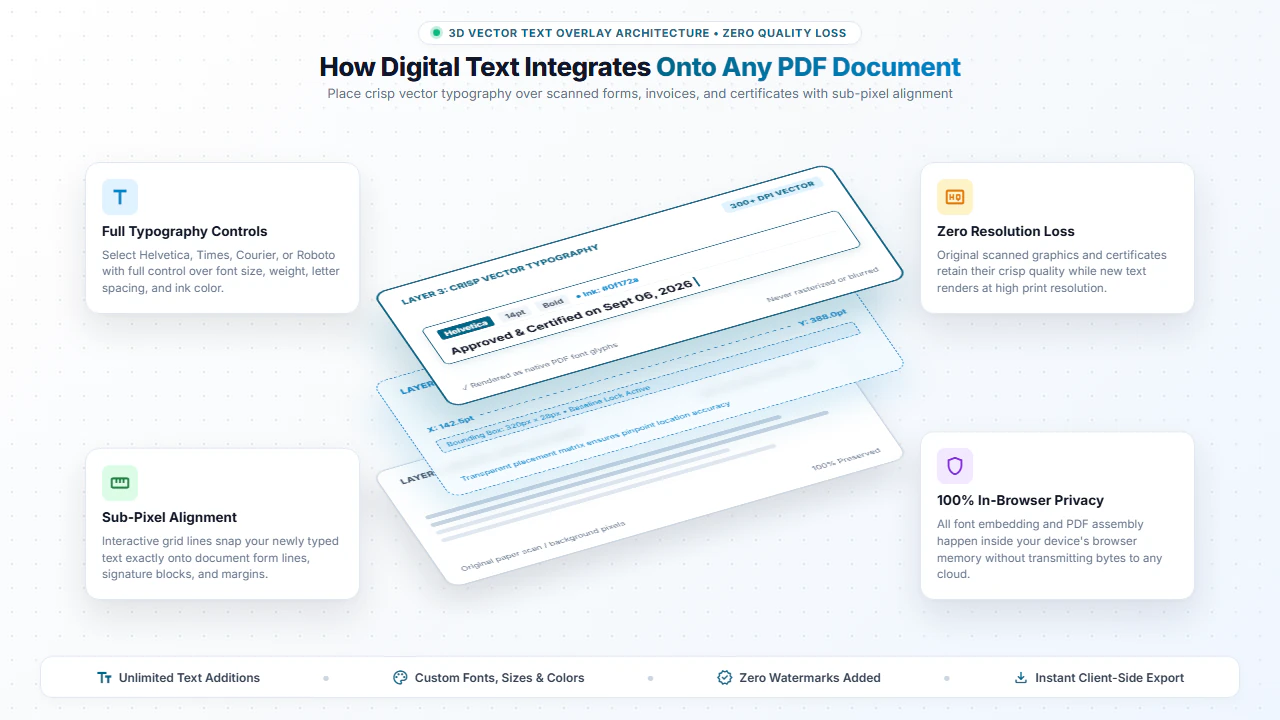
Adding text onto a PDF inserts new vector typography layers directly into the PDF content stream at exact (X, Y) page coordinates. Our editor provides a rich visual canvas where you can click anywhere to position a new text box.
Because the inserted text is baked natively into the PDF data structures upon export, it renders crisp and sharp across all standard PDF readers, web browsers, and printers without blurriness.
Complete Control Over Fonts, Styling & Alignment
Font Family & Sizing
Choose from standard document fonts including Sans-Serif, Serif, Monospace, and adjust font sizes precisely from 8pt to 72pt.
Color Picker & Background
Select any text color with hex codes and add opaque or semi-transparent background fill behind text boxes.
Drag & Snap Positioning
Easily drag text boxes to align with printed form lines, tables, boxes, and date stamps.
Multi-Line Paragraphs
Type multi-line paragraphs with automatic text wrapping, line-height control, and left/center/right alignment.
Step-by-Step: How to Add Text to a PDF in 4 Steps
- Step 1: Upload Your File: Click Add to Scanned PDF or Add to Normal PDF to open your document.
- Step 2: Position Text Box: Click the Add Text tool and click anywhere on the page to place a text box.
- Step 3: Type & Style: Type your text, select font style, adjust size from 8pt to 72pt, and pick a color.
- Step 4: Download PDF: Click Download PDF to save the updated document with crisp typography.
- Step 1: Tap to Select: Tap Add to Scanned PDF or Add to Normal PDF to choose your file from mobile storage.
- Step 2: Tap to Place Text: Tap on the page where you need to fill form data or add notes.
- Step 3: Enter Your Text: Type using your mobile keyboard and select font size.
- Step 4: Save to Device: Tap Download PDF to save the modified file directly to your phone.
Everyday Scenarios for Adding Text to PDFs
Filling Flat & Scanned Forms
Fill out non-fillable job applications, tax questionnaires, school registration forms, and medical histories.
Adding Dates & Reference Numbers
Stamp invoice numbers, approval timestamps, PO codes, and filing dates onto official sheets.
Correcting Typos & Missing Labels
Erase outdated numbers with the Erase tool and type corrected figures directly over the clean area.
Review Comments & Annotations
Add reviewer feedback, margin notes, grading scores, and editorial instructions on manuscripts.
100% Client-Side Privacy: Safe for Sensitive Records
Financial disclosures, tax filings, and legal agreements contain private details. Uploading them to cloud converters creates severe privacy and compliance risks.
EditScannedPDF.com renders and saves your PDFs 100% locally in your web browser. Your documents are never uploaded to any remote server.
Comparison: EditScannedPDF vs. Traditional Cloud Tools
Understanding how our in-browser WebAssembly architecture protects your sensitive documents compared to legacy cloud PDF converters:
Enterprise-Grade In-Browser Security Architecture
When working with sensitive contracts, financial spreadsheets, medical records, or identity credentials, uploading files to third-party web servers introduces major cybersecurity risks. EditScannedPDF solves this fundamental vulnerability by executing all PDF compilation, vector synthesis, and cryptographic operations directly inside your device's browser memory using WebAssembly.
Your documents never travel across the internet, are never indexed on remote hard drives, and leave zero data footprint behind once you close your browser tab. Experience complete operational privacy built from the ground up to satisfy modern corporate security protocols.
Frequently Asked Questions (FAQ)
How do I type new text onto an existing PDF document?
Click Edit Scanned PDF or Edit Normal PDF above, upload your PDF file, click anywhere on the page to spawn a new text box, and start typing. You can customize font size, color, and alignment freely.
Can I add text to scanned paper forms and certificates?
Yes! Our editor lets you place crisp digital text directly over scanned image pages, making it easy to fill out paper application forms and government certificates.
Can I change the font style, color, and size of the added text?
Yes. You have complete control over font family (Helvetica, Times, Courier, Roboto), font size, text color, bold, italic, and background fill.
Are my files uploaded to your cloud servers?
No. The entire editing environment runs 100% locally in your web browser memory. Your documents are never uploaded to any remote server.