
Compress PDF to 100KB Online Free — Reduce Size Below 100 KB
Reduce large scanned PDFs, marksheets, certificates, and ID documents to under 100KB or 200KB to meet strict UPSC, SSC, state PSC, bank, and visa portal upload thresholds. Our smart multi-pass WebAssembly engine shrinks file size while preserving razor-sharp text legibility.
Select or Drop PDF to Compress Under 100KB
Files process 100% in local browser memory (RAM). Zero cloud uploads.
Target Size Preset (Portal Limits)
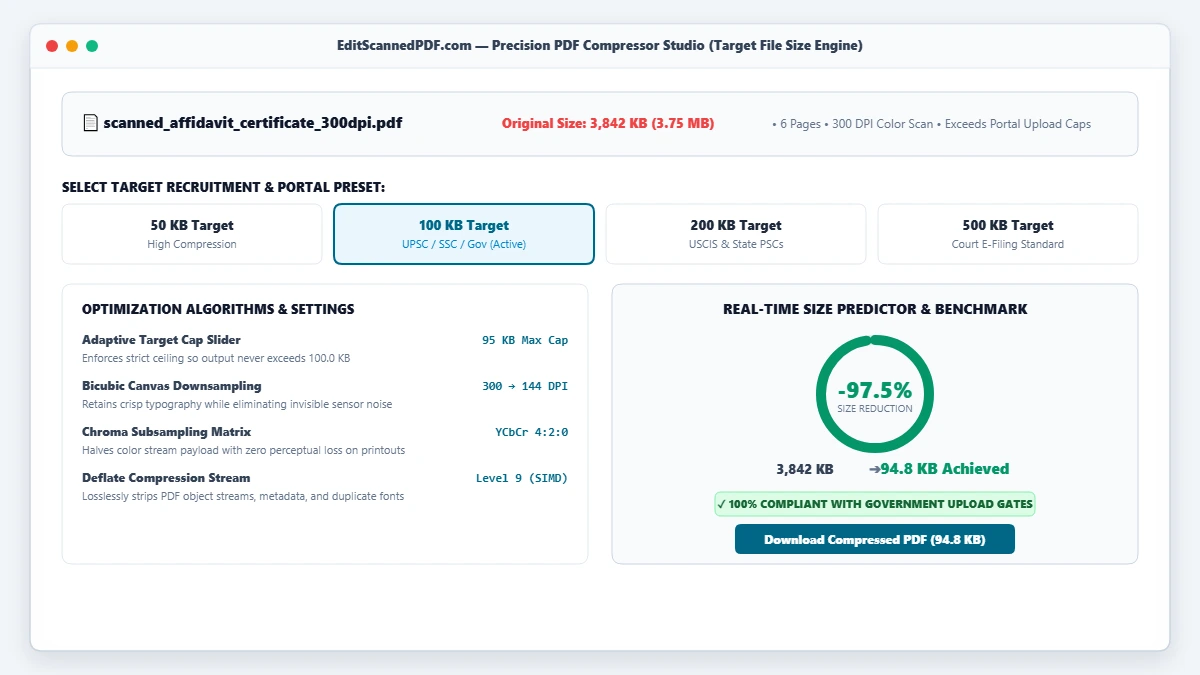
Select a target threshold for government exams (UPSC, SSC, PSC) or job portals. Our multi-pass binary search engine dynamically balances DPI downsampling and JPEG quality to ensure your file fits under the limit.
🔒 100% Private & In-Browser: Files are processed locally on your device and never uploaded to any server. Please edit only documents you own or are authorized to modify. Compliance Policy
Official Government & Entrance Exam Portal Upload Limits
Before submitting application forms, review the exact PDF file size thresholds enforced by major government commissions, examination boards, and immigration departments:
| Recruitment / Exam Portal | Document Type | Strict Upload Cap | Recommended Preset |
|---|---|---|---|
| UPSC (Civil Services / NDA / CDS) | Degree Certificate & Photo ID | 100 KB – 300 KB | < 100 KB or < 200 KB |
| SSC (CGL, CHSL, MTS, GD Constable) | Marksheet, Category Proof | 50 KB – 100 KB | < 100 KB (Grayscale) |
| State Public Service Commissions (BPSC, UPPSC, MPSC, TNPSC) | Domicile, Identity, Transcripts | 100 KB – 200 KB | < 100 KB or < 200 KB |
| IBPS & SBI (Bank PO / Clerk) | Thumb Impression, Declaration, Marksheet | 100 KB – 200 KB | < 100 KB |
| University Admissions (Common App / UCAS) | Academic Records, Essay Attachments | 200 KB – 500 KB | < 200 KB or < 500 KB |
| USCIS & NVC Visa Portals | Affidavits, Birth/Marriage Certificates | Under 2 MB – 6 MB | < 500 KB or Custom |
| UKVI (UK Visas & Immigration) | Sponsorship Evidence, Bank Records | Under 5 MB per doc | < 500 KB |
How to Compress Scanned PDF to Under 100KB in 4 Simple Stages
Follow this tutorial to reliably reduce scanned PDF documents below strict portal caps without suffering from illegible or blurry typography:
- Step 1: Open Your Scanned PDF in Browser RAM: Click Select PDF file or drag and drop your oversized file directly into the dropzone. Your document is read securely into device memory with zero server transmission.
- Step 2: Choose Your Target Limit (< 100KB, < 200KB, or Custom): Click < 100 KB for UPSC and SSC uploads, or choose Custom KB to set a specific threshold matching your upload portal guidelines.
- Step 3: Run Multi-Pass Client-Side Compression: Click Compress PDF to Target Limit. Our multi-pass binary search engine adjusts raster resolution down from 200 to 72 DPI and calibrates JPEG quantization matrices to hit the exact byte target.
- Step 4: Inspect Needle-Sharp Legibility & Download: Use the interactive preview modal with zoom controls to inspect certificate seals, signatures, and fine print before downloading your certified compliant file.
Compress PDF for Government Exam Portals (UPSC, SSC, State PSC — Under 100KB)
Competitive recruitment examination portals across India, the United States, and the UK enforce rigid server limits designed to manage millions of concurrent user attachments. If your PDF is even 1 kilobyte over the stated limit (e.g. 101 KB when the portal caps at 100 KB), the submission form crashes with an ambiguous file validation error.
EditScannedPDF solves this recurring challenge for aspirants preparing uploads for:
- UPSC Civil Services, NDA & CDS: Educational transcripts and degree certificates must fit within strict 100KB to 300KB limits. Our adaptive engine preserves university watermarks and roll number clarity.
- SSC CGL, CHSL, MTS & GD Constable: Category certificates (OBC/EWS/SC/ST) and 10th-grade matriculation sheets required under 100KB. Grayscale conversion strips background pulp discoloration for guaranteed approval.
- State Public Service Commissions (UPPSC, BPSC, MPSC, TNPSC): Domicile certificates and experience credentials strictly held to under 100KB or 200KB.
- IBPS & SBI Bank PO/Clerk: Hand-written declaration slips and marksheets constrained to 100KB caps.
Passport, Visa & Consular Document Uploads (Under 200KB & 500KB)
International visa applications and consular scheduling portals (including US CEAC/DS-160, USCIS, UK Visas and Immigration, Canada IRCC, Australian ImmiAccount, and Schengen visa platforms) require supporting PDF evidence to comply with strict per-document ceilings (often 200KB, 500KB, or 2MB).
When compressing bank statements, employment verification letters, and civil documents for consular officers, visual fidelity is critical. Standard aggressive compression can turn transaction figures into blurry artifacts that trigger administrative review delays. Our binary convergence engine guarantees crisp numeric baseline contrast while enforcing strict byte ceilings.
Signature & Photograph Scans Compression (Under 50KB & 20KB)
Job application forms and examination hall ticket portals routinely require individual signatures and candidate photographs in PDF or high-contrast raster format constrained to micro-budgets (under 50KB or under 20KB). Use our < 50 KB preset or the exact custom KB slider. By isolating ink strokes and removing ambient paper gray levels, your digital signature retains sharp, clear vector contours without muddy compression halos.
Target Size Compressor Comparison: Free In-Browser vs. Cloud Upload Tools
| Feature | EditScannedPDF (< 100KB) | Smallpdf (Strong Mode) | iLovePDF | Adobe Acrobat Pro |
|---|---|---|---|---|
| Price & Access | 100% Free Forever (No Limit) | $12/month (Strong mode paid) | Freemium ($7/mo for batch) | $19.99/mo subscription |
| Exact Target KB Control | Exact KB Slider & Presets | No (Basic presets only) | No (Extreme/Recommended) | Manual optimizer menus |
| Data Privacy & Storage | Zero Uploads (100% Client RAM) | Uploaded to cloud servers | Uploaded to cloud servers | Local app / cloud sync |
| Preserves Searchable OCR Text | Yes (Selectable toggle) | Varies (May flatten text) | Yes | Yes |
| Installation & Sign-Up | Instant Browser (No Sign-Up) | Account required for 2+ files | Daily task limits | Heavy desktop download |
Helpful PDF Compression Guides & Practical Tutorials
Read in-depth technical analysis and step-by-step instructions for portal compliance:
Frequently Asked Questions
How can I compress a scanned PDF to exactly under 100KB without losing text readability?
Our target-size compressor executes a client-side multi-pass binary search loop. It dynamically balances DPI downsampling (from 200 down to 72) and fine-tunes JPEG quantization matrices while preserving high-contrast edge strokes. If needed, automatic grayscale quantization eliminates background paper noise so typography stays sharp and legible.
Why do government portals (UPSC, SSC, State PSC) enforce strict 100KB or 200KB file caps?
Government, public recruitment, and banking servers process millions of candidate attachments during examination cycles. Inflexible file limits (often 50KB to 100KB for signatures and IDs, 100KB to 300KB for educational certificates) prevent database congestion and server timeouts.
Are my confidential tax documents, ID cards, and academic certificates uploaded to any server?
Never. All PDF parsing, downsampling, stream rebuilding, and compression calculations execute 100% inside your local device RAM via WebAssembly and JavaScript. Zero bytes are uploaded to remote cloud servers, ensuring total privacy for sensitive documents.
What is the difference between target-size compression and standard PDF compression?
Standard PDF compressors only offer generic presets (like low, medium, or high) with unpredictable output sizes that frequently get rejected by portals. Our target-size compressor works backward from your required limit (< 100 KB, < 200 KB, or exact custom KB) and iteratively adjusts compression passes until your file is guaranteed to fit.
Will compressing to 100KB remove my document's searchable text layer?
No. When 'Preserve Searchable Text' is checked, digital PDF text layers, OCR words, and font coordinates are preserved, allowing recruitment portals and Applicant Tracking Systems (ATS) to search and select text normally.
When should I enable Grayscale mode during compression?
Enable Grayscale mode when compressing multi-page documents, certificates, or receipts that need to fit under extremely tight caps like 100KB. Converting 24-bit RGB scans into 8-bit grayscale strips color noise while reducing image payload by an additional 30% to 50%.
Can I compress multi-page scanned documents to under 100KB?
Yes. For 2 to 4 page scans, our convergence engine automatically allocates a per-page byte budget, applies grayscale quantization, and optimizes DPI so that the combined multi-page document achieves the under 100KB threshold.
Can I compress my signature or photo scan PDF to under 50KB for government job applications?
Yes. Select the < 50 KB preset or use the Custom Slider set to 40KB or 50KB. Enable 'Grayscale / Black & White Mode' to eliminate background paper noise, which compresses signature scans and passport photos cleanly into micro-budgets without blurring ink strokes.
How do I ensure my degree certificate stays readable when compressed to under 100KB for UPSC/SSC?
Our tool uses high-contrast adaptive downsampling rather than aggressive blur filtering. For multi-page academic transcripts, check the 'Grayscale' option: this cuts color payload by 40% while preserving maximum resolution and crisp sharpness for university logos, roll numbers, and official signatures.