
Rotate Scanned PDF Pages Online Free
Permanently fix upside-down, inverted, or sideways scanned documents, blueprints, and receipts. Rotate 90°, 180°, or 270° clockwise and save corrected files instantly with zero server uploads.
Only edit documents that you own or are legally authorized to modify. Do not use this website to alter documents for fraud, misrepresentation, identity misuse, or any illegal purpose. You are fully responsible for how you use edited documents; Edit Scanned PDF is not responsible for unlawful or unauthorized use. Read More
To permanently fix inverted or sideways pages from automatic document feeder (ADF) scanners, use EditScannedPDF.com Scanned PDF Rotator. It rotates pages permanently and saves them with zero loss in resolution.
How Permanent PDF Rotation Works
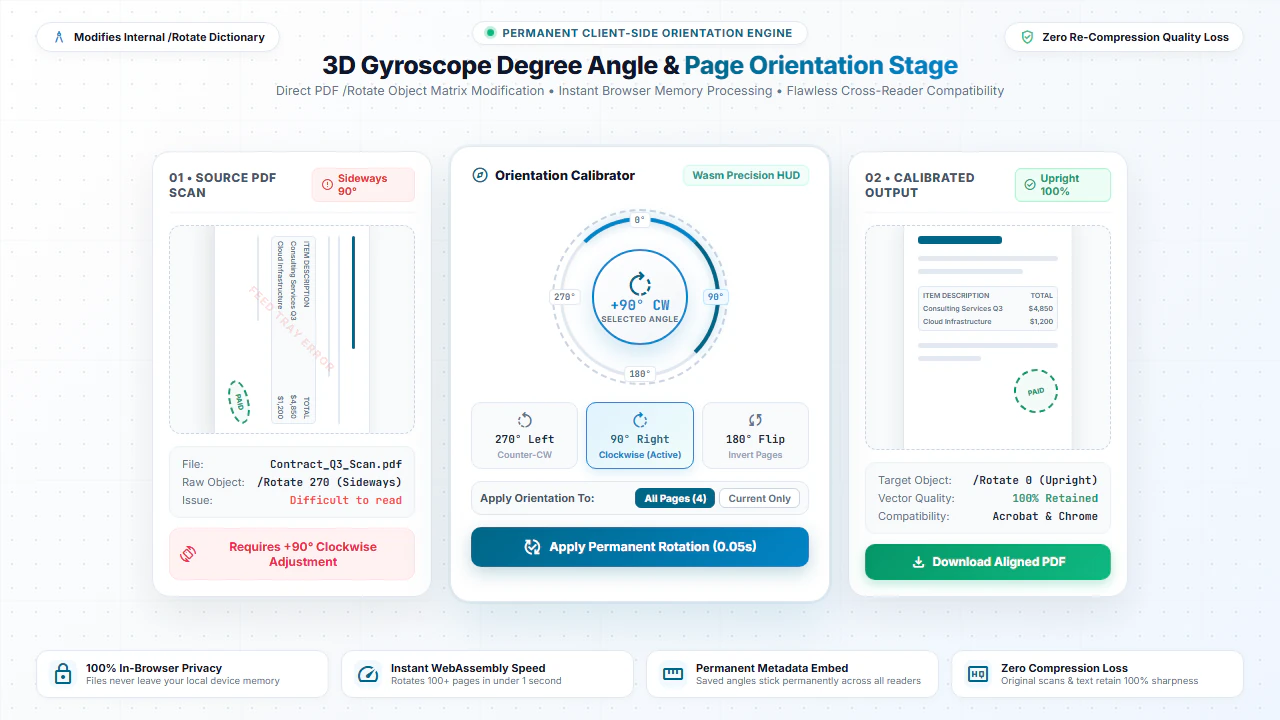
Standard PDF viewers often allow temporary view-level rotation that resets the moment the file is closed or shared. Our online rotation utility modifies the internal /Rotate page object dictionary permanently.
When you download the saved document, the updated orientation is preserved across Desktop PDF Software, Google Chrome, Apple Preview, web portals, and physical printing devices.
Choose Your Desired Rotation Angle
90° Clockwise (Right)
Perfect for documents scanned in portrait mode that were intended to be read in landscape format.
180° Inverted (Upside Down)
Instantly fix paperwork fed upside down into automatic sheet feeders or scanner trays.
270° Counter-Clockwise (Left)
Correct pages that were oriented 90 degrees counter-clockwise during mobile phone scanning.
Zero Quality Loss
Maintains crisp vector typography, rich colors, and image resolution without re-encoding.
Step-by-Step: How to Permanently Rotate PDF Pages
- Step 1: Choose Your PDF: Click Choose PDF or drag your sideways document scan into the tool area.
- Step 2: Choose Angle: Select 90° clockwise, 180° upside-down flip, or 270° from the rotation dropdown.
- Step 3: Rotate Locally: Click Rotate PDF to rewrite internal rotation tags in device memory instantly.
- Step 4: Download Upright PDF: Save your permanently oriented PDF file ready for printing or submission.
- Step 1: Tap to Select: Tap Choose PDF to select the sideways document scan from your mobile storage.
- Step 2: Pick Orientation: Tap the angle dropdown and select 90°, 180°, or 270°.
- Step 3: Execute on Phone: Tap Rotate PDF to fix page orientation directly in your phone's browser.
- Step 4: Save to Device: Tap Download to save the corrected PDF or forward via WhatsApp or email.
Common Reasons to Rotate PDF Documents
Mobile CamScanner Corrections
Quickly straighten phone photos of receipts, homework, and IDs that saved sideways.
Architectural & Engineering Blueprints
Rotate wide landscape schematics, CAD exports, and charts into standard viewing angles.
Accounting & Tax Schedules
Align horizontal spreadsheet balance sheets and IRS schedules before financial audits.
Legal Deeds & Notarized Records
Ensure historical court filings, title deeds, and scanned notarized affidavits are right-side-up.
100% Client-Side Privacy: Safe for Sensitive Documents
Rotating a simple page angle shouldn't require sending private banking statements, employment agreements, or healthcare records to cloud servers.
EditScannedPDF.com executes all rotation operations 100% locally in your web browser using pdf-lib WebAssembly. No files or byte streams are uploaded to any server.
Comparison: EditScannedPDF vs. Traditional Cloud Tools
Understanding how our in-browser WebAssembly architecture protects your sensitive documents compared to legacy cloud PDF converters:
Enterprise-Grade In-Browser Security Architecture
When working with sensitive contracts, financial spreadsheets, medical records, or identity credentials, uploading files to third-party web servers introduces major cybersecurity risks. EditScannedPDF solves this fundamental vulnerability by executing all PDF compilation, vector synthesis, and cryptographic operations directly inside your device's browser memory using WebAssembly.
Your documents never travel across the internet, are never indexed on remote hard drives, and leave zero data footprint behind once you close your browser tab. Experience complete operational privacy built from the ground up to satisfy modern corporate security protocols.
Frequently Asked Questions (FAQ)
Will the rotation remain permanent when I send the PDF to other people?
Yes. Unlike simple PDF viewers that only rotate the preview on screen, our tool rewrites the PDF coordinate rotation matrix so the file opens right-side up on all devices, phones, and printers.
Can I rotate only specific upside-down scanned pages in a multipage file?
Yes. You can rotate individual pages independently (90° clockwise, 180°, or 270°) or rotate all pages at once.
Does rotating a scanned PDF degrade image resolution or text quality?
No. The image raster and vector streams are re-oriented losslessly without re-compression, so clarity remains 100% identical to the original scan.
Is rotating private for sensitive scanned contracts and IDs?
Completely private. All processing is handled locally in your browser. No files are ever uploaded to any third-party server.