
Add Confidential Watermark to Scanned PDF Online Free
Stamp "CONFIDENTIAL", "DRAFT", "COPY", or your company logo onto scanned legal documents, blueprints, invoices, and paper scans. Customize opacity, angle, and position with zero server uploads.
Choose a scanned or normal PDF to open the interactive editor with the Watermark tool ready.
Only edit documents that you own or are legally authorized to modify. Do not use this website to alter documents for fraud, misrepresentation, identity misuse, or any illegal purpose. You are fully responsible for how you use edited documents; Edit Scanned PDF is not responsible for unlawful or unauthorized use. Read More
How PDF Watermarking Works
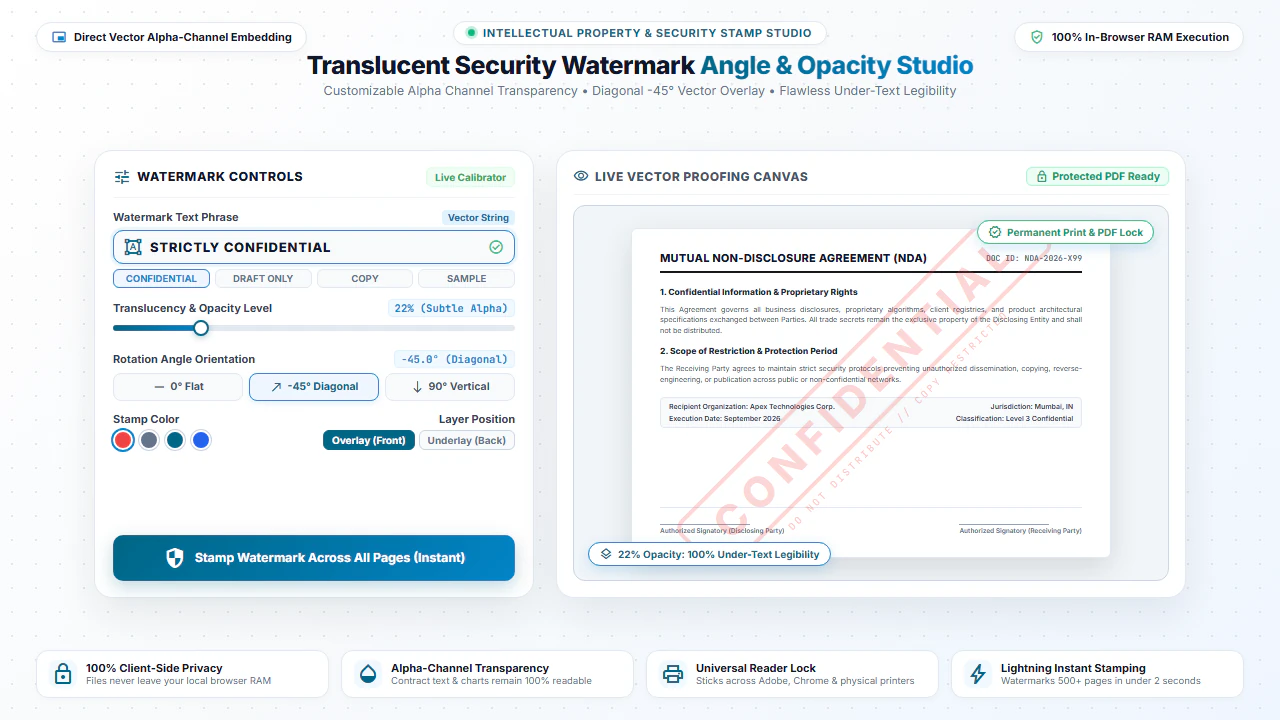
Watermarking overlays semi-transparent text strings or graphic stamps across document pages. Our tool renders the watermark layer directly into the PDF content stream with custom alpha channel transparency, angle rotation (such as 45° diagonal), and repeat patterns.
Because the watermark is embedded into the underlying page dictionary, it remains permanently visible during on-screen viewing, web browser previews, and physical printing.
Steps to Add Watermark to PDF Online Free
- Step 1: Upload Document: Select or drag your PDF file into the watermark utility.
- Step 2: Choose Text or Logo: Enter your watermark phrase or upload a transparent PNG logo.
- Step 3: Customize Style: Set diagonal rotation, font size, opacity percentage, and page distribution.
- Step 4: Download Document: Export the watermarked PDF directly with zero server delay.
- Step 1: Choose File: Tap to select your PDF from your mobile storage.
- Step 2: Enter Watermark Text: Type your security label like "CONFIDENTIAL" or "DRAFT".
- Step 3: Adjust Opacity: Use simple mobile sliders to set transparency and positioning.
- Step 4: Save PDF: Tap Download PDF to store the watermarked PDF directly to your device.
Everyday Scenarios for Watermarking PDFs
Confidential Business Proposals
Stamp "STRICTLY CONFIDENTIAL" across pitch decks and business plans before sharing with prospective investors.
Draft Contract Iterations
Mark "DRAFT - NOT FOR EXECUTION" on preliminary contracts to prevent accidental premature signing.
Sample Artwork & Photography Proofs
Protect copyright on photography portfolios, graphic designs, and architectural plans with sample watermarks.
Official Document Copies
Stamp "COPY ONLY" on passport scans, IDs, and deeds to prevent fraudulent identity duplication.
100% Client-Side Privacy: No Server Uploads
Confidential blueprints, trade secrets, and draft proposals must stay private. Using cloud-based watermark websites sends your sensitive intellectual property across third-party servers.
EditScannedPDF.com adds watermarks 100% locally in your web browser. Your documents are never uploaded to any remote server.
Comparison: EditScannedPDF vs. Traditional Cloud Tools
Understanding how our in-browser WebAssembly architecture protects your sensitive documents compared to legacy cloud PDF converters:
Enterprise-Grade In-Browser Security Architecture
When working with sensitive contracts, financial spreadsheets, medical records, or identity credentials, uploading files to third-party web servers introduces major cybersecurity risks. EditScannedPDF solves this fundamental vulnerability by executing all PDF compilation, vector synthesis, and cryptographic operations directly inside your device's browser memory using WebAssembly.
Your documents never travel across the internet, are never indexed on remote hard drives, and leave zero data footprint behind once you close your browser tab. Experience complete operational privacy built from the ground up to satisfy modern corporate security protocols.
Frequently Asked Questions (FAQ)
How do I stamp CONFIDENTIAL diagonally across all scanned pages?
Upload your scanned PDF, choose Text Watermark, type "CONFIDENTIAL", select a diagonal 45° angle and desired opacity, and apply it across every page with one click.
Can I add a custom company logo or stamp image to a scanned document?
Yes. Select Image Watermark to upload a transparent PNG logo and place it in any corner or center of your scanned pages.
Will the watermark obscure the underlying scanned text?
You can adjust the transparency (opacity) slider so your watermark is clearly visible as a security mark without making the underlying document text unreadable.
Is watermarking secure for sensitive proprietary blueprints and contracts?
100% secure. Processing happens in local browser memory. Your proprietary assets never leave your device.