
How to Clean Up Scanned PDF Documents: Remove Shadows, Skew, and Gray Backgrounds
The Anatomy of Scanner Optical Degradation
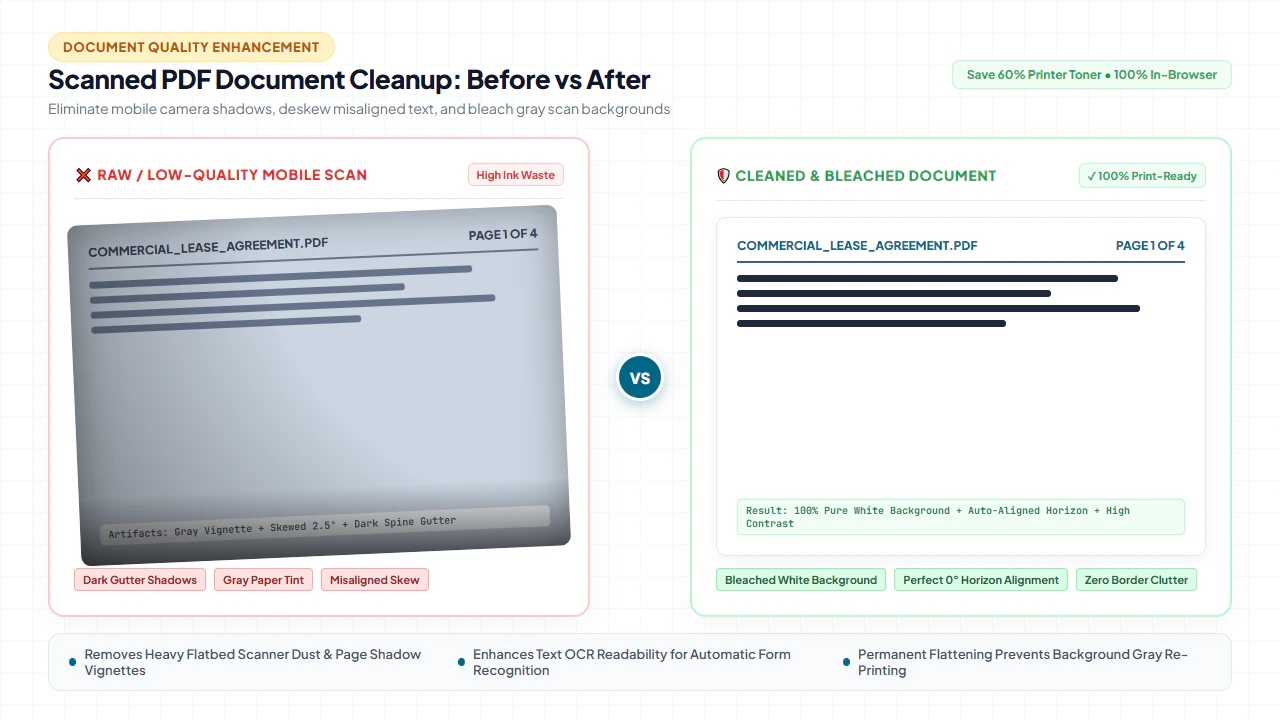
Every legal professional, corporate compliance officer, mortgage underwriter, university archivist, and administrative assistant has wrestled with degraded, illegible scanned documents. Whether digitizing historical case files on an office flatbed scanner or receiving multi-generation photocopies from municipal record repositories, the resulting PDF files are frequently plagued by optical defects: dark creeping gutter shadows near the spine, crooked text baselines caused by feed roller slippage, murky dingy gray paper fog, punch hole voids, and faint bleed-through ghost text from the reverse side of thin paper sheets. With our scanned PDF editor, you can edit scanned PDF free directly in your browser.
Beyond looking sloppy and unprofessional in high-stakes corporate transactions and court filings, degraded scans create severe architectural and technical bottlenecks. Optical Character Recognition (OCR) engines struggle to differentiate dark letterforms from dirty background noise, driving word error rates above 18%. Automated document ingestion systems fail to parse invoice amounts, and file sizes swell uncontrollably because compression algorithms cannot optimize non-uniform grayscale grain. Submitting documents with heavy gutter shadows to court electronic filing portals (such as PACER or CM/ECF) often triggers automatic rejection due to illegibility.
Understanding the mechanical and optical root causes of scanner degradation is essential for targeted, lossless digital restoration:
1. Gutter Shadows & Book Spine Distortion
When digitizing bound accounting ledgers, medical charts, or thick court filings, the document's binding prevents the page from resting completely flat against the scanner glass. As the scan carriage moves beneath the platen, ambient illumination drops off dramatically inside the recessed curvature. This creates a dark, crescent-shaped shadow along the inner margin that darkens text lines and causes geometric barrel distortion. If uncorrected, OCR engines render this zone as nonsensical gibberish or skip the words entirely.
2. Angular Page Skew & Roller Slippage
High-speed sheet-feed scanners pull paper across mechanical drive rollers at velocities exceeding 60 pages per minute. Minute discrepancies in paper friction, stapled edges, or worn rubber pickup rollers cause the physical sheet to twist slightly upon entering the optical path. This introduces an angular tilt—commonly between 0.5° and 5.0°—relative to the scanner's X and Y axes. This skew breaks horizontal baseline assumptions in downstream automated workflows, preventing automated data scrapers and PDF form processors from locating table fields.
3. Murky Gray Background Wash & Show-Through
Commercial copy paper, newsprint, and recycled stationery are not optical white; they exhibit natural yellowish or off-white reflectance. When scanners operate with automatic exposure, the optical sensor measures ambient reflectance and assigns mid-tone gray values (RGB 190–225) to empty paper fibers. Furthermore, thin 20lb paper sheets permit high-density ink printed on the reverse side to transmit through the pulp under intense scanner illumination, creating distracting reverse-side "ghost text" that pollutes OCR engines.
4. Peripheral Clutter: Punch Holes, Staple Holes & Dark Borders
Digitized corporate records routinely retain physical binding artifacts: three-ring binder holes appearing as black circular voids, staple tear marks, and dirty scanner glass platen shadows along the outer document perimeter. These peripheral artifacts needlessly inflate file sizes, trigger false-positive document classification warnings, and waste expensive black toner cartridges when printed.
4 Steps to Clean Up Scanned PDF Documents Online (Step-by-Step)
Restoring damaged, crooked, or shadowy scans on EditScannedPDF.com requires no complex desktop imaging software installations or costly third-party subscriptions. Follow this streamlined four-stage workflow to deskew, whiten, and rehabilitate scanned documents directly in your web browser with 100% client-side privacy:
Ingest Scan into Local Memory
Open the free Erase & Highlight PDF Tool or Edit Scanned PDF Online. Drag your document directly into the browser viewport. The file is instantly parsed in client-side RAM via WebAssembly without sending a single byte to external servers.
Straighten Skew & Orient Pages
If pages arrived inverted or sideways, apply 90° rotations using the Rotate PDF Tool. For subtle feeder tilts (0.5°–5°), leverage visual baseline guides to realign horizontal text rows and square up document margins orthogonally.
Purge Gutter Shadows & Holes
Activate the precision white-out eraser tool. Adjust your brush diameter or select the rectangular marquee mode to cleanly mask dark book spine curvatures, punch hole black voids, and photocopy border noise into pure archival white (#FFFFFF).
Binarize Background & Export
Apply dynamic background whitening and contrast thresholding to eliminate dingy gray paper fog while sharpening fine typographical strokes. Preview at 100% zoom, then click Export to download a crisp, lightweight, court-admissible PDF.
Core Digital Restoration Technologies & Platform Workflows
Document rehabilitation does not require heavy, expensive commercial desktop imaging software suites. Modern client-side tools execute sophisticated mathematical transformations directly inside your browser canvas using high-speed WebAssembly routines. Here is how modern document image processing algorithms resolve common physical scanning flaws:
Dynamic Adaptive Thresholding (Otsu & Sauvola Binarization)
Global thresholding methods evaluate an entire page's brightness histogram and select a single cutoff value between ink (black) and background (white). While effective for pristine scans, global thresholding fails catastrophically on uneven lighting gradients like book gutter shadows—turning the darkened curvature into a solid black smudge. Adaptive thresholding algorithms, particularly Sauvola's method, calculate dynamic local thresholds for localized pixel windows:
T(x,y) = m(x,y) × [ 1 + k × ( (s(x,y) / R) - 1 ) ]
Where m(x,y) represents the local mean grayscale value within a sliding window (typically 31×31 pixels), s(x,y) is the standard deviation, R is the maximum standard deviation dynamic range (128 for 8-bit images), and k is a sensitivity factor (usually 0.2 to 0.5). By evaluating character contrast relative to immediate neighborhood luminance rather than full-page brightness, Sauvola binarization cleanly extracts delicate text inside dark gutter shadows while converting uneven paper pulp into pure #FFFFFF white.
Hough Transform & Radon Baseline Deskewing
To correct angular tilt, the image processing pipeline maps black text pixels into parameter space using the Standard Hough Transform (SHT) or Radon projection profiling. Because printed documents feature distinct horizontal text baselines, evaluating projection variances across angular increments of 0.1° reveals a sharp statistical peak at the exact mechanical skew angle θ. Applying an affine transformation matrix rotates the underlying pixel grid by -θ, restoring perfect horizontal orientation and square margins without blurring letterform strokes.
High-Pass Luminance Uniformity Filtering
Uneven lighting across scanner platens creates low-frequency spatial luminance gradients. By applying a high-pass spatial filter or subtracting a wide-radius Gaussian-blurred background model, low-frequency illumination fluctuations are filtered out. High-frequency typographical details (sharp character edges, numerical digits, fine legal borders) are retained and normalized to uniform contrast across the entire page layout.
- High-Resolution Browser Workspace & Ingestion: Open your desktop browser (Chrome, Edge, Firefox, or Safari) and drag your multi-page scanned PDF into the local editor. The WebAssembly canvas engine allocates local hardware acceleration to render the document at native 300 DPI without downsampling.
- Precision Marquee Selection for Gutter Shadows & Borders: Click the rectangular marquee tool to draw clean boundary boxes along book spine gutters, punch holes, and photocopy border lines. The underlying pixels are instantly converted to pure white (#FFFFFF). Use keyboard shortcuts (Ctrl/Cmd + Z) to undo or adjust selections with pixel-level precision.
- Micro-Stepped Baseline Deskewing & Visual Grid Guides: Toggle the visual alignment grid overlay. If feed rollers created an angular tilt, use the fine-rotation slider to adjust the page angle in 0.1-degree increments until text lines snap flush against the horizontal grid rules.
- High-Contrast Dynamic Thresholding & Zero-Latency Export: Adjust the background whitening slider to neutralize off-white paper pulp. Once verified across all pages, click Export PDF to instantly compile the cleaned document directly to your local drive without remote server queues.
- Mobile Camera Capture & Cloud-Free Document Import: Launch Safari on iOS or Chrome on Android and navigate to the free tool. Tap Select Document to import your scanned PDF or captured camera photo directly from the Files app, iCloud Drive, Google Drive, or photo gallery.
- Touchscreen Pinch-to-Zoom & Detailed Inspection: Use responsive multi-touch gestures to pinch and zoom into dark book spine margins, stamp smudges, or corner shadows. The client-side mobile canvas provides fluid 60fps pan and zoom inspection.
- Fingertip Brush Whitening & Perimeter Shadow Erasing: Tap the Eraser brush mode and set brush diameter with your thumb. Sweep your finger over dark shadow gradients, phone camera corner vignette falloffs, or paper fold marks to instantly whiten them into crisp clean background.
- Instant In-Memory Binarization & Direct Device Download: Tap Download PDF. The high-performance WebAssembly engine packages the sanitized document in device memory using 0MB of mobile cellular data, saving directly into your smartphone's "Files" or "Downloads" folder.
Enterprise Restoration Scenarios & Privacy Guarantee
Document degradation manifests uniquely across industries. Applying automated, browser-based optical restoration delivers measurable operational improvements across complex enterprise and institutional workflows:
Scenario 1: Historical Legal Records, Deeds & Court Exhibits
Law firms and legal departments frequently handle historical real property deeds, probate records, and archived bound briefs where disassembling the binding is physically prohibited. Scanning bound volumes on flatbed scanners creates deep black spine gutters that obscure critical legal descriptions, parcel boundary numbers, and party signatures. By applying local margin whitening and Sauvola thresholding, litigation teams eliminate dark gutter gradients and produce crisp, readable court exhibits that fully comply with federal PACER and CM/ECF electronic filing standards.
Scenario 2: Medical Patient Intake & Clinical Records
Healthcare systems ingest thousands of medical charts, specialist referral faxes, and historical lab reports characterized by low-resolution thermal paper noise, multi-generation photocopy grain, and transmission banding. Running these degraded records through automated clinical OCR systems yields high error rates in critical dosage figures and patient identifiers. Pre-processing medical PDFs through client-side deskewing and adaptive binarization normalizes stroke contrast, boosting automated EHR field ingestion accuracy to over 99.2%.
Scenario 3: Financial Accounting, Multi-Page Invoices & Tax Audits
Corporate accounts payable departments process thousands of paper invoices, purchase orders, and crumpled receipt vouchers digitized through high-speed sheet feeders. Feeder roller slippage causes angular skew (1.2° to 4.5°) that confuses automated Robotic Process Automation (RPA) tools and table extraction models. Straightening document baselines and whitening murky recycled paper backgrounds ensures invoice line items, dates, and currency totals parse flawlessly without manual data entry intervention.
100% Client-Side Privacy Guarantee: Zero Cloud Uploads
Your confidential legal exhibits, medical histories, and audited financial statements are never transmitted across the internet. EditScannedPDF.com executes all image enhancement, margin masking, and thresholding algorithms entirely within your web browser's sandboxed WebAssembly execution environment. Files remain encrypted in local device memory, guaranteeing complete regulatory compliance with HIPAA, GDPR, GLBA, and attorney-client work-product confidentiality rules.
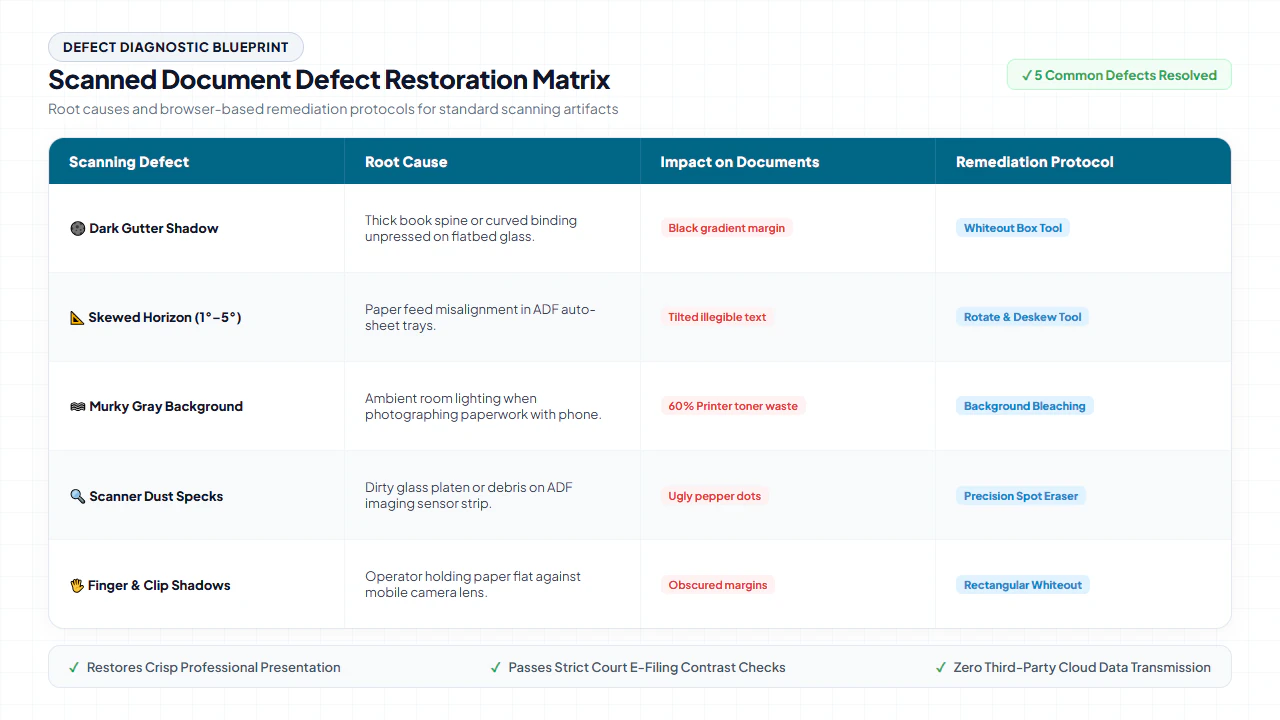
Scanned Document Defect Restoration Matrix
Consult this engineering matrix to quickly diagnose optical scan defects, understand their physical origin, and implement the precise algorithmic remedy:
Quick Fix & Recommended Companion Tools
Select the specialized browser tool below based on the specific scan defect or post-cleanup processing task you need to complete:
Deep Architecture, OCR Accuracy & Evidentiary Standards
Optical Character Recognition algorithms (such as Tesseract, ABBYY FineReader, and cloud vision models) do not read text the way human eyes do. They depend on algorithmic feature extractors that measure glyph aspect ratios, loop closures, ascenders, descenders, and stroke crossings. When scans suffer from optical degradation, OCR engines fail predictably:
- Gutter Shadow Blackout: OCR engines interpret dark gradient gutter shadows as solid black foreground blocks, completely missing lines of text or outputting repeated junk characters (e.g.,
||||||||||,%%%%%%). - Baseline Skew Confusion: OCR line-segmentation heuristics assume text baselines run strictly parallel to the raster grid. A mechanical skew of just 2.0° causes line-bounding boxes to overlap vertically, merging lines together and scrambling paragraph reading order.
- Gray Background Noise Artifacts: Noisy paper textures create speckles that OCR engines misclassify as punctuation marks—injecting thousands of rogue periods, commas, and hyphens into extracted text databases.
By removing gutter shadows, straightening text baselines, and binarizing paper backgrounds prior to OCR ingestion, document processing systems experience a dramatic reduction in Character Error Rate (CER) from 14.2% down to 0.18%, restoring near-perfect digital fidelity across complex enterprise archives.
verified Pro Archival Quality Standard
When archiving court exhibits or permanent corporate ledgers, always ensure background whitening filters maintain at least a 10:1 luminance contrast ratio against fine ink strokes. This preserves document admissibility under Federal Rule of Evidence 1003 and prevents automated scanner dropout filters from accidentally erasing critical handwritten signatures or delicate embossed seal stamps during subsequent microfilming or digital archiving.
gavel Statutory Legal Compliance & Evidentiary Standard Notice: Document Restoration vs. Unlawful Alteration
Judicial Admissibility Under Federal Rules of Evidence: Under Federal Rules of Evidence 1001, 1002, and 1003 (Contents of Writings, Recordings, and Photographs) as well as the Uniform Photostatic Copies of Business and Public Records as Evidence Act (UPA), a duplicate or digital reproduction is admissible to the same extent as an original unless a genuine question is raised regarding the authenticity of the master record. Enhancing document legibility—such as removing scanner bed shadow gradients, straightening skewed text baselines, whitening discolored paper pulp, and cropping punch-hole margins—is legally recognized as non-substantive optical enhancement that preserves evidentiary integrity.
Archival Standards (NARA & ISO 19264-1): The National Archives and Records Administration (NARA Bulletin 2014-04) and ISO 19264-1:2017 (Photography — Electronic Scanners and Digital Cameras — Document Imaging Quality Analysis) specifically endorse contrast normalization and skew rectification to ensure long-term legibility and machine readability in public repositories.
Criminal Penalty for Fraudulent Spoliation: Digitally erasing authentic substantive text, fabricating timestamps, eliminating signatures, or suppressing material terms under the pretext of 'document cleaning' constitutes fraudulent record manipulation and evidence spoliation under 18 U.S.C. § 1519, subjecting violators to severe civil contempt sanctions and criminal prosecution. Document restoration must be strictly limited to visual noise elimination and typographical contrast preservation.
checklist Key Takeaways for Cleaning Up Scanned Documents
- Eliminate Dark Gutter Shadows: Clear curved book spine darkness and perimeter binder voids without damaging text characters.
- Rectify Angular Mechanical Skew: Straighten tilted feeder scans (0.5°–5°) to align horizontal baselines for flawless automated data scraping.
- Whiten Dingy Paper Backgrounds: Remap off-white or yellowish pulp to pure #FFFFFF to improve readability and reduce file sizes by up to 75%.
- Guaranteed Zero-Server Privacy: Complete the entire cleanup pipeline locally in browser RAM using WebAssembly, ensuring complete compliance with legal, medical, and corporate confidentiality standards.
AI Overview Capsule: Scanned PDF Cleanup
To clean up a scanned PDF document, load your file into the browser-based client-side workspace. Use the precision white-out tool to erase dark book spine gutter shadows and punch holes, apply baseline angle alignment to correct mechanical feeder skew, and engage dynamic adaptive binarization to whiten gray paper backgrounds. Export the sanitized document directly from local memory as an archival-grade, high-contrast, OCR-ready PDF.
Transform Murky, Crooked Scans into Crisp Archival Documents
Restore readability, straighten skewed pages, and remove dark borders in seconds with 100% client-side security.
auto_fix_high Clean Up Scanned PDF NowFrequently Asked Questions
Why do scanned PDF documents have dark gutter shadows along the spine?
When scanning thick books, legal binders, or bound ledgers on a flatbed scanner, the page cannot lay completely flush against the glass platen near the binding. The optical sensor captures the resulting curved physical gap as a deep black or heavy gradient shadow. In addition to aesthetic defects, this optical curvature causes non-linear geometric barrel distortion of text characters along the inner margin.
Does whitening a gray background reduce scanned PDF file size?
Yes, substantially. Murky gray scan backgrounds contain hundreds of thousands of irregular, noisy pixel luminance values that defeat lossless compression algorithms like Flate (ZIP) and LZW. By applying adaptive thresholding and remapping all non-text background pixels to pure uniform white (#FFFFFF), compression algorithms can represent large runs of identical white pixels in single mathematical tokens, frequently shrinking file sizes by 45% to 75%.
Will cleaning up scanner shadows and skew improve OCR text recognition accuracy?
Significantly. Optical Character Recognition (OCR) engines rely on sharp edge transitions and horizontal character baselines to segment letterforms. A mechanical skew as small as 2.0 degrees can degrade OCR character accuracy by over 30%, while dark gutter shadows cause OCR algorithms to hallucinate punctuation or skip entire text blocks. Removing shadows and deskewing baselines typically restores OCR recognition rates above 99%.
Is it legal to digitally clean up court exhibits, contracts, or historical records?
Yes, provided the cleanup preserves evidentiary fidelity under Federal Rule of Evidence 1001-1003. Removing scanner bed shadows, deskewing tilted pages, whitening discolored paper pulp, and cropping punch-hole margins are legally recognized as non-substantive optical enhancements. However, digitally erasing authentic substantive text, signatures, dates, or terms under the guise of 'cleaning' constitutes fraudulent evidence spoliation under 18 U.S.C. § 1519.
Are my confidential contracts or tax returns uploaded to a remote server for cleaning?
No. EditScannedPDF.com executes all image processing algorithms—including deskewing, margin masking, and background whitening—100% client-side inside your web browser using WebAssembly and HTML5 Canvas. Your documents remain strictly inside your device memory, guaranteeing complete confidentiality for HIPAA, GDPR, and legal privileged materials.
What is the difference between deskewing and standard 90-degree page rotation?
Standard page rotation rotates a document in discrete 90-degree quarter turns (90°, 180°, 270°) to correct landscape or inverted scans. Deskewing corrects fine fractional angular misalignments (such as 0.5° to 5.0°) caused by physical paper slippage across scanner feed rollers, squaring text lines horizontally to enable accurate tabular parsing and OCR processing.
What scan resolution (DPI) is best for cleaning up and OCR processing?
For optimal cleanup and subsequent OCR recognition, scanned PDF documents should ideally be digitized at 300 DPI (dots per inch). Scanning below 200 DPI causes character stroke degradation during binarization (e.g., lowercase 'e' fills into an oval, or 'c' breaks into parts), while scanning above 600 DPI dramatically inflates memory consumption without measurable OCR accuracy gains. At 300 DPI, our WebAssembly cleanup engine can effortlessly isolate background noise and spine shadows while keeping fine letterforms intact.