
Why Duplicating PDF Pages Is Essential & Reader Limitations
In modern enterprise administration, legal casework, and logistics operations, multi-page PDF documents rarely maintain a strictly static, linear structure. Administrative coordinators, contract managers, and field technicians frequently need to repeat an identical page layout: generating multiple copies of a templated invoice line-item sheet, duplicating signature addenda riders across complex contracts, creating multiple carbon-copy bills of lading for freight carriers, or repeating patient intake questionnaires across multi-member family medical files. With our edit scanned PDF free, everything runs locally in your browser with zero file uploads.
However, when users attempt to duplicate a page inside standard desktop viewers (such as Google Chrome, Microsoft Edge, or Apple Preview), they encounter an immediate roadblock: standard PDF readers do not support page duplication. Built-in browser viewers and basic operating system utilities are strictly passive visualizers. They can display document streams, render print jobs, or add rudimentary highlight notes, but they possess zero capability to manipulate the underlying PDF document object model.
Faced with this limitation, professionals are routinely forced into absurd, inefficient workarounds:
- The Inefficient Print-to-PDF Cycle: Printing a single page to a secondary PDF file, opening a separate PDF merger website, and attempting to stitch the loose files back together in sequence. This disjointed process destroys internal hyperlinks, breaks document bookmarks, and often introduces visible raster resampling blurs.
- Predatory Commercial Software Subscriptions: Traditional commercial desktop suites demand recurring subscription fees exceeding $240 per user per year simply to unlock basic thumbnail-level page cloning. For small businesses, non-profits, and independent freelancers, paying exorbitant annual licensing fees for occasional page duplication is financially unjustified.
- Severe Cloud Privacy & Data Leakage Risks: Generic online file converters require uploading your entire multi-page document to remote third-party cloud servers. Transmitting confidential commercial sales agreements, proprietary design blueprints, or HIPAA-protected medical intake packets over external multi-tenant networks exposes your organization to data breaches and regulatory non-compliance.
True operational efficiency requires an in-browser utility capable of direct ISO 32000-1 Page Tree object manipulation executing with 100% client-side privacy. By harnessing compiled WebAssembly (Wasm) and native HTML5 canvas rendering, EditScannedPDF.com provides an instant, zero-upload page cloning suite. You can now duplicate single or multiple pages, rearrange thumbnail sequences, and export print-ready PDFs directly in your web browser memory—with zero software installation and zero cloud server exposure.
Step-by-Step Guide to Duplicating PDF Pages Online
Duplicating pages within any PDF document requires no software downloads, no administrative workstation credentials, and no credit card registrations. Follow these four streamlined steps to duplicate and rearrange pages inside your browser:
Open PDF in Duplicate Page Tool
Navigate to EditScannedPDF.com and open the Duplicate Page tool. Drag and drop your scanned document, contract, or form directly into the browser workspace.
Select Target Page on Grid
Browse the interactive visual thumbnail grid. Click the copy icon on any page you wish to clone. You can select single pages or multiple non-contiguous sheets.
Configure Copies & Position
Specify how many identical duplicate copies to generate (1, 2, or custom count). Cloned pages appear immediately adjacent to the original or can be dragged to new positions.
Export Lossless Multi-Page PDF
Click Export to generate your updated PDF. The WebAssembly engine compiles an ISO 32000-1 compliant file in local RAM, downloading instantly to your device.
Technical Architecture: Page Tree Cloning & Platform Workflows
Understanding how PDF documents structure multi-page documents reveals why our client-side WebAssembly cloning engine operates with sub-second speed while preventing massive file bloat. Under ISO 32000-1 specifications, a PDF is organized as a hierarchical object graph:
- Page Tree Catalog Manipulation: The PDF root catalog (
/Root) references a central/Pagesnode dictionary. This node maintains an array called/Kidscontaining indirect object references (e.g.,[4 0 R, 7 0 R, 12 0 R]) and an integer count (/Count 3). When duplicating Page 2, our WebAssembly engine does not blindly duplicate the entire file; it inserts a new reference into the/Kidsarray ([4 0 R, 7 0 R, 15 0 R, 12 0 R]) and increments the/Countvalue to4. - Shallow Resource Referencing (Zero File Bloat): Raw scanned pages contain heavy 300 DPI image dictionaries and embedded font subsets (often 5MB to 15MB per page). Clumsy tools duplicate the underlying binary image data, causing a 5-page document to balloon into 50MB. EditScannedPDF executes shallow object cloning: the newly created page node points back to the existing
/Resources,/XObject, and/Fontdictionaries. Duplicating 10 high-resolution pages adds only a few kilobytes of structural metadata to the final PDF. - Cross-Reference Table (/XRef) Re-Indexing: When the page hierarchy is altered, every byte offset in the document shifts. The engine recalculates the byte offsets of all indirect objects and generates a freshly formatted cross-reference table and trailer dictionary, ensuring 100% compliance with strict corporate PDF preflight validators and legal e-filing systems.
- Drag-and-Drop Thumbnail Organization: In Chrome, Edge, Safari, or Firefox on Windows, Mac, or Linux, drag your file into the workspace. The visual grid renders high-resolution thumbnail previews of every page in local RAM in milliseconds.
- One-Click Duplicate & Reorder: Hover over any page card and click the duplicate icon to generate an immediate clone. Drag page cards horizontally across the grid to position cloned template sheets exactly where needed within the multi-page binder.
- Multi-Page Batch Selection: Hold
Ctrl(Windows) orCmd(Mac) to select multiple distinct template pages throughout a large document, then click "Duplicate Selected" to duplicate entire multi-sheet sections in a single operation. - Instant Lossless Download: Click Export to generate the updated PDF immediately. Because processing is 100% local, even a 500-page document exports in under two seconds.
- Touch Screen Grid Interaction: Open EditScannedPDF on iOS Safari or Android Chrome. Tap the upload button to choose a PDF from iCloud Drive, Google Drive, or your device's Files app.
- Fingertip Tap-to-Clone: Tap the duplicate icon on any page thumbnail. Cloned pages appear instantly with clearly marked sequence badges (e.g., "Page 2 (Copy)").
- Touch Drag-and-Drop Reordering: Long-press any thumbnail card and drag it smoothly along the grid to reorder your document layout on touchscreen devices.
- Zero Mobile Data Consumption: Because the WebAssembly engine runs 100% inside your mobile browser RAM, your sensitive multi-megabyte files consume zero cellular data and never touch cloud servers.

Enterprise Administrative Use Cases & Zero-Upload Privacy Guarantee
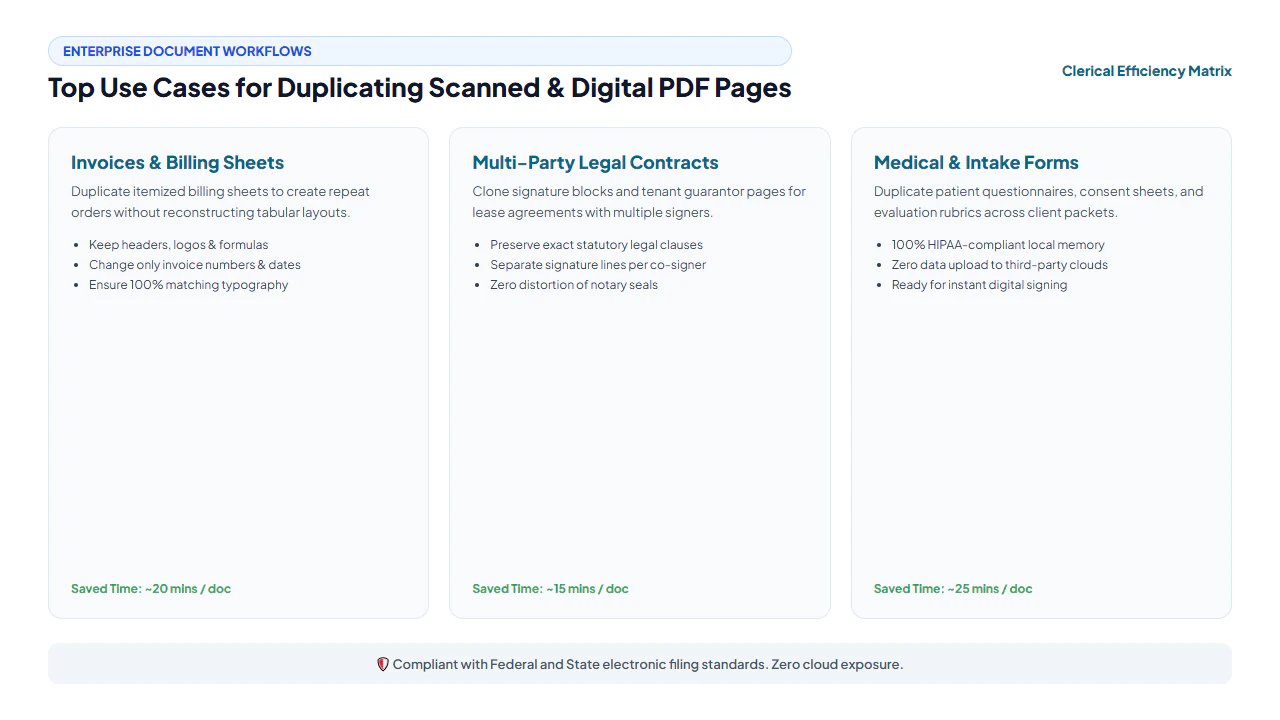
Commercial enterprises, legal teams, and public service institutions rely on document page duplication across mission-critical administrative workflows. Our private client-side architecture resolves crucial operational bottlenecks:
Commercial Contracts & Master Agreements
Corporate legal departments frequently execute Master Services Agreements (MSAs) requiring multiple identical Statements of Work (SOWs), exhibit riders, or party signature blocks. Legal coordinators can duplicate exhibit templates directly inside the active contract draft without altering established pagination or formatting.
Supply Chain Logistics & Freight Manifests
Warehouse dispatchers and freight coordinators manage multi-part Bills of Lading (BOL), hazardous material transport disclosures, and pallet packing lists. Duplicating standardized delivery receipt templates allows dispatchers to generate multi-copy driver manifests in seconds without retyping order headers.
Healthcare Intake & Clinical Onboarding
Hospital registration desks and clinical practices onboarding family groups require repeating patient medical history questionnaires, insurance disclosure acknowledgments, and consent sheets. Staff can clone intake templates across a single patient master binder with strict HIPAA privacy compliance.
PDF Page Duplication Methods: Technical Comparison
Selecting the optimal method for repeating and cloning pages within PDF documents requires evaluating data security, file size impact, software overhead, and cost:
| Comparison Dimension | EditScannedPDF In-Browser | Cloud Upload Converters | Commercial Desktop Suites | Manual Print & Re-Scan |
|---|---|---|---|---|
| Data Privacy & Document Custody | 100% On-Device RAM: Zero cloud upload; documents never leave your hardware. | High Privacy Risk: Files uploaded to remote multi-tenant servers, risking data leakage. | Local Workstation: Files stay local, but background telemetry tracks usage. | Physical Custody: Safe from network hackers, but leaves physical paper paper trails. |
| File Size Efficiency (Resource Sharing) | Shallow Object Referencing: Cloned pages share fonts and images; zero file bloat. | Blind Duplication: Often duplicates raw binary streams, doubling file size. | Optimized Object Trees: Efficient, but requires configuring PDF optimizer settings. | Severe Degradation: Re-scanned raster files balloon in size while losing vector text. |
| Software Installation & Footprint | Zero Installation: Runs instantly inside any standard desktop or mobile web browser. | Zero Installation: Browser-based, but requires uploading heavy files over internet. | Heavy Footprint: Consumes 2GB+ disk space, background daemons, and licensing services. | Hardware Dependent: Requires working laser printer, physical toner, and flatbed scanner. |
| Cost & Subscription Model | 100% Free Forever: No subscriptions, paywalls, watermarks, or page limits. | Freemium Paywalls: Limits document volume, file size, or daily duplication counts. | Expensive Subscriptions: Demands $240+ per user per year in perpetual licensing fees. | Consumable Costs: Continuous spending on paper cardstock, replacement toner, and electricity. |
| Visual Drag-and-Drop Grid | Interactive Thumbnail Grid: Instant visual reordering and one-click copy buttons. | Clunky Interfaces: Often limited to static text list boxes without visual previews. | Full Thumbnail Panel: Advanced visual sidebar, but requires navigating complex menus. | Manual Collation: Manually sorting physical paper sheets by hand across an office desk. |
| Processing Latency & Speed | Sub-Second Execution: Instant WebAssembly execution in local browser RAM. | Slow (3 to 10 Minutes): Throttled by upload queues, processing lag, and download speeds. | Moderate: Launching software, opening heavy files, and configuring export profiles. | Labor Intensive (15+ Mins): Print, wait for ink to dry, re-feed into scanner, and re-crop. |
Recommended Companion Tools for Document Assembly
Complete your PDF page organization, editing, and document compilation workflows using our comprehensive suite of private, client-side browser utilities:
| Document Assembly Objective | Recommended In-Browser Tool | Primary Technical Capability | Workflow & Administrative Use Case |
|---|---|---|---|
| Duplicate Single or Multiple Pages | Duplicate Page Tool | Clones page tree dictionaries with shallow resource referencing and zero file bloat. | Repeating invoice template pages, contract exhibits, and shipping manifests. |
| Insert Blank or Delete Obsolete Pages | Insert & Delete Page | Inserts blank template pages or deletes redundant sheets from multi-page PDFs. | Removing blank separator pages from scanner batches or adding cover sheets. |
| Correct Sideways & Inverted Pages | Rotate PDF Tool | Instantly rotates upside-down or sideways pages by 90, 180, or 270 degrees in memory. | Aligning wide-format landscape tables and blueprints before duplicating. |
| Combine Loose Documents into One File | Merge PDF Online | Stitches multiple distinct PDF files and scanned batches into one unified binder. | Assembling contract exhibits, cover letters, and duplicated addenda into one packet. |
| Extract Specific Pages into New File | Extract PDF Tool | Pulls individual pages or custom ranges into standalone, lightweight PDF documents. | Extracting duplicated signature pages to send to individual signatories. |
| Compress Assembled Multi-Page PDFs | Compress PDF Free | Applies smart Flate compression to shrink 40MB document binders down below 2MB. | Meeting email attachment size limits and government e-filing portal caps. |
Deep Architecture, Pro Engineering Tips & Statutory Compliance
When manipulating multi-page PDF documents for commercial, legal, or government filing, technical rigor and statutory compliance must be maintained. Under ISO 32000-1 specifications, a PDF is an object hierarchy separating raster backgrounds, vector paths, and font dictionaries. EditScannedPDF preserves the native 300 DPI background photograph while overlaying an exact typographic layer mapped with sub-pixel coordinates. When you export, the engine performs permanent raster flattening, baking whiteout rectangles and replacement glyphs into the base image stream so that third-party viewers cannot peel back edits or reveal previous data.
When duplicating pages that contain interactive fillable form fields (AcroForms), standard viewers suffer from a critical bug: form field namespace collision. Because the original and cloned page share identical field names (e.g., FieldName "TotalAmount"), typing an amount on the cloned page automatically updates and mirrors the keystrokes on the original page! To avoid this dilemma, follow this engineering best practice:
- Flatten Before Duplicating Interactive Forms: If your template page contains fillable fields that you intend to fill with different values on each copy, use our Flatten PDF Forms workflow first. This bakes the layout into static vector lines, allowing you to duplicate the page without interactive field mirroring bugs.
- Rename Cloned Widget Annotations: If you require fillable fields on all copies, open the duplicated PDF in an editor and append unique numerical suffixes to cloned fields (e.g., renaming
Item_DescriptiontoItem_Description_Copy2).
EditScannedPDF is engineered strictly for lawful administrative document management, template page repetition, organizing legal discovery binders, and formatting your own commercial contracts. Never duplicate, replicate, or insert fraudulent pages into official government records, academic diplomas, sovereign credentials, certified vital statistics certificates, or financial banking statements. Duplicating official sovereign credentials or altering binding legal contracts without authorized mutual consent constitutes criminal forgery and fraud under 18 U.S.C. § 1001 and 18 U.S.C. § 1028, punishable by substantial fines and federal imprisonment. Only duplicate and modify documents that you legally own or are authorized in writing to administer.
- check_circle Zero Cloud Server Exposure: All page tree cloning and PDF compilation execute 100% locally in your web browser memory, ensuring strict privacy.
- check_circle Zero File Size Bloat: Shallow object referencing shares existing font and image dictionaries, adding only tiny structural bytes.
- check_circle Lossless 300 DPI Preservation: Original vector text, scan clarity, and color fidelity remain 100% uncompressed and sharp.
- check_circle Universal Cross-Platform Access: Works smoothly on Windows, Mac, iPhone, iPad, and Android with zero software installation or fees.
To duplicate a page in a PDF document online without installing expensive commercial desktop software or uploading sensitive files to cloud servers, open EditScannedPDF.com in your web browser. Drag your PDF into the Duplicate Page tool where client-side WebAssembly renders high-resolution page thumbnails in local RAM. Click the duplicate icon on any target page to clone it instantly, rearrange pages along the visual grid as needed, and export an ISO 32000-1 compliant multi-page PDF directly to your device with 100% privacy and zero file bloat.
Ready to Duplicate Pages in Your PDF Document?
Perform instant in-browser page cloning, repeat template forms, and export updated multi-page PDFs with 100% local privacy.
content_copy Duplicate PDF Pages Free OnlineFrequently Asked Questions About Duplicating PDF Pages
Can I duplicate a page in a scanned PDF without losing image quality?
Yes, absolutely. Our in-browser tool clones the exact binary vector streams and 300 DPI raster dictionaries of the selected page without re-compressing or resampling images. Your cloned pages retain 100% of their original scan sharpness, color fidelity, and optical readability.
How can I edit the text on a duplicated page?
Once you duplicate your template page, you can open the newly generated multi-page file in our free Edit Scanned PDF Online tool. From there, use the color-matched whiteout tool to erase outdated invoice dates, PO numbers, or recipient names, then type fresh information directly onto the cloned sheet.
Do I need an expensive commercial software subscription to duplicate PDF pages?
No. Commercial desktop suites demand hundreds of dollars per year for basic page thumbnail manipulation. With EditScannedPDF.com, duplicating any number of pages across single or multi-page documents is 100% free with no subscriptions, account registrations, or software installation required.
Is my document uploaded to a remote server when duplicating pages?
No. All page cloning, array restructuring, and PDF assembly execute entirely inside your local device's web browser memory using compiled WebAssembly. Your confidential contracts, receipts, financial records, and medical forms never leave your computer or phone.
Can I duplicate multiple pages at once in a large PDF?
Yes. Our visual thumbnail interface allows you to select multiple non-contiguous pages across large multi-hundred-page documents and clone each one with a single click. The tool operates directly in system RAM, processing multi-page files smoothly without browser lag.
Does duplicating a page double the overall PDF file size?
No! Our engine performs intelligent shallow resource referencing. When duplicating a page, it creates a new page tree leaf referencing the existing image and font dictionaries rather than duplicating raw binary bytes. As a result, adding 5 copies of a heavy 10MB scanned page increases the total file size by only a few kilobytes.
What happens to bookmarks, page numbers, and hyperlinks when a page is duplicated?
Our engine updates the ISO 32000-1 Page Tree catalog and adjusts indirect object pointers. Internal links and bookmarks pointing to subsequent pages have their target destinations automatically re-indexed so your document navigation remains fully functional.