
Free PDF Editor Online
The practical, privacy-first free PDF editor for all your document tasks. Edit PDF online free, modify digital PDFs, update scanned PDF text with browser OCR, add electronic signatures, erase sensitive information, insert watermarks, and export high-resolution documents with zero server uploads and zero paywalls.
Select any PDF file to launch the appropriate editor mode immediately.
Only edit documents that you own or are legally authorized to modify. Do not use this website to alter documents for fraud, misrepresentation, identity misuse, or any illegal purpose. You are fully responsible for how you use edited documents; Edit Scanned PDF is not responsible for unlawful or unauthorized use. Read More
Helpful Guides & Tutorials
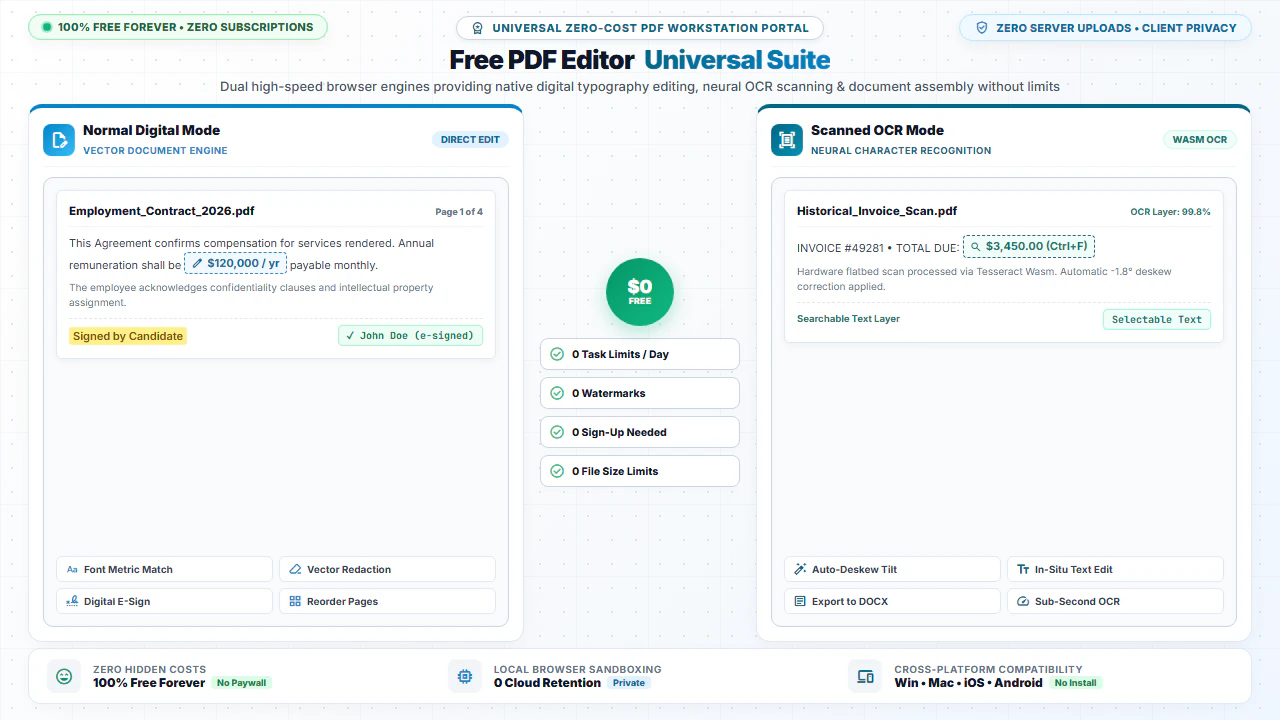
You can edit both scanned paper documents and digital vector PDFs online for free using EditScannedPDF.com Free PDF Editor. Erase unwanted lines, type replacement text, add electronic signatures, and organize pages without downloading heavy desktop software or paying for subscriptions—processed 100% in client-side memory.
The All-In-One Free PDF Editor Built for Your Web Browser
Most desktop PDF editing suites (like Paid Desktop Software) charge expensive monthly licensing fees that small businesses, students, and freelancers simply cannot justify for occasional document edits. On the other hand, conventional online PDF editors limit you to 2 free tasks per day or paste ugly watermarks across your finished files.
EditScannedPDF.com provides a comprehensive, permanent solution: a full-featured online PDF editor that runs 100% inside your web browser. Whether you need to fix a typo in a contract, sign a rental application, or run OCR on a scanned receipt, our suite gives you instant access to all core PDF manipulation tools for free.
Digital PDFs vs. Scanned PDFs: Which Mode Should You Use?
Normal Digital PDF Mode
Best for: Documents generated by computers (Word exports, digital invoices, generated reports, web receipts).
Features: Instant vector text selection, typography formatting, digital text box insertion, form filling, drawing, and page reorganization.
Launch Normal Editor →Scanned OCR PDF Mode
Best for: Physical paperwork scanned via flatbed scanners or photographed with smartphone cameras.
Features: In-browser WebAssembly Optical Character Recognition (OCR), font-matched text replacement, skew correction, and redaction.
Launch Scanned OCR Editor →Complete Directory of Included Free PDF Tools
Add & Edit Text
Insert custom text boxes with complete control over fonts, colors, and line spacing.
Erase & Highlight
White out unwanted elements, blackout sensitive data, or highlight critical paragraphs.
Digital Signatures
Draw signatures with mouse or touchscreen, type formatted script, or upload signature images.
Merge & Combine
Join multiple PDF files into one clean document with custom page ordering.
Split & Extract
Extract specific page ranges or split each page into standalone individual PDF files.
Compress PDF
Optimize document file sizes for strict job portals and government visa submission limits.
Custom Watermarks
Add confidential, draft, or copyright text/image watermarks across all pages simultaneously.
Rotate & Organize
Fix sideways or upside-down scans by rotating pages 90, 180, or 270 degrees.
How to Edit Any PDF File for Free
- Step 1: Choose Document Mode: Select Edit Scanned PDF for paper scans or Edit Normal PDF for digital documents.
- Step 2: Apply Edits: Use the visual toolbar to add text, whiteout mistakes, draw signatures, or highlight clauses.
- Step 3: Preview Output: Inspect your document changes in high-resolution vector mode.
- Step 4: Download PDF: Click Download PDF to save your file with zero watermarks.
- Step 1: Tap to Upload: Tap your preferred edit mode and select a document from mobile files.
- Step 2: Annotate on Screen: Use touch gestures to position text, erase data, or draw signatures.
- Step 3: Confirm Changes: Review the edited pages on your mobile screen.
- Step 4: Save to Phone: Tap Download PDF to save the file locally.
Zero-Upload Privacy: Why In-Browser Processing Matters
Most web services upload your documents to remote cloud servers to perform PDF modifications. This exposes sensitive tax forms, medical records, and legal agreements to potential data leaks and server holding periods.
At EditScannedPDF.com, all file parsing and PDF generation happen directly inside your web browser using HTML5 Canvas and WebAssembly. Your documents never leave your computer or phone, giving you 100% data confidentiality and total peace of mind.
Comparison: EditScannedPDF vs. Traditional Cloud Tools
Understanding how our in-browser WebAssembly architecture protects your sensitive documents compared to legacy cloud PDF converters:
Enterprise-Grade In-Browser Security Architecture
When working with sensitive contracts, financial spreadsheets, medical records, or identity credentials, uploading files to third-party web servers introduces major cybersecurity risks. EditScannedPDF solves this fundamental vulnerability by executing all PDF compilation, vector synthesis, and cryptographic operations directly inside your device's browser memory using WebAssembly.
Your documents never travel across the internet, are never indexed on remote hard drives, and leave zero data footprint behind once you close your browser tab. Experience complete operational privacy built from the ground up to satisfy modern corporate security protocols.
Frequently Asked Questions (FAQ)
What can I do with this free PDF editor?
You can modify existing text in digital and scanned PDFs, add new text boxes, draw annotations, insert image stamps, apply electronic signatures, redact sensitive information, rotate pages, and merge multiple documents—all 100% free.
How does this free editor handle scanned documents?
Our editor incorporates client-side Optical Character Recognition (OCR). When you upload a scanned image PDF, the tool detects the character shapes and allows in-place text editing directly in your web browser.
Are my files uploaded or stored on your servers?
No. EditScannedPDF.com processes your files 100% locally inside your web browser memory. No files are uploaded to external cloud storage, ensuring absolute confidentiality.
Is there any software installation required?
No installation is required. The editor runs natively in any modern web browser across Windows, Mac, Linux, Chromebook, iOS, and Android devices.
How can I edit PDF online free without signing up?
Simply click "Browse Normal PDF" or "Browse Scanned PDF" above. You can immediately edit PDF online free, modify text, draw annotations, and download your revised document with zero signup, zero watermarks, and 100% browser-based privacy. You can also read our complete walkthrough on edit scanned PDF on Windows 10 & 11 free.