
Delete Blank Scanned Pages & Insert Missing Pages in PDF
Clean up automatic document feeder scanner errors by deleting blank pages, removing erroneous double-scans, or inserting newly scanned pages into your existing PDF with 100% private processing.
Choose a scanned or normal PDF to open the interactive editor with page tools ready.
Only edit documents that you own or are legally authorized to modify. Do not use this website to alter documents for fraud, misrepresentation, identity misuse, or any illegal purpose. You are fully responsible for how you use edited documents; Edit Scanned PDF is not responsible for unlawful or unauthorized use. Read More
How Browser-Based PDF Page Restructuring Works
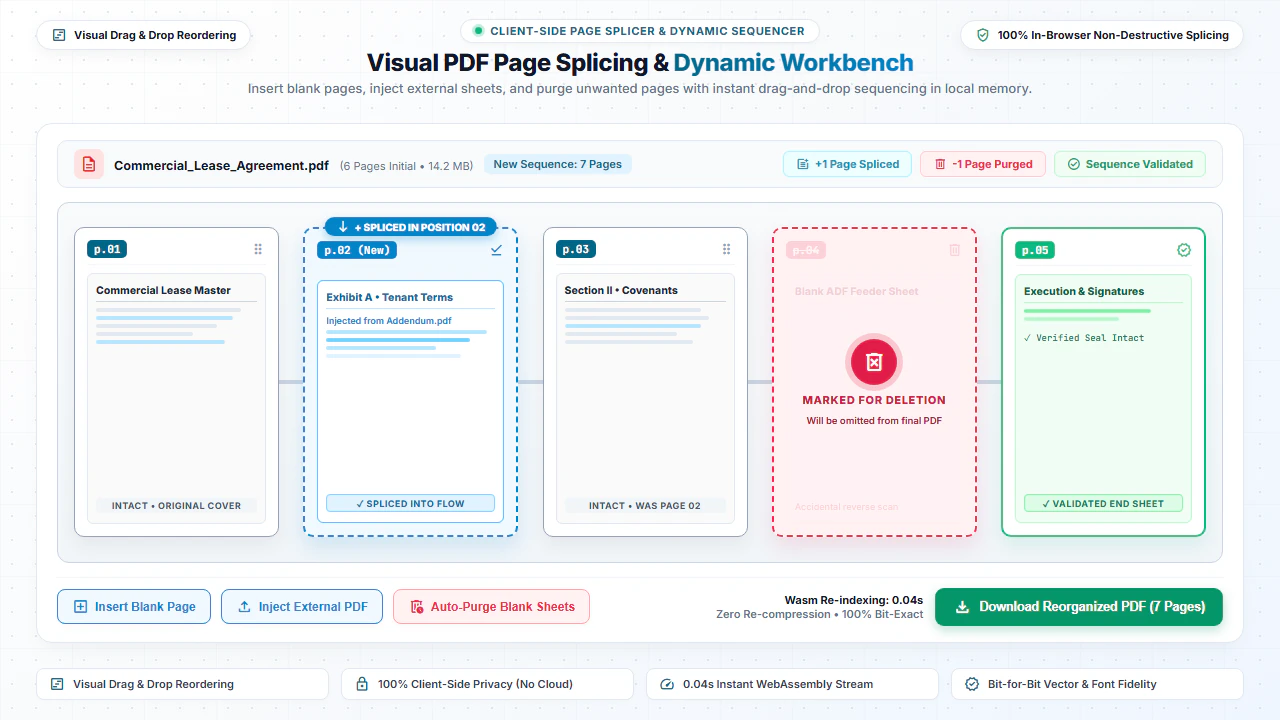
The internal architecture of a PDF document is organized as a hierarchical page tree. When you delete, insert, or reorder pages in our editor, the browser modifies the page tree references and recalculates cross-reference tables in memory.
This allows you to remove unnecessary cover sheets, eliminate blank scanned pages, insert missing addendum agreements, and reorganize chapters without re-encoding the unaffected page streams.
Step-by-Step: How to Insert or Delete PDF Pages in 4 Steps
- Step 1: Open PDF File: Click Browse or drag your document to display thumbnail previews of all pages.
- Step 2: Delete Unwanted Pages: Hover over any page thumbnail and click the delete trash icon.
- Step 3: Insert Pages: Click Insert Page to place a new page anywhere in the document flow.
- Step 4: Download Clean PDF: Click Save & Download to export your updated PDF immediately.
- Step 1: Tap to Select: Open your PDF file from your mobile device or cloud drive.
- Step 2: Tap to Remove: Tap the delete icon on any unnecessary or blank pages.
- Step 3: Add Pages: Tap Add Page to insert new content into your file.
- Step 4: Download PDF: Tap Download PDF to save the reorganized PDF to your phone.
Everyday Scenarios for Inserting & Deleting Pages
Cleaning Up Double-Sided Scans
Remove accidentally scanned blank rear pages from ADF feeder scans in seconds.
Combining Contract Addendums
Insert signed signature pages and disclosure exhibits directly into the middle of legal agreements.
Removing Sensitive Cover Sheets
Strip confidential routing sheets, fax covers, and printer banners before sharing client files.
Course Packs & Presentations
Reorder lecture slides, insert section break sheets, and delete outdated presentation handouts.
100% Client-Side Privacy: No Server Uploads
Contract addendums, board presentations, and tax filings should never be uploaded to third-party web services. Cloud servers can retain document copies.
EditScannedPDF.com processes all page deletions and insertions 100% locally in your web browser. Your documents remain strictly on your device.
Comparison: EditScannedPDF vs. Traditional Cloud Tools
Understanding how our in-browser WebAssembly architecture protects your sensitive documents compared to legacy cloud PDF converters:
Enterprise-Grade In-Browser Security Architecture
When working with sensitive contracts, financial spreadsheets, medical records, or identity credentials, uploading files to third-party web servers introduces major cybersecurity risks. EditScannedPDF solves this fundamental vulnerability by executing all PDF compilation, vector synthesis, and cryptographic operations directly inside your device's browser memory using WebAssembly.
Your documents never travel across the internet, are never indexed on remote hard drives, and leave zero data footprint behind once you close your browser tab. Experience complete operational privacy built from the ground up to satisfy modern corporate security protocols.
Frequently Asked Questions (FAQ)
How do I delete blank pages caused by two-sided scanner feeder passes?
Open your scanned PDF, preview thumbnail pages, click Delete on any blank or unwanted pages, and download your trimmed document.
Can I insert a newly scanned missing page into the middle of an existing PDF?
Yes. You can insert a blank sheet to type on or merge an additional scanned page into any specific slot between existing pages.
Does deleting or inserting pages alter the resolution of remaining scans?
No. All remaining pages retain their exact original scanner resolution, color profiles, and OCR text without re-compression.
Is organizing private for confidential financial and legal files?
100% private. All page insertion and deletion operations occur locally in your browser memory without server uploads.