
Extract Pages from Scanned Multipage PDF Online Free
Isolate and export specific pages, invoices, tax schedules, or legal exhibits from large batch-scanned multipage PDFs into clean, standalone files with 100% in-browser privacy.
Choose a scanned or normal PDF to open the interactive editor with Extract Page ready.
Only edit documents that you own or are legally authorized to modify. Do not use this website to alter documents for fraud, misrepresentation, identity misuse, or any illegal purpose. You are fully responsible for how you use edited documents; Edit Scanned PDF is not responsible for unlawful or unauthorized use. Read More
Helpful Guides & Tutorials
How In-Browser PDF Page Extraction Works
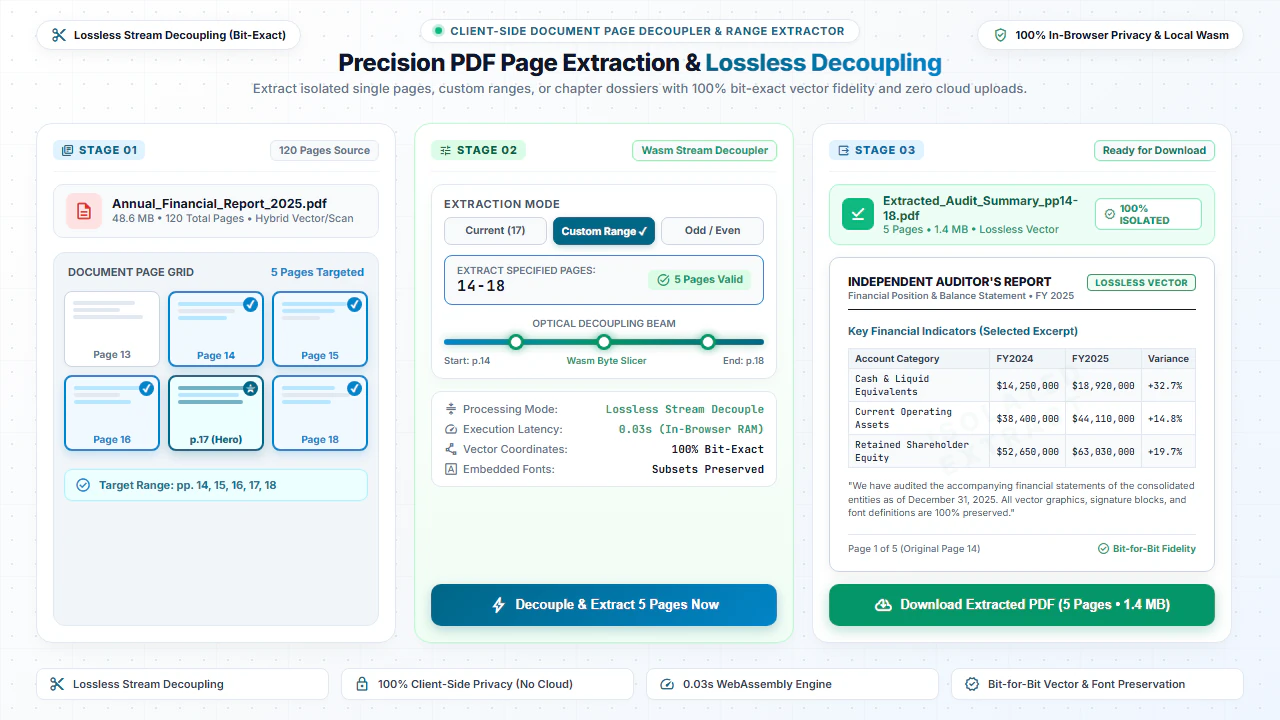
PDF extraction isolates the exact content streams, raster images, and font dictionaries of a target page and packages them into a clean, standalone PDF document container without unnecessary baggage.
This creates an ultra-compact single-page file that is ready to be emailed, printed, or filed without sharing the remaining confidential sections of your larger source document.
Step-by-Step: How to Extract a PDF Page in 4 Steps
- Step 1: Select PDF File: Drag and drop your document into the page extractor.
- Step 2: Select Target Pages: Click thumbnail cards or type page numbers (e.g. 2, 4-7).
- Step 3: Configure Output: Choose whether to merge extracted pages into one file or separate PDFs.
- Step 4: Download PDF: Save the extracted document directly to your computer.
- Step 1: Tap to Choose: Select your multi-page PDF from your mobile files.
- Step 2: Tap Desired Pages: Tap thumbnails to highlight the pages you need.
- Step 3: Confirm Selection: Verify the selected pages on your mobile screen.
- Step 4: Download PDF: Tap Extract to save your new PDF to your device.
Everyday Scenarios for Extracting PDF Pages
Isolating Invoices & Receipts
Extract individual monthly billing slips from 100-page bank statements for tax reporting.
Sharing Executed Signature Pages
Extract the final signature agreement page to send proof of execution without emailing the entire deed.
Academic Articles & Book Chapters
Extract specific assigned reading passages from textbooks and research journals for students.
Medical Lab Slips & Test Results
Isolate specific blood test reports from comprehensive patient diagnostic history binders.
100% Client-Side Privacy: No Server Uploads
Financial statements, tax filings, and legal deeds contain highly sensitive personal numbers. Cloud extraction tools store files on third-party servers.
EditScannedPDF.com isolates and exports your pages 100% locally in your web browser. Your files are never uploaded to external servers.
Comparison: EditScannedPDF vs. Traditional Cloud Tools
Understanding how our in-browser WebAssembly architecture protects your sensitive documents compared to legacy cloud PDF converters:
Enterprise-Grade In-Browser Security Architecture
When working with sensitive contracts, financial spreadsheets, medical records, or identity credentials, uploading files to third-party web servers introduces major cybersecurity risks. EditScannedPDF solves this fundamental vulnerability by executing all PDF compilation, vector synthesis, and cryptographic operations directly inside your device's browser memory using WebAssembly.
Your documents never travel across the internet, are never indexed on remote hard drives, and leave zero data footprint behind once you close your browser tab. Experience complete operational privacy built from the ground up to satisfy modern corporate security protocols.
Frequently Asked Questions (FAQ)
How do I extract a single receipt or certificate from a 50-page scanned PDF?
Open your multipage scan in our tool, select the specific page number you need, and click Extract Pages to instantly save that single page as an independent PDF.
Does extracting a page from a scanned document reduce its clarity?
No. The extracted page retains its exact original scanner DPI, color depth, and resolution with 100% lossless fidelity.
Can I extract multiple non-consecutive pages at once (e.g. pages 2, 5, and 9)?
Yes. Simply enter comma-separated numbers or ranges to bundle precisely the pages you need into a new PDF.
Is it safe to extract confidential legal exhibits or medical records?
Yes. All page extraction happens strictly in your browser memory without uploading your file to any server.