
Flatten PDF Online Free — Make PDF Read-Only & Non-Editable
Permanently merge interactive AcroForm widgets, text inputs, checkboxes, and digital signature strokes into the underlying PDF content stream. Everything processes 100% privately in your browser memory with zero server uploads, creating immutable, court- and audit-ready PDF documents.
Drag & Drop Your Completed PDF Form Here
Or click below to browse forms and contracts from your computer or phone
Step 2: Review Form Fields & Flattening Safeguards
Inspect active form widgets and configure how interactive layers are merged
All interactive widgets have been permanently merged into immutable content streams in browser RAM.
🔒 100% Private & In-Browser: Files are processed locally on your device and never uploaded to any server. Please edit only documents you own or are authorized to modify. Compliance Policy
The Engineering Architecture of PDF Flattening: Interactive Layers vs. Base Content Streams
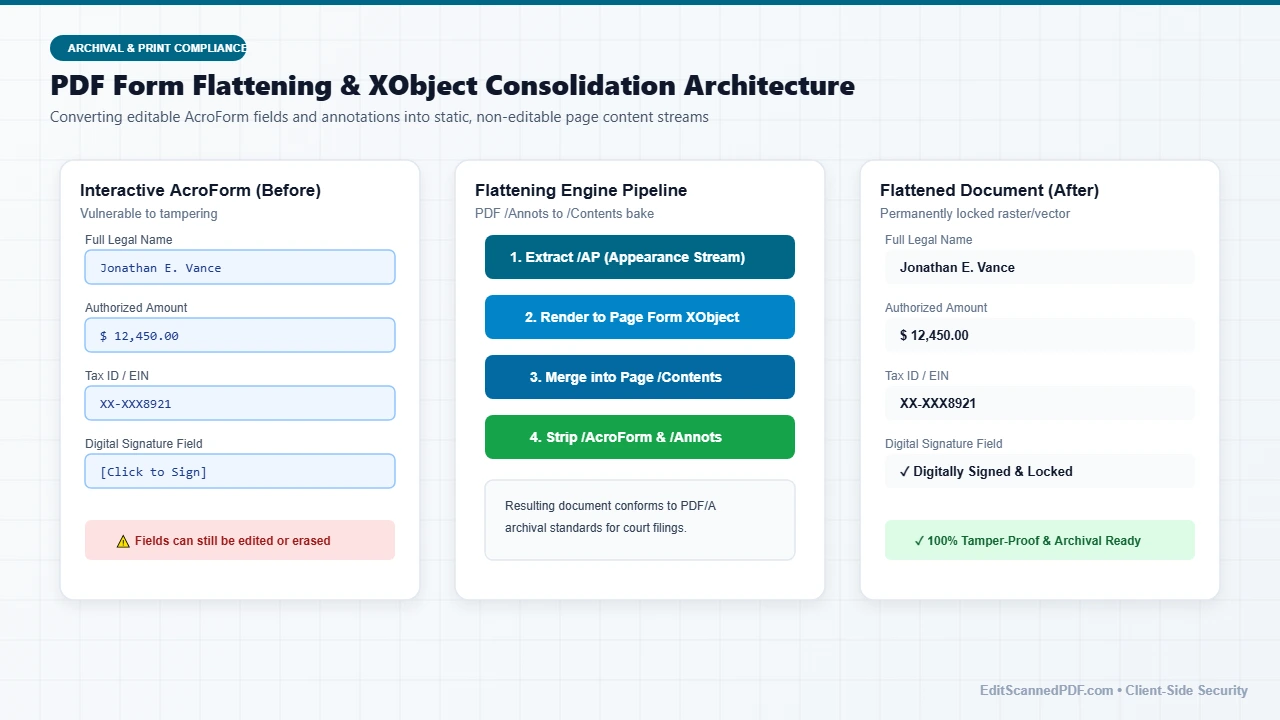
In standard PDF document architecture conforming to ISO 32000-1 specifications, a digital file is constructed through distinct hierarchical layers. When you complete an interactive business document or government form (such as an IRS W-9, lease agreement, or loan application), the numbers and words you enter are not written directly into the static background canvas. Instead, they reside in a floating dynamic layer of interactive form controls.
This dual-layer structure causes critical operational vulnerabilities in modern digital workflows:
- The Base Content Stream: The permanent underlying foundation containing printed boilerplates, vector lines, logos, and scanned images. This layer is rendered consistently across all compliant PDF software and printers.
- The Interactive Annotation Layer: Floating text fields, checkmarks, radio buttons, and digital signature widgets. These fields depend on the viewing application to display properly on the fly.
PDF form flattening is the deterministic process of taking every element from the form overlay, locking its exact appearance, and baking it directly into the base page content layer. Once flattened, the interactive controls are expunged, rendering the document completely immutable, tamper-resistant, and universally readable across all hardware and software platforms.
High-Stakes Document Scenarios Requiring PDF Flattening
1. IRS Tax Filings (W-9, 1040, W-4) & Financial Disclosures
When submitting completed tax forms to employers, mortgage lenders, or accounting portals, unflattened fields frequently cause automated processing bots or mobile reviewers to view blank boxes. Flattening locks Social Security Numbers, EINs, and salary numbers permanently into place.
2. Executed Real Estate & Commercial Contracts
Transmitting an unflattened contract leaves purchase prices, closing dates, and contingency terms open to accidental deletion or malicious alteration by counter-parties. Flattening converts typed entries and signatures into uneditable vector graphics.
3. Eliminating the "Disappearing Mobile Field" Crisis
Apple iOS Mail preview, Safari, and standard Android PDF readers often fail to render dynamic AcroForm appearances, triggering panics when clients report: "The contract you sent is blank!" Flattening permanently solves mobile rendering bugs.
4. Federal & State Court E-Filing Compliance
CM/ECF and appellate filing systems strictly reject documents containing active form widgets or scripts to prevent cybersecurity vulnerabilities and automated docketing corruption. Flattening guarantees immediate e-filing acceptance.
Flattening Fillable PDFs for Court E-Filing & USCIS Immigration Forms
Two of the most demanding institutional environments for PDF submissions are federal and state court electronic case filing (CM/ECF) portals and United States Citizenship and Immigration Services (USCIS) online petition uploads. In both cases, submitting an unflattened, interactive PDF form is one of the leading causes of automated submission rejection or critical administrative delays.
Court E-Filing (CM/ECF) Compliance
Federal District and Appellate court systems strictly require PDF/A-compliant or flattened static documents. CM/ECF docketing software automatically scans uploaded files for active form dictionaries, embedded JavaScript calculation scripts, or dynamic signature buttons. When detected, the intake portal throws a 'Defective Document' alert or clerk rejection, because active script controls could theoretically alter monetary claims or evidence timestamps after docketing.
USCIS Immigration Petitions (Forms I-130, I-485, N-400, G-28)
When submitting family, employment, or naturalization petitions via USCIS online accounts or Lockbox facilities, government automated intake scanners process files through high-speed rasterization pipelines. If fillable form fields remain unflattened, the dynamic appearance stream is frequently stripped during scanning, causing critical fields (applicant names, A-numbers, priority dates, or attorney signatures) to appear completely blank on the adjudicating officer's screen.
Step-by-Step Tutorial: How to Flatten PDF Forms Online Free
Load Completed Form Locally
Drag and drop your filled PDF form into the flattener dropzone. The document decodes in local browser RAM using client-side WebAssembly with zero server transfer.
Verify Form Field Analysis
The engine inspects the AcroForm tree, reporting the exact number of active interactive form fields, checkboxes, and signature widgets detected across all pages.
Select Safeguard Options
Ensure 'Flatten AcroForm Fields' and 'Preserve Searchable Digital Text' are checked to guarantee high-resolution vector output and Ctrl+F text searchability.
Execute & Download Immutable PDF
Click Flatten PDF Form Fields. Inspect the output with interactive zoom controls and download your tamper-proof, court-admissible PDF file instantly.
PDF Form Flattening Technology & Quality Comparison Matrix
Compare how EditScannedPDF client-side form flattener compares against virtual printer drivers and commercial desktop suites:
Frequently Asked Questions
What does flattening a PDF form actually mean?
Flattening a PDF takes dynamic interactive elements—such as fillable form fields, checkboxes, radio buttons, dropdown menus, and signature annotations—and renders them directly into the underlying page content stream. Once flattened, the interactive form controls are expunged, making the entered data a permanent, unalterable part of the document that cannot be edited, cleared, or deleted.
Why do filled form fields appear blank when opened on mobile phones or Apple Mail?
Interactive PDF forms store user input in separate overlay layers that require advanced PDF engines to render dynamically. Many mobile PDF viewers—including Apple iOS Mail preview, macOS Preview, webmail readers, and basic Android viewers—fail to process these appearance streams properly and display only the blank background template. Flattening permanently bakes the text into the page graphics, guaranteeing 100% visibility on all devices and software.
Can someone edit, modify, or tamper with form fields after flattening?
No. Once a PDF form is flattened, the interactive form widgets and text boxes cease to exist in the PDF code. The text and checkmarks are converted into standard non-interactive vector glyphs and graphic paths, preventing recipients from altering monetary amounts, altering contract terms, or wiping signature blocks.
Does flattening a PDF remove searchable text or prevent Ctrl+F searching?
Not with EditScannedPDF. When you leave 'Preserve Searchable Digital Text' enabled, our client-side engine retains true vector typography in the page stream rather than converting pages into blurry raster images. All flattened text remains completely selectable with mouse cursor and searchable via standard Ctrl+F keyword queries.
Are my sensitive tax returns (e.g. W-9, 1040) or medical forms uploaded to any server?
Never. All form inspection, widget flattening, and PDF recompilation execute 100% locally in your web browser memory (RAM) via WebAssembly. Zero bytes leave your device, ensuring total privacy and strict compliance with HIPAA, GDPR, and financial secrecy regulations.
What is the difference between flattening and using 'Print to PDF'?
Using an operating system's 'Print to PDF' virtual printer often rasterizes pages into bloated bitmap images, strips out internal hyperlinks and document bookmarks, and frequently downsamples images to low printer resolutions. Our in-browser flattener retains original vector sharpness, preserves hyperlinks, and optimizes file size without generational quality loss.
Can I flatten a document that does not contain any interactive AcroForm fields?
Yes. If your PDF does not contain AcroForm inputs, our tool inspects and flattens floating annotations, sticky notes, markup highlights, and stamps, consolidating all visual layers into the base content stream for clean, tamper-proof archival distribution.
Why does my federal court or appellate e-filing portal reject interactive PDF forms?
Federal CM/ECF and state appellate filing rules strictly mandate static PDF documents to ensure permanent record integrity. Interactive AcroForm dictionaries, embedded calculations, and button macros are flagged by court intake validators as security and evidentiary risks. Flattening your form removes interactive widget dictionaries while baking entries into permanent vector graphics for instantaneous e-filing acceptance.
Will USCIS accept my immigration petition if form fields are not flattened?
Submitting unflattened forms to USCIS online portals or Lockbox facilities frequently leads to catastrophic 'blank form' errors during optical capture. USCIS automated systems read the static document stream; dynamic form field layers can fail to render on the adjudicator's monitor. Flattening your Form I-130, I-485, N-400, or G-28 ensures every typed character, checkmark, and signature remains permanently visible.