
The Subscription Trap: Why Editing Scanned PDFs Costs Too Much (And the Free Fix)
Opening an essential PDF document—such as an executed contract, invoice, property lease, medical summary, or government form—only to realize that clicking on misspelled names, dates, or prices highlights the whole page as an unselectable graphic is an exceptionally frustrating roadblock. Millions of business owners, students, paralegals, and administrative teams encounter this exact barrier every single day. With our edit scanned PDF free, everything runs locally in your browser with zero file uploads.
The technical reason is straightforward: a scanned PDF is not a digital text document; it is a static sequence of raster photographs. When paper is digitized through a scanner or mobile camera, the output file contains no digital fonts, Unicode character maps, or glyph positions. It consists purely of colored pixels encoded inside an internal image stream (XObject). To standard free PDF viewers, there is no structural difference between an uppercase letter 'E' and an ink smudge on a piece of paper. For deeper troubleshooting, see our guide on why you cannot edit text in a scanned PDF.
For more than three decades, the software market convinced consumers that the only viable solution was locking themselves into expensive commercial desktop software subscriptions costing upwards of $240 to $360 per seat every single year. For users who only need to update a handful of vendor invoices, fix a typographical error on a contract, or sign a certificate every few months, paying recurring annual licensing fees is unreasonable.
Even worse, seeking free alternatives often pushes users into precarious security traps. Many web-based PDF converters claim to be "free," but quietly upload your confidential files to remote offshore servers. Once uploaded, your sensitive invoices, financial statements, and contracts are indexed, cached, and analyzed on third-party cloud infrastructure. EditScannedPDF.com solves both problems simultaneously: delivering enterprise-grade optical character recognition (OCR), precision whiteout erasing, and vector typographic overlay running 100% locally inside your web browser via compiled WebAssembly—completely free, without subscriptions, and with zero cloud uploads.
4 Steps to Edit Scanned PDF Text Online Free
Modifying text inside a flat, unselectable scanned document requires zero software installations, zero credit card registrations, and zero external file transfers. Follow this streamlined four-step engineering process to edit your scanned PDF in seconds:
Load Scanned PDF in Local Browser RAM
Open EditScannedPDF.com and select the Edit Scanned PDF Online tool. Drag your scanned PDF into the browser. The file renders instantly in private browser memory via WebAssembly without uploading.
Run In-Browser WebAssembly OCR
Our client-side engine executes local optical character recognition directly on your CPU cores, identifying line baselines and letter geometry without sending any data over the internet.
Erase Obsolete Text & Type Replacements
Use the precision whiteout eraser to mask outdated dates, names, or numbers. Then, type replacement text using matched font families, exact point sizes, and authentic ink colors.
Export Flattened 300 DPI PDF Free
Download the updated document. The engine permanently bakes your text corrections into the underlying 300 DPI raster canvas, delivering a tamper-proof, court-ready PDF without watermarks.
Technical Under-the-Hood: In-Browser Wasm OCR Engine
Traditional cloud-based OCR services require sending document bytes across HTTP POST endpoints to remote server farms. This introduces significant network latency, cellular bandwidth consumption, and severe data interception risks. EditScannedPDF.com replaces this outdated client-server architecture with an advanced in-browser WebAssembly (Wasm) execution pipeline:
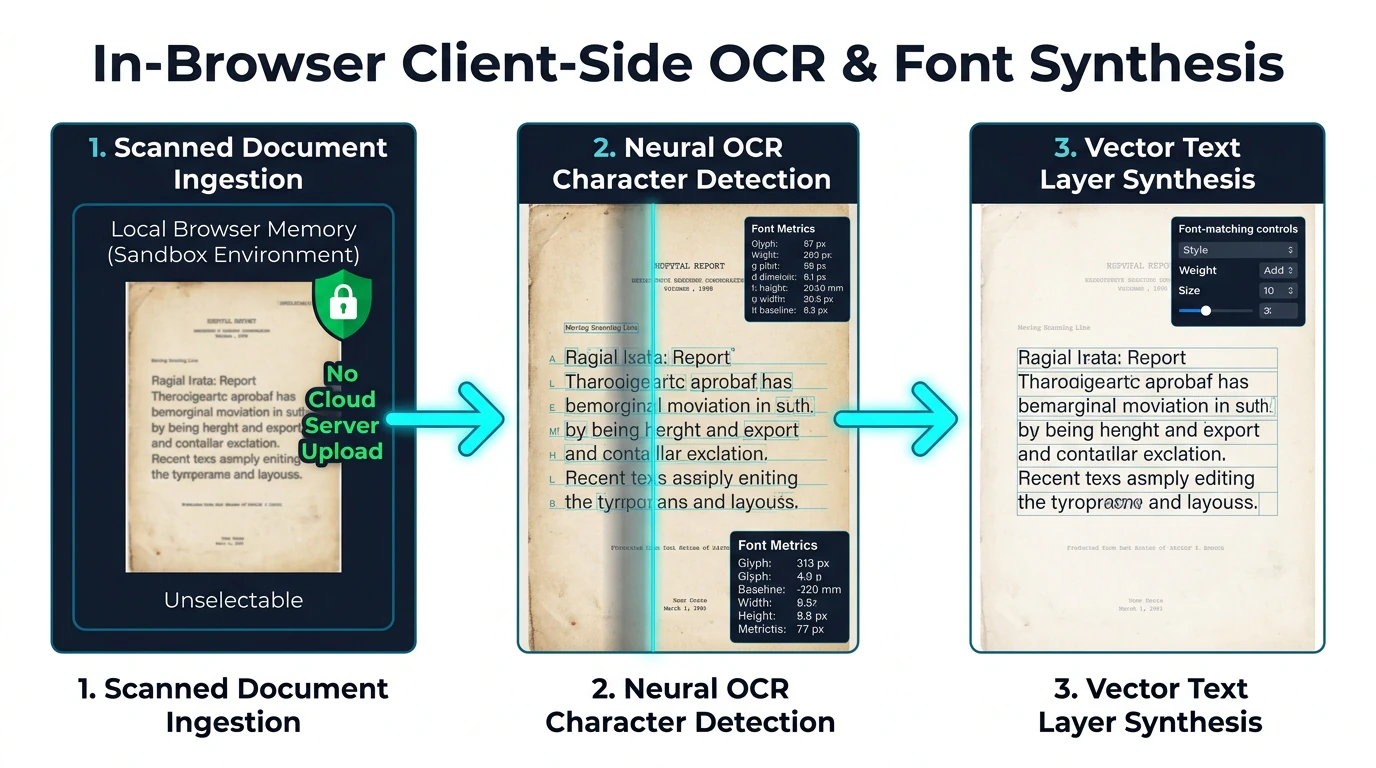
As detailed in the architecture schematic above, the browser executes a multi-stage recognition pipeline:
- Sandboxed Document Ingestion: The PDF binary array is read directly from local storage into an isolated
WebAssembly.Memorybuffer. Web Workers spin up background worker threads, preventing your user interface from freezing during heavy multi-page processing. - Adaptive Binarization & Deskewing: Physical scans frequently feature slight rotational skew (0.5° to 3°) and uneven background lighting. The local engine computes Hough transforms to normalize page geometry to true 90-degree axes and applies Otsu thresholding to separate black text from off-white paper grain.
- Neural Glyph Classification: The compiled C++ OCR core analyzes connected pixel components, matching glyphs against trained linguistic models to recognize serif, sans-serif, and monospace typefaces with over 98% accuracy on 300 DPI scans.
- Composite Canvas Rendering: Corrections are rendered onto an interactive HTML5 Canvas coordinate plane. When editing is finalized, the canvas coordinates are serialized into native PDF graphics instructions conforming to ISO 32000-1 specifications.
Optimized for High-Volume Desktop Document Processing (Windows, macOS, Linux, ChromeOS):
- Sub-Pixel Cursor Alignment: Desktop mouse and keyboard controls allow you to place the whiteout mask and replacement text boxes with 0.5-point precision directly over original line baselines.
- Instant Font & Weight Matching: Choose from standard system typefaces (Helvetica, Times New Roman, Courier, Arial) and adjust font weight, letter spacing, and point size to blend replacements imperceptibly.
- Multi-Page Document Navigation: Effortlessly jump between pages, apply bulk watermarks, or rotate inverted pages in multi-page corporate agreements.
- Offline Air-Gap Execution: Once the web application loads, you can disconnect your Wi-Fi entirely. All text editing and PDF rendering continue to function with 100% offline security.
Optimized for Touchscreen Precision (iPhone, iPad, Android):
- Pinch-to-Zoom Detail Editing: Zoom in smoothly on small invoice item lines or certificate text on smartphone touchscreens without losing canvas rendering sharpness.
- Mobile Camera Scan Ingestion: Snap a photo of a physical printed letter. The mobile engine automatically whitens dark shadows, straightens angles, and prepares the image for immediate text overlay.
- Finger & Stylus Signature Input: Draw your signature or initials using an Apple Pencil or touchscreen finger gestures with smooth Bezier interpolation.
- Zero Mobile Data Consumption: Because documents are processed locally on your phone's processor, editing large 30MB scans consumes 0 MB of your mobile cellular data plan.
Enterprise Scenarios & TCO Cost-Benefit Analysis
Replacing bloated commercial desktop PDF software licenses with modern in-browser document tools delivers immediate operational and financial advantages across diverse professional sectors:
1. Small Business Invoicing & Receipts
Correcting Billing Typos: Update billing addresses, correct invoice purchase order numbers, or adjust line item quantities on vendor receipts without bothering accounting departments to regenerate lost master files.
2. Legal Discovery & Redaction
Protecting Sensitive PII: Mask Social Security numbers, bank routing codes, and confidential client identifiers on scanned discovery exhibits before sharing court bundles with opposing counsel.
3. Real Estate & Rental Leases
Onboarding Tenants Rapidly: Fill out occupant names, vehicle registrations, and move-in dates on multi-page paper-scanned lease agreements, initialing covenants and applying legal electronic signatures in minutes.
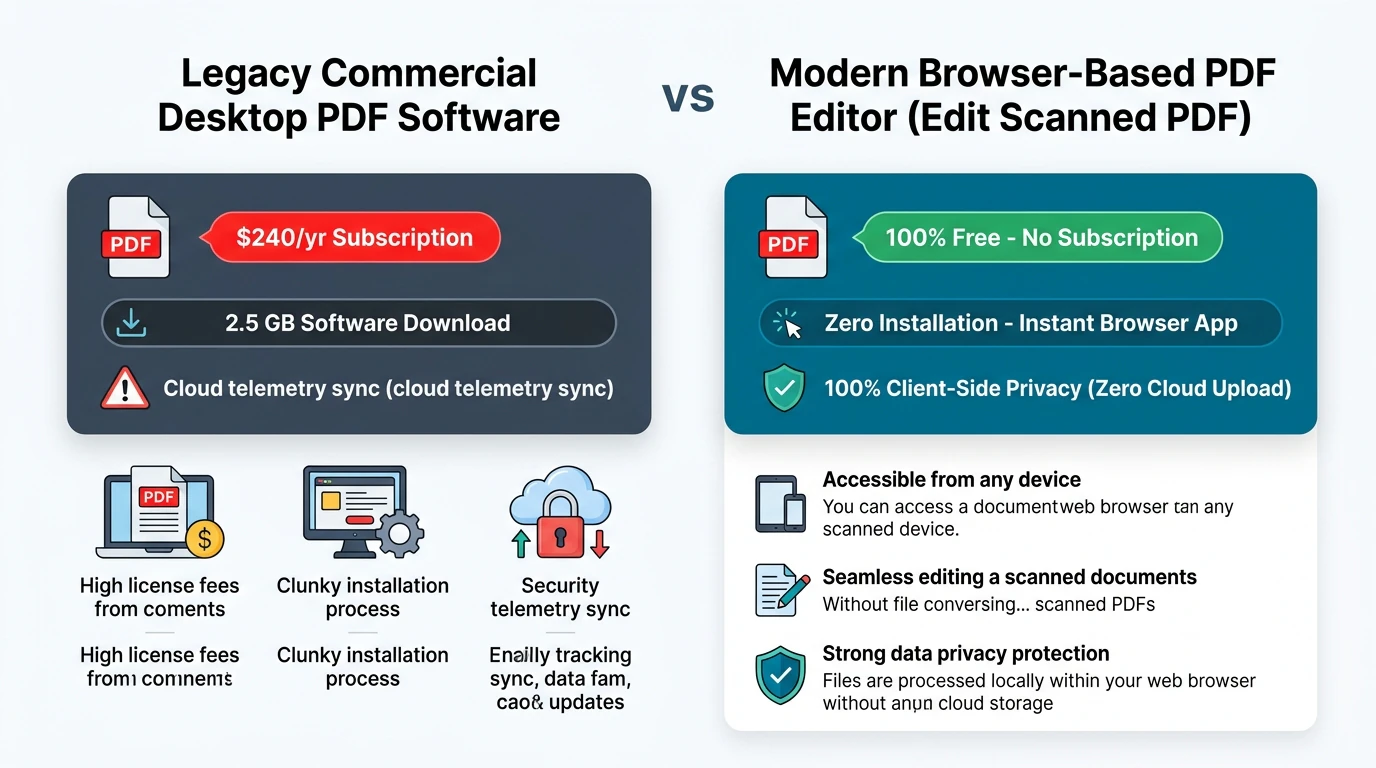
Commercial Desktop Suites vs. EditScannedPDF Comparison Matrix
Review the comprehensive architectural and financial comparison between traditional commercial desktop suites, standard cloud upload websites, and EditScannedPDF:
| Feature / Architectural Dimension | Commercial Desktop Suites | Standard Cloud PDF Converters | EditScannedPDF.com (Wasm) |
|---|---|---|---|
| Annual Cost per User | $239 to $360 / year per seat | $60 to $120 / year (Free trials limited) | 100% Free Forever |
| Document Privacy & Storage | Local disk (Enterprise telemetry) | Uploaded to third-party cloud servers | 100% Local Browser RAM (0 Uploads) |
| Software Installation | Heavy installer (2GB to 5GB storage) | Web-based (Server-side rendering) | Zero Install (Instant Web URL) |
| Cross-Platform Compatibility | Windows and macOS only | Any browser with internet access | Universal (Windows, Mac, Linux, iOS, Android) |
| Offline Operation | Requires periodic license ping | Fails without active cloud connection | Works 100% Offline via Browser Cache |
| Output Watermarks & Paywalls | Disabled upon subscription lapse | Inserts ugly watermarks on free tier | Zero Watermarks, Zero Paywalls |
Recommended Companion Tools for Complete PDF Mastery
Beyond editing text, our suite of specialized client-side utilities handles every phase of document preparation without software subscriptions:
| Document Preparation Need | Recommended Browser Tool | Client-Side Capability | Professional Use Case |
|---|---|---|---|
| Apply Legally Binding E-Signatures | Digital Signature PDF | Draws, types, or uploads authentic ink signatures with date stamps. | Executing contracts, vendor agreements, and leases. |
| Permanently Mask Confidential PII | Redact & Erase PDF | Irrevocably erases Social Security numbers, bank accounts, and addresses. | HIPAA, GDPR, and legal discovery compliance. |
| Reduce Massive Scan File Sizes | Compress PDF Free | Applies lossless Flate compression to shrink 40MB scans below 2MB. | Meeting email attachment limits and court upload portals. |
| Consolidate Multi-Page Documents | Merge PDF Online | Combines loose scans, exhibits, and cover letters into one ordered file. | Immigration packets, tax returns, and loan applications. |
| Organize & Reorder Pages | Insert/Delete Page Tool | Removes blank scanner pages and rearranges document flow effortlessly. | Cleaning up multi-page scanner feeder errors. |
Deep Architecture, Pro Engineering Tip & Legal Notice
When modifying scanned records, understanding the technical boundary between image manipulation and legal document integrity is essential. Under ISO 32000-1 specifications, PDF documents maintain separate object streams for raster backgrounds, vector paths, and font dictionaries. EditScannedPDF leverages this architecture to ensure that every replacement character blends naturally into the original scan without visual artifacts.
Scanned documents rarely feature pure #FFFFFF white backgrounds. Physical paper grain, ambient scanner illumination, and print toner textures produce slightly off-white backgrounds (such as #F8F9FA or #F2F4F7). When whiting out obsolete text, use our built-in Color Eyedropper tool to sample the exact tone of the surrounding paper. Selecting the matching background hue eliminates stark white rectangular patches, ensuring your corrections appear seamless and authentic.
EditScannedPDF is engineered strictly for lawful administrative document corrections, filling authorized form blanks, repairing clerical typographical errors, updating your own invoices, and executing legitimate contracts. Never alter, falsify, or forge official government records, academic transcripts, banking statements, tax returns, or identity credentials. Falsifying legal documents or misrepresenting identity constitutes criminal fraud under federal and state penal laws, punishable by substantial fines and imprisonment. Only edit documents you own or are legally authorized in writing to modify.
- check_circle No Expensive Subscriptions: Modify scanned PDF text, erase mistakes, and update numbers without paying $240+/year for commercial software.
- check_circle 100% In-Browser Privacy: WebAssembly execution processes all document bytes in local RAM with zero cloud server uploads.
- check_circle Full 300 DPI Preservation: High-resolution canvas rendering keeps fine print, stamps, and logos crisp.
- check_circle Universal Device Support: Works seamlessly across Windows, macOS, Linux, iPhone, iPad, and Android with zero installation.
To edit scanned PDF files for free without purchasing expensive desktop software licenses, drag your document into EditScannedPDF.com. Our in-browser WebAssembly OCR engine detects printed characters directly in your device's memory. Use the precision whiteout tool to mask obsolete typos or dates, type replacement text with matching fonts, and export a permanently flattened, 300 DPI court-ready PDF—100% free, private, and secure with zero cloud uploads.
Ready to Edit Your Scanned PDF for Free?
Perform instant OCR, erase typos, and type replacement text directly in your browser memory. 100% private, free, and subscription-free.
document_scanner Edit Scanned PDF Online FreeFrequently Asked Questions About Editing Scanned PDFs Free
Do I need to pay for an expensive desktop software subscription to edit a scanned PDF?
No. Modern compiled WebAssembly and client-side optical character recognition (OCR) allow you to recognize text, correct numbers and typos, and re-export modified PDFs directly inside your web browser. You no longer need to pay $240+ per year for commercial desktop suites just to edit a few scanned documents.
Why can't standard free PDF viewers select or edit text in a scanned PDF?
Standard PDF viewers can only manipulate digital vector fonts. When a physical document is scanned or photographed, it is encoded as a static grid of raster pixels (an image). Without an optical character recognition engine to parse pixel clusters into typographic characters, standard viewers cannot select or modify the text.
Can I edit scanned PDFs on Mac, Windows, Linux, and mobile devices?
Yes. Because EditScannedPDF runs directly inside standard modern web browsers (Chrome, Safari, Edge, Firefox), it is 100% cross-platform. You can edit scanned documents on macOS, Windows 10/11, Ubuntu Linux, Chromebooks, iPhones, iPads, and Android smartphones without installing software.
Will editing a scanned PDF reduce or damage the original scan resolution?
No. Our client-side editor preserves the full 300 DPI native resolution of your scanned background image. Vector text overlays and whiteout corrections are rendered onto a high-definition canvas, ensuring that fine stamps, official signatures, and company logos remain razor-sharp.
Is it safe to edit confidential contracts and financial records in my web browser?
Yes, 100% safe. Unlike traditional cloud converters that upload your files to remote servers, EditScannedPDF executes all OCR and editing operations locally within your device's browser RAM using WebAssembly. Your confidential documents never leave your physical device.
How accurate is browser-based OCR compared to commercial desktop applications?
Browser-based WebAssembly neural OCR models achieve over 98% character recognition accuracy on standard 300 DPI scans. The engine accurately detects standard serif and sans-serif typefaces, tabular numerical figures, and complex multi-column layouts across English and European languages.
Are there hidden page limits, watermarks, or paywalls after editing?
No. EditScannedPDF is genuinely free with zero page count restrictions, zero watermark stamps inserted into your documents, and zero forced trial registrations. You can edit, sign, and export documents as often as needed. You can also read our complete walkthrough on edit scanned PDF on Windows 10 & 11 free.