
Scanned PDF to Searchable PDF Online Free
Turn flat scanned paper documents and photo PDFs into fully searchable, selectable, and copyable PDF files. Embed an invisible OCR text layer with 100% private in-browser processing.
Only edit documents that you own or are legally authorized to modify. Do not use this website to alter documents for fraud, misrepresentation, identity misuse, or any illegal purpose. You are fully responsible for how you use edited documents; Edit Scanned PDF is not responsible for unlawful or unauthorized use. Read More
Helpful Guides & Tutorials
To convert a scanned PDF to a searchable PDF online for free:
- Open Tool: Go to EditScannedPDF.com Scanned PDF to Searchable PDF.
- Upload Document: Select your scanned paper, invoice, receipt, or photo PDF.
- Run In-Browser OCR: Click Make Searchable to activate WebAssembly OCR without uploading files to any server.
- Download Searchable PDF: Save your searchable document — press Ctrl+F (or Cmd+F) to instantly locate keywords and select/copy text.
✓ 100% Client-Side Privacy | Zero Server Uploads | Instant Ctrl+F Search & Copy
What is a Searchable PDF and How Does In-Browser OCR Work?
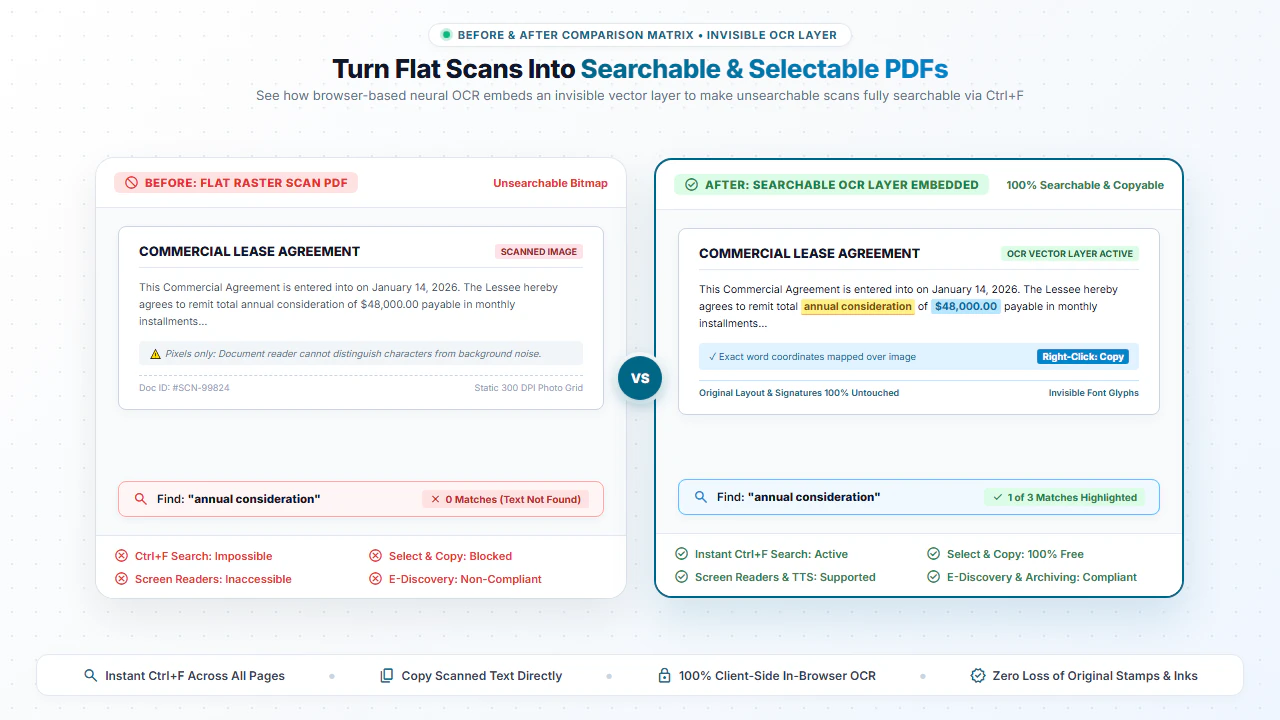
When you scan a paper document or capture a photo with your mobile device, the resulting PDF is simply a container of flat pixel images. If you try searching for keywords using Ctrl+F (or Cmd+F on Mac), the document reader reports zero matches because no digital character data exists.
Our Scanned PDF to Searchable PDF tool solves this by running an advanced neural OCR engine inside your web browser via WebAssembly. The engine recognizes letters, words, and coordinates, then layers an invisible vector font layer directly over the original image. You get the exact visual layout of your original paper scan plus full text searching and copy-pasting capabilities.
Key Advantages of Making Scanned PDFs Searchable
Instant Ctrl+F Keyword Search
Locate specific invoice numbers, dates, client names, and clauses across 100+ scanned pages in milliseconds.
Select & Copy Text
Highlight text with your cursor and copy paragraphs directly into emails, Word documents, or spreadsheets.
100% Visual Fidelity
Preserves original stamps, signatures, hand drawings, and paper textures without re-flow distortion.
EDRM & Discovery Ready
Make historical legal contracts and corporate archives compliant with e-discovery and electronic filing standards.
Step-by-Step: How to Make a Scanned PDF Searchable in 4 Steps
- Step 1: Upload Scanned PDF: Drag your document scan into the browser tool window.
- Step 2: Execute OCR Processing: Click Generate Searchable PDF to begin client-side OCR.
- Step 3: Review Text Layer: The engine matches character coordinates across all pages in RAM.
- Step 4: Download Searchable File: Click Download PDF to export your searchable, compliant file.
- Step 1: Tap to Select: Choose your scanned document from mobile storage or camera scans.
- Step 2: Tap Make Searchable: Initiate local text layer synthesis on your mobile device.
- Step 3: Wait for OCR: In-browser WebAssembly finishes recognition in seconds.
- Step 4: Save PDF: Tap Download to store the searchable document on your smartphone.
Everyday Use Cases for Searchable PDFs
Law Firms & Case Documents
Make court filings, deposition transcripts, and scanned discovery exhibits keyword searchable.
Accounting & Receipts
Search vendor totals, tax IDs, and billing line items across scanned receipts and bank slips.
Academic Archives & Books
Digitize historic manuscripts, research papers, and library books into searchable academic references.
Healthcare & Patient Charts
Find lab results, prescriptions, and physician notes across scanned medical records.
100% Client-Side Privacy: No Server Uploads
Scanned medical records, tax documents, and legal contracts contain strictly confidential personal information. Uploading them to cloud conversion platforms introduces compliance and data leak vulnerabilities.
EditScannedPDF.com executes all OCR processing 100% locally in your web browser. Your documents never leave your computer or phone.
Comparison: EditScannedPDF vs. Traditional Cloud Tools
Understanding how our in-browser WebAssembly architecture protects your sensitive documents compared to legacy cloud PDF converters:
Enterprise-Grade In-Browser Security Architecture
When working with sensitive contracts, financial spreadsheets, medical records, or identity credentials, uploading files to third-party web servers introduces major cybersecurity risks. EditScannedPDF solves this fundamental vulnerability by executing all PDF compilation, vector synthesis, and cryptographic operations directly inside your device's browser memory using WebAssembly.
Your documents never travel across the internet, are never indexed on remote hard drives, and leave zero data footprint behind once you close your browser tab. Experience complete operational privacy built from the ground up to satisfy modern corporate security protocols.
Frequently Asked Questions (FAQ)
What is a searchable PDF document?
A searchable PDF contains both the high-resolution scanned page image and an invisible, perfectly aligned text layer created by OCR. This allows users to search words using Ctrl+F, highlight text, and copy-paste sentences while preserving the original visual appearance.
Can I search words using Ctrl+F on the output file?
Yes! The output PDF responds instantly to Ctrl+F (or Cmd+F on Mac) across Desktop PDF Software, Google Chrome, Safari, Microsoft Edge, and mobile PDF readers.
Does OCR alter or degrade the original scanned picture quality?
No. The original page images are preserved at 100% resolution. The OCR characters are embedded invisibly underneath or above the image pixels.
Are my sensitive scanned documents uploaded to remote servers?
No. All neural character recognition and PDF reconstruction runs 100% locally in your web browser using WebAssembly. Your files never leave your device.
Need to Change or Replace Text Instead of Just Searching?
If you need to edit typos, correct numbers, change invoice dates, or redact confidential information on a scanned document, use our Full Scanned PDF Editor with font-matching OCR. You can also read our complete walkthrough on convert scanned PDF to Word online free.
Launch Scanned PDF Editor Free →