
Add Bates Numbering & Page Numbers to Scanned PDF Online
Number scanned court exhibits, discovery packets, accounting binders, and academic papers with sequential numbering or Bates stamping. Customize position, font size, and prefix with 100% in-browser security.
Only edit documents that you own or are legally authorized to modify. Do not use this website to alter documents for fraud, misrepresentation, identity misuse, or any illegal purpose. You are fully responsible for how you use edited documents; Edit Scanned PDF is not responsible for unlawful or unauthorized use. Read More
How PDF Page Numbering Works
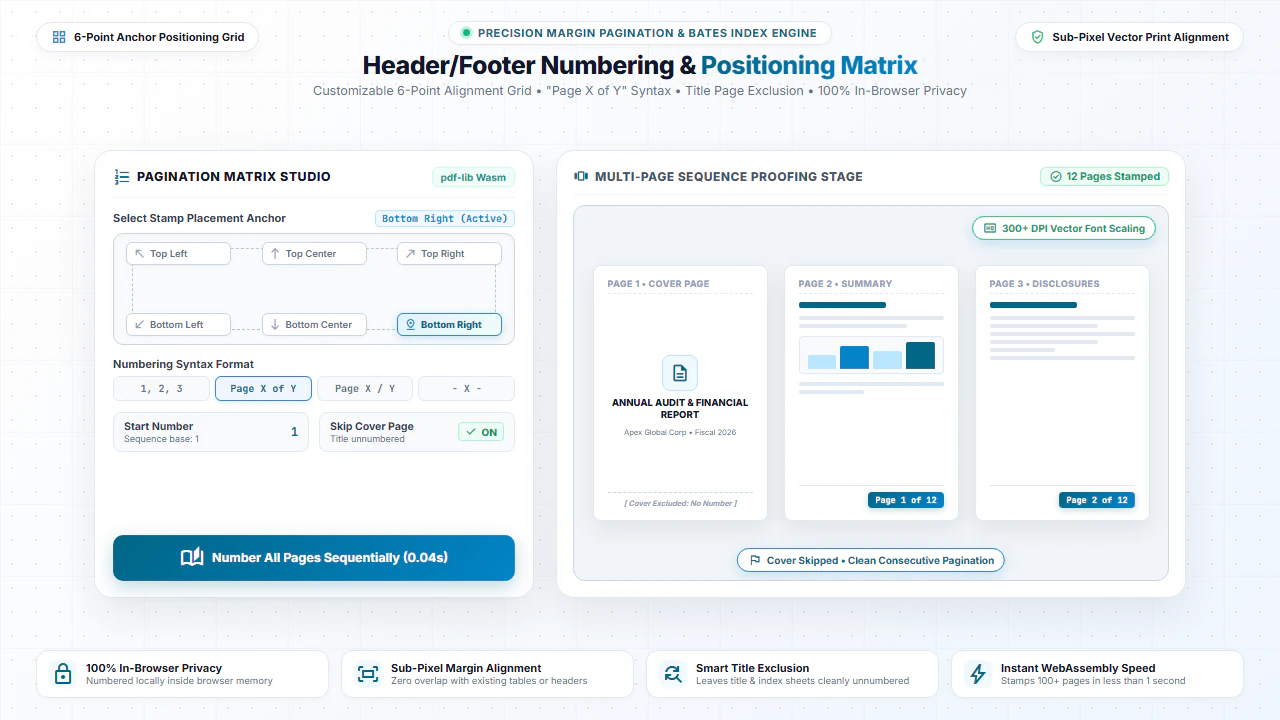
When you add page numbers to a PDF, our browser engine analyzes the page dimensions (such as A4, US Letter, or custom print formats) and calculates exact coordinates for headers and footers. It embeds vector typography directly into the document's content stream.
This produces crisp, razor-sharp numbers that scale smoothly when printed or viewed on high-DPI displays without distorting existing text or tables.
Step-by-Step: How to Add Page Numbers to PDF in 4 Steps
- Step 1: Select PDF File: Click Browse or drag your document into the numbering tool.
- Step 2: Select Layout & Style: Choose between bottom-center, bottom-right, or header positions and select font size.
- Step 3: Configure Range: Exclude cover pages if needed by setting custom start page number.
- Step 4: Download Document: Click Download PDF to export your paginated document in seconds.
- Step 1: Tap to Select: Choose your PDF from your smartphone or cloud storage.
- Step 2: Pick Position: Tap the preferred position (e.g. bottom-right) and number format.
- Step 3: Preview Layout: Review page number placement on mobile screen.
- Step 4: Save PDF: Tap Download PDF to save the numbered file.
Everyday Scenarios Where Page Numbering is Essential
Legal Briefs & Court Filings
Ensure legal pleadings, discovery bundles, and exhibits follow mandatory court numbering rules.
Academic Theses & Reports
Format college dissertations, research papers, and class assignments with standard pagination.
Corporate Annual Reports
Number financial disclosures, investor decks, and board meeting packets for easy referencing.
Merged Binder Packs
Re-number multiple documents combined with our Merge PDF tool into a unified numbering sequence.
100% Client-Side Privacy: No Server Uploads
Financial packets, student theses, and legal exhibits often contain sensitive personal data. Traditional online editors upload your files to remote servers, exposing you to privacy risks.
EditScannedPDF.com adds page numbers 100% locally inside your web browser using pdf-lib WebAssembly. No files or byte streams leave your device.
Comparison: EditScannedPDF vs. Traditional Cloud Tools
Understanding how our in-browser WebAssembly architecture protects your sensitive documents compared to legacy cloud PDF converters:
Enterprise-Grade In-Browser Security Architecture
When working with sensitive contracts, financial spreadsheets, medical records, or identity credentials, uploading files to third-party web servers introduces major cybersecurity risks. EditScannedPDF solves this fundamental vulnerability by executing all PDF compilation, vector synthesis, and cryptographic operations directly inside your device's browser memory using WebAssembly.
Your documents never travel across the internet, are never indexed on remote hard drives, and leave zero data footprint behind once you close your browser tab. Experience complete operational privacy built from the ground up to satisfy modern corporate security protocols.
Frequently Asked Questions (FAQ)
How do I add Bates numbering to a batch of scanned legal documents?
Select your scanned PDF, choose your prefix format (such as "PLTF-00" or "EXHIBIT-"), set the starting number, and choose the bottom-right or top-right corner to stamp all pages sequentially.
Can I number scanned pages using "Page X of Y" format?
Yes. Choose the "Page X of Y" style to automatically calculate the total page count and display professional page numbering across the document.
Will page numbers overlap existing scanned text or margins?
You can customize margins, position (top/bottom, left/center/right), and font size to position numbers cleanly in the blank scanner margins.
Is it safe for attorney-client privileged discovery documents?
Completely safe. All numbering is stamped in client-side JavaScript. Privileged records are never uploaded to any remote server.