
Edit Scanned PDF Online Free
The truly free scanned PDF editor and scanned document editor with ⚡ 100% Free OCR, No Sign-Up, and No Watermarks. Edit text, replace names, and correct numbers on scanned paperwork, invoices, receipts, and image PDFs directly in your browser. Powered by client-side WebAssembly OCR with Zero Uploads — your sensitive files are 100% private and never uploaded to any server.
or drag and drop a PDF here
Only edit documents that you own or are legally authorized to modify. Do not use this website to alter documents for fraud, misrepresentation, identity misuse, or any illegal purpose. You are fully responsible for how you use edited documents; Edit Scanned PDF is not responsible for unlawful or unauthorized use. Read More
Choose the right editor for your PDF
Select any tool below to open its dedicated page. Upload your document and begin editing instantly.
picture_as_pdfPDF tools
Edit Scanned PDF Online
Upload a scanned PDF, prepare it, then edit the document in the browser.
edit_documentEdit Normal PDF Online
Upload a normal generated PDF and open the editor for practical changes.
merge_typeMerge PDF
Combine multiple PDFs into one browser-generated PDF file.
call_splitSplit PDF
Extract a range or split every page into separate PDF files.
compressCompress PDF
Open a PDF in the editor and optimize the document structure from More tools.
imagePDF to JPG
Render PDF pages as JPG images and download them.
picture_as_pdfJPG to PDF
Convert JPG, PNG, or WebP images into one PDF.
rotate_rightRotate PDF
Rotate every page by 90, 180, or 270 degrees.
format_list_numberedAdd Page Numbers
Add simple page numbers to every PDF page.
articlePDF to Word
Export selectable PDF text into a Word-compatible document.
descriptionWord to PDF
Create a clean PDF from readable DOCX, DOC, or TXT text.
document_scannerScanned PDF to Word
Convert scanned PDF content into a Word-compatible file.
text_snippetScanned PDF to Searchable PDF
Create a searchable PDF from scanned page images.
lockLock PDF
Open PDF security guidance while we prepare real password locking.
lock_openUnlock PDF
Open readable PDFs and see the safe unlock workflow status.
edit_noteEditor actions
Add Text
Add new text boxes to scanned or normal PDFs in the editor.
find_replaceFind and Replace
Open the editor with the find and replace workflow ready.
ink_eraserErase & Highlight
Cover unwanted areas or highlight important lines on your PDF.
drawDraw
Draw freehand marks and quick notes on scanned or normal PDFs.
approvalImage & Stamp
Add image stamps, approval labels, or uploaded graphics.
signatureDigital Signature
Upload or create a signature and place it on the PDF page.
branding_watermarkWatermark
Add text or image watermark guidance before editing your PDF.
content_cutInsert/Delete/Move Page
Insert extra PDF pages or delete pages from the document.
content_copyDuplicate Page
Open the editor with duplicate page action ready in More tools.
file_saveExtract PDF
Extract the current page as a separate PDF from the editor.
The Ultimate Scanned PDF Editor — Edit Scanned PDF Free in Browser
Looking for a fast, online scanned PDF editor free of hidden limits? Easily edit a scanned PDF, use our scan PDF editor to edit scanned document text, whiteout errors, or add annotations directly in your browser with zero server uploads.
100% Scanned PDF Editing
Most online tools fail with complex scanned documents. We succeed. Any scanned PDF, even those that fail on other websites, can be edited perfectly on our platform. Test it with your hardest documents.
Absolute Privacy & Security
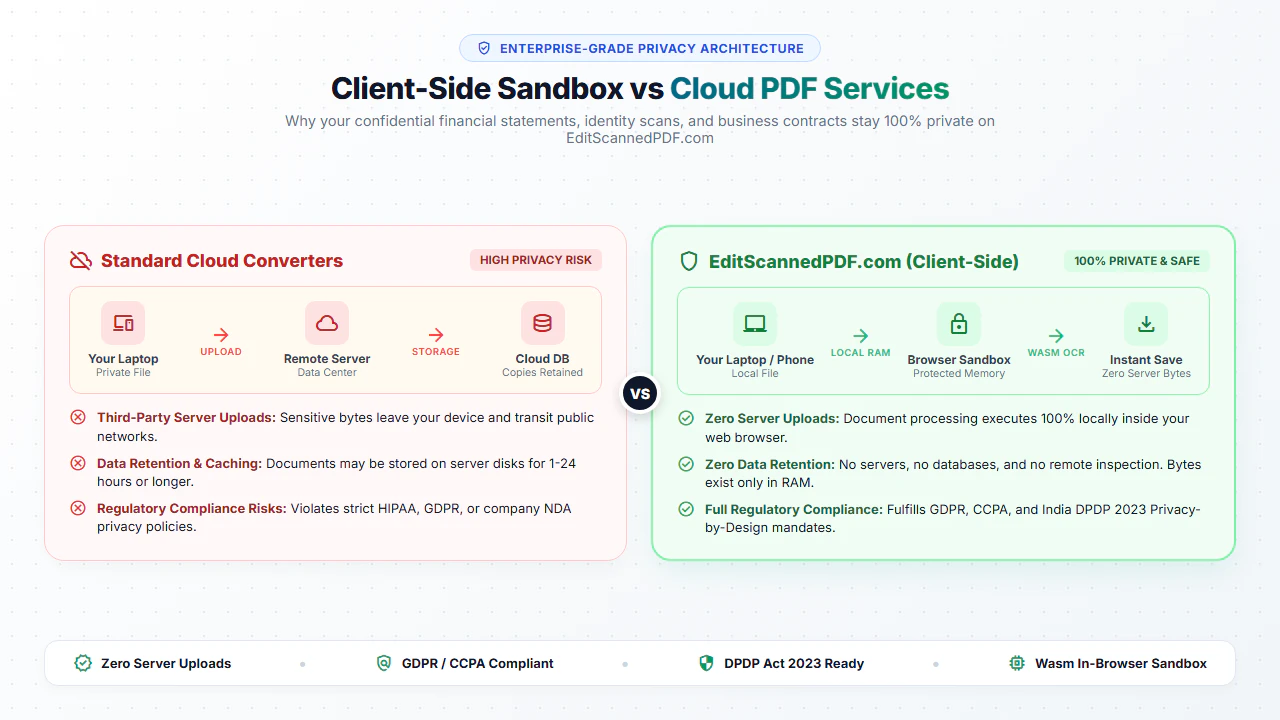
Your files never leave your computer. We process everything locally directly in your browser. We never see your PDFs, store them, or upload them to any server. 100% safe.
Smart Multi-Page Sync
Add a signature or stamp once, and apply it to every page effortlessly. Stretch, move, or modify it on one page, and watch it auto-sync across the entire document instantly.
Pro Watermarking
Add text or image watermarks with full control. Customize the exact font, size, and color. Drag and drop to reposition them perfectly anytime during your editing session.
Scanned to Searchable PDF
Instantly convert your flat image-based PDFs into fully searchable, selectable, and copyable text documents. We make searching through your scanned archives fast and perfectly accurate.
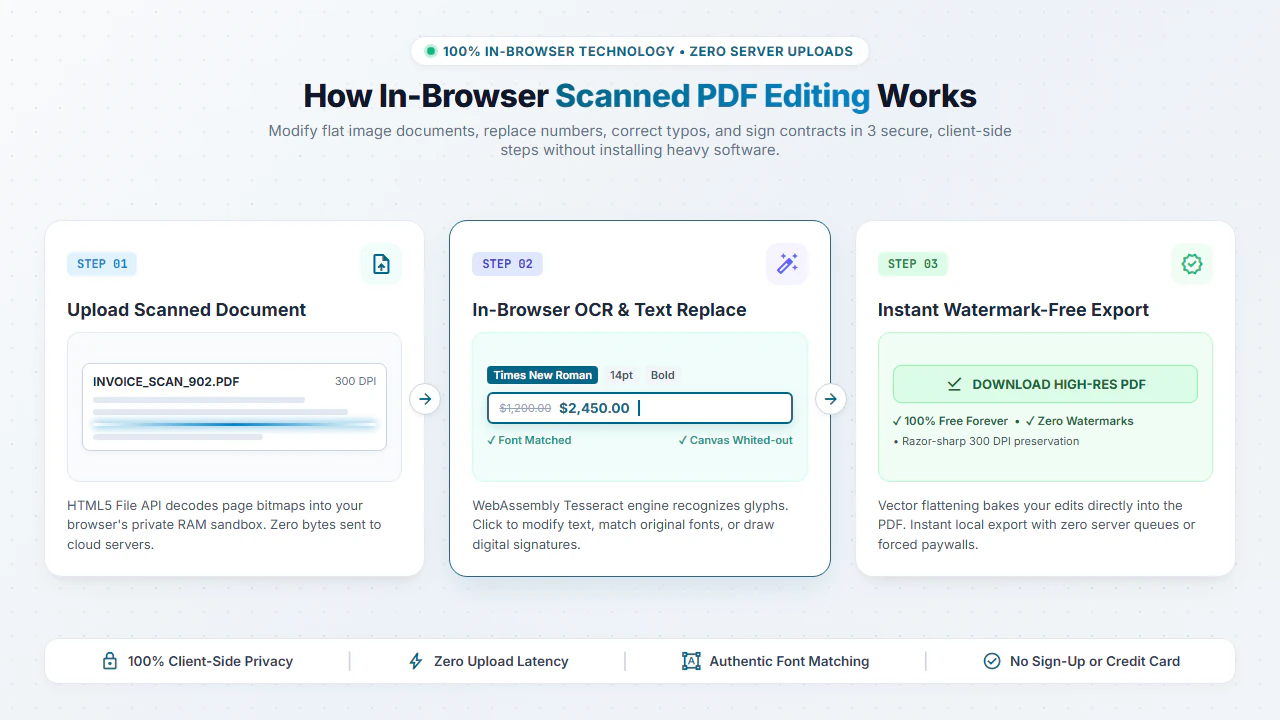
Make Searchable PDF arrow_forwardFrom upload to edited PDF in a few clear steps
The workflow is designed for people who need a fast PDF fix without installing desktop software.
Normal PDF editing vs scanned PDF editing
Normal PDF
Best when the document is generated digitally. Use it for generated invoices, reports, forms, letters, and digital documents.
Edit a normal PDFScanned PDF
Best when pages are images from a scanner or phone camera. Use scanned PDF mode when a document comes from a scanner or phone camera.
Open Online OCR PDF EditorWhy EditScannedPDF vs Other PDF Tools & Websites?
See why thousands of users choose our free in-browser WebAssembly OCR over other expensive software and online converters.
Common jobs people can finish faster
Online Scanned Document Editor for Any Paperwork
Whether you captured a document with a smartphone camera or an office flatbed scanner, our in-browser OCR engine transforms static images into living text. Modify typos, replace dates, white-out sensitive lines, and add legitimate annotations across all common scanned document formats without downloading heavy desktop software.
Invoices & Receipts
Correct misspelled vendor names, adjust dates, or fix clerical billing typos on receipts and invoices with precise typographic font matching. Edit Scanned Invoices Guide →
Bank & Financial Records
Securely black-out or white-out confidential account numbers and balance details before submitting bank statements for visa or loan verification. Redact Bank Statements Guide →
Lease & Legal Agreements
Fill in missing tenancy dates, add initial stamps, and sign rental agreements or business contracts with zero server uploads. Edit & Sign Lease Guide →
Certificates & Forms
Restore aged scanned certificates, fill W-9 tax forms, and update form fields with clean vector text overlays directly in your browser. Edit Scanned Certificates Guide →
Your Confidential PDFs Never Leave Your Browser
Unlike standard online PDF services that upload your private contracts, invoices, and bank statements to remote cloud servers, EditScannedPDF.com processes everything 100% locally on your device using WebAssembly and client-side OCR. Zero bytes are uploaded or stored on any server.
Frequently Asked Questions About Scanned PDFs
How do I edit text in a scanned PDF online free without costly software?
You can use EditScannedPDF.com, a free browser-based OCR tool. Simply upload your scanned document, let the tool process the image into selectable text, and edit it directly in your browser without downloading any expensive software.
Can I change the font and size of existing text in a scanned PDF?
Yes. Our advanced OCR engine identifies the original font and size. When you edit the scanned text, you can match the existing font style or change the size, color, and formatting to seamlessly blend with the original document.
Is it possible to make a scanned PDF searchable and selectable?
Absolutely. Using our "Scanned PDF to Searchable PDF" tool, we convert flat images into searchable documents. You can easily search (Ctrl+F), highlight, and copy text from any scanned page.
Is it safe to upload my confidential scanned documents?
Yes, 100% safe. EditScannedPDF.com processes your files locally within your web browser. Your sensitive files are never uploaded to or stored on our backend servers, ensuring absolute privacy.
How can I erase or hide text in a scanned document?
You can use our "Erase & Highlight" tool. It allows you to draw a solid white box over unwanted text or sensitive information (like an invoice number) to completely redact it before saving.
More helpful PDF pages
These editor-focused pages stay available at the bottom of the homepage and open their own dedicated page when clicked.
Edit Normal PDF
Open normal generated PDFs for generated documents and edit them in the browser.
workspace_premiumFree PDF Editor
Use a practical browser-based PDF editor with clean dummy ad spaces and no usage limits right now.
text_select_startScanned PDF Tools
Automatically detect and extract text from your scanned documents so you can easily edit, copy, and search them.
auto_fix_highScanned PDF to Editable PDF
Understand how scanned PDFs become editable with an OCR editable result and editor tools.
text_fieldsPDF Text Editor
Click existing PDF text where available or add new text boxes wherever the page needs changes.
Featured PDF Security & Editing Guides
Master scanned document editing, HIPAA privacy compliance, metadata sanitization, and optical defect restoration with our in-depth authority tutorials.
Why Can't I Edit Text in My PDF?
Understand why scanned PDFs lock text as flat images and how in-browser OCR unlocks instant text editing.
desktop_windowsEdit Scanned PDF on Windows 10 & 11 Free
Modify scanned documents directly in Edge, Chrome, or Firefox on Windows without installing heavy desktop apps.
workspace_premiumEdit Scanned Certificate PDF Safely
Fix clerical name typos, match formal serif typography, and restore scanned certificates with zero uploads.
receipt_longEdit Scanned Invoices & Receipts Online
Update billing records, enhance faded thermal receipts, and add approval stamps privately in browser RAM.
gavelEdit & Sign Scanned Lease Agreements
Complete tenancy dates, initial clauses, and apply legally binding electronic signatures to scanned leases.
shield_lockEdit Scanned PDF Without Uploading
Discover how client-side WebAssembly OCR processes confidential PDFs locally with 100% browser privacy.
branding_watermarkPut Confidential Watermark & Stamp on PDF
Add diagonal confidential marks, draft stamps, and official company logos with custom opacity in your browser.
medical_servicesRedact Medical Records for HIPAA
Permanently purge 18 PHI identifiers from medical PDFs with true vector blackouts and zero cloud exposure.
auto_fix_highClean Up Scanned PDF Documents
Eliminate dark gutter shadows, correct skewed text baselines, and whiten gray paper backgrounds.
call_splitSplit Multipage Scanned PDF Files
Decouple thick feeder scans into separate invoices, contracts, and single pages without losing OCR layers.
securitySanitize PDF Before External Distribution
Permanently strip invisible XMP metadata, truncate incremental save revisions, and flatten hidden layers.
text_snippetMake Scanned PDF Searchable with OCR
Inject an invisible searchable OCR text layer underneath scanned images for instant Ctrl+F searchability.
Start with the PDF you already have
Upload a scanned PDF for OCR editing, or choose normal PDF editing for selectable documents.
Start editing now