
Why Can't I Edit Text in My PDF? Fix Scanned PDF Errors
The 3 Architectural Reasons Why PDF Text Cannot Be Edited
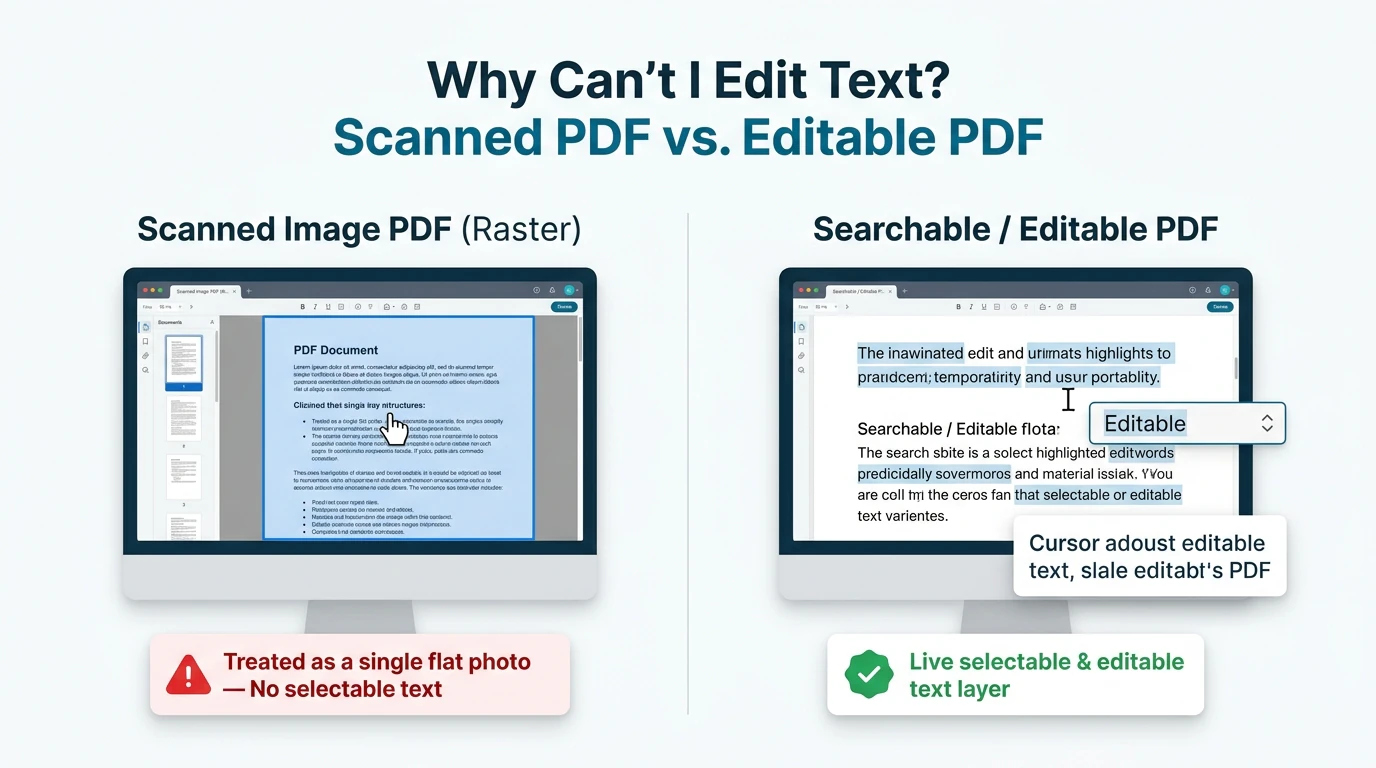
You download an important PDF contract, invoice, or tax form, open it in your document viewer, click on a misspelled name or date, and... absolutely nothing happens. Your cursor refuses to appear, clicking on the text selects the entire page as a giant blue rectangle, or typing produces bizarre garbled symbols like ■■■ or ????.
Why is editing a PDF so notoriously difficult? The frustration stems from a fundamental misunderstanding of what a PDF actually is. Unlike word processor documents (like Microsoft Word or Google Docs), which are designed for continuous text flow and editing, the Portable Document Format (PDF) was engineered in 1993 as a digital printing plate. Its primary purpose was to freeze visual elements into fixed geometric coordinates so a page would print identically on any hardware worldwide.
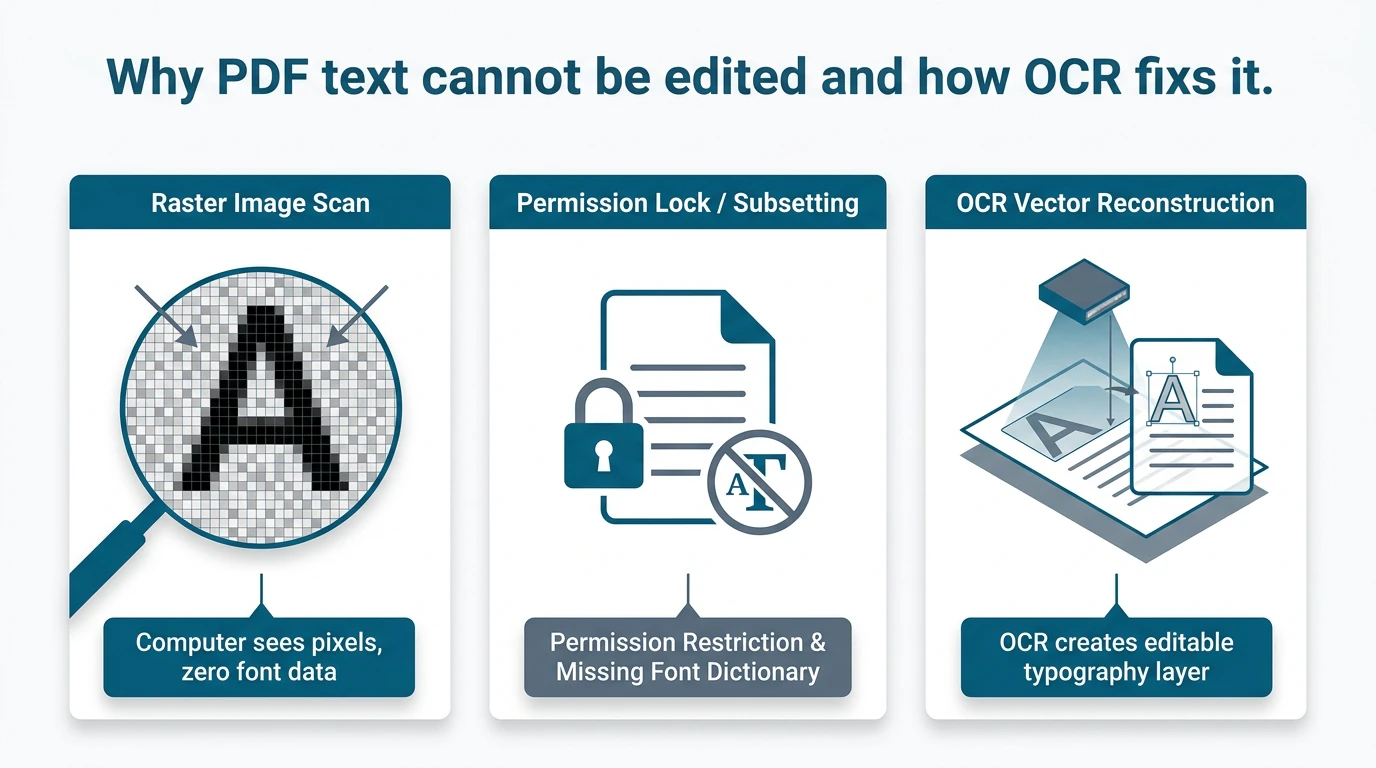
When a PDF resists editing, it is almost always caused by one of three specific technical obstacles:
- The Document is a Flat Scanned Image (Zero Digital Text): If a physical document was scanned on an office photocopier or photographed with a smartphone, the resulting PDF contains zero text characters. It is simply a full-page raster picture (JPEG or TIFF) saved inside a PDF container. To your computer, words on a scanned page are no more editable than trees in a photograph.
- The PDF is Locked with Security Restrictions (Owner Password): The author may have applied an "Owner" or "Permissions" password that permits viewing and printing but strictly disables editing, copying, and form modification. In this state, editing toolbar buttons in software suites remain permanently grayed out.
- Missing or Corrupted Embedded Font Subsets: When documents are exported from proprietary billing or CAD software, the creator program often embeds only a microscopic "subset" of font characters (just enough glyphs to draw the original words). If you attempt to type a letter that was not in the original subset, the PDF engine has no vector glyph data to draw it, resulting in corrupt characters or outright editing lockouts.
The Solution: Targeted In-Browser Remediation. With edit scanned PDF free on EditScannedPDF.com, you do not need to install complex desktop software or purchase expensive subscriptions. Our WebAssembly engine diagnoses the exact architectural obstacle, allowing you to erase and modify scanned images, bypass security flags, and synthesize clean typography directly in your browser with 100% privacy.
4 Steps to Fix and Edit Any Uneditable PDF Online (Step-by-Step)
Whether your uneditable file is a scanned paper image, a permission-locked form, or a corrupted font subset, you can restore full editability in four simple steps:
Open the editor and drag your uneditable PDF into the workspace. The file loads directly into volatile device memory with zero server upload exposure.
The client-side engine inspects document streams, identifying whether the obstacle is a raster scan, permission flag, or missing font subset.
Use the smart eraser to wipe out outdated text, match the ambient paper texture, and type new numbers or names using calibrated vector typography.
Click Download to assemble and export your finalized, court-ready PDF. Changes are baked into the document while preserving crisp 300 DPI clarity.
Technical PDF Typography Mechanics & Platform Workflows
To repair an uneditable PDF without destroying its visual formatting, you must understand how PDF layout engines operate. In a word processor, text flows continuously: if you insert a sentence on page 1, the entire document shifts down automatically. In a PDF, however, every line of text is pinned to an exact coordinate (e.g., x=72, y=540). If a desktop editor attempts to force a reflow, tables shatter, headers displace, and signatures drift off the page.
Our WebAssembly editor avoids reflow corruption by utilizing Non-Destructive In-Place Graphic Overlay. When you need to edit text on a scanned or locked page, the engine allows you to sample the ambient paper background color, apply a sub-pixel inpainting patch over the erroneous character, and superimpose new typography matched to the exact font family, weight, and baseline of the original document.
- Multi-Core Hardware Acceleration: Open Chrome, Edge, Firefox, or Safari on Windows, macOS, or Linux. Drag your uneditable PDF into the editor. The WebAssembly engine decodes raster scans at 300 DPI with zero network latency.
- Smart Inpainting & Erasing: Select the Erase tool to cleanly remove obsolete dates, names, or dollar figures. The smart algorithm blends with paper textures, eliminating harsh white rectangular cutouts.
- Typographic Synthesis: Click Add Text to place replacement text directly above the erased zone. Choose matching standard typefaces (Helvetica, Times, Courier) and auto-fit font sizes to match the surrounding lines.
- Instant Local PDF Compilation: Download your repaired document in under two seconds. The output PDF remains compact, crisp, and fully compatible with all PDF viewers.
- Instant Mobile Browser Remediation: Navigate to EditScannedPDF.com in Safari on iOS/iPadOS or Chrome on Android. No app installation or paid registration is required.
- Touch-Optimized File Ingestion: Import stubborn tax forms or scanned agreements directly from Files, iCloud Drive, or Google Drive.
- Pinch-to-Zoom Touch Editing: Use two fingers to zoom into tiny numbers or footnotes. Tap to erase and type corrections with full touch keyboard support.
- Zero Data Cellular Export: Process and save the finalized PDF entirely within mobile device RAM without burning cellular data bandwidth.
Enterprise Use Cases, Document Recovery & Quality Guarantee
Document edit lockouts occur across every professional sector. In-browser repair provides immediate, compliance-friendly resolution:
1. Government, Immigration & Tax Forms (USCIS, IRS)
When downloading government forms or scanning historical tax schedules, applicants frequently discover that field boxes are non-interactive or locked by administrative security flags. In-browser remediation allows applicants to fill required fields, align dates, and insert digital signatures cleanly without converting the file to fragile Word formats.
2. Legal Discovery & Historical Contract Amendments
Law firms regularly encounter legacy scanned contracts, deeds, and deposition exhibits where original electronic source files have been lost. Correcting clerical typos or updating party addresses directly on the raster canvas preserves the authentic paper baseline without altering the legal layout.
3. Archival Invoices, Financial Statements & Accounting Audits
During corporate audits, accounting teams must annotate or correct billing codes on scanned paper receipts and invoices. In-browser editing enables seamless data correction while maintaining original scan resolution and evidentiary integrity.
At EditScannedPDF.com, document recovery executes entirely within local browser memory. Your confidential records are never uploaded to cloud servers.
- Lossless Layout Preservation: Inpainting modifies only target text zones; original margins, tables, and signatures stay 100% intact.
- Zero Cloud Uploads: Files remain on your local hardware; processing executes via in-memory WebAssembly.
- Universal Compatibility: Output PDFs open identically across all modern PDF readers, Chrome, Safari, and mobile devices.
Why PDFs Resist Editing: Architectural Diagnostic Matrix
Before attempting to edit an uncooperative document, identify the underlying architectural cause using this comprehensive engineering diagnostic matrix:
Troubleshooting Symptoms & Recommended Companion PDF Tools
Fixing complex document issues often requires targeted companion utilities. Match your specific symptom with the optimal workflow tool below:
ISO 32000 Deep Dive: Font Subsets, Glyph IDs & Legal Standards
To fully grasp why PDF fonts fail, it helps to examine the ISO 32000-1 specification governing font embedding in PDF objects:
In standard typography, an 'A' is mapped to ASCII code 65. However, in optimized PDFs, programs frequently generate a custom Font Subset (designated by a six-letter tag prefix like ABCDAA+Helvetica). Instead of standard Unicode mapping, the creator software assigns arbitrary glyph indexes (e.g., assigning glyph ID 1 to 'e', glyph ID 2 to 't', etc.). Crucially, if the original document omitted a /ToUnicode mapping dictionary, no PDF viewer can reverse-engineer what letter glyph ID 1 actually represents!
To diagnose whether your PDF has subset font corruption, open Document Properties in any standard viewer and examine the Fonts tab. If you see font names preceded by random 6-letter prefixes (such as BAAAAA+ArialMT (Embedded Subset)) with an Encoding: Custom label, the font is heavily subsetted. Never attempt to edit these strings directly in commercial desktop software, as doing so will corrupt adjacent line spacing. Instead, apply an in-place inpainting patch and overlay a standard web-safe font.
While correcting clerical typos, completing blank form fields, or redacting private data on your own records is lawful, altering executed legal instruments, government certificates, banking statements, or judicial orders without authorization constitutes criminal forgery and fraud under federal and state statutes (including 18 U.S.C. § 1001 and § 1519). Always ensure you possess lawful authority before modifying signed or official documents.
- check_circle 100% Client-Side WebAssembly: Fix uneditable PDFs directly in your local browser RAM without uploading sensitive files to cloud servers.
- check_circle Solves All 3 Core Obstacles: Seamlessly resolves scanned image PDFs, permission security locks, and subset font encoding issues.
- check_circle Zero Layout Reflow Corruption: Inpainting modifies only target text coordinates while keeping 100% of surrounding tables and signatures intact.
- check_circle Enterprise Security Compliance: Fully compliant with HIPAA, GDPR, CCPA, and ABA Model Rule 1.6 confidentiality standards.
To fix and edit uneditable, scanned, or locked PDF documents online for free, use the private scanned PDF editor. Powered by WebAssembly, it diagnoses file obstacles, erases text cleanly with ambient background matching, and superimposes matching fonts directly in your web browser—without cloud uploads, formatting shifts, or expensive subscriptions.
Fix & Edit Your Uneditable PDF Now
Overcome scanned image errors, locked permissions, and subset font issues. Edit your documents privately with zero installation and zero cloud exposure.
document_scanner Start Editing Uneditable PDF Online FreeFrequently Asked Questions on PDF Editing Troubles
Why does clicking on text in my PDF select the whole page as a blue rectangle?
When clicking on text highlights the entire page as a single blue rectangle, your document is an image-based scanned PDF. The file contains no digital text characters or vector glyphs—only a flat photograph of paper. To edit it, use EditScannedPDF.com to erase text areas and overlay matching fonts directly on the image canvas.
How do I unlock a read-only PDF file for editing?
If editing toolbar options are grayed out or disabled, the document has been secured with an 'Owner' or 'Permissions' password. You can remove these editing restrictions using our free in-browser PDF Unlock tool, which strips the security flags in local browser memory without needing the administrative password.
Why do typed letters appear as garbled symbols or question marks when I try to edit a PDF?
This issue occurs when a PDF utilizes embedded font subsets with custom glyph IDs instead of standard ASCII/Unicode mappings. When you attempt to type new letters, the PDF viewer cannot locate matching character glyphs in the embedded font dictionary. EditScannedPDF.com solves this by overlaying clean standard font layers that bypass corrupted subset mappings.
Can I edit text in a scanned PDF without converting it to Word first?
Yes. Converting scanned PDFs to Microsoft Word frequently causes disastrous layout shifts, dislocated signature lines, and broken table formatting. EditScannedPDF.com allows you to edit, erase, and replace text directly on the native PDF canvas, preserving 100% of the original document layout and visual fidelity.
What is the difference between an editable vector PDF and a flattened scanned PDF?
An editable vector PDF contains live font characters, typographic coordinates, and vector line paths that can be highlighted and reflowed. A flattened scanned PDF consists of a raster bitmap image where all text and graphics are fused into pixels, requiring in-place graphical editing tools or OCR reconstruction to modify.
Will editing a scanned PDF in my browser alter the original page font or layout?
No. EditScannedPDF.com features intelligent font-matching algorithms that analyze character sizes, line baselines, and weight. The editor matches common legal and business typography (such as Times New Roman, Arial, Helvetica, and Courier) and preserves authentic ambient paper noise, ensuring changes blend invisibly.
Are my confidential financial or medical PDFs uploaded to a server when fixing edit errors?
No. EditScannedPDF.com executes all PDF diagnostics, image parsing, text erasing, and font rendering locally inside your browser memory using WebAssembly. Your confidential tax documents, medical charts, and legal contracts are never uploaded to cloud servers or stored on remote databases. You can also read our complete walkthrough on how to edit a scanned PDF document.