
PDF Text Editor Online Free
Modify existing PDF text, correct typos, insert new typography text boxes, and update dates or pricing in your browser. Fast, accurate, and 100% private client-side processing.
Choose a PDF file to launch the interactive text editor.
Only edit documents that you own or are legally authorized to modify. Do not use this website to alter documents for fraud, misrepresentation, identity misuse, or any illegal purpose. You are fully responsible for how you use edited documents; Edit Scanned PDF is not responsible for unlawful or unauthorized use. Read More
Helpful Guides & Tutorials
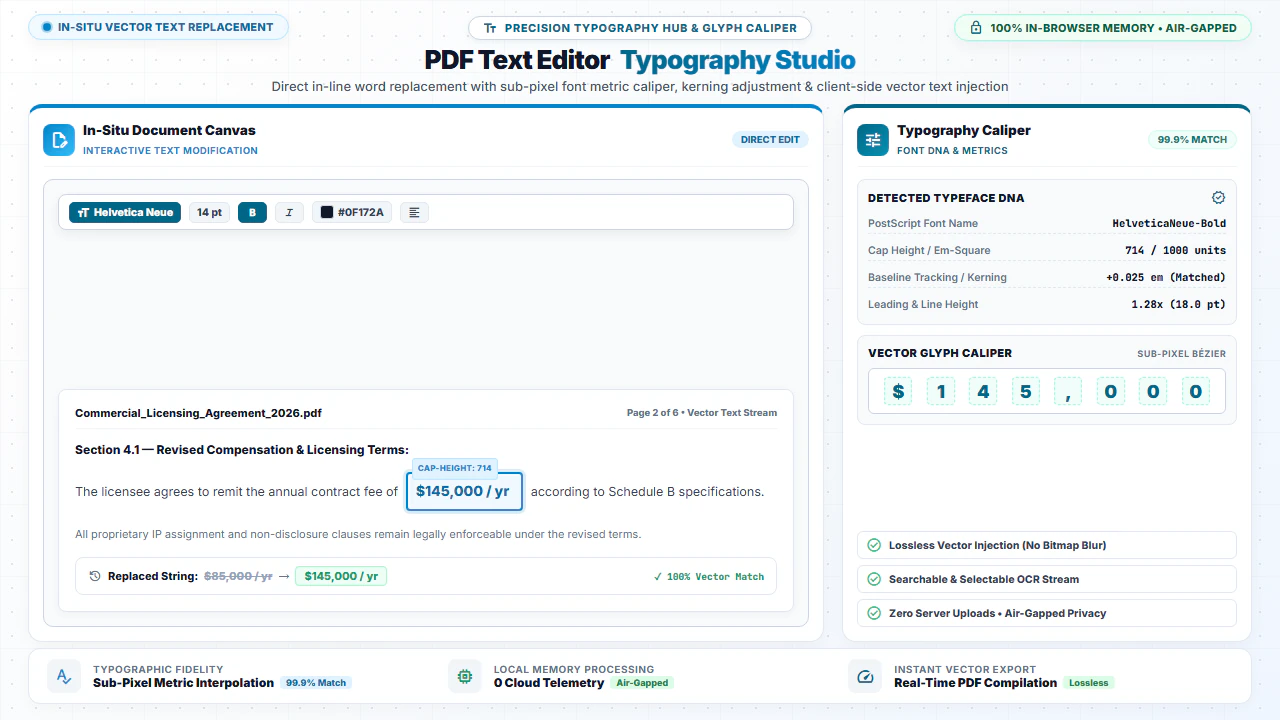
You can modify existing text blocks and type new paragraphs into PDF documents online for free using EditScannedPDF.com Text Editor. Correct spelling typos, update billing figures, and adjust line spacing with precision typeface rendering inside your local web browser with zero server uploads.
Two Powerful Approaches: Digital PDF vs Scanned PDF Text Editing
Editing text in a PDF depends on whether your document is digitally generated or a scanned photo of paper:
- Digital Native PDFs: These files contain selectable vector text streams. Our editor enables direct text manipulation, font matching, and inline typing.
- Scanned Document PDFs: These files are flat images. Our WebAssembly OCR engine scans the image, recognizes character geometry, and superimposes live editable text boxes exactly where the words appear.
Comprehensive Text Editing Capabilities
Click & Type Text Boxes
Place new text boxes anywhere on the document canvas to fill out forms, add notes, or insert clauses.
Font & Style Matching
Choose font families (Helvetica, Times, Courier), font sizes, custom hex colors, bold, and italics.
Erase & Replace Workflow
Whiteout outdated sentences, incorrect serial numbers, or obsolete pricing and type new text seamlessly.
Batch Find & Replace
Search words across all pages and replace names, addresses, or reference codes simultaneously.
Step-by-Step: How to Edit Text in Any PDF
- Step 1: Open Your PDF: Click Choose PDF or drag your document into the editor workspace.
- Step 2: Position Text: Click anywhere on the page to insert a new text box or click detected OCR text.
- Step 3: Format Typography: Adjust font family, font size, bold/italic, color, and alignment.
- Step 4: Download PDF: Click Download PDF to save your text modifications.
- Step 1: Tap to Select: Tap Choose PDF to select your document scan from your mobile device.
- Step 2: Tap to Type: Tap the spot where you need to enter text or update a number.
- Step 3: Adjust Font: Select font size and styling from the mobile formatting bar.
- Step 4: Save File: Tap Download PDF to save the updated document to your phone.
Everyday Scenarios for Online PDF Text Editing
Updating Job Resumes & CVs
Update employment dates, add new certifications, and polish job titles without needing original Word files.
Correcting Vendor Invoices
Fix typographical errors in billing addresses, line-item totals, and purchase order reference codes.
Filling Flattened Application Forms
Type clean digital text into non-fillable government forms, insurance applications, and school registrations.
Legal Agreement Amendments
Correct party names, effective dates, and monetary figures on scanned or digital contract addendums.
100% Client-Side Privacy: No Cloud Uploads
Financial invoices, legal contracts, and personal resumes contain sensitive data. Uploading them to cloud converters introduces severe privacy and compliance risks.
EditScannedPDF.com performs all font rendering and text manipulation 100% locally in your web browser. Your documents are never uploaded to any remote server.
Comparison: EditScannedPDF vs. Traditional Cloud Tools
Understanding how our in-browser WebAssembly architecture protects your sensitive documents compared to legacy cloud PDF converters:
Enterprise-Grade In-Browser Security Architecture
When working with sensitive contracts, financial spreadsheets, medical records, or identity credentials, uploading files to third-party web servers introduces major cybersecurity risks. EditScannedPDF solves this fundamental vulnerability by executing all PDF compilation, vector synthesis, and cryptographic operations directly inside your device's browser memory using WebAssembly.
Your documents never travel across the internet, are never indexed on remote hard drives, and leave zero data footprint behind once you close your browser tab. Experience complete operational privacy built from the ground up to satisfy modern corporate security protocols.
Frequently Asked Questions (FAQ)
Can I edit existing text in a PDF without converting it to Word?
Yes! For digital PDFs with selectable text, you can directly click on text blocks to change words, spelling, dates, or prices. For scanned PDFs, our OCR engine automatically detects text and generates live editable text blocks over the page.
Can I change font styles, sizes, and colors when typing new text?
Yes. You can customize font family (Helvetica, Times, Courier), font size (8pt to 72pt), text color (RGB palette), bold, italic, and text alignment.
Can I whiteout old text before typing new content over it?
Yes! Use the Erase / Whiteout tool to cover existing unwanted text or obsolete prices with a clean vector box, then type your new text directly over it.
Is my document private and secure while editing text?
Yes, 100% private. All text editing and font rendering occur strictly within your web browser's local memory. Your documents are never uploaded to any remote server.