
How to Add Confidential Watermark to Scanned PDFs Free
The Security Role of Watermarks in Scanned PDF Workflows
In modern corporate finance, legal discovery, and executive administration, distributing unwatermarked scanned documents is a severe operational risk. Scanned PDFs—whether containing non-public financial audits, unreleased patent schematics, patient health records, or commercial merger terms—can be illicitly leaked, forwarded to competitors, or altered without leaving an immediate visual paper trail.
A watermark is not merely a cosmetic stamp. It serves as an indispensable primary line of defense in information governance:
- Psychological Deterrence Against Leaks: When an executive, external auditor, or opposing counsel sees a bold, semi-transparent "CONFIDENTIAL - RESTRICTED DISTRIBUTION" banner stretching diagonally across every page, the likelihood of unauthorized photocopying, social media sharing, or forwarding drops dramatically.
- Evidentiary Notice of Ownership & Trade Secret Protection: Under the federal Defend Trade Secrets Act (DTSA) and the Uniform Trade Secrets Act (UTSA), maintaining legal trade secret protection requires companies to take "reasonable measures" to keep the information secret. Stamping documents with clear confidentiality markings provides explicit evidentiary proof that the recipient was placed on formal notice of the document's proprietary nature.
- Lifecycle & Version Governance: Stamping working files with "DRAFT - FOR INTERNAL REVIEW ONLY" or "PRELIMINARY WORK PRODUCT" prevents unapproved revisions or preliminary balance sheets from being mistakenly executed as binding final contracts.
The Privacy Dilemma with Conventional Online Tools: Most free watermarking websites require you to upload your sensitive corporate files to unknown cloud servers. For corporate counsel, compliance officers, and healthcare providers, uploading confidential filings to cloud servers violates HIPAA, GDPR, and non-disclosure agreements. With EditScannedPDF.com (scanned document editor), watermarking takes place 100% inside your local web browser using WebAssembly. Your proprietary files never cross the internet or leave your machine.
4 Steps to Add a Confidential Watermark Online (Step-by-Step)
You do not need to purchase expensive commercial desktop software or install unvetted utilities to brand your files. With EditScannedPDF Watermark Tool, you can securely stamp any scanned or native PDF in four simple steps:
Open the Watermark tool and drag your scanned document into the workspace. The file is parsed inside browser RAM via WebAssembly with zero server transit.
Type custom confidentiality text (e.g., CONFIDENTIAL, DRAFT, COPY) or upload an authentic corporate seal, logo, or verification stamp.
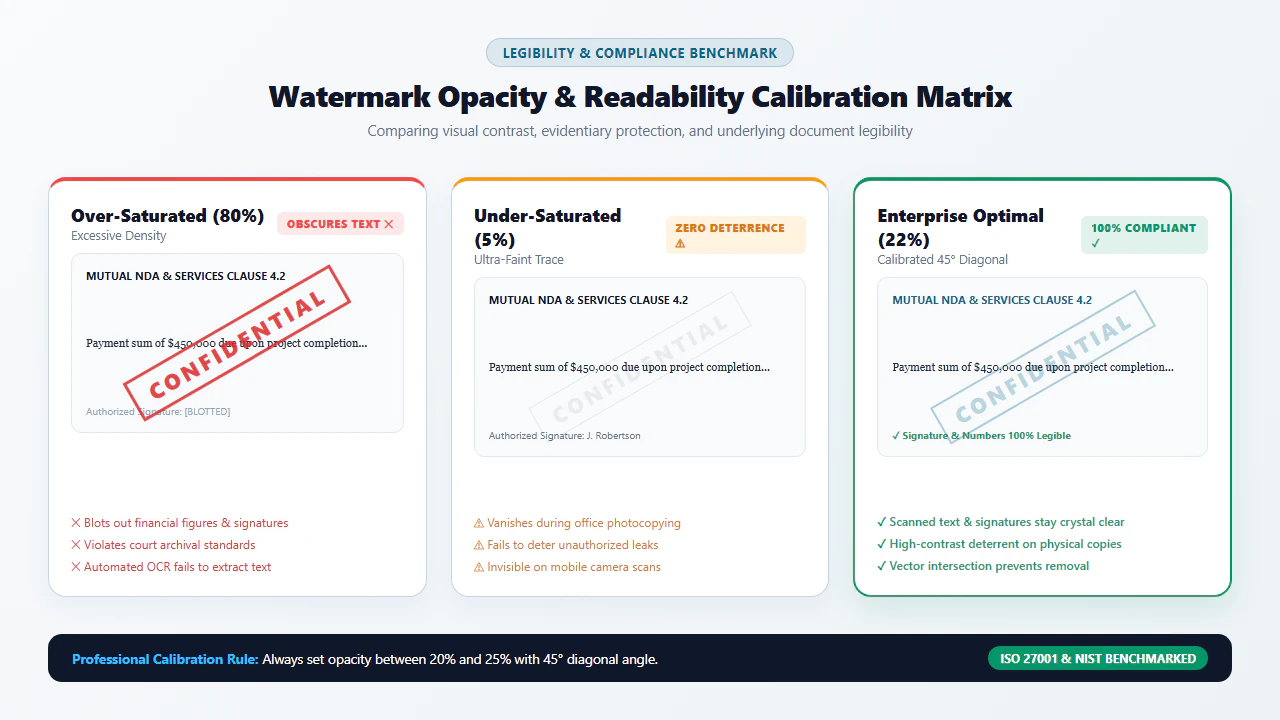
Adjust the diagonal rotation angle (standard 45°) and fine-tune alpha opacity to 15-25% to ensure underlying scan text remains crisp and readable.
Click Download to bake the watermark directly into the document content stream across all pages. The output PDF remains lean and tamper-evident.
Technical Watermarking Mechanics & Platform Workflows
A watermark in a scanned document behaves fundamentally differently from a watermark in a word processor. In a scanned PDF, the entire page is an opaque or semi-transparent raster bitmap. If you place an opaque text banner on top of a scanned invoice or contract, you will obliterate vital signatures and clause text. Conversely, if you place the watermark "behind" the opaque scanned background image, the watermark will be completely hidden from view!
To solve this conundrum, our WebAssembly graphics pipeline utilizes Alpha Channel Transparency Blending (Extended Graphic State /ExtGState). The engine injects a semi-transparent Form XObject layer with calibrated non-stroking alpha values (/ca 0.20), allowing the watermark glyphs to visually overlay the scanned document while allowing 80% of the underlying paper pixels, signatures, and printed text to shine through with razor-sharp contrast.
- High-Resolution Multi-Page Ingestion: Launch Google Chrome, Mozilla Firefox, Microsoft Edge, or Apple Safari on Windows, macOS, or Linux. Drag your contract or scanned exhibit bundle into the editor. The document renders at 300 DPI across all pages.
- Interactive Watermark Placement & Rotation: Enter your custom text (e.g., "CONFIDENTIAL - PROPERTY OF ACME CORP") or upload a corporate PNG seal. Use the precision angle slider to set a 45-degree diagonal layout across the optical center of the page.
- Sub-Pixel Alpha Opacity Calibration: Adjust opacity to 18-22% using the live preview canvas. Verify that fine print footnotes, tabular numbers, and signatures remain 100% legible beneath the watermark glyphs.
- Batch In-Memory Graphics Baking & Export: Apply the watermark across all pages simultaneously. The WebAssembly pipeline integrates the Form XObject into each page's content stream in under a second with zero cloud latency.
- Zero-Download Mobile Browser Access: Open EditScannedPDF.com in Safari on iOS/iPadOS or Chrome on Android. No app installation or account registration is required.
- Touch-Optimized Document Selection: Tap the upload target to select your PDF form or document directly from the Files app, Google Drive, or local storage.
- Touch Gestures & Preset Stamps: Select quick pre-configured stamps like 'CONFIDENTIAL' or 'DRAFT'. Use touch-friendly sliders to calibrate transparency and angle with instant visual feedback.
- Client-Side RAM Rendering & Instant Share: Process the document locally without mobile data upload fees. Save the watermarked PDF directly to your device or dispatch it securely via email or messaging apps.
Enterprise Use Cases, Trade Secret Governance & Privacy Guarantee
Watermarking is a fundamental pillar of corporate and legal risk mitigation. Across high-stakes business environments, standardized watermarking protocols prevent catastrophic information leaks:
1. Corporate Mergers & Acquisitions (M&A) Virtual Data Rooms
During financial due diligence, prospective acquirers, investment bankers, and legal auditors examine proprietary financial audits, customer churn metrics, and intellectual property portfolios. Applying individualized recipient watermarks (such as "CONFIDENTIAL - PREPARED FOR PROJECT TITAN - DO NOT COPY") ensures that if any page is photographed or exfiltrated, the exact recipient can be instantly identified.
2. Legal Discovery & Protective Orders ("Attorneys' Eyes Only")
In high-stakes commercial litigation, court protective orders strictly regulate how proprietary trade secrets are exchanged between opposing counsel. Watermarking exhibits with "HIGHLY CONFIDENTIAL - ATTORNEYS' EYES ONLY PURSUANT TO PROTECTIVE ORDER" is legally required to avoid contempt of court and preserve evidentiary privilege.
3. Intellectual Property, Engineering Blueprints & Product Schematics
Before releasing architectural blueprints or manufacturing schematics to third-party fabrication vendors, engineering teams apply diagonal watermark stamps. This prevents contractors from claiming that technical drawings were distributed as public domain materials.
At EditScannedPDF.com, your confidential corporate data never touches a cloud server. All watermarking operations are executed directly within your device's browser memory.
- Zero Cloud Uploads: Files remain on your local hardware; processing executes via in-memory WebAssembly.
- Strict Regulatory Compliance: Fully aligned with HIPAA privacy rules, GDPR Article 25, and corporate NDA mandates.
- Irreversible Graphic Fusion: Watermarks are baked into the PDF content stream, resisting superficial annotation stripping.
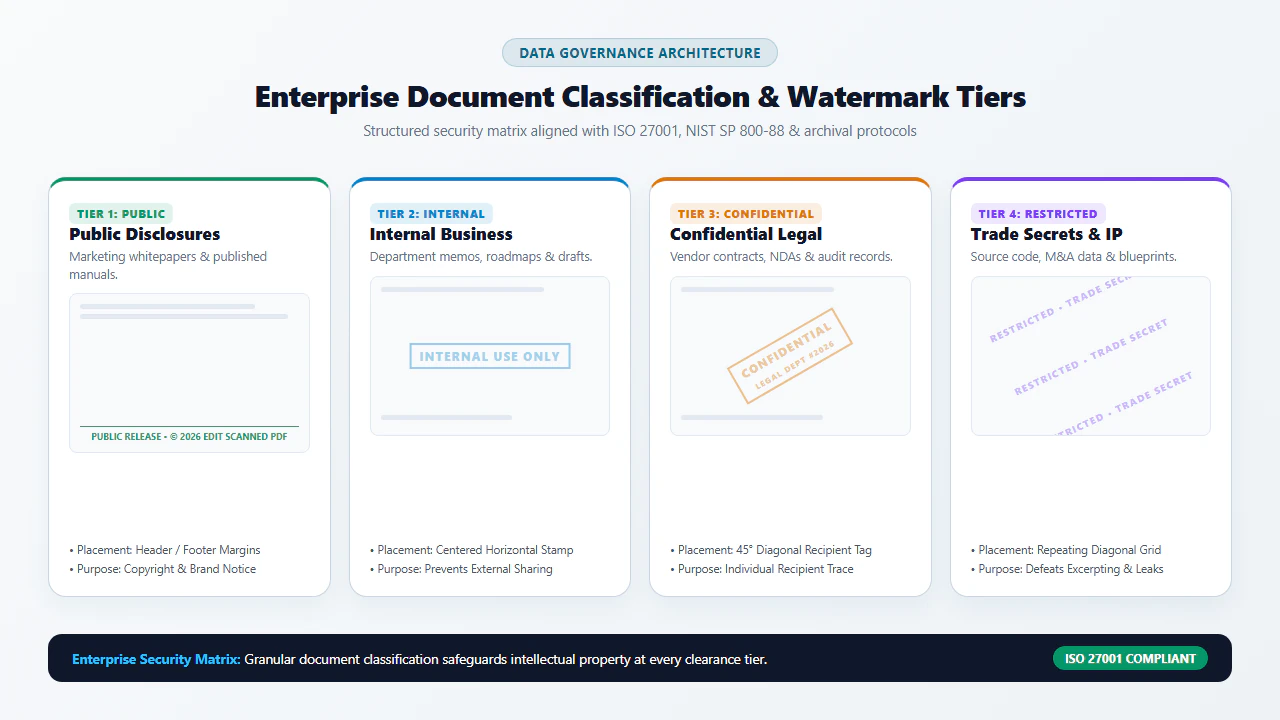
Watermark Security & Implementation Technologies Comparison Matrix
Not all methods of watermarking a PDF provide equal legal protection or data security. Below is an engineering comparison of four common approaches:
Calibration Guidelines & Recommended Companion Tools
To ensure that your watermarked PDF achieves maximum security without impairing legal or operational usability, adhere to these professional calibration guidelines:
- The 15% to 25% Opacity Rule: Opacity higher than 30% begins to obscure fine handwriting, numeric decimal points, and small footnote text. Opacity below 10% may be lost when the document is photocopied or viewed on lower-contrast laptop screens. Aim for 18% to 22% for the perfect balance.
- The 45-Degree Diagonal Standard: Diagonal placement from the bottom-left to top-right corner intersects multiple lines of content, making it mathematically impossible for bad actors to crop out the watermark without cutting through substantive text.
- All-Page vs. Targeted Stamping: For legal discovery bundles, apply the watermark uniformly across every page. For finalized contracts, you may choose to stamp only exhibit attachments while leaving the signature execution block uncluttered.
ISO 32000 Deep Dive: Alpha Blending, Form XObjects & Anti-Tampering Standards
To understand why cheap watermarking tools fail, it is essential to understand the underlying graphics specifications outlined in ISO 32000-1:
In standard PDF viewers, watermarks are frequently created as /Subtype /Watermark annotation objects in the page's /Annots array. Because annotations are merely independent metadata tags floating above the page content, any recipient who opens the file in a standard PDF editor can simply click on the watermark, press the Delete key on their keyboard, and export a clean, unwatermarked document in three seconds!
EditScannedPDF.com eliminates this catastrophic vulnerability through structural Form XObject injection:
- Extended Graphic State Injection: The engine defines an
/ExtGStateresource with an explicit alpha constant (e.g.,/CA 0.20 /ca 0.20). This instructs the rendering engine to apply transparent alpha composition rather than opaque overprinting. - Form XObject Content Stream Fusion: The watermark text or image is compiled into an independent self-contained Form XObject stream (
/Type /XObject /Subtype /Form). The page's primary/Contentsstream is then modified to call the graphics operatorDo, binding the watermark permanently to the underlying raster graphics. - Anti-Tampering Immutability: Because the watermark is embedded directly within the content stream rather than an annotation layer, standard annotation removal tools cannot detect or delete it. The watermark behaves like physical ink stamped onto paper, ensuring true evidentiary permanence.
When watermarking scanned documents that will subsequently undergo automated OCR (Optical Character Recognition) indexing or search extraction, always maintain an alpha opacity between 15% and 20% using light gray (#888888) or soft red (#dc2626) tones. High-contrast opaque watermarks create character segmentation errors in OCR neural networks by bridging adjacent glyphs. A properly calibrated 18% alpha watermark provides 100% human visibility while remaining completely transparent to algorithmic OCR thresholding.
Under the federal Defend Trade Secrets Act of 2016 (18 U.S.C. § 1836) and state Uniform Trade Secrets Acts, the legal definition of a protectable trade secret hinges on whether the owner took "reasonable measures under the circumstances" to maintain secrecy. Failing to watermark proprietary schematics, client lists, or financial projections before sharing them with outside vendors or prospective investors can result in a court finding that trade secret protection was forfeited. Explicit confidentiality watermarks serve as critical courtroom evidence establishing intent and statutory compliance.
- check_circle 100% Client-Side WebAssembly: Watermark confidential PDFs directly in your local browser RAM without uploading sensitive files to cloud servers.
- check_circle Precision Alpha Blending: 15-25% opacity ensures clear confidentiality notice while preserving 100% legibility of underlying text and numbers.
- check_circle Content Stream Baking: Fuses watermark Form XObjects directly into page graphics, preventing superficial annotation deletion.
- check_circle Enterprise Compliance: Satisfies trade secret protection standards (DTSA/UTSA), legal discovery orders, and strict corporate NDAs.
To add confidential watermarks, draft stamps, or corporate seals to scanned PDF documents online for free, use the private EditScannedPDF Watermark Tool. It fuses semi-transparent text or image overlays directly into the document content stream inside your web browser—preventing data leaks, establishing trade secret protection, and keeping your confidential files 100% private.
Watermark Your Scanned PDF Documents Now
Protect your proprietary files from unauthorized leaks and maintain enterprise compliance. Apply custom watermarks privately with zero installation and zero cloud exposure.
security Start Watermarking PDF Online FreeFrequently Asked Questions About Watermarking Scanned PDFs
How to put a confidential watermark on PDF documents online free?
To put a confidential watermark on your PDF online for free, open the EditScannedPDF Watermark Tool in any web browser. Drag and drop your scanned or digital document into the workspace, type your desired text (such as CONFIDENTIAL, DRAFT, or DO NOT COPY), adjust opacity and rotation angle, and click Download. The watermark is rendered directly in your browser without uploading files to external servers.
How do I add a draft stamp or official document stamp to a PDF?
You can apply an official stamp by selecting the Watermark or Stamp tool on EditScannedPDF.com. Choose from pre-configured legal stamps like DRAFT, APPROVED, FINAL, or COPY, or upload your corporate seal or PNG signature. Position the stamp in the desired margin or header area, calibrate transparency to preserve underlying text readability, and apply across selected or all pages.
Can someone easily remove a watermark applied by EditScannedPDF.com?
No. Unlike standard PDF viewers that place watermarks as superficial annotation layers (which can be selected and deleted with a single click), EditScannedPDF.com burns the watermark directly into the underlying document graphics stream using Form XObjects and alpha transparency blending. Once flattened, the watermark becomes an integral part of the page pixels and cannot be trivially stripped.
Will adding a confidential watermark make the scanned text blurry or illegible?
Not when properly calibrated. EditScannedPDF.com provides precision opacity controls (recommended between 15% and 25%) and semi-transparent alpha blending. This ensures the watermark remains clearly visible as an anti-leak deterrent while maintaining 100% optical legibility and OCR scan accuracy for all underlying text and numbers.
Is a watermarked document legally valid in commercial and legal transactions?
Yes. Watermarking documents with terms such as 'CONFIDENTIAL', 'ATTORNEYS' EYES ONLY', or 'PRELIMINARY DRAFT' is standard practice in legal discovery, merger negotiations, and government filings. Under the federal Defend Trade Secrets Act (DTSA) and evidentiary rules, watermarks establish explicit legal notice of confidentiality and document provenance.
Can I apply a confidential watermark across all pages simultaneously?
Yes. EditScannedPDF.com features batch page watermarking. You can choose to stamp every page in a multi-hundred-page contract or discovery archive with identical angle, position, font, and opacity settings in a single operation, or target specific individual exhibit pages as needed.
Are my confidential corporate documents uploaded to external cloud servers during watermarking?
No. EditScannedPDF.com operates completely client-side using WebAssembly and HTML5 Canvas technology. Your document is processed entirely inside your local device RAM. Your confidential financial reports, trade secret schematics, and legal filings are never transmitted over the internet or saved to third-party databases.