
How to Sanitize a PDF Document Before Sending: Strip Metadata, Revision History & Hidden Layers
The Invisible Threat: Why Unsanitized PDFs Cause Catastrophic Leaks
In high-stakes corporate transactions, legal discovery, medical record exchange, and government contracting, sharing electronic PDF documents is routine. However, distributing an unsanitized PDF is the computational equivalent of handing opposing counsel or commercial adversaries an open window into your internal corporate history. Behind the clean, static visual page rendered on your screen lies an intricate binary architecture that quietly catalogs author identities, local network server paths, deleted draft clauses, and sensitive financial formulas. With our scan PDF editor, everything runs locally in your browser with zero file uploads.
Modern legal and corporate history is filled with catastrophic data breaches resulting from distributing unscrubbed PDF files: For deeper troubleshooting, see our guide on add a confidential watermark to scanned PDFs.
- Superficial Black Box "Redactions": Major federal investigative agencies and law firms have published court filings with black rectangles drawn over confidential testimony. Because the underlying text stream was never sanitized, investigative journalists simply pressed
Ctrl+A, copied the entire page to their clipboard, and pasted the classified secrets into plain text editors. - Incremental Save Data Exposure: In corporate mergers and acquisitions, negotiating teams have sent counter-offers in PDF format, unaware that their word-processing software appended the entire revision history to the end of the file. The recipient used forensic analysis to extract earlier internal valuation ranges and maximum concessions.
- Metadata Intelligence Leaks: Anonymous whistleblower submissions, public interest exposés, and corporate leaks have repeatedly unmasked sources because embedded Extensible Metadata Platform (XMP) schemas preserved the author's real full name, corporate workstation ID, and embedded printer serial numbers.
The Solution: True Client-Side Binary Sanitization. With EditScannedPDF Sanitizer, document security goes far beyond superficial cosmetic masking. Our browser-based WebAssembly engine scours the internal PDF object tree, excising Document Information dictionaries, collapsing incremental save streams, stripping camera EXIF tags, and destroying hidden OCR text layers. Processing executes entirely inside your browser memory—ensuring your sensitive data is completely sterilized with 100% privacy and zero cloud server exposure.
4 Steps to Sanitize Any PDF Document Online Before Sending
Sanitizing a sensitive document before emailing, uploading to court portals, or publishing publicly requires under a minute. Follow this streamlined workflow:
Open Erase & Highlight PDF and drag your document into the browser. The file loads directly into local browser sandbox memory via WebAssembly with zero server transit.
Activate automated sanitization to purge author names, creation timestamps, local network file paths, printer metadata, and prior revision history trees.
Use the precision eraser or marquee blackout tool to permanently excise Social Security numbers, bank balances, or patient names. Our engine executes bilinear pixel inpainting.
Click "Export Sanitized PDF". The engine compiles a clean, non-incremental byte stream with all ghost layers, OCR streams, and orphaned attachments permanently purged.
Technical Anatomy: The 4 Hidden Data Vectors Lurking Inside PDFs
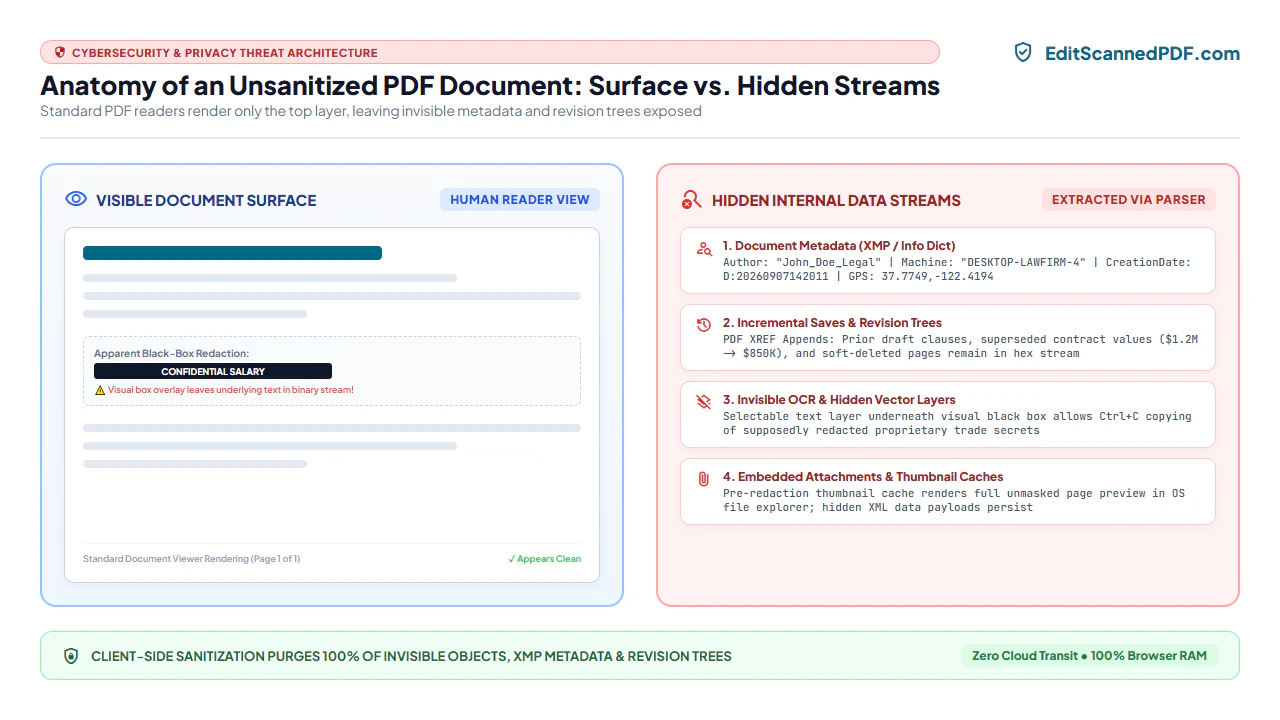
To safely sanitize a document, one must understand what standard PDF viewers hide from visual inspection. A standard PDF container houses four distinct hidden data vectors:
1. Document Information Dictionary & Extensible Metadata Platform (XMP)
Every PDF file incorporates two distinct metadata catalogs: the legacy Document Information Dictionary (located at the trailer dictionary under the /Info key) and modern XML-based Extensible Metadata Platform (XMP) streams (under the /Metadata key). These catalogs routinely store:
- The author's operating system username and internal company email address.
- Absolute local file paths (e.g.,
\CORP-FILESERVERLegalAcquisitionsProjectTitanDraftContract.docx). - Exact software versions and operating system build numbers.
- Camera EXIF metadata (including smartphone GPS longitude and latitude coordinates where photos were captured).
2. Incremental Saves & Revision History Trees
The PDF specification (ISO 32000-1) supports a performance feature known as Incremental Updates. When a user deletes a paragraph or replaces an image in standard desktop software and clicks "Save", the software does not rewrite the file. Instead, it appends a new cross-reference (xref) table and updated objects to the end of the file.
The previous draft—including supposedly deleted trade secrets, settlement figures, and internal comments—remains 100% intact inside the earlier byte segments of the file. Anyone equipped with a hex viewer or PDF parser can roll back the file to its earlier revision state in seconds.
3. Invisible OCR Text Layers & Transparent Graphic Paths
When a document is scanned and processed with Optical Character Recognition, software creates an invisible vector text layer positioned directly over the scanned image. If a user subsequently applies a black marker or opaque shape over a Social Security number, they have only obscured the visible raster picture. The underlying invisible OCR text stream remains active and searchable beneath the black box, permitting instant copy-pasting by any recipient.
4. Pre-Redaction Thumbnail Caches & Orphaned Attachments
PDF files frequently contain embedded low-resolution thumbnail images (/Thumb keys) used by sidebar navigation panels. Many desktop tools sanitize the primary high-resolution page canvas but fail to update the thumbnail cache. A zoomed-in inspection of the thumbnail dictionary often reveals the original, unredacted text prior to editing.
- High-Throughput Local Ingestion: In Chrome, Edge, Firefox, or Safari on Windows, Mac, or Linux, navigate to Erase & Highlight PDF. Drag multi-page contracts or litigation binders directly into the browser.
- Deep Object Tree Inspection: Leverage desktop screen real estate to inspect headers, footers, and marginalia. Open browser developer tools to verify that zero network packets leave your computer during sanitization.
- Precision Marquee Blackout: Use mouse crosshairs to draw pixel-accurate redaction rectangles across financial figures, SSNs, or addresses. The engine destroys both visible pixels and underlying text streams.
- Clean Stream Binary Rebuilding: Export the finalized PDF. The WebAssembly engine rewrites the entire file from byte offset 0, ensuring that earlier incremental revision trees are completely eradicated.
- Zero-Install Mobile Browser Sanitization: Access EditScannedPDF.com instantly in mobile Safari on iOS or Chrome on Android without downloading native apps or creating accounts.
- Direct Camera & Cloud Drive Ingestion: Select scanned PDF documents directly from the iOS Files app, iCloud Drive, Google Drive, or email attachments.
- Touch-Based Pixel Scrubbing: Use pinch-to-zoom gestures to zoom in on sensitive lines. Swipe with your fingertip or stylus to erase confidential account numbers or medical diagnosis codes.
- Cellular-Bandwidth-Friendly Export: Because processing executes 100% on your smartphone's internal processor via WebAssembly, your confidential files are never uploaded over cellular data connections.
Enterprise Compliance Scenarios & Zero-Data-Leak Guarantee
PDF sanitization is a mandatory statutory and ethical requirement across high-risk professional sectors:
1. Legal E-Discovery & Mandatory Court Redactions (FRCP 5.2)
Under Federal Rule of Civil Procedure 5.2 and state court e-filing mandates, litigators face severe sanctions if publicly filed documents expose Social Security numbers, dates of birth, financial account numbers, or minor child names. Sanitizing documents prior to CM/ECF submission permanently strips invisible text vectors and metadata, shielding law firms from ethical grievances under ABA Model Rule 1.6.
2. Corporate Mergers, Acquisitions & Procurement Bidding
During commercial negotiations, sharing PDF drafts without sanitizing revision histories allows opposing deal teams to inspect previous valuation limits, strike-through clauses, and internal markup notes. True binary rebuilding ensures that only the final agreed terms are communicated, protecting proprietary trade secrets.
3. Healthcare Records, Clinical Research & HIPAA Safe Harbor
Healthcare organizations sharing patient records for clinical trials or insurance claims must satisfy the HIPAA Safe Harbor De-Identification standard (45 CFR § 164.514) by purging 18 distinct personal identifiers. Client-side browser sanitization ensures PHI is stripped locally without violating HIPAA Security Rules through cloud data transmission.
At EditScannedPDF.com, your proprietary legal, financial, and medical documents never touch remote cloud servers or third-party databases.
- Complete Stream Sterilization: All XMP schemas, author dictionaries, and historical revision objects are permanently excised.
- Destructive Pixel Inpainting: Redacted text and figures are permanently deleted from the bitmap canvas; no hidden text vectors survive.
- Zero Cloud Uploads: WebAssembly processes all byte operations locally inside your browser's isolated memory sandbox.
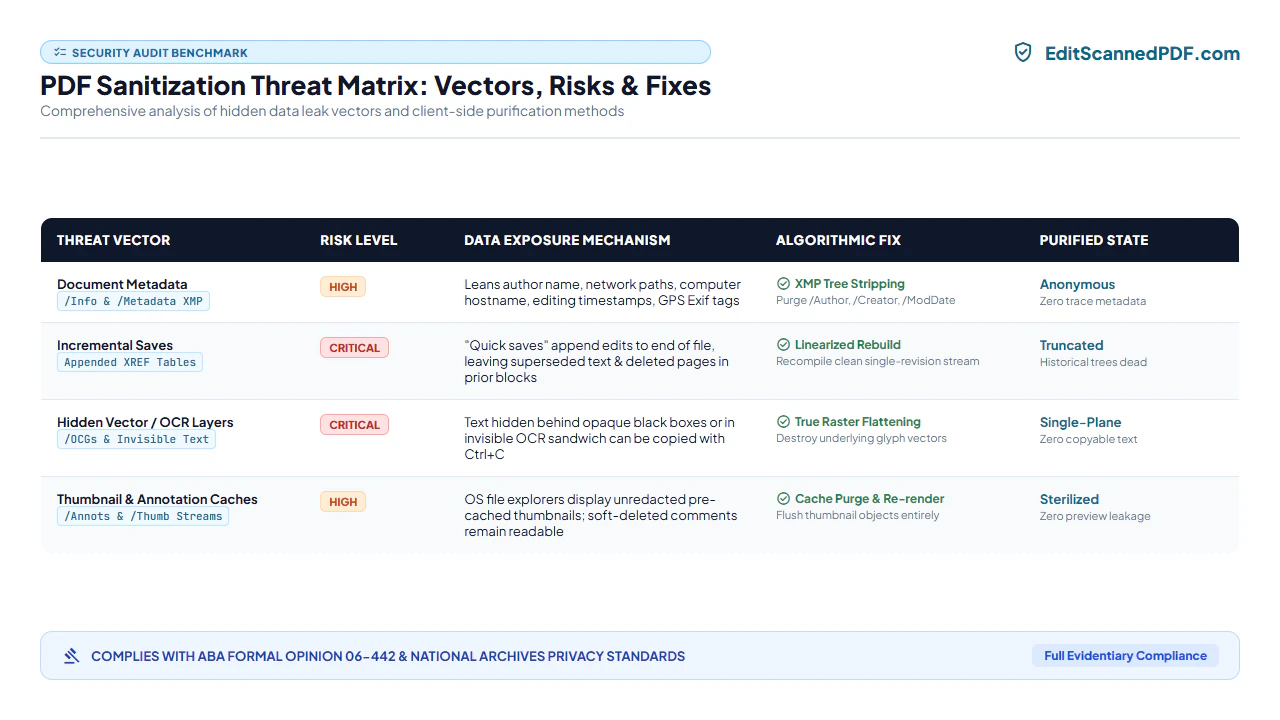
Threat Remediation Matrix: Visual Masking vs. True Binary Sanitization
Review how different document preparation methods defend against common forensic discovery techniques:
| Security Threat Vector | Cosmetic Visual Masking (Black Shapes) | Standard "Print to PDF" Re-Export | EditScannedPDF Binary Sanitization |
|---|---|---|---|
| Clipboard Copy-Paste Attack | ❌ Vulnerable (underlying text copied easily) | ⚠️ Partially effective (OCR may survive) | ✅ 100% Secure (underlying text destroyed) |
| Document Author & Path Metadata | ❌ Retained in full (XMP & Info intact) | ⚠️ Replaced with print driver metadata | ✅ 100% Cleared (metadata dictionaries purged) |
| Incremental Save Revision Recovery | ❌ Fully recoverable via hex inspection | ✅ Eliminated during print spooling | ✅ 100% Eliminated (clean stream rebuild) |
| Hidden OCR Text Layer Leakage | ❌ Inactive masking (OCR layer remains) | ⚠️ Inconsistent depending on printer driver | ✅ 100% Scrubbed (raster canvas flattened) |
| Visual Resolution Preservation | Maintains original resolution | ❌ Degrades resolution, introduces blurriness | ✅ Lossless 300 DPI preservation |
| Client-Side Cloud Privacy | Dependent on desktop software | Local printer execution | ✅ 100% In-Browser WebAssembly Sandbox |
Recommended Companion PDF Tools for Document Security
Sanitizing a document before external transmission is part of an integrated security workflow. Utilize these specialized tools to prepare and protect your files:
| Security Objective | Recommended Companion Tool | Core Security Function | Processing Architecture |
|---|---|---|---|
| Sanitize & Scrub Metadata | Erase & Highlight PDF | Excise metadata, purge revision history, and redact text | 100% Client-Side In-Memory Sandbox |
| Password Protect & Encrypt | Password Protect PDF | Apply military-grade AES-256 encryption with custom keys | Zero Cloud Key Storage |
| Make Scans Searchable Post-Scrub | Make Scanned PDF Searchable | Inject clean, sanitized dual-layer OCR text streams | Multi-Threaded WebAssembly Neural Engine |
| Compress File for Submission | Compress Scanned PDF | Downsample images to 100KB limits without re-introducing metadata | Direct In-Memory Byte Optimization |
| Apply Verifiable Digital Signatures | Sign Scanned PDF | Stamp vector signatures and flatten into page canvas | Hardware-Accelerated Canvas Synthesis |
Deep Architecture: XMP Trees, Incremental Saves, Ghost Layers & ABA Ethics
Under the international ISO 32000-1 specification, the internal architecture of a PDF document is constructed as a directed acyclic graph of objects linked by cross-reference (xref) tables. When a document undergoes superficial edits, older objects remain embedded in earlier sectors of the file stream:
To achieve true sanitization, our engine conducts a complete stream garbage collection and rebuild:
- The cross-reference table is dismantled, and unreachable or superseded object versions are permanently expunged.
- The
/Metadatastream containing the Extensible Metadata Platform (XMP) packet is excised and replaced with an empty or standardized schema. - The
/Infodictionary keys (including/Author,/Creator,/Producer,/CreationDate, and/ModDate) are thoroughly scrubbed. - Hidden text rendering operators (
3 Tr) inside content streams are inspected; any text glyphs intersecting redaction bounding boxes are purged from the content stream.
lightbulb Engineering Pro Tip: Verifying True Sanitization via Plain-Text String Inspection
To audit your sanitized PDF for leaks before emailing, open the file in a standard code editor (such as VS Code or Notepad++) or execute the terminal command strings sanitized.pdf | grep -i "author". If your document was sanitized properly using EditScannedPDF.com, search results for your computer username, local file paths, or redacted company names will return zero matches.
gavel Statutory Legal Compliance & Ethical Duty Notice
Under American Bar Association (ABA) Model Rule 1.6 and Formal Ethics Opinion 06-442, legal practitioners have an affirmative, non-delegable duty to take reasonable precautions against the inadvertent transmission of confidential client data and attorney work product concealed in metadata. Failing to scrub metadata prior to electronic filing or transmitting files to adverse parties can result in formal ethical disciplinary sanctions and forfeiture of attorney-client privilege.
- Visible Isn't Everything: Unsanitized PDFs harbor hidden XMP metadata, author usernames, and local network drive paths.
- Incremental Saves Leak Drafts: Conventional saving preserves deleted confidential terms in earlier byte streams.
- Avoid Black Boxes: Drawing opaque shapes over text fails to delete underlying copyable text streams.
- 100% In-Browser Privacy: EditScannedPDF.com rebuilds byte streams locally via WebAssembly with zero server transit.
PDF sanitization is the complete excision of invisible metadata, historical revision trees, ghost OCR text layers, and embedded technical fingerprints from electronic documents. By utilizing client-side WebAssembly, EditScannedPDF.com permanently scrubs confidential metadata and executes in-place pixel redaction directly inside your web browser—delivering courtroom-compliant, leak-proof documents with absolute privacy.
Sanitize & Protect Your PDF Documents Today
Strip hidden metadata, purge revision trees, and permanently redact sensitive information with 100% in-browser WebAssembly security. Zero cloud uploads and zero software installation.
security Sanitize & Redact PDF FreeFrequently Asked Questions on PDF Sanitization
What is the fundamental difference between PDF redaction and PDF sanitization?
PDF redaction is the permanent, irreversible excision of visible text, numbers, or images from the document page. PDF sanitization is a broader structural process that scours the entire underlying file architecture, stripping non-visible metadata, document creation logs, author usernames, GPS coordinates, hidden OCR text layers, and incremental revision histories.
Can an external recipient recover deleted text or older drafts from an unsanitized PDF?
Yes, frequently. When a user edits a PDF using conventional document editors and selects 'Save', many PDF applications perform an 'incremental save'. Instead of rewriting the entire file, the software appends changes to the end of the byte stream. The earlier draft, including deleted paragraphs and sensitive pricing terms, remains completely intact inside previous cross-reference (xref) tables.
Why is placing a black rectangle or highlight over sensitive text dangerous and ineffective?
Drawing a black graphic rectangle over text merely places an opaque visual object on top of the page. The underlying text characters, font operators, and OCR search vectors remain untouched in the PDF stream. Any recipient can drag their cursor across the black box, copy the text to their clipboard, or delete the rectangle in a standard editor.
What specific metadata and technical fingerprints are hidden inside a standard PDF file?
A standard unsanitized PDF typically contains the author's full operating system username, local network file paths (e.g., C:\Users\Name\Documents\Confidential\), exact software version details, creation and modification timestamps, printer spooler metadata, camera EXIF coordinates, and hidden embedded document thumbnails.
Are lawyers, medical providers, and corporate officers legally required to sanitize PDF metadata?
Yes. Under American Bar Association (ABA) Model Rule 1.6 and Formal Ethics Opinion 06-442, attorneys have an affirmative duty to prevent inadvertent transmission of client secrets within metadata. Under Federal Rule of Civil Procedure 5.2 and HIPAA privacy regulations (45 CFR § 164.514), filers must rigorously purge Protected Health Information (PHI) and Personally Identifiable Information (PII).
Does sanitizing a PDF document with EditScannedPDF upload my confidential files to cloud servers?
No. EditScannedPDF.com runs 100% client-side in your local web browser using WebAssembly. All metadata stripping, byte stream reconstruction, and canvas flattening execute in your device's memory. Your sensitive files never travel across the internet or touch remote cloud servers.
Will sanitizing a PDF break bookmarks, hyperlinks, or page numbering in my document?
Standard metadata sanitization scrubs author and revision data while preserving clean page geometry and navigation. However, if full structural raster flattening is chosen to guarantee absolute zero-leak security on classified documents, interactive bookmarks are flattened into the page canvas.