
Why Scanned Bank Statements Lock Text & Privacy Risks
Applying for a residential mortgage pre-approval, leasing an apartment, submitting foreign visa financial guarantees, proving liquidity for business credit lines, or responding to civil litigation discovery demands invariably requires submitting official bank statements. Whether downloaded from an online banking portal or photographed and scanned from physical monthly paper mailers, these documents are crucial proof of income, liquidity, and financial stability.
However, sharing raw, unredacted bank statements creates severe personal security liabilities. A standard checking or savings statement contains your complete financial fingerprint: full bank routing numbers (ABA), account numbers, residential street addresses, Employer Identification Numbers, employer payroll direct deposits, and itemized debit card merchant transactions detailing medical clinics, child care facilities, pharmacy purchases, and private retail habits. With our online scanned PDF editor free, everything runs locally in your browser with zero file uploads.
When borrowers, tenants, or legal counsel attempt to sanitize these files in conventional PDF readers, they encounter two critical barriers:
- Locked Raster Bitmap Architecture: Scanned bank statements or photographed monthly statements do not store selectable text strings. In compliance with ISO 32000-1 specifications, the document encapsulates a flat 300 DPI photograph inside an image dictionary (
/XObjectof subtype/Image). Standard PDF readers cannot select individual account numbers or backspace sensitive transaction rows because there are zero digital character codes—only a continuous grid of colored pixels. - Severe Data Privacy Vulnerabilities on Cloud Upload Sites: Many users turn to free online PDF converters, unaware of the extreme security hazards. When you upload a bank statement to a multi-tenant cloud conversion server, your financial transactions, account credentials, and home address are transmitted over the public internet, parsed by third-party backend servers, and cached in temporary hard drives. This practice exposes you to identity theft, bank fraud, and severe violations of federal financial privacy mandates, including the Gramm-Leach-Bliley Act (GLBA) and GDPR.
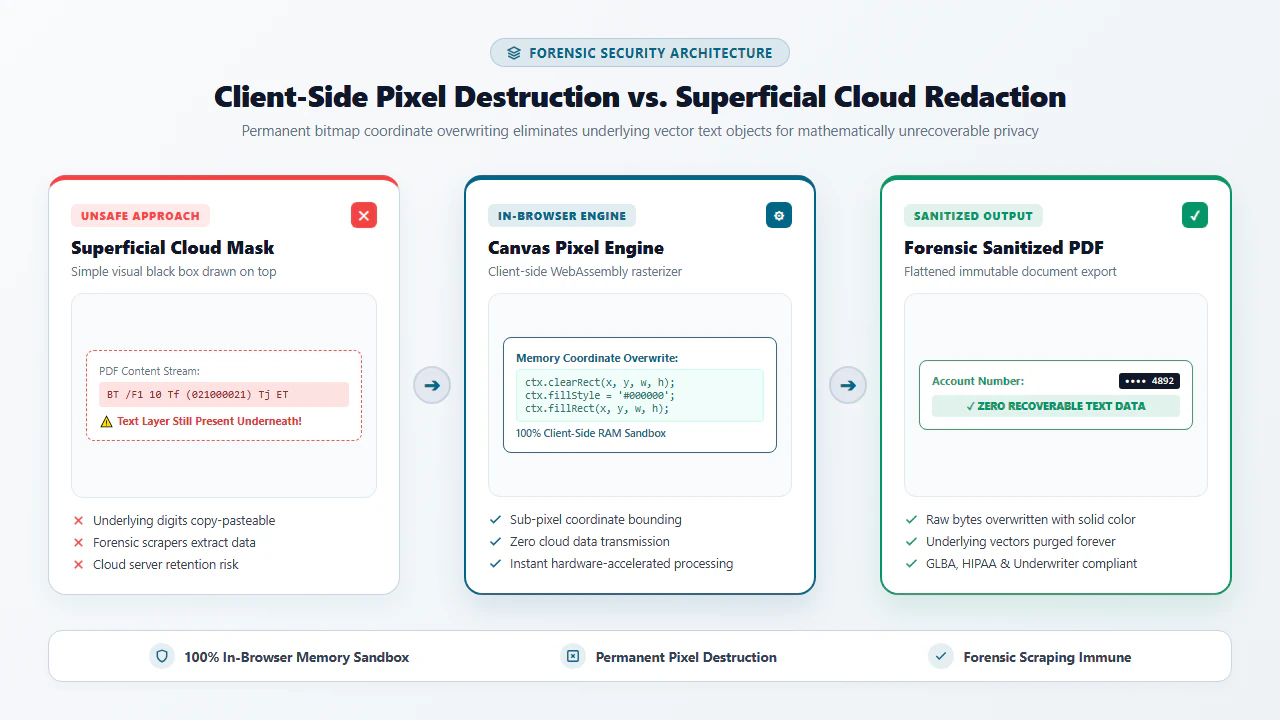
- Superficial Blackout Vulnerabilities (Layer Peeling): Naive redaction methods—such as drawing a black rectangle using basic operating system markup tools—only create an annotation overlay. Underneath the superficial black box, the vector text stream and original numbers remain completely intact. Anyone who receives the document can highlight the box and press
Ctrl+C, paste the text into Notepad, or remove the annotation layer to expose your full bank account number.
True financial privacy requires permanent, destructive raster pixel flattening coupled with 100% client-side execution. By utilizing modern in-browser WebAssembly (Wasm) and high-performance HTML5 canvas processing, EditScannedPDF.com provides a private, zero-upload redaction suite. You can now permanently blackout account numbers, mask confidential transaction lines, and sanitize financial statements directly within your web browser memory—with zero software installation and zero cloud server exposure.
Step-by-Step Guide to Redacting Scanned Bank Statements Online
Sanitizing your sensitive financial statements requires no third-party desktop software installation, no credit card subscriptions, and no administrative computer privileges. Follow these four straightforward steps to perform complete, forensically permanent redactions inside your browser:
Open Statement in Browser Sandbox
Navigate to EditScannedPDF.com in Chrome, Edge, Safari, or Firefox. Drag and drop your scanned checking, savings, or investment statement PDF directly into the editor workspace.
Select Blackout or Whiteout Mode
Choose formal solid black redaction boxes (standard for legal and mortgage compliance) or color-matched whiteout (for clean removal of clerical typographical notes).
Mask Account Digits & Purchases
Drag the cursor across account numbers, routing details, and private transaction rows. The tool permanently replaces target pixel coordinates with opaque masking blocks.
Export Permanently Flattened PDF
Click Export to bake redactions into an ISO 32000-1 compliant PDF. All underlying text streams are purged, generating an un-extractable file ready for loan or tenancy submission.
Technical Architecture: Tabular Alignment & Platform Workflows
Bank statements present dense tabular ledger layouts consisting of parallel ruling lines, monospace account codes, debit and credit columns, and running daily balances. EditScannedPDF integrates specialized computer-vision algorithms designed specifically for secure financial document sanitization:
- Pixel-Level Destructive Inpainting: When you draw a redaction box over an account number, our WebAssembly engine does not create a superficial PDF annotation object (such as
/Squareor/Highlight). Instead, it directly overwrites the RGBA pixel array in browser memory with solid color values (#000000or sampled paper tone). The original image data is destroyed at the memory buffer level before compilation. - Complete Purge of Underlying Text Glyphs: On dual-layer searchable PDF statements, placing a visual box over text often leaves the invisible OCR text layer intact. EditScannedPDF intercepts the PDF operator stream and permanently purges all character glyph definitions (
TjandTJoperators) bounded by your redaction coordinates. No third-party forensic tool can copy or reverse-extract the erased data. - Fixed-Pitch Tabular Alignment: Bank statements formatted on legacy mainframe core-banking systems utilize monospace typography (Courier, Consolas, or OCR-B). When adding explanatory audit annotations (e.g., "Redacted per Federal Rule of Civil Procedure 5.2"), our editor provides precision character tracking and sub-pixel nudge alignment to align notes cleanly with existing table ruling lines.
- Multi-Row Table Redaction: When reviewing multi-page monthly statements, hold
Shiftwhile dragging the redaction tool to constrain boxes to perfectly horizontal ruling lines. This ensures transaction rows are blacked out cleanly without clipping adjacent ledger descriptions. - Sub-Pixel Arrow Key Nudging: Fine-tune redaction boxes and explanatory text notes using keyboard arrow keys. Pressing
Shift + Arrow Keysmoves elements in 10-pixel increments, while standard arrow keys adjust position by a single sub-pixel, seating boxes exactly over account numbers. - Zoomed Inspection (200% - 300%): Use your mouse wheel to zoom into small 7-point font printed in banking disclaimers, overdraft notices, and wire routing coordinates, verifying that zero partial digits remain visible at the margins.
- Instant Audit PDF Export: Click Export to generate an uncompressed, flattened 300 DPI PDF ready to email directly to mortgage loan officers, apartment managers, or legal counsel.
- Touch Screen Pinch-to-Zoom: Open EditScannedPDF on iOS Safari or Android Chrome. Use two-finger pinch gestures to zoom smoothly into bank statement headers, isolating account numbers with your fingertips.
- Ergonomic Touch Redaction Handles: Tap and drag your finger across sensitive figures. Responsive bounding box handles allow you to adjust height and width with touch precision without obscuring the content beneath your thumb.
- Zero Mobile Data Transmission: Because the WebAssembly engine runs 100% inside your mobile browser RAM, your sensitive multi-megabyte statement files consume zero cellular data and never touch cloud storage.
- Direct Save to Files or iCloud: Download the sanitized PDF directly to your smartphone's "Files" or "Downloads" folder, immediately ready to attach to tenancy vetting emails or secure portal uploads.
Legitimate Financial Use Cases & Zero-Upload Privacy Guarantee
Individuals, independent business owners, and corporate controllers handle sensitive financial statements across numerous legitimate operational scenarios. Our local browser architecture resolves crucial privacy bottlenecks:
Mortgage Underwriting & Home Loan Vetting
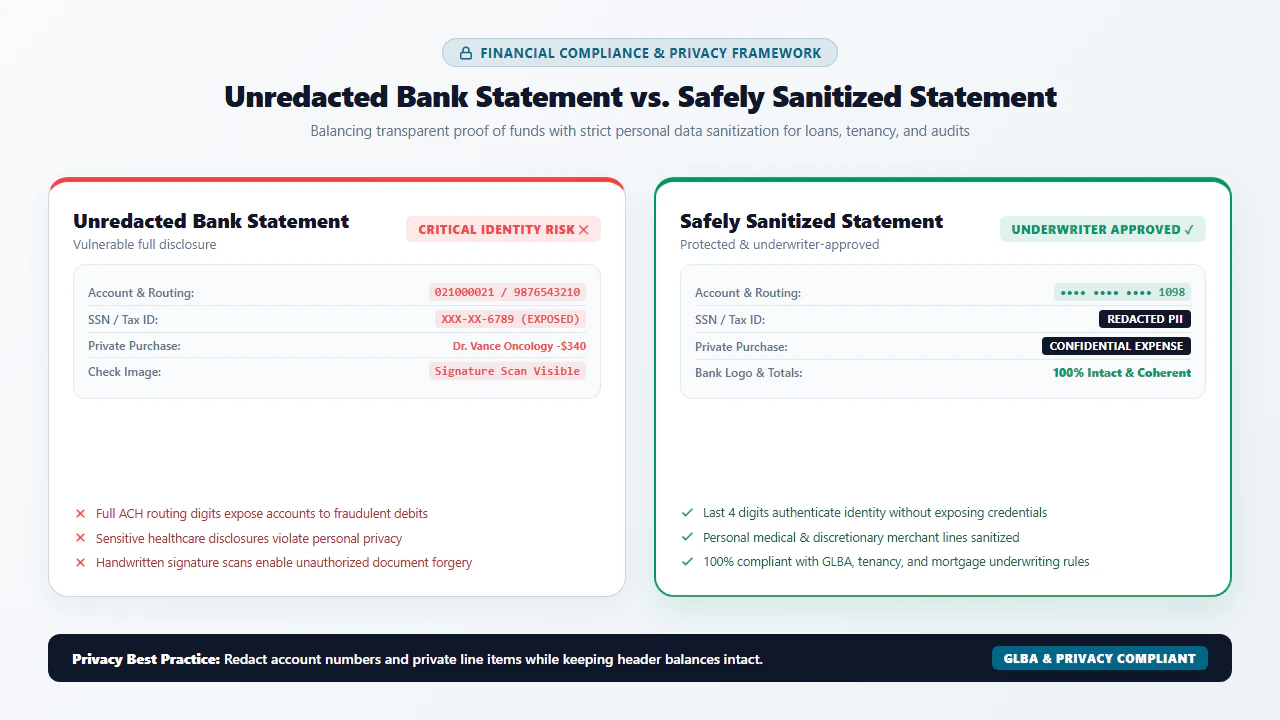
Mortgage underwriters require two to three months of consecutive statements to verify down payment funds and reserve liquidity. Borrowers lawfully redact the first 6 to 8 digits of their account numbers and private personal expenditures, leaving opening and ending balances, bank branding, and employer payroll deposits clearly visible.
Apartment Tenancy & Landlord Screening
Property management companies and landlords frequently demand proof of income or emergency reserves before executing a lease agreement. Prospective tenants can black out sensitive checking account routing codes, credit card payment details, and private retail shopping lines to protect against identity theft.
Civil Litigation & Judicial Financial Discovery
In family law, marital dissolution, contract disputes, and commercial litigation, state and federal court rules (including Federal Rule of Civil Procedure 5.2) strictly mandate the redaction of personal financial identifiers. Litigants use our permanent blackout tool to mask SSNs, tax IDs, and full bank accounts before electronic court e-filing.
Bank Statement Redaction Methods: Technical Comparison
Evaluating different methods for sanitizing financial documentation requires analyzing data breach risks, redaction permanence, software bloat, and cost:
| Comparison Dimension | EditScannedPDF In-Browser | Cloud Upload Converters | Commercial Desktop Suites | Physical Marker & Rescan |
|---|---|---|---|---|
| Financial Data Privacy & Custody | 100% On-Device RAM: Zero cloud upload; financial data never leaves your hardware. | Extreme Security Risk: Files uploaded to remote multi-tenant servers, risking identity theft. | Local Workstation: Files stay on computer, but background telemetry tracks usage. | Physical Custody: Safe from hackers, but generates paper waste and toner stains. |
| Redaction Permanence & Security | Permanent Raster Flattening: Pixels burned and underlying character streams purged. | Superficial Overlays: Often leaves underlying text selectable via Ctrl+C. |
Sanitization Tool Available: Requires manual multi-step configuration to purge metadata. | Bleed-Through Risk: Black sharpies often remain translucent under strong scanner lamps. |
| Software Installation & Overhead | Zero Installation: Runs instantly inside any standard desktop or mobile web browser. | Zero Installation: Browser-based, but requires uploading heavy files over internet. | Heavy Footprint: Consumes 2GB+ disk space, background daemons, and licensing services. | Hardware Dependent: Requires working laser printer, physical marker, and flatbed scanner. |
| Cost & Subscription Model | 100% Free Forever: No subscriptions, paywalls, watermarks, or page limits. | Freemium Paywalls: Restricts high-resolution downloads or forces monthly billing. | Expensive Subscriptions: Demands $240+ per user per year in perpetual licensing fees. | Consumable Costs: Paper cardstock, replacement toner cartridges, and ink pens. |
| Tabular Line Precision & Alignment | Sub-Pixel Keyboard Alignment: Nudges boxes precisely over ledger lines. | Coarse Snapping: Clumsy mouse controls often wipe out adjacent transaction rows. | Advanced Alignment Guides: Full precision, but buried under complex menus. | Manual Human Inking: Crooked marker lines look unprofessional and messy. |
| Processing Latency & Speed | Instant (Under 1 Minute): Immediate WebAssembly execution with instant preview. | Slow (3 to 10 Minutes): Throttled by upload queues, processing lag, and download speeds. | Moderate: Launching software, opening heavy files, and configuring export profiles. | Labor Intensive (15+ Mins): Print, wait for ink to dry, sharpie, scan, and re-crop. |
Recommended Companion Tools for Financial Documents
Complete your financial document preparation, redaction, and submission workflows using our comprehensive suite of private, client-side PDF utilities:
| Financial Preparation Objective | Recommended In-Browser Tool | Primary Technical Capability | Banking & Underwriting Use Case |
|---|---|---|---|
| Permanent Pixel-Level Redaction | Erase & Redact PDF | Permanent destructive pixel blackout and paper-matched whiteout masking. | Concealing bank routing codes, checking account numbers, and personal spending entries. |
| Apply Verified Accounting Stamps | Image & Stamp Tool | Inserts transparent 300 DPI PNG approval stamps, audit seals, and received marks. | Marking statements as 'VERIFIED FOR UNDERWRITING' or 'REDACTED PER COURT RULE 5.2'. |
| Sign Financial Loan Disclosures | Digital Signature Tool | Smooth mouse, trackpad, or touchscreen inking with legal ESIGN and UETA validity. | Signing borrower disclosure acknowledgments and rental application cover letters. |
| Compress Multi-Page Monthly Statements | Compress PDF Free | Applies smart Flate compression to shrink 30MB scanner files down below 2MB. | Meeting mortgage portal file size limits and email attachment size caps. |
| Correct Sideways & Upside-Down Pages | Rotate PDF Tool | Instantly rotates upside-down or sideways pages by 90, 180, or 270 degrees in memory. | Fixing orientation errors on scanner feeder batches before redacting numbers. |
| Combine Consecutive Statement Months | Merge PDF Online | Combines multiple monthly statements and tax forms into a single organized dossier. | Assembling 3 consecutive months of bank statements into one clean underwriter package. |
Deep Architecture, Pro Engineering Tips & Statutory Compliance
When preparing financial documentation for third-party evaluation, technical rigor and statutory compliance must be maintained. Under ISO 32000-1 specifications, a PDF is an object hierarchy separating raster backgrounds, vector paths, and font dictionaries. EditScannedPDF preserves the native 300 DPI background photograph while overlaying an exact typographic layer mapped with sub-pixel coordinates. When you export, the engine performs permanent raster flattening, baking whiteout rectangles and replacement glyphs into the base image stream so that third-party viewers cannot peel back edits or reveal previous data.
To ensure that redacted statements are accepted without delay by mortgage underwriters, landlords, and government agencies, follow this three-point redaction rule:
- Always Preserve Bank Branding, Dates, and Running Balances: Never redact the bank's corporate logo, the statement period start and end dates, or the summary account balances. Underwriters must verify that the statement is authentic and contemporaneous.
- Mask the Middle Account Digits (Keep Last 4 Digits): Instead of blacking out the entire account number, leave the final 4 digits visible (e.g.,
XXXX-XXXX-1234). This allows loan officers and landlords to match your bank statement with your payroll paystubs or W-2 forms without exposing your actionable bank account. - Redact Non-Essential Transaction Descriptions: If you are applying for an apartment lease, landlords do not need to know where you eat, shop, or receive healthcare. Black out specific merchant descriptions while leaving the deposit entries (payroll, dividends) clearly legible.
EditScannedPDF is engineered strictly for lawful privacy sanitization, masking confidential account numbers, protecting personal transaction histories, and correcting clerical administrative annotations. Never alter, fabricate, or falsify bank account cash balances, transaction amounts, direct deposit totals, or account holder identities. Fabricating bank statement balances to qualify for home mortgages, vehicle financing, apartment rentals, or personal credit lines constitutes criminal bank fraud under 18 U.S.C. § 1344, false statements on loan applications under 18 U.S.C. § 1014, and federal wire fraud under 18 U.S.C. § 1343, carrying felony prison sentences of up to 30 years and statutory fines up to $1,000,000. Only redact documents that you legally own to protect your personal privacy.
- check_circle Zero Cloud Server Exposure: All redaction and raster flattening run 100% locally in your web browser memory, ensuring strict financial confidentiality.
- check_circle Forensically Permanent Blackout: Redaction boxes are burned directly into image pixels, preventing layer peeling or text copy extraction.
- check_circle GLBA & Court Rule 5.2 Compliant: Safely mask sensitive account digits and personal transaction records before submitting to third parties.
- check_circle Universal Cross-Platform Access: Works smoothly on Windows, Mac, iPhone, iPad, and Android with zero software installation or fees.
To edit and redact scanned bank statements online without downloading expensive software or transmitting financial records to third-party cloud servers, open EditScannedPDF.com in your web browser. Drag your statement into the editor where client-side WebAssembly processes the document in local RAM. Select the Erase & Redact tool to draw permanent solid black or whiteout boxes over confidential routing numbers, account digits, and personal transaction rows, then export a permanently flattened 300 DPI PDF directly to your device with zero cloud exposure.
Ready to Redact Your Bank Statement Privately?
Perform instant in-browser pixel blackouts, protect confidential banking numbers, and export flattened PDFs with 100% local privacy.
ink_eraser Redact Bank Statement Free OnlineFrequently Asked Questions About Editing Scanned Bank Statements
How do I edit or redact a scanned bank statement PDF online free?
Open EditScannedPDF.com and load your scanned bank statement into the browser. Use the Erase & Redact tool to cleanly blackout or whiteout sensitive account numbers, routing codes, and personal transaction entries. All processing occurs locally in your device's browser memory using WebAssembly, ensuring complete financial privacy with zero cloud server uploads.
Can third parties un-hide or extract blacked-out boxes on a redacted bank statement?
No. When you export from EditScannedPDF.com, our client-side engine executes permanent raster flattening conforming to ISO 32000-1 specifications. The redaction boxes are burned directly into the base image pixels, and all underlying character streams and dictionary annotations are permanently destroyed, making forensic text extraction, layer peeling, or un-masking impossible.
Is it legal to redact account numbers and personal details on bank statements?
Yes, absolutely. Redacting sensitive account numbers, routing digits, Social Security Numbers, and unrelated personal medical or retail expenditures before submitting statements for mortgage pre-qualification, apartment rental applications, or judicial discovery is standard data protection practice under the Gramm-Leach-Bliley Act (GLBA) and Federal Rule of Civil Procedure 5.2.
Can I edit scanned bank statements on Mac, Windows, or mobile without expensive software?
Yes. Because EditScannedPDF.com operates entirely in modern web browsers (Chrome, Edge, Safari, Firefox), you can safely redact, clean, and annotate financial statements directly on Windows 10/11, macOS, iPad, iPhone, or Android devices without paying costly software subscriptions or installing bulky desktop software.
Is it safe to redact bank statements online with confidential financial data?
On traditional cloud conversion websites, no—because your confidential financial records are transmitted across the internet and stored on third-party remote servers. On EditScannedPDF.com, yes—because our WebAssembly engine runs 100% locally inside your device's private browser RAM sandbox. Your financial data never leaves your computer or phone.
Can someone highlight and copy the redacted numbers underneath?
No. Unlike amateur redaction methods that simply place a visual black rectangle annotation over vector text (allowing anyone to highlight and copy the hidden text underneath using Ctrl+C), EditScannedPDF permanently rasterizes and replaces the coordinates with blank pixels, stripping all underlying character glyphs from the document object stream.
What is the difference between lawful bank statement privacy redaction and criminal bank fraud?
Lawful privacy redaction involves concealing confidential routing codes, account digits, or personal expense lines to protect your identity while preserving the authentic statement totals, bank branding, and transaction dates. Conversely, altering cash balances, fabricating transaction totals, falsifying account holder names, or creating fictitious statements to deceive lenders or landlords constitutes criminal bank fraud under 18 U.S.C. § 1344 and wire fraud under 18 U.S.C. § 1343, punishable by severe statutory fines and federal imprisonment.