
How to Split a Scanned Multipage PDF into Separate Files Online Free
Enterprise Batch Separation & The Monster PDF Problem
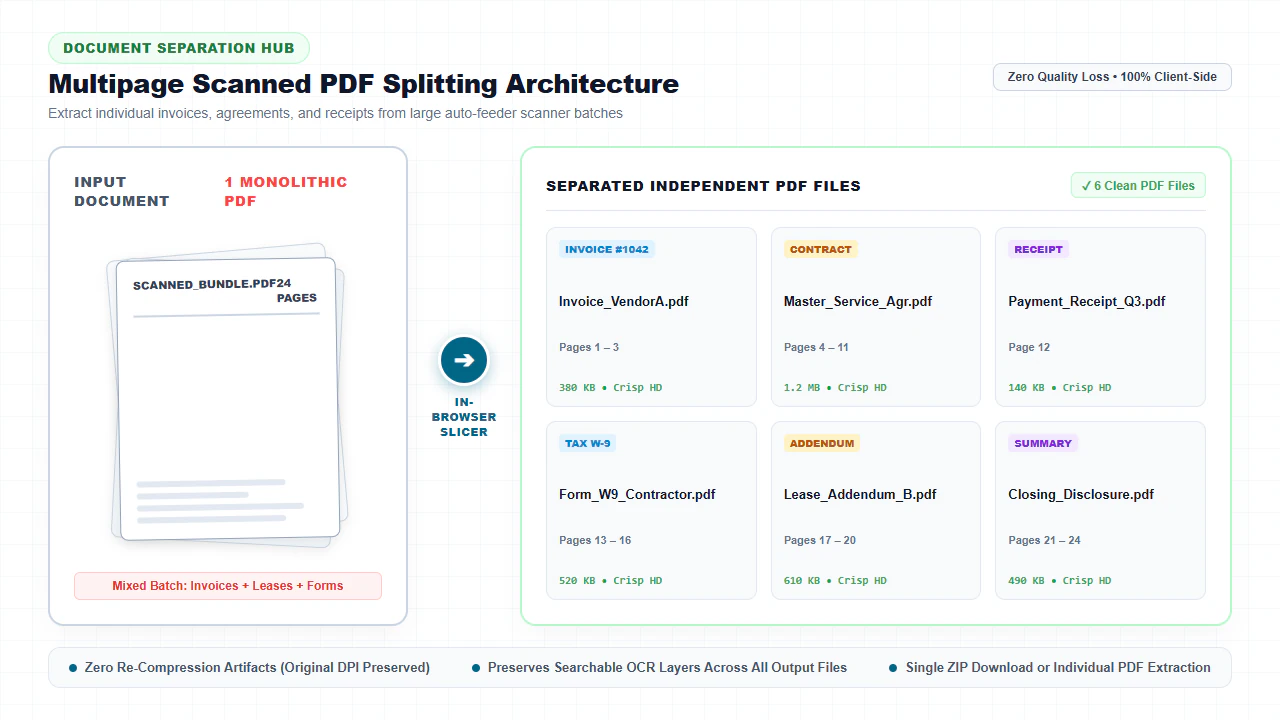
When administrative personnel, legal paralegals, healthcare record specialists, or accountants digitize physical paperwork using high-speed Automatic Document Feeder (ADF) scanners or departmental multi-function peripherals (MFPs), the hardware treats the entire physical tray as a continuous, uninterrupted scan job. If an operator places 40 invoices, 5 vendor contracts, and 12 medical claim vouchers into the feeder hopper, the scanner's internal firmware writes all scanned raster images into one monolithic, sequential PDF container—often exceeding 80 MB in file size. With our edit scanned PDF, everything runs locally in your browser with zero file uploads.
This automated batch ingestion creates severe operational friction across corporate, judicial, and financial workflows: For deeper troubleshooting, see our guide on clean up scanned PDF documents.
- Mixed Document Contamination: Distinct legal entities, client records, and confidential transactions get commingled into a single unwieldy PDF file, violating information segregation protocols.
- Email Gateway Attachment Rejection: High-resolution 300 DPI and 600 DPI bitmap images rapidly inflate file payloads past corporate email gateway thresholds (typically 20 MB to 25 MB), causing critical client communications to bounce.
- Government & Judicial Portal Gateways: Official regulatory portals—including Federal Court Electronic Case Filing (CM/ECF / PACER), USCIS immigration intake, and IRS tax portals—strictly mandate individual document attachments classified by exhibit type or schedule.
- Accidental Blank Separator Waste: Scanning operators regularly place blank colored or white sheets between document batches to visually separate transactions, embedding redundant blank pages into the final output.
Decoupling these multi-page scan bundles into distinct, organized documents is essential for archiving and compliance. With modern client-side WebAssembly technology, you can now split, extract, and burst scanned PDFs directly inside your web browser with complete privacy and zero server uploads.
4 Steps to Split a Scanned Multipage PDF Online (Step-by-Step)
Follow these four simple steps to decouple your monolithic scan bundle into clean, independent documents:
Import Multipage Scan
Open the free Split PDF Online Tool and drag your document into local browser memory.
Choose Split Mode
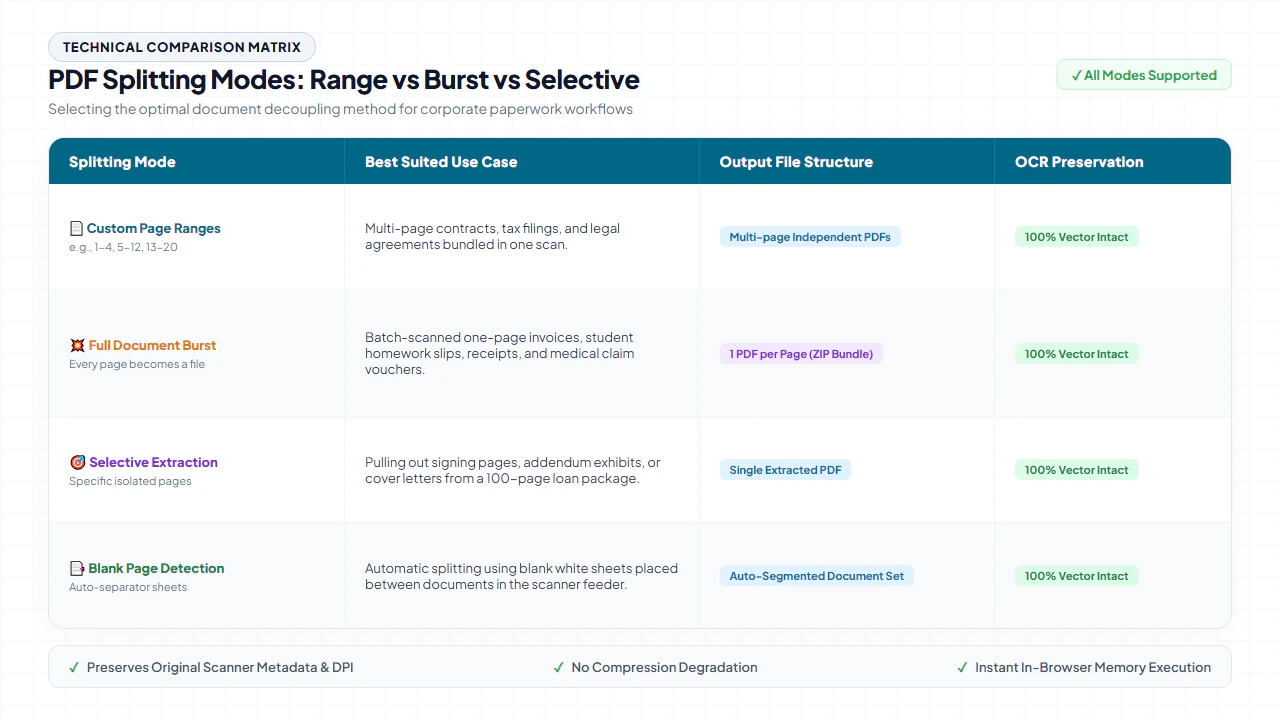
Select your desired decoupling method: Custom Page Ranges, Burst Every Page, or Specific Page Extraction.
Non-Destructive Slicing
The client-side WebAssembly engine updates cross-reference pointers and separates page objects losslessly.
Download Split PDFs
Save your separated documents or an organized ZIP bundle instantly with 100% original scan quality preserved.
Technical Splitting Methods & Platform Workflows
Different administrative, litigation, and archival scenarios require targeted document decoupling techniques. EditScannedPDF.com provides four specialized splitting architectures to accommodate diverse paperwork challenges:
- 1. Custom Page Ranges (The Group Slicer): Enables users to specify discrete sub-document intervals (e.g., Pages 1–4 for Notice of Appearance, Pages 5–14 for Sworn Affidavit, and Pages 15–32 for Exhibit Binder). Each configured range is compiled into an independent, multi-page document with updated page catalogs and root dictionaries.
- 2. Full Document Burst (Every Page an Independent PDF): Completely deconstructs the multi-page container, outputting each single page as an individual, sequentially named PDF (e.g.,
Document_page_001.pdf,Document_page_002.pdf). This architecture is critical for high-volume receipt categorization, invoice sorting, and automated batch OCR pipelines. - 3. Selective Page Extraction: Isolates specific targeted pages (such as Pages 3, 7, and 12) from an exhaustive reference manual or escrow disclosure packet, leaving the original master PDF completely intact and uncorrupted.
- 4. Blank Page Detection & Purge: Automatically identifies and filters out empty scanner sheets created during duplex feed cycles or manual separator staging, cleaning up document catalogs prior to sub-file assembly.
- Ingest Large Scans: Drag and drop multi-megabyte ADF scan dumps directly into your browser viewport. Multi-threaded WebAssembly loads all pages instantly into secure RAM.
- Visual Grid Selection: Review high-resolution thumbnail cards. Enter custom page ranges (e.g., 1-4, 5-10, 11-18) or click individual cards to extract targeted exhibit pages.
- Lossless Stream Extraction: Click "Split PDF". The browser extracts object cross-reference pointers at memory bus speeds without re-compressing high-DPI image bitmaps.
- Batch Download: Download individual split PDFs or a neatly consolidated ZIP archive directly to your hard drive with zero waiting queues.
- Open Mobile Browser: Launch Safari on iOS or Chrome on Android and access the free Split PDF tool. Tap "Select Document" to select files from the Files app, iCloud Drive, or Google Drive.
- Touch Page Selection: Use touch pinch-to-zoom to inspect document thumbnails on your smartphone screen. Tap specific pages to partition or extract.
- In-Memory Processing: Tap "Split PDF". The engine executes 100% inside your smartphone's browser memory, saving mobile data bandwidth and ensuring zero cloud exposure.
- Direct Mobile Download: Save your split files directly to your device's "Files" or "Downloads" folder, ready to attach to mobile emails or message threads.
Overcoming Strict File Size Limits in Portals
When submitting legal pleadings, immigration dossiers, or corporate tax filings, strict portal upload limits represent a constant hurdle:
- Federal Court CM/ECF & PACER: The majority of federal and state electronic filing systems impose rigid attachment limits between 25 MB and 50 MB per submission. A 100-page scanned transcript at 300 DPI will routinely fail upload unless partitioned into distinct exhibit files.
- USCIS Immigration Forms: The U.S. Citizenship and Immigration Services online filing portal limits individual PDF evidence attachments to 12 MB. Splitting marriage certificates, financial records, and medical affidavits into discrete PDFs ensures immediate compliance.
- Mortgage Underwriting & Escrow: Underwriting portals require clear separation between borrower tax returns, W-2 forms, bank statements, and title disclosures for rapid underwriting categorization.
verified Lossless Stream Slicing Guarantee
Unlike traditional web utilities that convert pages into compressed JPEG images before rebuilding PDFs, EditScannedPDF.com decouples the PDF object catalog directly at the binary stream level. Your original scanner DPI, color depth, and vector sharp text remain 100% unadulterated.
Preserving Searchable OCR & Binary Stream Slicing
A frequent disaster when using substandard online PDF splitters is the accidental destruction of the invisible Optical Character Recognition (OCR) text layer. Modern office scanners frequently run real-time OCR, embedding an invisible font text layer directly beneath the visible bitmap scan so users can search with Ctrl+F and copy quotes.
When low-grade converters split a PDF, they often rasterize each page into a raw image, completely discarding the underlying text layer. When you open the resulting split files, you can no longer search or copy text. Our WebAssembly engine performs lossless structural decoupling—each output file retains its complete, authentic OCR text dictionary, font mapping matrix, and page rotation angles intact.
In addition, conventional server-based PDF splitters often introduce secondary artifacts:
- Lossy DCT Re-Encoding: Re-saving high-resolution scans with lossy JPEG compression blurs critical 6-point legal footnote text, rendering case citations illegible.
- Stripped Metadata & Bookmarks: Standard splitters often wipe out document outline trees, embedded creation timestamps, and author metadata required for legal discovery production sets under FRCP Rule 34.
- Altered Color Profiles: Color-managed scanner profiles (such as sRGB or calibrated CMYK) can be inadvertently converted into uncalibrated device spaces, resulting in washed-out legal stamps and distorted seal colors.
Quick Fix & Recommended Specialized Tools
Choose the specialized browser tool below based on your exact document restructuring need:
| Paperwork Task | Workflow Challenge | Recommended Tool |
|---|---|---|
| Divide large scan bundle into separate files | Batch Document Separation | Split PDF Tool → |
| Extract specific signing pages or exhibits | Isolated Page Extraction | Extract PDF Tool → |
| Insert missing scan pages or delete blanks | Page Insertion & Deletion | Insert & Delete Page Tool → |
| Recombine split files in new sequence | Multi-File Collation | Merge PDF Tool → |
| Shrink heavy scan attachments for email | File Size Optimization | Compress PDF Tool → |
Archival Compliance & Chain-of-Custody Notice
Maintaining the integrity of official business and legal records during decoupling operations is subject to strict regulatory frameworks:
psychology Engineering Pro Tip: Orphaned Object Garbage Collection in Split Files
Naively extracting a 2-page section from a 200-page PDF can result in bloated files if unused document resources (such as embedded fonts or unreferenced image XObjects) remain in the trailer dictionary. Our WebAssembly engine traces the indirect object reference graph starting from each extracted /Page node, discarding unreferenced orphaned objects so each split file achieves the minimal possible byte payload.
gavel Regulatory & Legal Notice: Preserving Evidentiary Chain of Custody
When decoupling court exhibits, real estate closing packages, or government disclosure records under Federal Rule of Civil Procedure 10(c) and state electronic court filing (ECF) guidelines, parties must maintain exact page sequence fidelity and evidentiary provenance. Extracting specific exhibits from a master deposition transcript or master ledger is legally sanctioned to comply with mandatory e-filing attachment file size ceilings (typically 25 MB to 50 MB per submission). Intentionally deleting unfavorable evidentiary pages, omitting audit trail sheets, or modifying document pagination to mislead judicial officers, bankruptcy trustees, or auditors constitutes unlawful evidence spoliation and obstruction of justice under 18 U.S.C. § 1519, carrying criminal sanctions.
- check_circle 100% Client-Side WebAssembly: Runs entirely in your local browser RAM without uploading sensitive files to cloud servers.
- check_circle Strict Data Privacy: Fully compliant with HIPAA, GDPR, and enterprise confidentiality rules with zero server data retention.
- check_circle Lossless Fidelity: Preserves original 300 DPI text sharpness, authentic line baselines, and exact page layout structures.
- check_circle Universal Cross-Platform: Works seamlessly across Windows, Mac, Linux, iPhone, iPad, and Android with zero installation.
bolt Quick Summary (AI Overview)
Splitting large multipage scanned PDFs into separate documents or extracting specific pages is effortless with EditScannedPDF.com. Our free, in-browser WebAssembly splitter decouples PDF cross-reference catalogs directly at the binary stream level. High-resolution scanner bitmaps and searchable OCR text layers are preserved with 100% mathematical fidelity—all without uploading sensitive legal or financial paperwork to remote servers.
Experience Fast, Seamless, 100% Private Document Splitting
Join thousands of legal, finance, and corporate professionals who organize batch paperwork with our zero-upload WebAssembly suite.
call_split Start Splitting Scanned PDF FreeFrequently Asked Questions
Does splitting a scanned PDF reduce its visual clarity or scan DPI?
No. EditScannedPDF.com performs direct object catalog slicing. The underlying compressed image streams (whether 300 DPI, 600 DPI, JBIG2, or JPEG) are extracted bit-for-bit without canvas re-rendering or lossy re-encoding.
Will the searchable OCR text layer remain functional in the split PDF files?
Yes. Our WebAssembly engine extracts the complete document object tree, including invisible OCR font mappings, ToUnicode CMaps, and text bounding coordinates, ensuring all output files remain fully searchable via Ctrl+F.
Are my confidential legal contracts or invoices uploaded to a server?
No. All document parsing, cross-reference table splitting, and ZIP generation occur 100% client-side inside your browser's local RAM. Your files never touch external servers or cloud databases.
Can I automatically delete blank scanner separator pages while splitting?
Yes. Our visual layout manager allows you to inspect page thumbnails and delete accidental blank feeder sheets prior to executing the split.
How do I split a 100-page scanned document into single-page files at once?
Select the 'Burst' mode in our Split PDF tool. The engine automatically decouples every individual page into its own numbered PDF file and packages the output into a single, organized ZIP file for instant download.
Is there any file size limit or page count cap when splitting scanned PDFs?
Because all operations run locally in your computer's browser memory via WebAssembly, there are no artificial file size ceilings or page limits imposed by remote servers.
Can I split password-protected scanned PDF files?
Yes. If a scanned PDF is protected with a password, you enter the password to unlock the document in your browser's local memory. Once authenticated locally, you can configure your split ranges and download individual unlocked files with complete security.
RELATED SCANNED PDF GUIDES & TOOLS: