
Why Scanned Invoices & Thermal Receipts Lock Text
Every business day, millions of commercial invoices, point-of-sale thermal receipts, bill-of-lading forms, and vendor purchase statements are ingested into corporate accounting workflows. Whether photographed on a job site with a smartphone camera, fed through a high-speed office document feeder, or received via postal mail, physical billing paperwork inevitably requires administrative handling before it can be reconciled in ledger systems like QuickBooks, Xero, or enterprise ERP platforms.
However, when accountants, corporate controllers, or independent contractors open these files in standard desktop readers, they encounter a universal wall: the text is completely locked. Clicking on a supplier's misprinted tax ID, an erroneous billing address, an outdated purchase order reference code, or an illegible item description merely drags a blue selection box over the entire page image. Standard document viewers cannot select, edit, or backspace characters on scanned billing paperwork.
To understand why this happens, consider how physical invoices and receipts are converted into digital files under ISO 32000-1 specifications:
- Raster Bitmap Encapsulation: When an invoice passes over an optical scanner glass or is photographed by a mobile sensor, the hardware captures a grid of millions of colored picture elements (pixels). The generated PDF encapsulates this static photograph inside a single dictionary object (
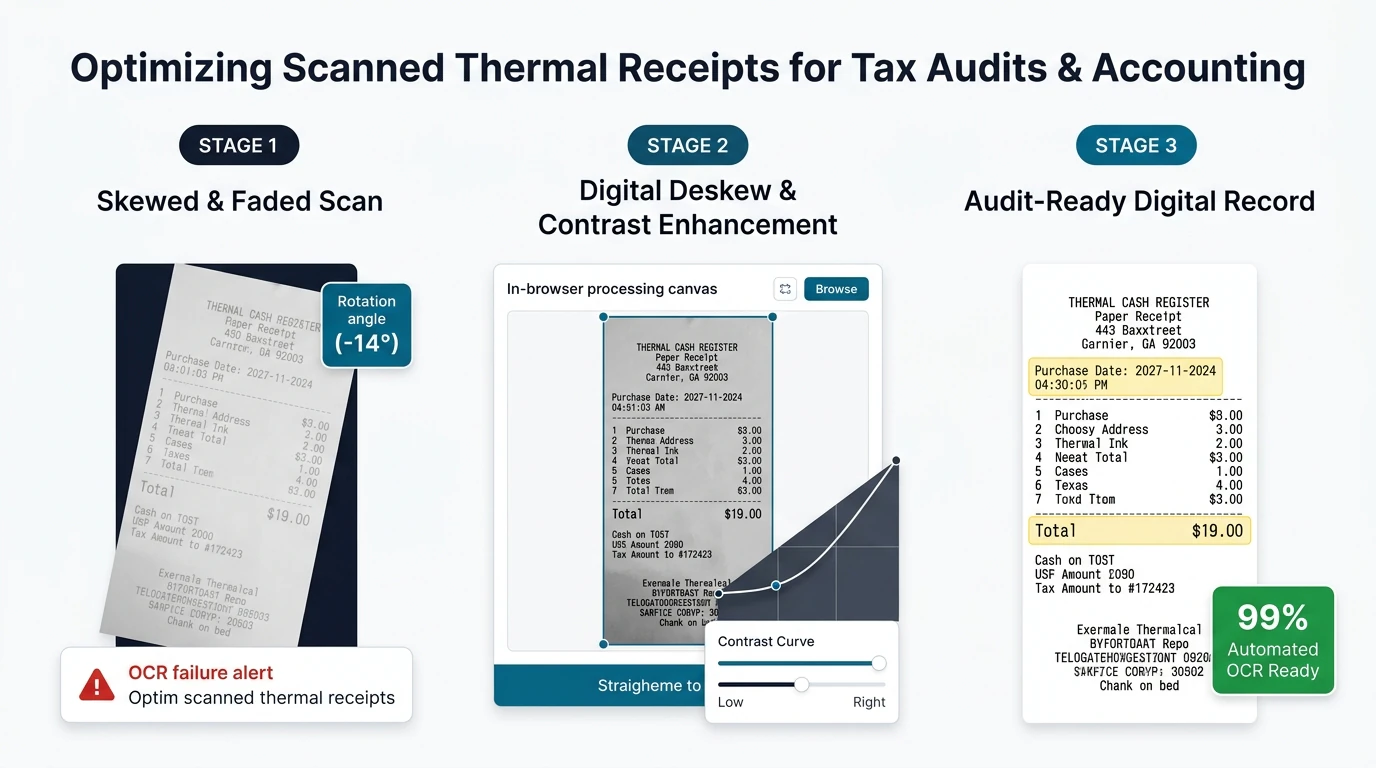
/XObjectwith/Subtype /Image). It contains zero font tables, zero character code points, and zero vector text glyphs. To your computer, an invoice is identical to a family JPEG photo. - Thermal Paper Chemical Degradation: Restaurant, fuel station, airline luggage, and retail register slips are printed on specialized thermal paper coated with a colorless leuco dye and an organic acid developer. When exposed to heat, UV sunlight, skin oils, or routine office humidity, this dye structure degrades rapidly. Within months, receipt ink turns faint light gray, background paper yellows, and crease folds create severe dark shadows that obscure critical tax and price data.
- Smartphone Perspective Distortion & Keystone Skew: Receipts snapped on mobile devices rarely lay perfectly flat. Curled receipt edges, parallax lens distortion, ambient shadows, and angled capture angles produce skewed tabular lines that prevent standard OCR engines from associating numerical totals with their corresponding line-item descriptions.
- Financial Privacy and Confidentiality Exposure: Commercial invoices and corporate expense receipts contain highly sensitive corporate intelligence: Federal Taxpayer Identification Numbers (TIN), Employer Identification Numbers (EIN), Social Security Numbers (SSN), banking routing codes, direct wire coordinates, customer billing addresses, and confidential supplier pricing structures. Transmitting these documents to multi-tenant cloud conversion websites exposes your enterprise to third-party data breaches, corporate espionage, and regulatory violations under GLBA, SOC 2, and GDPR.
Historically, correcting even a single typographical error on a supplier bill forced accounting teams to spend hundreds of dollars on complex commercial desktop software licenses or endure days waiting for a busy vendor to issue a revised invoice. By leveraging modern client-side WebAssembly (Wasm) and advanced HTML5 canvas processing, EditScannedPDF.com (scan PDF editor) delivers an enterprise-grade in-browser editor. You can now restore faded thermal contrast, correct clerical typographical mistakes, redact private banking credentials, and overlay official accounting approval stamps—running 100% locally in your web browser memory with zero cloud server uploads.
Step-by-Step Guide to Editing Scanned Invoices Online
Editing scanned billing documentation in your web browser requires no third-party software installation, no administrative computer privileges, and no recurring software subscriptions. Follow these four straightforward steps to perform complete, audit-ready adjustments on your desktop, laptop, or mobile workstation:
Open Invoice or Receipt in Browser
Navigate to EditScannedPDF.com in Chrome, Edge, Safari, or Firefox. Drag and drop your scanned vendor invoice, fuel receipt, or billing statement directly into the editor canvas.
Run Local WebAssembly OCR
Our in-browser engine applies adaptive contrast optimization to faded thermal paper and generates an interactive text coordinate layer directly in local browser RAM without server uploads.
Whiteout Errors & Apply Stamps
Select the color-matched whiteout tool to mask typos, type replacement text matching original invoice typography, and overlay official 'PAID' or 'AP APPROVED' verification stamps.
Export Flattened 300 DPI PDF
Click Export to bake all modifications permanently into an ISO 32000-1 compliant PDF. Edits are flattened directly to your local storage, ready for ERP reconciliation or tax filing.
Technical Architecture: Thermal Receipt Contrast, Deskewing & Platform Workflows
Commercial invoices and point-of-sale slips present unique optical challenges that standard text processors cannot handle. EditScannedPDF integrates specialized computer-vision algorithms designed specifically for degraded accounting documents:
- Otsu Adaptive Binarization for Thermal Contrast: Thermal paper degradation reduces the optical density between ink characters and background paper. Our client-side image engine executes Otsu's thresholding algorithm across localized sliding windows (16x16 pixel blocks). By calculating the optimal intra-class variance between degraded leuco dye pixels and yellowed paper fibers, the algorithm restores crisp character boundaries without amplifying paper noise.
- Hough Transform Geometric Deskewing: Smartphone photos of curled receipts often feature rotational skew angles between 2 and 15 degrees. The engine applies an edge-detection filter followed by a Hough Transform to identify parallel line segments along printed table borders. It automatically rotates the raster image back to true orthogonal baselines (0.0° horizontal alignment), ensuring that added text lines up cleanly with existing tables.
- Fixed-Pitch Tabular Typography Matching: Invoices generated by legacy mainframe systems, point-of-sale registers, and dot-matrix printers rely on fixed-pitch (monospace) typography like Courier, Consolas, or OCR-B. Our typographic engine provides fractional letter-spacing and pitch controls so that replacement invoice numbers align perfectly down tabular accounting columns without creeping out of bounds.
- Dual-Monitor Ledger Reconciliation: Open your accounting software (such as QuickBooks Online, NetSuite, or Xero) on your primary display and EditScannedPDF on your secondary monitor. Drag scanned invoice batches directly from Windows File Explorer or macOS Finder into the browser tab.
- Sub-Pixel Keyboard Arrow Nudging: When inserting replacement purchase order numbers, billing quantities, or vendor contact codes, use your keyboard's arrow keys. Holding
Shift + Arrow Keysmoves text boxes by 10 pixels, while standard arrow keys adjust position by a single sub-pixel increment, guaranteeing that numbers sit precisely on printed ledger lines. - Eyedropper Paper Tone Matching: Physical invoice paper is rarely pure stark white (
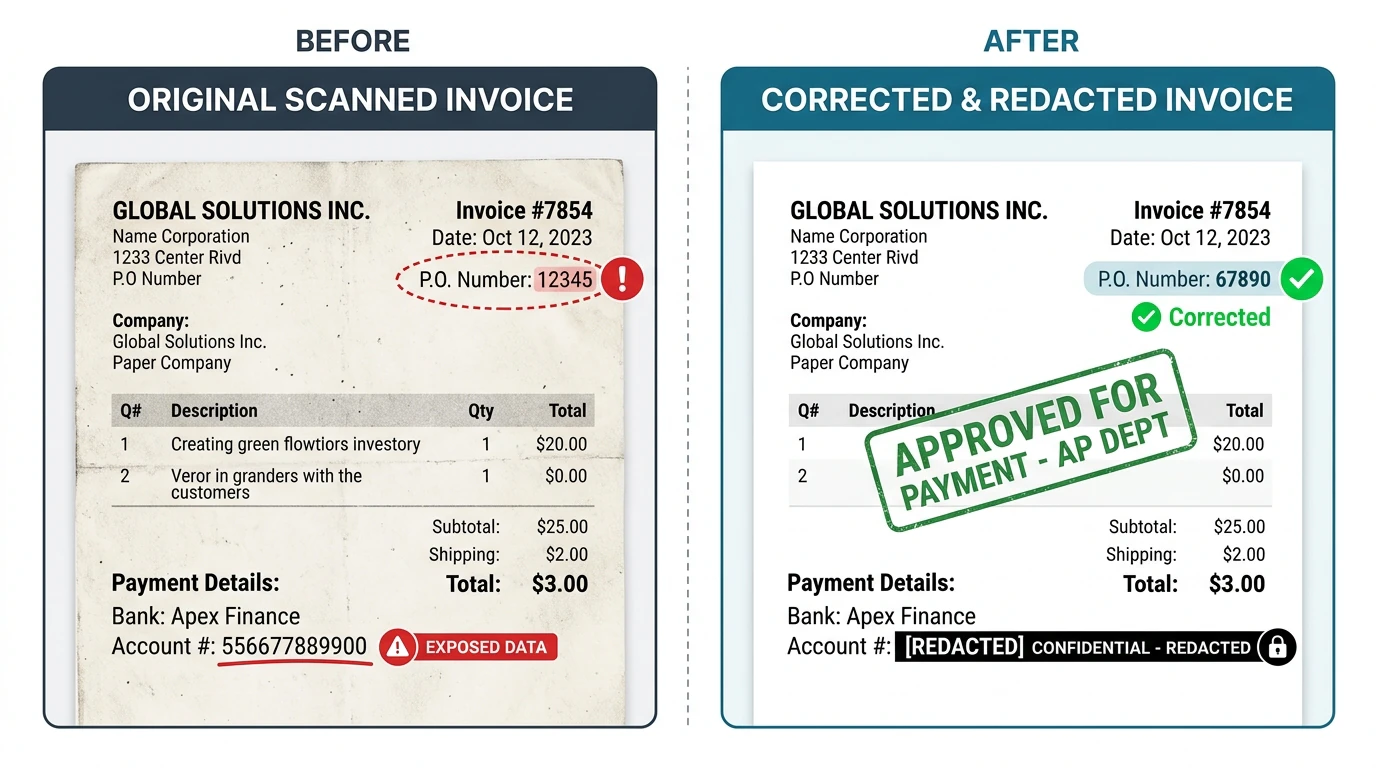
#FFFFFF). Scanned forms exhibit subtle cream or gray tints (such as#F8F9FAor#F3F4F6). Use the Color Eyedropper to sample the exact background paper hue before applying whiteout patches, ensuring seamless, invisible corrections. - Batch Approval Rubber Stamping: Ingest vendor bills requiring managerial sign-off, click the Image & Stamp tool, and overlay customized corporate approval blocks (e.g., "APPROVED FOR PAYMENT - AP DEPT - ACCT #4020") with date stamps and signature initials before exporting to accounts payable archives.
- Instant Smartphone Camera Ingestion: Traveling executives, sales representatives, and field technicians can capture receipts at restaurants, airport parking terminals, or client dinners. In Safari on iOS or Chrome on Android, tap the upload area and select "Take Photo" or choose an existing snapshot from your camera roll.
- Touch Screen Crop & Contrast Enhancement: Pinch-to-zoom into the captured receipt to frame receipt boundaries, eliminating unwanted restaurant table backgrounds and coffee cup shadows. Tap the contrast enhancement filter to instantly sharpen faded thermal register print.
- Fingertip Personal Data Redaction: Before submitting business lunch receipts to corporate travel reimbursement portals, drag a solid whiteout rectangle over the first 12 digits of your personal credit card number, leaving only the required last 4 digits visible for bookkeeping compliance.
- Digital Touchscreen Signature: Sign employee reimbursement disclosures directly with your fingertip or an active stylus (such as the Apple Pencil or Samsung S-Pen), rendering an anti-aliased digital signature directly onto the receipt voucher before saving to your mobile downloads.
Enterprise Accounting Use Cases & Zero-Upload Privacy Guarantee
Commercial finance departments and independent certified public accountants handle complex document corrections across a wide variety of legitimate operational scenarios. Our local browser architecture resolves crucial operational bottlenecks:
Accounts Payable Clerical Rectification
Vendor invoices often arrive with clerical defects: an inverted customer PO number, a transposed tax identifier digit, or an outdated corporate remittance address. With written confirmation from the vendor, AP staff can white-out typographical errors, insert correct routing data, and stamp payment authorization codes without halting payment cycles.
Freelance & Contractor Expense Billing
Consultants and remote contractors billing clients for project expenses must provide proof of purchase without exposing personal banking details. Our editor allows contractors to black out personal card account numbers, highlight allowable client billable meals, and insert contract reference codes onto receipt scans.
CPA Tax Preparation & IRS Audit Defense
Certified public accountants preparing corporate tax returns regularly receive shoe-boxes of faded, illegible thermal fuel and supply slips from small business clients. Accountants use our contrast enhancement and annotation tools to legibly document business purpose, date, and project allocations required under Internal Revenue Code Section 274.
Invoice & Receipt Editing Methods: Technical Comparison
Selecting the right workflow for managing scanned financial documentation requires evaluating data security risks, software bloat, recurring subscription fees, and regulatory audit compliance:
| Comparison Dimension | EditScannedPDF In-Browser | Cloud Upload Converters | Commercial Desktop Suites | Manual Vendor Re-Issuance |
|---|---|---|---|---|
| Financial Data Privacy & Custody | 100% On-Device RAM: Zero cloud upload; financial data never leaves your hardware. | High Security Risk: Files uploaded to multi-tenant servers, risking regulatory breaches. | Local Workstation Storage: Files stay local, but background telemetry tracks usage. | Low Technical Risk: Transmitted via email, but relies on vendor administrative queues. |
| Installation & System Footprint | Zero Installation: Runs instantly in any standard desktop or mobile web browser. | Zero Installation: Browser-based, but requires uploading files over internet connections. | Heavy Footprint: Requires 2GB+ disk space, background daemons, and updater agents. | None: Handled entirely through communications and manual bookkeeping entries. |
| Cost & Subscription Model | 100% Free Forever: No subscriptions, credit card requirements, or page limits. | Freemium Paywalls: Restricts document volume, file size, or daily conversion counts. | Expensive Subscriptions: Costs $240+ per user per year in ongoing licensing fees. | Indirect Labor Cost: Consumes administrative hours chasing suppliers and accounting reps. |
| Thermal Receipt Contrast Restoration | Integrated Otsu Binarization: Recovers faded leuco dye print and levels tilted camera angles. | Basic Conversion: Lacks dedicated thermal receipt contrast restoration algorithms. | Advanced Filters Available: Powerful tools, but buried behind complex menus and dialogs. | Not Applicable: Does not solve the problem of already faded physical receipts. |
| Permanent Raster Flattening | Permanent ISO 32000-1 Flattening: Edits are baked into pixel data, preventing reverse extraction. | Superficial Overlays: Often leaves underlying text streams intact and accessible. | Supported via Print to PDF: Requires manual multi-step configuration to flatten layers. | Original File Generated: Generates a clean new PDF directly from the supplier ERP. |
| Processing Latency & Speed | Sub-Second Execution: Instant WebAssembly execution in local browser RAM. | Network Dependent: Upload and download speeds throttle processing on large scans. | Slow Launch Time: Heavy application launch times delay fast single-page edits. | Days to Weeks Delay: Awaiting accounts receivable rep to reprint and email corrected bill. |
Recommended Companion Tools for Accounts Payable & Bookkeepers
Complete your accounting and document preparation workflows using our modular suite of private, client-side PDF utilities:
| Accounting Objective | Recommended In-Browser Tool | Primary Technical Capability | Bookkeeping & Tax Use Case |
|---|---|---|---|
| Blackout Confidential Account Digits | Erase & Redact PDF | Permanent pixel redaction that eliminates underlying raster and text streams. | Redacting SSNs, tax identifiers, and credit card digits before sharing expense reports. |
| Overlay Approval & Payment Stamps | Image & Stamp Tool | Inserts transparent PNG approval stamps, corporate seals, and audit verification blocks. | Marking vendor bills as 'PAID', 'ENTERED IN ERP', or 'APPROVED FOR DISBURSEMENT'. |
| Execute Digital Signatures | Digital Signature Tool | Smooth mouse, trackpad, or touchscreen inking with legal ESIGN and UETA validity. | Signing managerial expense reimbursement authorizations and contractor approvals. |
| Convert Invoices to Editable Word Tables | Scanned PDF to Word | Transforms non-selectable scanned invoice tables into fully editable Word tables. | Extracting detailed multi-page line items into Excel or Word for financial modeling. |
| Compress High-Resolution Receipt Batches | Compress PDF Free | Applies smart Flate compression to shrink 25MB scanner files down below 1MB. | Meeting email gateway attachment restrictions and ERP upload limits. |
| Fix Inverted or Upside-Down Scans | Rotate PDF Tool | Instantly rotates upside-down or sideways pages by 90, 180, or 270 degrees in memory. | Correcting orientation errors on scanner feeder batches before running OCR. |
Deep Architecture, Pro Engineering Tips & Statutory Compliance
When handling corporate financial documents, technical precision and legal compliance must be strictly observed. Under ISO 32000-1 specifications, a PDF is an object hierarchy separating raster backgrounds, vector paths, and font dictionaries. EditScannedPDF preserves the native 300 DPI background photograph while overlaying an exact typographic layer mapped with sub-pixel coordinates. When you export, the engine performs permanent raster flattening, baking whiteout rectangles and replacement glyphs into the base image stream so that third-party viewers cannot peel back edits or reveal previous data.
To ensure that paper receipts withstand IRS audit scrutiny under Internal Revenue Code Section 274, follow this two-step engineering practice:
- Apply Contrast Thresholding Before Archiving: Thermal paper receipts naturally degrade over 2 to 5 years. Always pass smartphone receipt photos through our adaptive contrast tool upon receipt. Converting faint grayish text into sharp black-and-white pixels ensures permanent legibility when archived in your company's cloud document store.
- Contemporaneous Audit Tagging: The IRS strictly requires business expense documentation to establish: (1) Business Purpose, (2) Business Relationship, (3) Date, (4) Location, and (5) Amount. Use our Add Text tool to type an audit header directly in the white margin of the receipt (e.g., "Client Strategy Dinner with Acquired Tech Leadership regarding Q3 Cloud Migration"). Having this metadata permanently burned into the PDF file eliminates disallowance penalties during IRS audits.
EditScannedPDF is engineered strictly for lawful administrative document corrections, repairing clerical typographical errors, updating your own commercial invoices with vendor agreement, adding internal accounting reference codes, and redacting private banking details. Never alter, fabricate, or falsify financial invoice amounts, tax percentages, VAT/GST registration numbers, or receipt totals for deceptive purposes. Modifying invoice numbers to inflate deductions, claim illegitimate corporate expense reimbursements, or deceive tax authorities constitutes criminal tax fraud under 26 U.S.C. § 7206 and federal wire fraud under 18 U.S.C. § 1343, punishable by substantial statutory penalties and federal imprisonment. Only edit documents that you legally own or are authorized in writing to adjust.
- check_circle Zero Cloud Server Exposure: All OCR processing and image modifications run 100% locally in your web browser memory, ensuring strict financial confidentiality.
- check_circle Otsu Contrast Optimization: Automatically restores faint, unreadable text on degraded thermal paper receipts from restaurants, gas stations, and stores.
- check_circle Permanent Raster Flattening: Redacted banking details and corrected numbers are baked directly into the document bitmap to prevent reverse extraction.
- check_circle Audit-Ready Compliance: Produces clean 300 DPI ISO 32000-1 compliant PDFs ready for QuickBooks, Xero, ERP systems, and IRS record-keeping.
To edit scanned invoices and receipts online without downloading expensive software or uploading confidential financial records to third-party cloud servers, navigate to EditScannedPDF.com in your web browser. Drag your document scan into the editor where client-side WebAssembly OCR detects printed characters in local RAM. Use the color-matched whiteout tool to mask typos, overlay replacement text matching original typography, blackout private account digits, and apply approval rubber stamps before exporting a permanently flattened 300 DPI PDF directly to your device.
Ready to Edit Your Scanned Invoices & Receipts Online?
Perform instant in-browser OCR, correct billing numbers, enhance faded thermal receipts, and export flattened PDFs with 100% local privacy.
receipt_long Edit Scanned Invoices Free OnlineFrequently Asked Questions About Editing Scanned Invoices & Receipts
Is it legal to edit numbers or text on a scanned invoice or receipt?
Editing self-generated commercial invoices, correcting minor clerical typographical errors with vendor agreement, adjusting internal purchase order reference numbers, or blacking out private financial account digits is completely legal for legitimate bookkeeping. However, intentionally modifying invoice totals, altering tax calculations, fabricating business expenses, or inflating deduction receipts constitutes criminal tax fraud under 26 U.S.C. § 7206 and federal wire fraud under 18 U.S.C. § 1343, carrying severe criminal penalties.
Can I safely edit invoices with confidential banking and tax details without cloud exposure?
Yes, 100% safely when using EditScannedPDF.com. Unlike traditional cloud converter websites that transmit documents to remote multi-tenant servers, our entire OCR detection, text editing, and PDF rendering engine compiles into WebAssembly and runs locally in your device's browser memory. Your taxpayer IDs, employer identification numbers (EIN), bank wire routing codes, and billing balances never touch external servers.
How do I fix faded or unreadable text on scanned thermal paper receipts?
Thermal paper receipts fade rapidly due to heat, light, and chemical degradation of the leuco dye layer. EditScannedPDF utilizes client-side Otsu adaptive thresholding and contrast normalization. When you load a faded receipt scan, the engine dynamically isolates faint ink characters from background paper yellowing, dramatically boosting contrast and sharpening character outlines before you apply edits or save the document for audit archiving.
Can I add a company 'PAID' or 'APPROVED' stamp and digital signature to an invoice?
Yes! You can use our built-in Image & Stamp tool to insert transparent PNG company seals, 'PAID' rubber stamps, or accounts payable verification boxes. You can also utilize our Digital Signature tool to ink an authentic executive authorization signature directly using your mouse, trackpad, or touchscreen stylus.
How do I match the exact font and number alignment on an old printed invoice?
Scanned invoices frequently use classic monospace dot-matrix typefaces (such as Courier, Consolas, or OCR-A) or standard commercial sans-serifs (Helvetica and Arial). Our browser editor lets you choose matching typeface families, adjust font size down to decimal point increments, calibrate character letter-spacing, and use keyboard arrow keys for sub-pixel nudge alignment to seat replacement numbers cleanly on existing table ruling lines.
Can I redact my personal credit card number or bank account before submitting an expense report?
Yes. When submitting meal, travel, or fuel receipts for corporate employee expense reimbursement, company policies often require masking personal card numbers. Use our Erase & Redact tool to draw permanent black or whiteout blocks over the first 12 digits of your card number or personal checking routing codes. Our engine performs irreversible raster flattening, preventing anyone from removing the mask.
Will the edited invoice pass IRS audit standards and accounting software validation?
Yes, provided all edits reflect truthful commercial transactions and substantiated expenses under Internal Revenue Code Section 274. The exported PDF is rendered at standard 300 DPI print fidelity conforming strictly to ISO 32000-1 specifications. It uploads seamlessly into bookkeeping software like QuickBooks, Xero, FreshBooks, or SAP, and meets IRS electronic record-keeping standards (Revenue Procedure 97-22).