
The Scanned Lease Dilemma: Analog Hassle vs. Secure Browser Solution
Executing a residential or commercial tenancy contract is one of the most critical legal transactions entered into by tenants, landlords, and property managers. A lease agreement establishes binding legal covenants: monthly rental rates, security deposit escrow obligations, utility allocations, pet restrictions, maintenance protocols, and lease term durations. When onboarding a new tenant, properties must gather essential details—such as tenant legal names, emergency contact numbers, vehicle registrations, and signed acknowledgments. With our online scanned PDF editor free, everything runs locally in your browser with zero file uploads.
However, landlords and property management agencies routinely deliver tenancy contracts as flat, multi-page paper-scanned PDF documents. These scanned lease agreements contain zero clickable digital form fields, zero interactive checkboxes, and zero electronic signing anchors. To standard desktop PDF viewers, the entire 15-to-30-page agreement is simply a sequence of static image bitmaps (XObjects).
This technical friction routinely forces contracting parties into frustrating and risky workarounds:
- The Exhausting Print-and-Scan Cycle: Printing 20 or more physical pages, manually writing occupant names and vehicle details in tiny margins with a pen, signing and initialing every single page by hand, and then re-scanning the stack using a flatbed scanner or smartphone camera app. This process is time-consuming, wastes paper, and introduces skewed, blurry pages that small claims courts and housing authorities reject for illegibility.
- The Cloud Privacy Threat: Uploading the multi-page contract to unverified third-party cloud PDF editors. Lease agreements contain comprehensive personal identity portfolios: full tenant legal names, government photo ID numbers, Social Security Numbers (SSNs), vehicle license plates, bank direct deposit numbers, and private home addresses. Storing these files on third-party cloud servers introduces grave data breach vectors and violates consumer financial privacy rules.
Modern web engineering offers a faster, 100% private solution. With EditScannedPDF.com, landlords and tenants can fill in designated contract blanks, correct agreed-upon typographical errors, place legal initial stamps, and apply legally binding electronic signatures directly inside their web browser—running entirely in local RAM via WebAssembly with zero file uploads.
4 Steps to Edit & Sign Scanned Rental Contracts
Completing and executing a scanned residential or commercial lease requires zero software installations, zero account registrations, and zero subscription fees. Follow this standardized four-step workflow to prepare an executed, court-ready lease packet in minutes:
Open Scanned Lease in Local RAM
Launch EditScannedPDF.com and open the Edit Scanned PDF or Digital Signature tool. Drag your multi-page scanned lease PDF into the window. It opens instantly in private browser memory via WebAssembly.
Fill Occupancy Blanks & Clerical Edits
Click on form lines to position vector text boxes. Type tenant legal names, emergency contacts, move-in dates, and vehicle details. Use color-matched whiteout to fix agreed clerical typos seamlessly.
Place Signatures & Clause Initials
Open the Digital Signature tool to draw your signature using a mouse, touchpad, or touchscreen stylus. Place signatures on the execution page, add date stamps, and stamp initials on individual clause pages.
Export Flattened Court-Ready PDF
Download the finalized lease. Our engine executes client-side raster flattening, permanently baking all text and signatures into the 300 DPI image stream to ensure tamper-proof contractual enforceability.
Technical Under-the-Hood: Multi-Layer Execution & Flattening
When you edit terms or apply signatures onto a scanned lease, your web browser coordinates a sophisticated multi-planar canvas engine. Traditional PDF readers fail on scanned agreements because they cannot differentiate between original printed contractual boilerplate and newly inserted tenant entries. The diagram below illustrates how client-side WebAssembly bridges paper scans and tamper-resistant legal records:
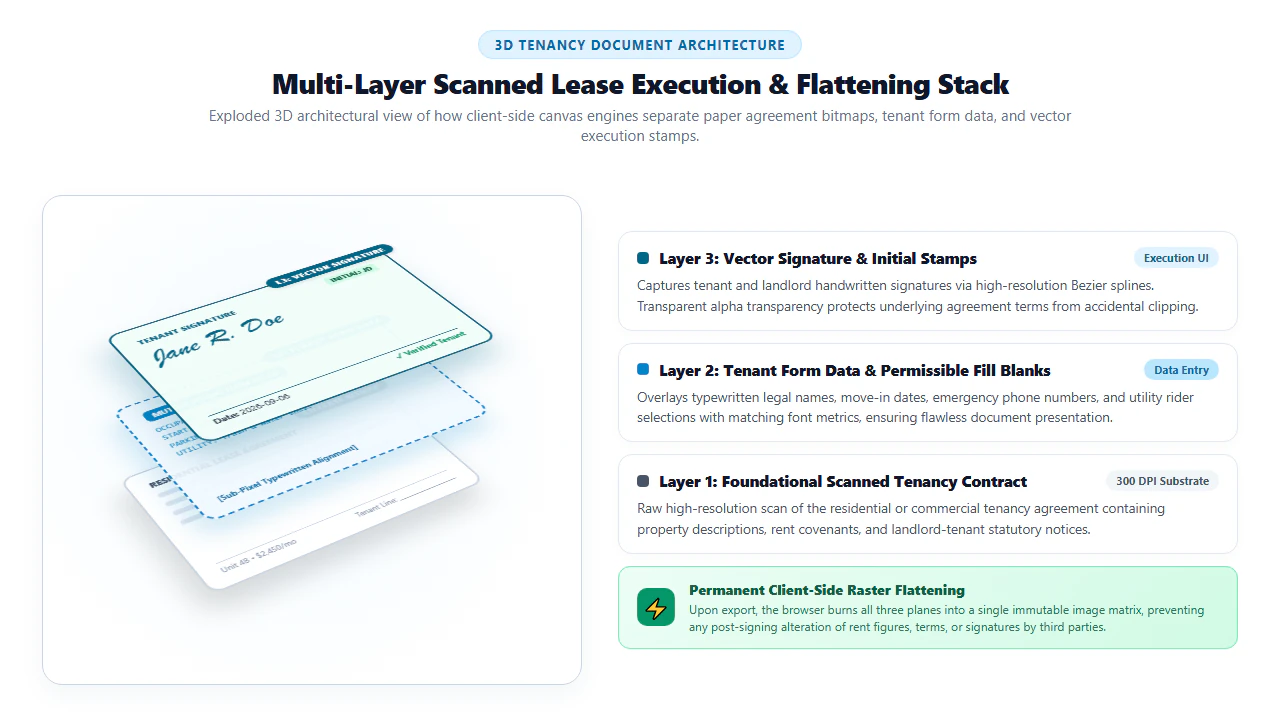
As visualized in the 3D isometric architecture diagram above, the client-side canvas engine manages three distinct coordinate planes during the lease preparation session:
- Layer 1: Foundational Scanned Tenancy Contract: The bottom raster plane contains the high-resolution 300 DPI scan of the landlord's original lease agreement. It preserves the exact physical paper grain, property address description (e.g., Unit 4B, 742 Evergreen Terrace), rent covenants, default terms, and pre-printed signature lines.
- Layer 2: Tenant Form Data & Permissible Fill Blanks: The intermediate virtual plane renders typography-matched typewritten strings for tenant legal names, agreed commencement dates, vehicle registration details, and checkbox marks (such as acknowledging pet riders or storage locker assignments).
- Layer 3: Vector Signature & Initial Stamps: The top interaction plane captures smooth cursive signature strokes using sub-pixel Bezier curves. Transparent alpha channel handling ensures that signing strokes seamlessly overlay the printed signature rules without creating unsightly white bounding boxes.
When you click Download, our engine initiates a permanent raster flattening routine. The three layers are baked into a single, unified bitmap stream. This prevents malicious third parties from extracting your signature stamp or separating text layers, creating an unalterable contractual record that holds up under judicial scrutiny.
Optimized for Extensive Multi-Page Agreement Review (Windows, macOS, Linux, ChromeOS):
- Multi-Page Thumbnail Navigation: Easily browse through 20+ lease pages, jumping directly between General Tenancy Rules, Utility Riders, Lead-Based Paint Disclosures, and the Execution Signature Block.
- Sub-Pixel Baseline Alignment: Snap typed tenant names, emergency phone numbers, and lease commencement dates directly onto printed form lines for an authentic, professional appearance.
- Multi-Page Initial Stamping: Stamp your pre-rendered initials onto the bottom margin of every single page with a single click, satisfying standard property management leasing requirements.
- Zero Cloud Data Exposure: All contract modifications, tenant SSNs, and signatures are processed inside client RAM, completely isolated from external servers.
Optimized for On-Site Move-In & Tablet Walkthroughs (iPhone, iPad, Android):
- Pinch-to-Zoom Clause Verification: Fluidly zoom into individual lease covenants, pet deposit riders, and move-in inspection checklists on your touchscreen.
- Natural Stylus & Touch Signing: Draw your signature with an Apple Pencil, stylus, or your finger. High-frequency touch sampling ensures natural, fluid penmanship without jagged digital lines.
- Mobile Camera Lease Ingestion: Photograph physical paper lease pages on-site during a lease signing walkthrough. Our engine automatically deskews pages and whitens paper backgrounds.
- Instant Local Save: Export the signed lease directly to your device's Files or Downloads folder, ready to email to your landlord or property manager immediately.
Lease Modification Rules: Lawful Edits vs. Unlawful Fraud
Because residential and commercial leases establish enforceable property rights and financial liabilities, contracting parties must clearly distinguish between permissible form completion and criminal contract alteration.
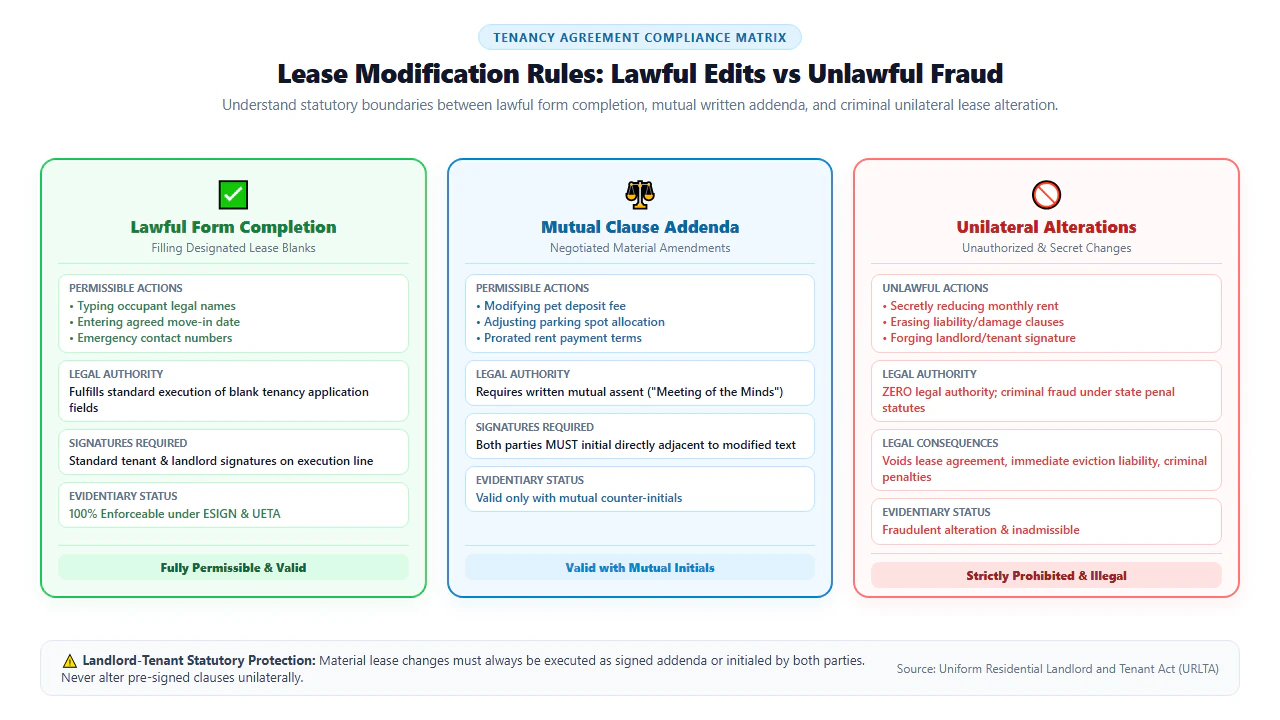
As outlined in the compliance matrix above, document modifications fall into three distinct legal categories:
1. Lawful Form Completion
Fully Permissible: Filling in designated blank fields—such as typing occupant names, vehicle license plates, emergency contacts, or agreed utility meter account numbers—completes the document's intended purpose under the US ESIGN Act and state UETA laws.
2. Mutual Clause Addenda
Requires Counter-Initials: When negotiating lease terms—such as adjusting a pet deposit fee from $500 to $250 or amending the move-in date—both landlord and tenant must place initials adjacent to the modified clause or execute a formal separate addendum.
3. Prohibited Alterations
Criminal Fraud & Breach: Secretly reducing monthly rent amounts, whiting out damage liability clauses, or forging a signature is strictly unlawful. Such fraudulent actions void the contract and expose the perpetrator to eviction and criminal prosecution.
Lease Modification Compliance & Enforceability Matrix
Before editing or executing terms on a scanned lease agreement, consult the statutory enforceability matrix below to ensure full compliance with landlord-tenant laws:
| Modification Type | Permissible Scope | Execution Requirement | Legal Consequence / Risk |
|---|---|---|---|
| Filling Blank Information | Occupant names, contact info, vehicle plates, emergency contacts. | Standard tenant signature on execution line. | 100% legally enforceable and standard industry practice. |
| Clerical Typo Correction | Fixing misspelled tenant surnames or minor apartment numbering errors. | Both landlord and tenant initial adjacent to the corrected text. | Valid; prevents administrative confusion during utility activations. |
| Agreed Term Adjustments | Changing lease start date, parking fee, or prorated first-month rent. | Counter-initials by all signing parties or formal signed addendum. | Binding if mutual assent is documented; invalid if unilateral. |
| Pet & Subletting Riders | Adding pet authorization, service animal waivers, or sublease rules. | Dedicated signed rider appended to the master lease packet. | Protects tenant security deposit from improper pet damage forfeitures. |
| Unilateral Rent Reduction | Lowering monthly base rent without landlord's explicit agreement. | Strictly prohibited; cannot be validated. | Criminal contract fraud, immediate eviction proceedings, and money damages. |
Recommended Companion Tools for Real Estate Workflows
Executing residential and commercial leases frequently requires combining multiple document actions. Discover our suite of companion browser utilities for streamlined property management:
| Real Estate Task | Recommended Tool | Browser Function | Property Benefit |
|---|---|---|---|
| Sign Tenant Lease or Application | Digital Signature Tool | Draws, types, or uploads legally binding e-signatures and date stamps. | Complies with ESIGN Act and state UETA electronic contract statutes. |
| Type Details on Scanned Lines | Scanned PDF Editor | Overlays crisp vector typography and color-matched whiteout over scan. | Ensures move-in inspection details and tenant info remain sharp. |
| Combine Lease with Utility Addenda | Merge PDF Online | Appends lead paint disclosures, HOA rules, and pet riders to the lease. | Creates a single unified, numbered contract packet for archival. |
| Reorder or Remove Blank Pages | Insert/Delete Page Tool | Extracts unneeded blank scanner sheets or reorganizes exhibits. | Cleans up messy multi-page scans before final counter-signing. |
| Compress Multi-Page Scans for Email | Compress PDF Free | Reduces 35MB multi-page lease scans below 2MB without blurring text. | Bypasses property management email attachment size limits. |
ESIGN Act Standards, Pro Engineering Tip & Statutory Notice
Under the federal Electronic Signatures in Global and National Commerce Act (ESIGN Act, 15 U.S.C. § 7001) and the Uniform Electronic Transactions Act (UETA) adopted across 49 states, an electronic contract or signature may not be denied legal effect, validity, or enforceability solely because it is in electronic form. In residential real estate transactions, electronic lease execution is valid provided the system satisfies four core legal requisites:
- Intent to Sign: The signer must demonstrate clear, deliberate intent to execute the lease agreement (such as drawing an active signature or clicking an explicit execution confirmation).
- Consent to Do Business Electronically: Both the landlord and tenant must mutually agree to conduct the leasing transaction through digital means.
- Association of the Signature: The electronic signature must be logically associated with or attached to the specific contract text being agreed upon.
- Record Retention & Reproduction: The executed lease must remain reproducible and tamper-evident for reference by both contracting parties throughout the tenancy term.
If you negotiate a minor lease amendment directly on a printed or scanned contract—such as extending the rent payment grace period from 3 days to 5 days—never leave the correction as an unverified standalone edit. Under contract law, an uninitialed change can be contested by the other party as an unauthorized post-execution alteration. Ensure that both the landlord and all adult tenants place their initials and the date directly adjacent to the modified sentence. Alternatively, execute a separate one-page Lease Addendum and merge it onto the back of the PDF.
Modifying financial figures, lease expiration dates, security deposit covenants, or tenant rules on an executed residential or commercial lease without the explicit written mutual assent of all parties constitutes criminal contract fraud and forgery under state penal codes and 18 U.S.C. § 1001. Unilateral alterations void contractual protections and expose the altering party to immediate civil eviction, loss of security deposits, and criminal liability. Only edit documents you own or are explicitly authorized in writing to execute.
- check_circle No Printing Required: Complete tenant information blanks and apply legally binding signatures directly onto scanned lease PDFs.
- check_circle Mutual Assent for Alterations: Any negotiated change to terms or rent amounts must be counter-initialed by both landlord and tenant.
- check_circle Permanent Raster Flattening: Bakes signature strokes and fill entries into the 300 DPI image to prevent tampering.
- check_circle 100% In-Browser Privacy: WebAssembly execution ensures tenant Social Security Numbers and banking details never upload to external servers.
To fill out rental details, correct clerical errors, and electronically sign a scanned apartment lease agreement without printing, drag the document into EditScannedPDF.com. Position text fields on printed lines to enter tenant legal names, emergency contacts, move-in dates, and vehicle details. Draw or paste your signature on the execution line, add initial stamps on individual pages, and export an official flattened PDF compliant with ESIGN and UETA standards—100% free and private in browser memory.
Ready to Edit and Sign Your Scanned Lease?
Fill tenant blanks, initial clauses, and apply legally binding digital signatures in your browser memory. 100% private, free, and secure.
draw Sign Scanned Lease Now FreeFrequently Asked Questions About Editing & Signing Leases
Are electronic signatures on residential lease agreements legally binding?
Yes. Under the federal Electronic Signatures in Global and National Commerce Act (ESIGN Act, 15 U.S.C. § 7001) and Uniform Electronic Transactions Act (UETA) adopted across 49 states, electronic signatures on residential leases carry the identical legal validity, enforceability, and judicial admissibility as handwritten pen-and-ink signatures.
Can a tenant legally change the monthly rent amount on a scanned lease?
No. Unilaterally altering monthly rent figures, security deposit amounts, or lease covenants without explicit written mutual consent from the landlord constitutes criminal contract fraud and immediate lease breach. Any material modification requires written mutual assent and initials from both parties.
Can I sign a scanned lease using my finger or a stylus on a smartphone?
Yes. EditScannedPDF provides hardware-accelerated touch drawing on iOS and Android devices. You can draw your authentic signature or initials directly on your mobile screen using your finger or an Apple Pencil/stylus with smooth Bezier curve smoothing.
Are tenant Social Security Numbers and bank details safe on this website?
Yes, 100% safe. EditScannedPDF operates entirely within client-side browser memory via WebAssembly and HTML5 Canvas. Your multi-page lease document, identification numbers, and signatures never transmit to external servers or cloud storage.
Can I edit text on a multi-page scanned lease without disrupting formatting?
Yes. Our browser editor allows you to navigate through all pages, fill in designated tenant blanks, update clerical typographical errors using color-matched whiteout, and add new text fields while preserving original page geometry and fonts.
What is the difference between in-line clause edits and a formal lease addendum?
Minor clerical corrections (like fixing a misspelled name) can be handled in-line if both landlord and tenant place their initials directly adjacent to the change. For substantial modifications (such as changing pet terms, rent concessions, or parking rights), executing a separate formal Lease Addendum and merging it onto the PDF packet is recommended.
How do I ensure a signed scanned lease is admissible in housing court or small claims?
To guarantee judicial admissibility, ensure the final PDF includes both parties' signatures, complete date stamps, initials on every page or modified clause, and an unbroken email chain of custody demonstrating that the final executed copy was delivered to both landlord and tenant.