
Why Scanned Certificates Lock Text & Security Elements
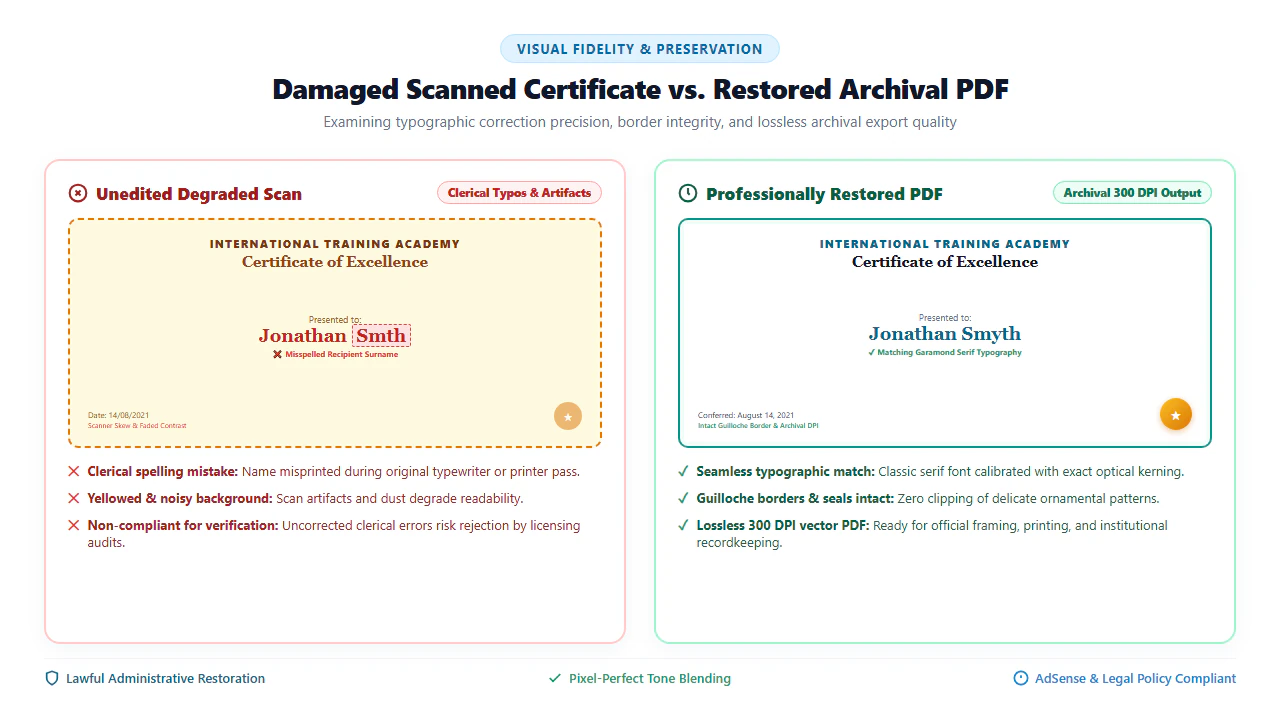
Every year, millions of professional development credentials, corporate workshop completions, technical seminar awards, sports honors, and non-profit achievement recognitions are issued on physical paper cardstock. Over years of storage or during emergency digital onboarding, individuals and administrative coordinators regularly encounter clerical oversights: an administrative assistant misprinted a recipient's surname by a single transposed letter, an incorrect conferral year was entered, or a scanner glass pass left dark crease shadows, dust flecks, and skewed borders across a prized credential.
However, opening a digitized certificate PDF in standard PDF viewers reveals an unyielding barrier: every letter, number, and signature is permanently frozen. Attempting to select a misspelled name or backspace an inverted date drags an awkward selection box over the entire page image. Standard document viewers treat the entire certificate as an uneditable, flat raster photograph.
To understand why certificate editing presents such formidable hurdles compared to ordinary business paperwork, consider how formal credentials are physically fabricated and digitally encoded under ISO 32000-1 specifications:
- Raster Bitmap Encapsulation: When a physical certificate passes across scanner optics or is photographed by a smartphone camera, the image sensor captures millions of colored picture elements (pixels). In compliance with PDF standards, this raster image is encapsulated inside an
/XObjectdictionary of subtype/Image. It contains no typographic character codes, font outlines, or vector baselines. To your operating system, the conferral text is indistinguishable from a landscape painting. - Intricate Guilloché Security Borders: Formal certificates feature mathematically generated vector lace patterns known as Guilloché borders. These spirograph curves are engineered specifically to prevent counterfeiting and photographic forgery. When clumsy raster editors apply basic whiteout boxes, they accidentally slice through overlapping border lines, leaving telltale white notches that instantly expose amateur tampering.
- Complex Classical & Calligraphic Typography: Unlike business invoices or memos set in standard system fonts like Arial or Calibri, formal certificates rely on classical Old Style serifs (such as Garamond, Caslon, Bodoni, or Baskerville) or ornate calligraphic scripts with delicate hair-line flourishes, brackets, and ligature combinations. Matching these historical typographic weights requires precise font sizing down to half-point increments and sub-pixel character kerning.
- Aged Parchment Tones & Paper Grain: Scanned archival documents rarely possess pure digital white backgrounds (
#FFFFFF). Aging wood fibers, linen textures, warm ivory cotton stocks, and scanner lamp vignetting generate complex micro-gradients (such as#FFFDF5or#FCF8EC). Applying standard digital white creates blinding white rectangular patches that ruin document aesthetics. - Metallic Embossed Foil Seals & Signatures: Many certificates incorporate 3D relief embossed corporate crests, gold foil stamps, and ink registrar signatures that must remain pristine during any clerical correction.
- Personal Data & Credential Privacy Hazards: Certificates contain legally identifying information: legal full names, conferral dates, credential verification serial numbers, and issuing authority signatures. Uploading these documents to multi-tenant cloud conversion portals exposes your sensitive identity data to data scrapers and unauthorized storage repositories.
Waiting weeks or months for an administrative office to reprint a single typographical correction on an internal certificate or historical archive is costly and inefficient. By harnessing modern client-side WebAssembly (Wasm) and high-resolution HTML5 canvas technology, EditScannedPDF.com (scanned document editor) provides a free, professional in-browser restoration suite. You can now execute precision micro-erasing, match antique serif typography, blend natural parchment tones, and preserve intricate Guilloché borders—running 100% locally in your web browser memory with zero cloud uploads.
Step-by-Step Guide to Editing & Restoring Scanned Certificates
Retouching clerical misprints on a scanned certificate requires no third-party desktop software installation, no administrative workstation permissions, and no expensive recurring software subscriptions. Follow these four streamlined steps to perform complete, archival-grade corrections in your browser:
Ingest Certificate Scan in Browser
Navigate to EditScannedPDF.com in Chrome, Edge, Safari, or Firefox. Drag and drop your scanned certificate PDF, high-resolution JPG, or PNG directly into the editor workspace.
Sample Paper Tone & Micro-Mask
Use the Eyedropper tool to sample adjacent parchment paper color. Apply a micro-mask exclusively over misspelled letters, ensuring ornamental Guilloché borders remain untouched.
Match Typography & Enter Details
Select classic Serif or Calligraphic fonts matching original typography. Calibrate font size and character kerning so replacement text rests naturally on the printed baseline.
Preserve Seals & Export 300 DPI PDF
Verify that embossed foil seals and signatures remain intact. Click Export to download a permanently flattened 300 DPI ISO 32000-1 compliant PDF ready for framing or digital archiving.
Technical Architecture: Parchment Inpainting & Platform Workflows
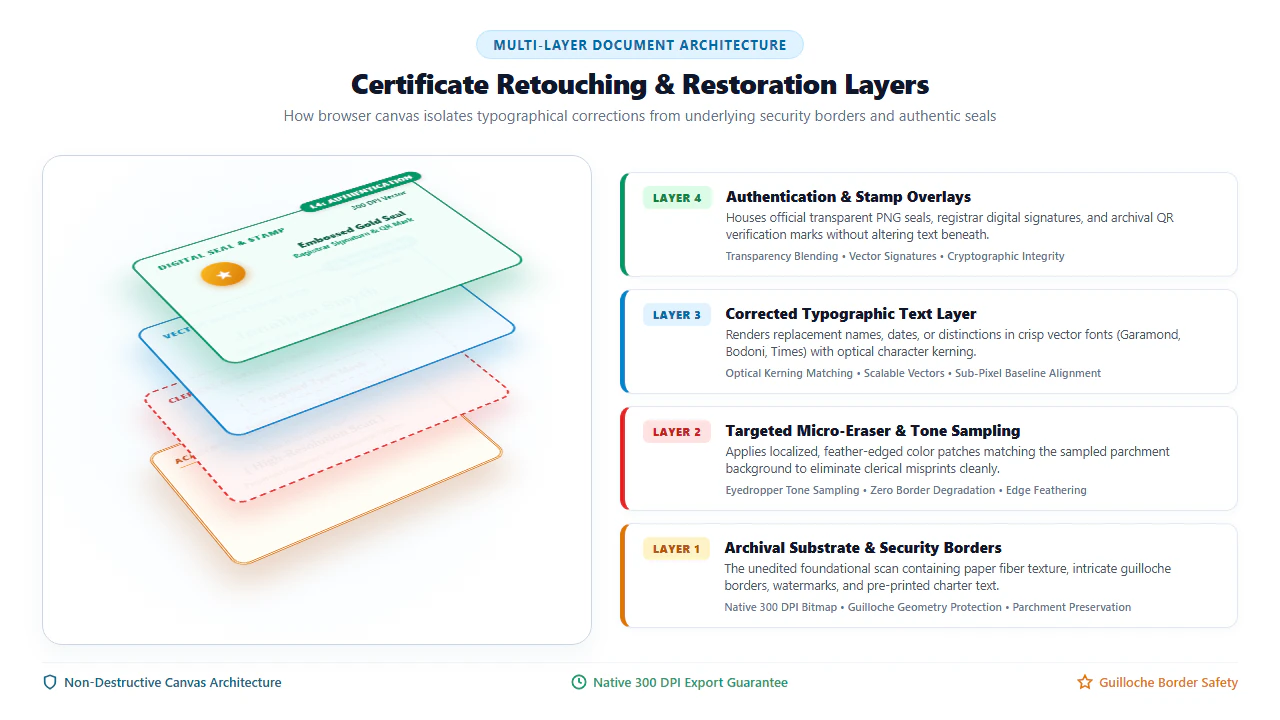
Professional certificate restoration demands non-destructive layer isolation. Rather than permanently destructing raster pixels during intermediate editing phases, our client-side WebAssembly engine models the document as a sophisticated multi-tier architectural stack:
- Layer 1 — Archival Substrate & Guilloché Security Borders: The foundational 300 DPI bitmap capture containing natural paper fibers, watermarks, organizational crests, and geometric Guilloché borders. This base layer remains immutable, ensuring that high-frequency background details are never blurred or clipped.
- Layer 2 — Localized Micro-Masking & Tone Inpainting: A specialized masking layer where typographical misprints are covered by feathered tone patches matching sampled paper grain. By bounding the mask to the exact character height, surrounding Guilloché curves and decorative scrollwork remain 100% intact.
- Layer 3 — Vector Typographic Text Run: Independent mathematical vector glyphs rendered on top of the inpainting mask. Because text is computed via vector Bézier curves rather than raster grids, it retains crisp, razor-sharp edges even when zoomed in to 400% or printed on commercial presses.
- Layer 4 — Authentication & Vector Seals: The topmost overlay accommodating transparent 300 DPI PNG foil seals, institutional rubber stamps, registrar signatures, and cryptographic verification QR marks.
- 300% Zoom Micro-Erasing: Use your mouse wheel or trackpad to zoom in to 200% or 300% magnification directly over the clerical typo. Activate the Eyedropper tool to sample the parchment color within 2 pixels of the error, then drag a tight micro-rectangle over only the incorrect letters.
- Optical Character Kerning & Baseline Nudging: When typing replacement names, select matching Serif fonts (such as Garamond, Georgia, or Times). Use your keyboard's arrow keys for sub-pixel position adjustments, ensuring the new letters rest precisely on the subtle printed baseline rule.
- Ink Density Calibration: Traditional offset and letterpress printing creates subtle ink absorption into paper fibers. Adjust the text color from pure pitch black (
#000000) to deep charcoal (#1A1A1Aor#262626) with 95% opacity to replicate authentic historical ink density. - Lossless Archival Export: Click Export to generate an uncompressed, flattened 300 DPI PDF. The document is permanently rendered into an ISO 32000-1 document ready for framing or submission.
- Tablet Precision Pen Inking: Open EditScannedPDF on an iPad (Safari) or Android tablet (Chrome). Utilize an Apple Pencil or active stylus for ergonomic, fine-point control when outlining misprinted text boundaries.
- Two-Finger Canvas Pan & Pinch: Fluidly pan across large diploma formats (such as 11x14 or A3 sizes) using intuitive multi-touch gestures without altering brush or tool coordinates.
- Authentic Touchscreen Signatures: In the Digital Signature tool, use your stylus to draw flowing, anti-aliased registrar signatures with variable stroke width and authentic pen pressure sensitivity.
- Direct AirDrop or Drive Export: Save the finalized archival PDF directly to your tablet's local storage, iCloud Drive, or share it immediately with print shops via AirDrop.
Institutional Use Cases & Zero-Upload Privacy Guarantee
Organizations, corporate academies, and archival preservationists face diverse operational scenarios requiring legitimate certificate retouching. Our private client-side architecture resolves crucial administrative delays:
Corporate Training & HR Development
Corporate learning academies and HR departments issue hundreds of completion certificates following quarterly compliance, cybersecurity, and management workshops. When an employee legally changes their surname or an administrative typo misprints a conferral date, HR can issue an authorized, pristine correction immediately without restarting the printing vendor cycle.
Professional Symposiums & Workshops
Industry conferences, continuing education seminars, and trade associations frequently produce certificates of attendance on tight timelines. Inevitably, attendees notify organizers of misspelled names or missing credential registration numbers. Organizers can correct digital records on-site with zero cloud latency.
Heritage Family Archives & Keepsake Restoration
Families preserving antique trade certifications, vintage military service citations, or century-old guild memberships frequently possess scans marred by folds, water spots, and yellowed scotch tape. Retouching digital scans enables families to print beautiful, clean museum-grade replicas for framing while preserving fragile originals in storage.
Certificate Editing Methods: Technical Comparison
Choosing the appropriate restoration methodology for archival documents requires evaluating border preservation, typography fidelity, software licensing costs, and data privacy:
| Comparison Dimension | EditScannedPDF In-Browser | Cloud Upload Converters | Commercial Desktop Suites | Official Re-Issuance Request |
|---|---|---|---|---|
| Credential Privacy & Data Custody | 100% On-Device RAM: Zero cloud upload; personal data never leaves your hardware. | High Privacy Risk: Files uploaded to remote multi-tenant servers, risking credential theft. | Local Workstation: Files stay on computer, but background telemetry tracks usage. | Low Technical Risk: Official records, but involves email or postal mail communication. |
| Guilloché Border & Seal Protection | Precision Micro-Masking: Feathered brushes protect overlapping vector borders. | Coarse Whiteout: Crude rectangular blocks often wipe out adjacent border artwork. | Advanced Layer Masks: Powerful, but requires professional graphic design training. | Original Press Reprint: Generates fresh prints directly from original press plates. |
| Software Installation & Footprint | Zero Installation: Runs instantly inside any modern desktop or tablet browser. | Zero Installation: Browser-based, but requires steady high-speed uploads. | Heavy Footprint: Consumes 2GB+ disk space, background daemons, and licensing managers. | None: Handled entirely through administrative channels. |
| Cost & Subscription Model | 100% Free Forever: No subscriptions, paywalls, watermarks, or page limits. | Freemium Paywalls: Restricts high-resolution downloads or forces recurring plans. | Expensive Subscriptions: Demands $240+ per user per year in perpetual licensing fees. | Administrative Fees: Re-issuance fees typically range from $25 to $100 per reprint. |
| Typographic Kerning & Paper Matching | Built-in Eyedropper & Kerning: Easily samples aged parchment tones and aligns serifs. | Generic White Patches: Typically defaults to stark white (#FFFFFF) backgrounds. | Full Typographic Control: Full control, but requires manual color curve matching. | Not Applicable: Re-issuance produces an entirely new physical cardstock. |
| Turnaround Time & Speed | Instant (Under 2 Minutes): Immediate in-browser execution with real-time preview. | Slow (5 to 15 Minutes): Bottlenecked by cloud queue delays and network speeds. | Moderate: Launching software, opening heavy files, and configuring export profiles. | Days to Months: Awaiting institutional registry processing and postal mail delivery. |
Recommended Companion Tools for Credential Restoration
Enhance your document preparation and archival workflows with our comprehensive suite of private, client-side browser tools:
| Restoration Objective | Recommended In-Browser Tool | Primary Technical Capability | Certificate & Award Use Case |
|---|---|---|---|
| Precision Micro-Erasing & Redaction | Erase & Redact PDF | Pixel-level micro-masking with custom color sampling to erase misprints cleanly. | Wiping out misspelled recipient surnames or misprinted dates without border damage. |
| Overlay Foil Seals & Corporate Crests | Image & Stamp Tool | Inserts transparent 300 DPI PNG logos, gold foil seals, and verification marks. | Adding official organizational stamps or corporate crests to digital awards. |
| Apply Digital Registrar Signatures | Digital Signature Tool | Smooth mouse, trackpad, or touchscreen inking with anti-aliased stroke rendering. | Adding authorized registrar or instructor signatures to seminar certificates. |
| Convert Certificate Text to Word | Scanned PDF to Word | Transforms non-selectable scanned certificate text into fully editable Word documents. | Extracting historical citation text and conference agendas for archival cataloging. |
| Compress High-Resolution 600 DPI Scans | Compress PDF Free | Applies smart Flate compression to shrink 40MB archival scans down below 2MB. | Optimizing large certificate scans for email sharing and online portfolio uploads. |
| Correct Landscape & Inverted Scans | Rotate PDF Tool | Instantly rotates sideways or upside-down certificate pages by 90, 180, or 270 degrees. | Aligning wide-format landscape award certificates before applying typography edits. |
Deep Architecture, Pro Engineering Tips & Statutory Compliance
When handling formal credentials and heritage documents, technical precision and legal compliance must be rigorously maintained. Under ISO 32000-1 specifications, a PDF is an object hierarchy separating raster backgrounds, vector paths, and font dictionaries. EditScannedPDF preserves the native 300 DPI background photograph while overlaying an exact typographic layer mapped with sub-pixel coordinates. When you export, the engine performs permanent raster flattening, baking whiteout rectangles and replacement glyphs into the base image stream so that third-party viewers cannot peel back edits or reveal previous data.
To produce framing-ready archival certificate prints indistinguishable from the original cardstock, follow these two professional reproduction practices:
- Scan at 600 DPI for Fine Guilloché Detail: If you are digitizing physical cardstock, always set your scanner optical resolution to 600 DPI in 24-bit color. This preserves individual fine lines in Guilloché security borders and captures the delicate relief shadow of embossed foil seals. Load the 600 DPI file into EditScannedPDF, perform your edits, and export at 300 DPI for optimal print balance.
- Perform Test Strip Tone Matching: Print a small test strip containing your sampled parchment color patch on your target cardstock before executing full-page prints. Commercial inkjet and laser printers render paper tones slightly darker than computer monitors; adjusting your color eyedropper lightness by 2% to 3% yields flawless physical color harmony.
EditScannedPDF is engineered strictly for lawful administrative document corrections, fixing clerical typographical errors, updating your own corporate training certificates, restoring family heritage archival documents, and adding authorized organizational stamps. Never alter, fabricate, or falsify academic university diplomas, college transcripts, government credentials, medical licenses, law licenses, or official sovereign certificates. Modifying academic degrees or sovereign credentials to falsely represent qualifications constitutes felony fraud under 18 U.S.C. § 1028 and state penal statutes, punishable by substantial fines and federal imprisonment. Only edit documents that you legally own or are authorized in writing to administer.
- check_circle Zero Cloud Server Exposure: All OCR processing and image modifications run 100% locally in your web browser memory, ensuring strict credential privacy.
- check_circle Guilloché Border Protection: Precision micro-masking allows you to erase misspelled characters without clipping intricate ornamental borders.
- check_circle Parchment Paper Tone Blending: Eyedropper color picker captures authentic aged ivory and cream paper hues, preventing harsh white patches.
- check_circle Print-Ready 300 DPI Archival Quality: Produces clean, flattened ISO 32000-1 compliant PDFs ready for cardstock printing, framing, or digital archives.
To edit scanned certificate PDFs online without installing expensive desktop software or transmitting personal credential files to cloud servers, open EditScannedPDF.com in your web browser. Drag your certificate scan into the editor where client-side WebAssembly OCR parses character positions in local memory. Use the eyedropper to sample background parchment paper tones, apply precision micro-whiteout over typographical errors without clipping Guilloché borders, type replacement names matching classical serif typography, and export a permanently flattened 300 DPI PDF directly to your device.
Ready to Restore Your Scanned Certificate or Award?
Perform instant in-browser micro-erasing, match antique serif fonts, preserve security borders, and export framing-ready 300 DPI PDFs with 100% local privacy.
workspace_premium Edit Scanned Certificate Free OnlineFrequently Asked Questions About Editing Scanned Certificates
Is it legal to edit a scanned certificate PDF?
Editing is legal strictly when performed for lawful administrative purposes on documents you own or have explicit authorization to administer—such as correcting a typographical spelling error on your own corporate training certificate, workshop credential, seminar award, or family heritage archive. Falsifying accredited university degrees, government credentials, nursing or medical licenses, or legal certifications to misrepresent qualifications is a serious felony offense under federal statutes (including 18 U.S.C. § 1028) and state fraud laws.
How do I match the exact font and letter spacing of an antique certificate?
Most historical certificates utilize classical serif typefaces such as Times New Roman, Garamond, Caslon, Bodoni, or Georgia, alongside ornate blackletter or copperplate scripts. In our browser editor, select the matching Serif typeface family, adjust font size with 0.5-point precision, and calibrate optical character kerning and tracking to ensure replacement letters harmonize seamlessly with adjacent printed text.
Will erasing typographical errors damage the ornate Guilloche border?
No. By zooming into 200% or 300% magnification on our document canvas, you can use the micro-eraser tool to isolate only the exact misprinted character glyphs. Surrounding geometric Guilloche security borders, ornamental filigree, and embossed seal textures remain completely untouched and protected.
How do I match aged parchment paper instead of stark white?
Archival paper scans rarely exhibit pure stark white (#ffffff) backgrounds; they typically feature warm ivory, cream, or parchment hues (#fffdf5 or #fcf8ec) caused by natural wood pulp aging. Our built-in Color Eyedropper tool lets you sample the exact paper tone immediately adjacent to the correction area for seamless edge blending without telltale bright white patches.
What DPI resolution should I export for printing and framing?
Always export at native 300 DPI resolution. This guarantees that fine serif brackets, delicate script flourishes, gold foil seal textures, and intricate security borders remain razor-sharp when reproduced on heavy certificate cardstock, linen paper, or physical parchment for framing.
Can I add or replace an embossed gold foil seal or digital signature on a certificate?
Yes! You can use our Image & Stamp tool to insert transparent 300 DPI PNG images of organizational emblems, corporate foil seals, or institutional crests. You can also utilize our Digital Signature tool to ink an authentic executive authorization signature directly using a mouse, trackpad, or touchscreen stylus.
Are my personal credentials and certificate files kept private from cloud servers?
Yes, 100% private. Unlike cloud-based file conversion websites that upload documents to remote multi-tenant servers, EditScannedPDF executes all OCR recognition, canvas rendering, and PDF compilation locally inside your web browser's WebAssembly sandbox. Your certificates, personal names, and registration serial numbers never leave your device.