
How to Redact Pay Stubs for an Apartment Application Without Getting Rejected
The Tenant's Privacy Dilemma: Proof of Income vs. Identity Theft Exposure
Searching for a rental apartment in competitive housing markets like New York, Los Angeles, London, or Toronto is an intense, fast-moving ordeal. To secure a lease, prospective tenants must prove their income satisfies the standard 3x monthly rent rule. Landlords, property management companies, and individual real estate brokers routinely demand two to three consecutive months of recent pay stubs before even considering your application. With our edit scanned PDF free, everything runs locally in your browser with zero file uploads.
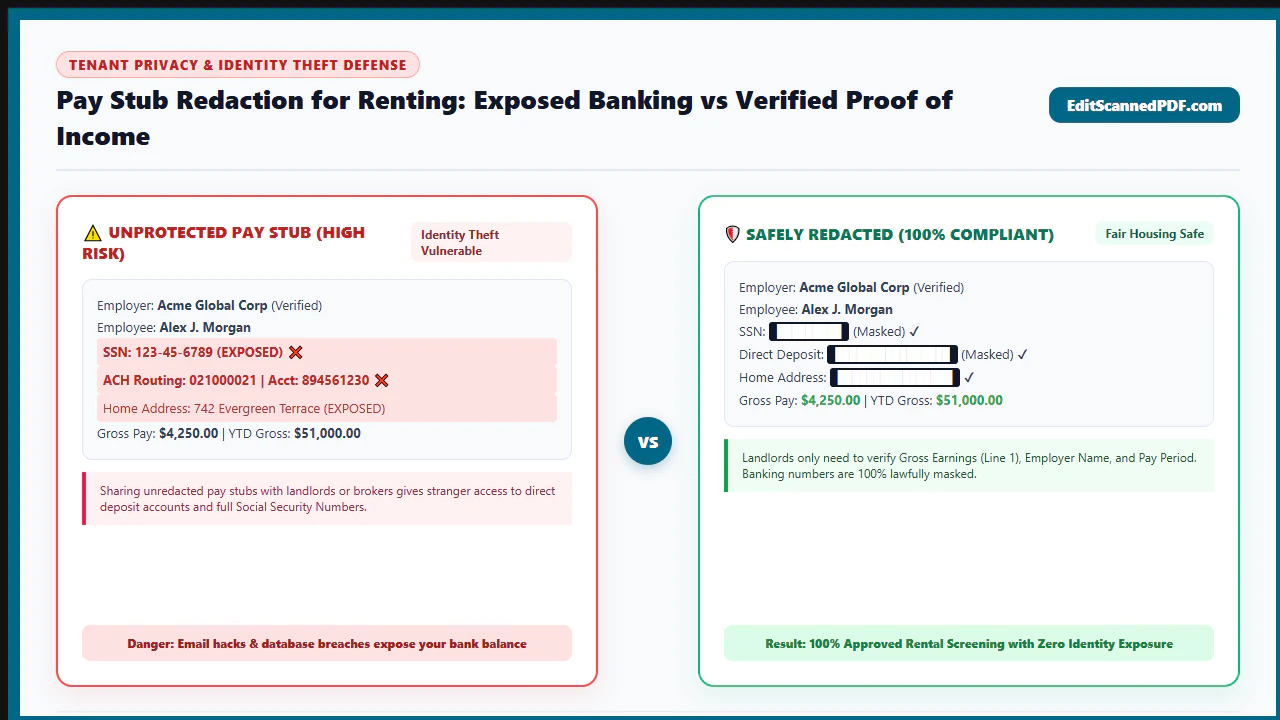
However, handing an unredacted earnings statement directly to an unfamiliar leasing agent or uploading it to an unverified web form exposes your most sensitive financial identifiers. Modern payroll stubs generated by corporate platforms (like ADP, Paychex, Gusto, and Workday) are packed with high-value targets for cybercriminals:
- Your full nine-digit Social Security Number (SSN) or Taxpayer Identification Number.
- Direct deposit bank routing numbers and complete checking account numbers.
- Your employee ID number and corporate department code.
- Granular pre-tax and post-tax deductions revealing personal health insurance conditions, medical flexible spending account details, retirement balances, union memberships, or court-ordered wage garnishments.
If the landlord's personal email account is compromised, or if a property management portal suffers a database leak, your complete financial profile becomes exposed to synthetic identity theft. Yet many applicants over-redact their documents—blacking out their employer's name, pay period dates, or year-to-date earnings—causing the leasing office to immediately reject the application as suspicious or unverified.
The Solution: Surgical, Client-Side In-Browser Redaction. With EditScannedPDF Redaction Tool, you can strike the perfect balance between privacy and approval. Permanently black out sensitive banking numbers and personal deductions while keeping core income verification pillars crystal clear. Operating entirely in your browser via WebAssembly, your documents never touch third-party cloud servers—guaranteeing 100% confidentiality.
4 Steps to Redact a Pay Stub PDF Online Without Getting Rejected
Redacting a pay stub for an apartment rental application takes under a minute. Follow these four practical steps using our client-side WebAssembly tool:
Open Erase & Highlight PDF and drag your earnings statement into the viewport. The document loads directly into browser RAM via WebAssembly with zero server transit.
Leave your legal name, employer name and address, pay period dates, gross salary, and year-to-date income totals 100% visible and untouched.
Draw precise marquee redaction boxes over your Social Security number (leave last 4 digits visible), direct deposit bank routing numbers, and private medical deductions.
Click "Export Redacted PDF". The engine permanently bakes the redaction into the raster canvas, destroying underlying text vectors and pixels, and downloads the file instantly.
Technical Pay Stub Anatomy: What to Keep vs. What to Permanently Black Out
The secret to redacting a pay stub without raising red flags at the leasing office is distinguishing between mandatory verification pillars and redactable private identifiers:
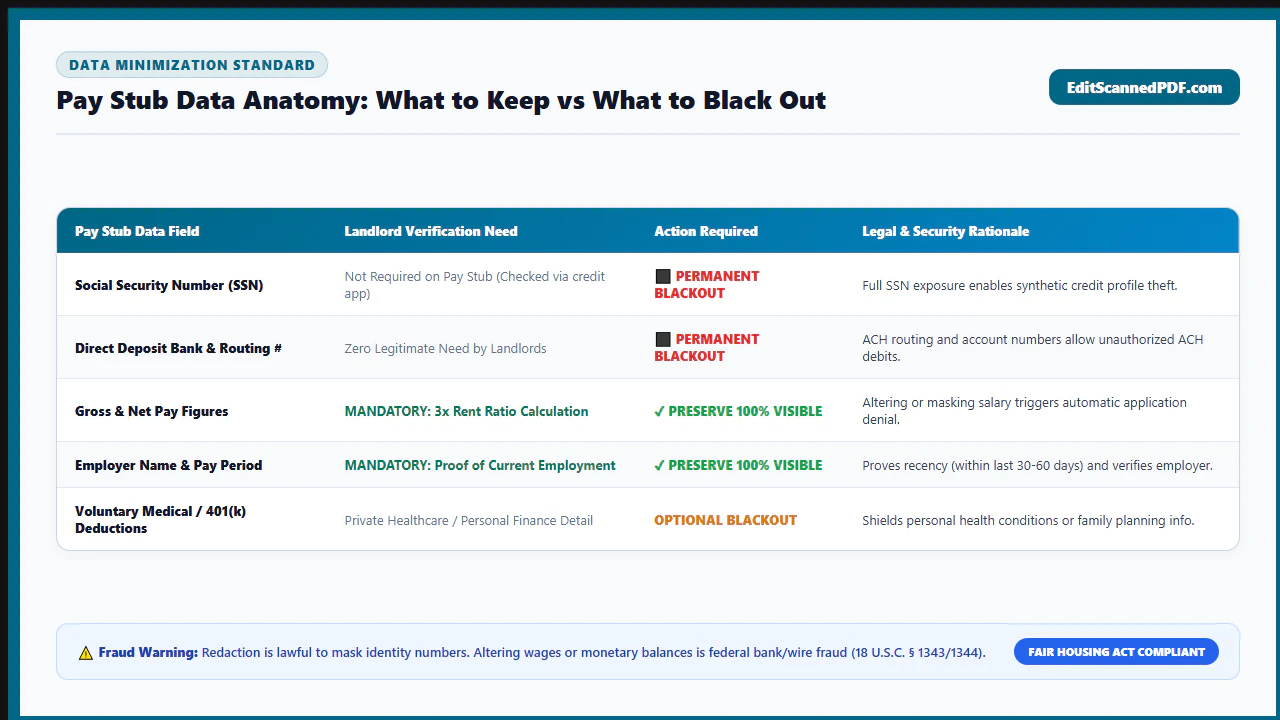
1. The Verification Pillars (MUST LEAVE 100% INTACT)
If you redact any of these items, property managers will immediately reject your application:
- Employer Legal Name & Corporate Address: Landlords verify your company via state business registries and corporate directories.
- Pay Period Dates & Pay Date: Establishes that your income is current and recurring.
- Gross Pay & Year-to-Date (YTD) Totals: Gross pay is the universal metric used by leasing software to calculate the 3x rent ratio.
- Hourly Wage or Base Salary Rate & Regular Hours Worked: Confirms full-time versus part-time employment status.
2. The Sensitive Identifiers (SHOULD SAFELY REDACT)
These elements create massive identity theft exposure and have zero bearing on your rent eligibility:
- Social Security Number (SSN): Blackout the first 5 digits, leaving the last 4 digits visible (
XXX-XX-1234) to match your credit check. - Direct Deposit Bank Coordinates: Redact the ACH routing transit number and full checking account number.
- Personal Medical & Voluntary Deductions: Blackout line items for health insurance copays, union memberships, life insurance, and wage garnishments.
- Employee ID & Internal Payroll Codes: Internal corporate identifiers that have no relevance to tenancy.
- Multi-Month Statement Review: In Chrome, Edge, Firefox, or Safari on Windows, Mac, or Linux, drag 2 to 3 consecutive pay stubs into Erase & Highlight PDF.
- Sub-Pixel Marquee Precision: Use mouse crosshairs to draw clean rectangular blackout bars over the first 5 digits of your SSN and direct deposit routing numbers.
- Line-Item Deduction Masking: Draw clean redaction boxes across voluntary healthcare or retirement deduction lines while ensuring summary totals rows remain mathematically legible.
- DevTools Air-Gap Verification: Open your browser network monitor to verify that zero outgoing requests occur while your sensitive payroll files are processed.
- Zero-Install Mobile Browser Redaction: Launch Safari on iPhone/iPad or Chrome on Android and access EditScannedPDF.com with no app downloads or registrations.
- Direct Payroll App Import: Download your PDF pay stub from ADP, Gusto, or Workday mobile apps directly into your device Files app, then import into the browser sandbox.
- Touch-Based Pinch-to-Zoom: Use two fingers to zoom into fine 8pt payroll deduction grids. Drag with your fingertip or Apple Pencil to blackout sensitive routing numbers.
- Bandwidth-Free Local Export: Save the redacted file directly back to your device storage without burning cellular data on large file uploads.
Leasing Office Workflows: Redaction Protocols Across Landlord Profiles
Different landlord types review tenant applications through different operational lenses:
1. Corporate Property Management & Automated Screening Portals
Large property management companies utilize automated tenant screening software (such as Yardi, RealPage, or AppFolio). These platforms rely on automated optical character recognition to extract gross earnings and match your name and last 4 SSN digits against credit bureau reports. Redacting routing numbers and full SSN while leaving last-4 digits ensures 100% automated pass rates.
2. Independent Private Landlords ("Mom-and-Pop" Owners)
Individual property owners review applications manually via personal email or printed paper. These individuals rarely maintain enterprise-grade cybersecurity; a simple phishing attack on a landlord's Gmail account exposes all tenant documents. Redacting your direct deposit coordinates and SSN is critical to protect your identity.
3. Roommate Groups, Subleases & Lease Guarantors
When applying for multi-tenant apartments or providing co-signer income documentation, pay stubs are often circulated among prospective roommates or secondary brokers. Redacting private healthcare deductions and personal finances prevents uncomfortable disclosures between housemates.
At EditScannedPDF.com, your salary records, employer details, and personal earnings data remain strictly confined to your device's memory.
- Permanent Raster Canvas Flattening: Redacted numbers cannot be revealed or copy-pasted from the resulting PDF.
- Zero Cloud Data Exposure: Redaction operations execute 100% locally via WebAssembly with zero server transit.
- Universal PDF Readers Acceptance: Output documents conform strictly to ISO 32000-1 and open flawlessly in all modern PDF readers and property management portals.
Redaction Methodology Matrix: Cosmetic Markers vs. Desktop Suites vs. Client-Side WebAssembly
Compare the practical trade-offs between standard document redaction techniques when submitting rental applications:
| Operational Dimension | Cosmetic Shape / Pen Highlighters | Commercial Desktop Software Suites | EditScannedPDF In-Browser Redactor |
|---|---|---|---|
| Underlying Text Excision | ❌ Zero (text remains copyable underneath) | ✅ Permanent (with specialized redaction tool) | ✅ Permanent (text stream & pixels destroyed) |
| Metadata Scrubbing | ❌ Retained in full | ⚠️ Often requires separate manual step | ✅ Automatic stream sanitization |
| Landlord Approval Rate | ⚠️ Risky (looks amateurish or suspicious) | ✅ High | ✅ 100% Professional Appearance |
| Cloud Privacy & Data Security | Dependent on desktop installation | Requires recurring enterprise subscriptions | ✅ 100% Private (local device WebAssembly) |
| Software Cost & Paywalls | Free in basic viewers | ⚠️ Costly enterprise licensing ($20+/mo) | ✅ 100% Free with zero registration |
| Mobile Device Compatibility | Inconsistent across mobile apps | Requires native mobile app installation | ✅ Instant touch signing in Safari & Chrome |
Recommended Companion PDF Tools for Rental Applicants
Assembling a complete apartment rental dossier often involves multiple document preparation steps. Pair our redaction tool with these essential utilities:
| Application Dossier Task | Recommended Companion Tool | Key Technical Feature | Privacy & Security Mode |
|---|---|---|---|
| Redact Pay Stubs & W-2s | Erase & Highlight PDF | Destructive marquee blackout and ambient paper whiteout | 100% Client-Side In-Memory Sandbox |
| Redact Bank Statements | Redact Bank Statements | Blackout routing numbers and private transactions | Zero Cloud Uploads • Browser RAM |
| Merge Application Packet | Merge Scanned PDF | Combine ID, pay stubs, and landlord references into 1 PDF | Native PDF Object Tree Concatenation |
| Compress File for Email Submission | Compress Scanned PDF | Downsample large 30 MB document scans to under 100KB | Direct In-Memory Byte Stream Optimization |
| Sign Lease Agreement Online | Sign Scanned PDF | Stamp vector signatures and flatten into page canvas | Hardware-Accelerated Canvas Synthesis |
Deep Architecture: Fair Housing Act, FCRA, Tenant Screening & Anti-Fraud Boundaries
Under United States federal law, tenant screening and consumer data handling are governed by two major statutory acts:
- The Fair Credit Reporting Act (FCRA, 15 U.S.C. § 1681): Regulates how third-party tenant screening agencies collect, store, and evaluate consumer financial records. While screening bureaus possess statutory authorization to run background checks with your signed consent, individual landlords have no legal duty to collect or store your unredacted bank routing numbers.
- The Fair Housing Act (FHA, 42 U.S.C. § 3601 et seq.): Prohibits housing discrimination based on race, color, national origin, religion, sex, familial status, or disability. Redacting voluntary deductions related to medical care, union affiliations, or religious charitable contributions prevents unconscious bias during landlord review.
lightbulb Engineering Pro Tip: Keep Summary Deduction Totals Mathematically Intact
When redacting sensitive personal deductions (like health insurance or child support), blackout only the specific deduction description text (e.g., blacking out the words "Medical FSA" or "Court Case #123"). Do not blackout the summary totals row showing total deductions, gross pay, or net pay. Property managers routinely check that Gross Pay minus Total Deductions equals Net Pay; preserving mathematical balance prevents application rejection.
gavel Statutory Legal Notice: Legitimate Privacy Protection vs. Criminal Forgery
Lawful Redaction vs. Forgery: Redacting Social Security numbers, routing codes, and private deduction line-items to protect your financial identity is fully lawful under the Privacy Act of 1974. However, using editing software to alter your hourly wage, fabricate higher gross pay totals, change pay dates, or generate synthetic pay stubs violates state forgery laws and federal fraud statutes (including 18 U.S.C. § 1014 and 18 U.S.C. § 1028), carrying severe criminal penalties. Users may only process documents they own.
- Never Redact Income Columns: Keep employer name, gross earnings, pay dates, and YTD totals 100% visible.
- Redact Sensitive Identifiers: Blackout the first 5 digits of your SSN, full bank routing numbers, and private medical deductions.
- Avoid Cosmetic Shapes: Basic viewers leave copyable text underneath; use true destructive raster inpainting.
- 100% In-Browser Security: WebAssembly processing guarantees your pay stubs are never uploaded to cloud servers.
Redacting pay stubs for an apartment application protects your Social Security number and direct deposit banking coordinates without jeopardizing lease approval. By preserving core income verification pillars while destroying sensitive identifier streams via client-side WebAssembly, EditScannedPDF.com ensures your documents pass landlord review with 100% personal data privacy.
Redact Your Pay Stubs Privately Online
Black out Social Security numbers, routing codes, and sensitive personal deductions in seconds. 100% in-browser WebAssembly security with zero cloud uploads.
verified_user Redact Pay Stub FreeFrequently Asked Questions on Pay Stub Redaction
Is it legal to redact personal information on a pay stub before submitting it to a landlord?
Yes, absolutely. Redacting sensitive personal identifiers (PII) like full Social Security numbers, bank account numbers, and healthcare deductions to protect yourself against identity theft is completely legal and recommended. However, altering your actual salary, hourly wage, or tax withholdings is illegal and constitutes criminal fraud.
What specific payroll information does a landlord or property manager actually need to see?
Landlords need to verify that your gross income meets their rent-to-income threshold (typically 3x monthly rent). They require your employer name, official pay period dates, pay date, gross earnings, and year-to-date (YTD) income totals. They do not need your complete SSN, bank routing coordinates, or private medical deductions.
Can a leasing office reject my rental application because I blacked out my SSN on my pay stub?
If you leave the last 4 digits visible (e.g., XXX-XX-1234), reputable property managers and landlords will not reject your application because the last 4 digits match your formal rental application and credit report check. Completely obliterating all 9 digits can sometimes trigger extra verification questions.
Should I redact my bank account and transit routing numbers from my direct deposit stub?
Yes, highly recommended. Direct deposit line items often print your full checking account and bank routing numbers. If a leasing office or third-party email account is compromised, those banking coordinates can be used to initiate unauthorized withdrawals. Redact the routing number and account number, leaving only the last 4 digits.
Why is drawing a black shape in basic PDF viewers unsafe for redacting pay stubs?
Drawing a black graphic rectangle in basic PDF viewers creates a superficial visual mask on top of the document. The underlying digital text, font operators, and invisible OCR layers remain intact. Anyone can highlight the text beneath the black box, copy it to their clipboard, or delete the box in a vector editor.
Can I safely black out confidential deductions for medical insurance, union dues, or wage garnishments?
Yes. Private voluntary deductions such as healthcare contributions, union dues, retirement withholdings, and court-ordered garnishments have no bearing on your gross income calculation. You can safely black out these specific line items, though you should ensure the gross earnings and net pay totals remain legible.
Does redacting my pay stub with EditScannedPDF upload my salary and financial records to cloud servers?
No. EditScannedPDF.com runs 100% client-side in your local web browser using WebAssembly. All pixel processing, text destruction, and document flattening execute strictly within your device RAM. Your private pay stubs and financial data are never uploaded to remote servers.