
The Dangerous Mistake: "Visual Masking" vs. "True Redaction"
Whether you are securing a residential lease in Manhattan or London, onboarding with an international remote software company, opening an investment portfolio, or booking private accommodation, you will inevitably be required to present scanned copies of your sovereign passport, state driver's license, or national identity card. Modern cybersecurity compliance frameworks and global statutory privacy bodies uniformly issue a stern warning: "Never transmit an unredacted copy of your government identity document across unencrypted email threads, public cloud forms, or unvetted commercial portals." With our scanned PDF editor, everything runs locally in your browser with zero file uploads.
Yet, millions of professionals and consumers make a catastrophic, life-altering mistake every day. They open their smartphone gallery, standard image preview software, or native desktop markup tools, draw an opaque black rectangle or thick digital pen stroke over their passport serial number or Social Security number, and immediately transmit the file. Here is the alarming technical truth: drawing an opaque black vector rectangle or drawing stroke on a PDF is merely "visual masking"—it is NOT true redaction. For deeper troubleshooting, see our guide on how to edit a scanned certificate PDF.
Under the ISO 32000 PDF standard, portable documents are constructed as hierarchical databases of distinct content streams, vector paths, and raster bitmap resources. When an ordinary desktop preview utility places a black box over an ID scan, it simply adds a graphic overlay instruction into the uppermost annotation layer. The underlying optical character recognition (OCR) text layer, XML metadata dictionaries, and high-resolution photographic pixels beneath that rectangle remain completely untouched. Any recipient opening the document in basic PDF software can click the black shape, hit Delete on their keyboard, or press Ctrl + A to copy the invisible underlying text directly into a plain text editor, exposing your full identity credentials in milliseconds.
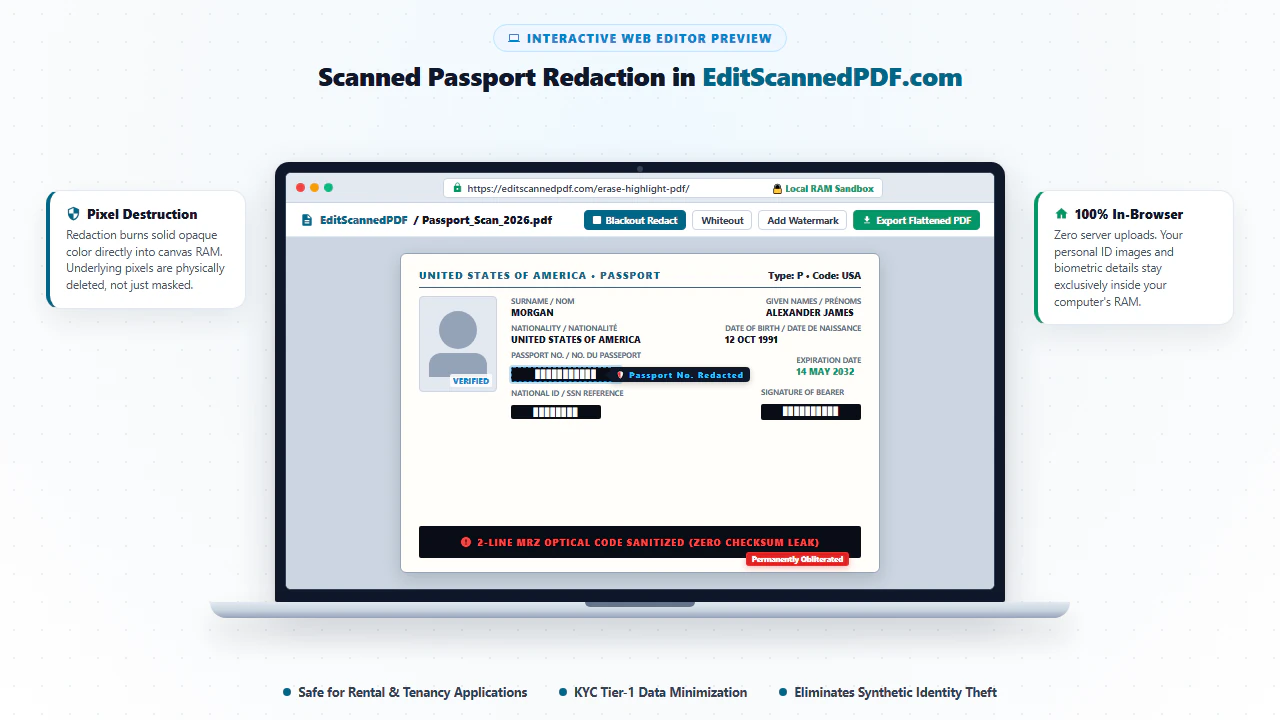
True cryptographic and destructive redaction operates on an entirely different level. It physically alters the underlying image substrate in system RAM. The pixel values within the designated bounding box coordinates are mathematically purged and replaced with solid, uniform color bytes (such as solid #000000 blackout or solid #ffffff whiteout). Once the canvas buffer is flattened and re-encoded into an immutable PDF stream, the original biometric pixel values and text glyphs are extinguished from existence, making mathematical or forensic recovery entirely impossible. By executing this entire destructive rasterization pipeline inside your local web browser via client-side WebAssembly, EditScannedPDF.com guarantees maximum identity defense with zero server upload exposure.
4 Steps to Redact Passport or License on EditScannedPDF.com
Sanitizing your scanned identification documents requires zero software downloads, zero credit card registrations, and zero server uploads. Follow this simple 4-step workflow to permanently destroy confidential identification codes before sending documents to prospective landlords, employers, or KYC verification portals:
Ingest ID Document Locally
Open EditScannedPDF.com and select the Erase & Highlight PDF tool. Drag and drop your scanned passport or ID card into the workspace. The file loads directly into isolated browser memory with zero cloud transfer.
Activate Redaction Tool
Select the Blackout Redaction tool or Whiteout Eraser from the top editor toolstrip. Use Blackout for explicit censorship transparency, or Whiteout for seamless administrative document styling.
Draw Marquee Redaction Boxes
Click and drag bounding boxes over sensitive identification targets: passport booklet serial numbers, the bottom 2-line optical MRZ zone, signature specimens, and reverse-side 2D barcodes.
Bake & Export Flattened PDF
Click Preview & Download. The client-side WebAssembly engine burns your redactions directly into the raster image layer, purging underlying pixels and exporting an unhackable, flattened PDF.
Technical Under-the-Hood: In-Browser Wasm Redaction Workflows
Traditional web-based PDF editors function as file relay proxies: you upload your high-resolution passport scan to a remote server farm, server-side binary libraries render and alter the document, and you download the processed result. This legacy architecture poses unacceptable legal and security liabilities. If a cloud server experiences a database breach, an insecure S3 bucket misconfiguration, or subpoenaed data extraction, your unredacted passport scans—complete with biometric facial photography, signature, and booklet serials—are permanently compromised.
EditScannedPDF.com eliminates this risk by running an isolated, high-performance WebAssembly (Wasm) and HTML5 Canvas pipeline directly within your web browser sandbox. When you drag your document into our editor:
- Zero Cloud Data Transfer: The document is parsed locally by a client-side PDF runtime. No file bytes or network packets containing your identification imagery are ever transmitted over the Internet. You can literally disconnect your Wi-Fi or unplug your Ethernet cable after the page loads, and the editor functions flawlessly.
- Hardware-Accelerated Canvas Rasterization: When you draw a blackout rectangle, the coordinates are mapped against the native 300 DPI or 600 DPI bitmap matrix of your scanned document. The underlying pixel values within that coordinate matrix are mathematically overwritten with pure opaque RGB hex values (#000000).
- Destructive Flattening: Upon export, the editor reconstructs the PDF document structure as a single flattened raster image object. All invisible vector paths, hidden OCR text bounding boxes, and EXIF camera metadata tags are completely stripped away, creating a forensic-grade, tamper-proof credential document.
Precision Editing for High-DPI Desktop Monitors: When processing high-resolution passport scans or multi-page ID PDFs on macOS, Windows 11, or Linux workstations, utilize mouse-driven precision tools for courtroom-grade sanitization:
- Launch Local Workspace: Open EditScannedPDF.com in Google Chrome, Microsoft Edge, Mozilla Firefox, or Safari, and select the Erase & Highlight tool. Drag your scanned PDF from your file explorer directly into the drop zone.
- Configure Redaction Thickness & Color: Choose Blackout for overt censorship compliance or Whiteout for neutral aesthetic formatting. Use the cursor crosshairs to draw exact millimeter-tight boxes over the passport number in the top right corner.
- Sanitize the Full Bottom MRZ Strip: Draw an elongated horizontal rectangle covering the entire two lines of ICAO 9303 chevrons across the bottom of the passport identity page.
- Instant Export: Click Preview & Download. The WebAssembly engine compiles the flattened PDF in milliseconds, saving the finalized file directly into your local Downloads directory.
On-the-Go Privacy for Smartphone Camera Scans: If you captured a quick photo or camera scan of your driver's license or passport on your iPhone, iPad, or Android device, sanitize it immediately before emailing landlords or employers:
- Load in Mobile Safari or Chrome: Navigate to EditScannedPDF.com. Tap the file upload container to select your document from the iOS Files app, iCloud Drive, Google Drive, or your photo camera roll.
- Pinch-to-Zoom Precision: Use standard dual-finger pinch gestures to zoom into target areas, such as the reverse-side PDF417 2D barcode of your driver's license or the national identity number block.
- Touch-Optimized Drag Handles: Tap the Redact tool and drag your finger across the confidential fields. Dynamic touch boundary handles allow micro-adjustments to ensure total text coverage without obscuring your portrait or legal name.
- Save to Mobile Files: Tap Download. Your mobile browser generates and saves the flattened PDF directly into your device's local storage with zero cellular data used for cloud processing.
What Details to Redact: KYC, Tenancy, and Enterprise Use Cases
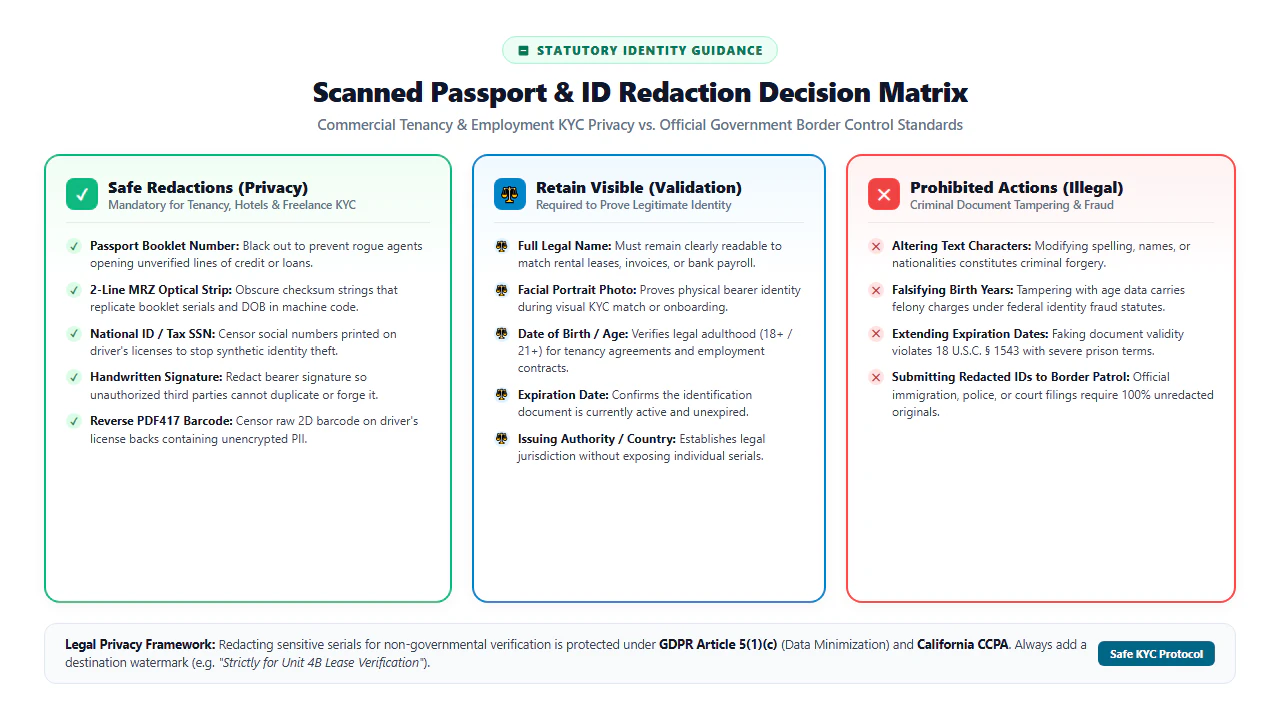
Data minimization is not merely an engineering best practice—it is an established international legal right. Under GDPR Article 5(1)(c) (Data Minimization), the California Consumer Privacy Act (CCPA/CPRA), and international privacy frameworks, commercial recipients are strictly prohibited from collecting more personally identifiable information (PII) than is strictly necessary to fulfill their legitimate business purpose. Here is the operational protocol for what you should redact and what you must preserve across three primary real-world verification scenarios:
1. Apartment Rental Applications
Keep Visible: Full legal name, photographic likeness, date of birth, and document expiration date.
Permanently Redact: Passport booklet serial number, 2-line bottom MRZ chevrons, Social Security Number, and your handwritten signature specimen. Landlords only require proof of identity; they do not need international travel serials that could expose you to synthetic identity theft.
2. Remote Employment & Contracting
Keep Visible: Legal name, photo portrait, nationality, and issuance authority.
Permanently Redact: Passport booklet number, personal tax registration numbers, and reverse-side barcodes. For initial HR onboarding vetting, pairing your sanitized ID with an intentional diagonal watermark prevents recruiters from circulating your credentials to unvetted third parties.
3. Commercial KYC & Platform Onboarding
Keep Visible: Full name, date of birth, issuing country, and document validity dates.
Permanently Redact: Optical MRZ strips and unrequested biometric identifiers. If an automated KYC portal requires machine verification, verify their SOC-2 / ISO-27001 data retention policy prior to submitting unredacted machine-readable records.
Redaction Methods Compared: Security & Privacy Benchmarks
Not all redaction methodologies offer the same level of cryptographic security. The following comprehensive benchmark compares casual mobile markups, generic cloud PDF converters, high-cost commercial desktop suites, and our client-side WebAssembly engine across critical security, privacy, and forensic recovery criteria:
| Redaction Method | Security Level | Cloud Privacy Risk | Forensic Text Recovery | Cost & Friction |
|---|---|---|---|---|
| Mobile Markup / Preview Shape | Zero (Unsafe) | Low (Local app) | 100% Recoverable (Select & Delete) | Free / Native |
| Standard Cloud PDF Portals | Moderate | Severe (Uploaded to Cloud Servers) | Varies by converter vendor | Freemium / Account required |
| Commercial Desktop Suites | High | Low (Local installation) | Permanently Destroyed | Expensive ($240/year subscription) |
| EditScannedPDF.com (Client-Side Wasm) | Maximum Enterprise | Zero (100% Local Browser Memory) | Permanently Purged & Flattened | 100% Free / No Account Needed |
Recommended Companion Tools for Complete ID Compliance
Redacting confidential numbers is frequently only one step in preparing a comprehensive, tamper-resistant document package. Pair your redactions with these specialized in-browser tools to achieve complete statutory document compliance:
| Tool Name | Primary Privacy Function | Recommended Real-World Workflow |
|---|---|---|
| Add Watermark to PDF | Brand document copies with purpose-specific restrictions | Overlay a semi-transparent diagonal notice: "FOR APARTMENT APPLICATION ONLY - UNIT 4B - NOT FOR CREDIT OR BANKING". |
| Compress PDF to 100KB | Downsample heavy 600 DPI scanner bitmaps for web portals | Shrink bloated 15 MB smartphone photos into compact, web-optimized 300 DPI files that satisfy strict portal upload caps. |
| Digital Signature Tool | Apply client-side electronic signature stamps | Sign lease disclosures, employment agreements, or KYC affidavits immediately after sanitizing ID numbers. |
| Edit Scanned PDF Online | Add, modify, or format text annotations on scanned forms | Fill out accompanying rental applications, government declaration slips, or onboarding vouchers with pixel-matched typography. |
| Merge PDF Documents | Consolidate disparate ID proofs into a unified dossier | Combine passport scans, redacted pay stubs, bank statements, and utility bills into a single clean application file. |
International Identity Standards: ICAO 9303, Pro Tip & Statutory Notice
National passports and sovereign travel cards conform to rigorous international engineering standards established by the International Civil Aviation Organization (ICAO Document 9303). Understanding the architecture of these travel credentials reveals why superficial redactions routinely fail security evaluations.
Standard passports utilize the "TD3" size specification, featuring a dedicated visual inspection zone (VIZ) at the top and a standardized Machine Readable Zone (MRZ) at the bottom. The MRZ consists of two lines of 44 optical characters printed in an OCR-B font matrix:
- Line 1 Architecture: Encodes document type (e.g.,
P<), issuing state (e.g.,USA), and the cardholder's surname and given names separated by chevron filler characters (<). - Line 2 Architecture: Encodes the primary passport booklet number, document number check digit, cardholder nationality, date of birth (
YYMMDD), birth check digit, sex, document expiration date (YYMMDD), expiration check digit, personal national ID number, and an overarching composite check digit calculated across all fields using a weighted modulus 10 algorithm.
Because automated passport scanners and high-speed document inspection bots calculate and cross-verify these check digits instantaneously, failing to redact the MRZ means any automated software can reconstruct your exact booklet serial number, birth date, and validity dates from line 2 alone. Total sanitization demands complete coverage of both MRZ lines.
When preparing passport copies for non-governmental verifications, always implement the Dual-Zone Redaction Protocol: (1) Redact the booklet serial number located in the top right margin of the data page, and (2) Apply an uninterrupted horizontal blackout rectangle spanning the entire width of the lower two-line MRZ chevron block. Furthermore, on US and Canadian driver's licenses, turn the card over and completely black out the high-density PDF417 2D barcode, which encodes your complete home address, physical attributes, and license numbers in raw, unencrypted text.
Permissible Data Minimization: Blacking out confidential serial numbers, Social Security identifiers, and optical barcodes to safeguard your private identity during commercial exchanges (e.g., apartment leases, car rentals, gym memberships, or job applications) is fully lawful and recognized under GDPR Article 5(1)(c) and statutory consumer privacy frameworks.
Severe Federal Criminal Warning: Modifying text characters (such as forging names, changing dates of birth, altering nationality, or manufacturing synthetic identities) or submitting redacted documents to sovereign government agencies, border immigration officials, customs agents, or law enforcement officers is a severe felony under 18 U.S.C. § 1543 (Passport Forgery) and 18 U.S.C. § 1028 (Identity Fraud), carrying heavy federal fines and imprisonment. Always submit unaltered, unredacted original credentials when required by sovereign legal authority.
- check_circle Visual Masking is NOT True Redaction: Drawing black rectangles in standard viewer apps leaves underlying text and pixels 100% extractable. Use permanent pixel destruction.
- check_circle Always Black Out the Bottom MRZ Zone: Redacting the top passport number is useless if the two lines of machine-readable chevrons at the bottom remain visible.
- check_circle 100% Client-Side WebAssembly Privacy: EditScannedPDF.com processes all ID scans directly in your browser RAM, guaranteeing zero server uploads and zero data retention.
- check_circle Lawful Data Minimization: Redacting ID numbers for landlords and employers protects against synthetic identity theft while preserving valid legal proof of identity.
To legally and securely redact passport numbers, driver's licenses, national ID cards, and machine-readable zones (MRZ) without leaking identity data, use the EditScannedPDF ID Redaction Tool. It executes permanent pixel replacement right in your client-side browser memory—eliminating any server upload risks and preventing forensic unmasking under GDPR and global KYC privacy rules.
Experience Fast, Seamless, 100% Private Passport Redaction
Permanently sanitize passport numbers, MRZ codes, and biometric barcodes with 100% in-browser WebAssembly encryption. Zero uploads. Zero cloud logs. Total peace of mind.
shield_person Redact Passport & ID Card PrivatelyFrequently Asked Questions About Passport Redaction
Can someone remove a black box drawn over a passport in a PDF?
Yes, if you use a standard PDF reader or mobile markup app to draw a black rectangle, the software simply places a vector shape on top of your document while leaving the original text layer and image pixels untouched underneath. Anyone with basic PDF software can click and delete the black shape. True redaction, executed client-side on EditScannedPDF.com, physically destroys and overwrites the pixel data in local browser memory before flattening.
What information should I redact on a passport copy for a rental application or KYC?
Unless specifically instructed otherwise by statutory authorities, you should always black out your Passport Booklet Number, the 2-line Machine Readable Zone (MRZ) code at the bottom, your National Identification / Social Security Number, and your handwritten signature specimen. Leave your full legal name, date of birth, photo portrait, and expiration date visible to prove document validity.
Is it safe to upload passport scans to free online PDF editors?
Most free online PDF websites upload your files to remote cloud servers, storing your passport image where it could be vulnerable to data leaks, unauthorized employee access, or automated AI scraping. EditScannedPDF.com runs 100% locally in your web browser using WebAssembly. Your ID documents never leave your computer or phone, guaranteeing zero server retention and total privacy.
How do I redact driver's licenses and national ID cards safely?
Open EditScannedPDF.com, load your driver's license scan into the Erase & Redact tool, and draw permanent blackout bounding boxes over your driver's license number, social security/tax ID, and critically, the 2D PDF417 barcode on the reverse side. Exporting flattens and permanently replaces the underlying image pixels with opaque color in browser memory.
Will redacting my passport invalidate it for apartment rental applications?
No. Property managers and leasing agents only require verification of your legal name, photographic likeness, and document validity dates. Masking sensitive serial numbers and MRZ barcodes is widely recognized as standard tenant privacy protection against synthetic identity theft and unauthorized credit inquiries.
What is the difference between whiteout and blackout redaction on ID cards?
Both methods provide identical cryptographic security on EditScannedPDF.com by permanently destroying the underlying pixel data in browser RAM. Blackout redaction uses solid dark rectangles, making it immediately transparent to the recipient that confidential fields were intentionally censored. Whiteout redaction matches the document's background color, creating a cleaner administrative appearance for forms and official filings.
Is redacting a passport illegal for travel or official government submissions?
Redacting a passport is completely legal when providing proof of identity to private third parties like landlords, employers, or utility providers. However, submitting a redacted passport to sovereign government authorities, customs border control, visa consular officers, or law enforcement is strictly illegal under 18 U.S.C. § 1543. You must always supply unredacted, original documents for official government inspections.