
How to Redact SSN & Black Out Sensitive Info on Scanned Bank Statements Free
The Identity Theft Dilemma: Why Financial Scans Require Permanent Redaction
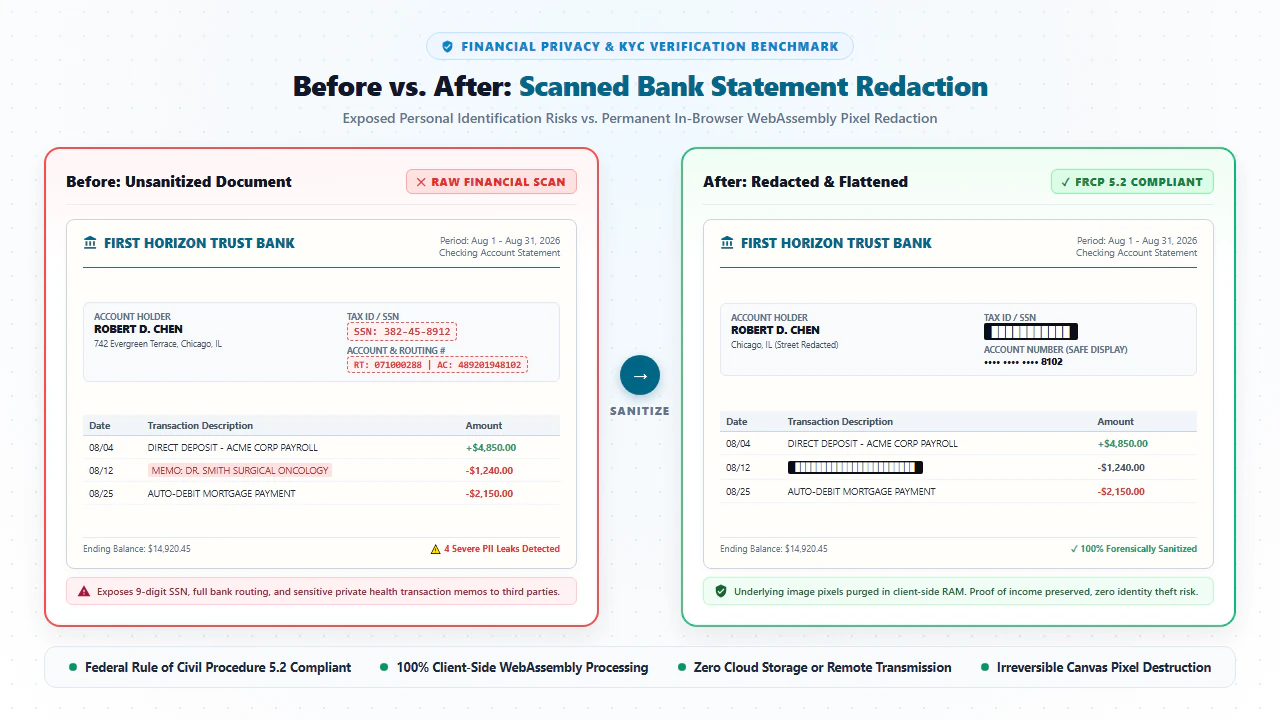
Whether you are applying for a residential apartment lease, securing pre-approval for a mortgage loan, verifying small business revenue, or submitting documentary discovery in civil court, third parties routinely demand two to six months of recent bank statements. However, sending unredacted financial scans directly to third-party brokers, landlords, or external portals is an extraordinary personal security risk. Every standard bank statement prominently displays your full 9-digit Social Security Number (SSN), automated clearing house (ACH) routing numbers, full account numbers, and granular line-item records of your personal life. With our online scanned PDF editor free, everything runs locally in your browser with zero file uploads.
Financial identity theft remains the fastest-growing cybercrime worldwide. In the hands of malicious actors or compromised intermediaries, the coordinates exposed on an unredacted statement can be weaponized in minutes:
- Synthetic Identity Creation: A full 9-digit SSN paired with your legal name and home address is everything an attacker needs to open fraudulent credit cards, apply for payday loans, or redirect tax refunds.
- Unauthorized ACH Withdrawals: Bank routing and account numbers allow unauthorized entities to initiate direct debit ACH transactions against your checking balance.
- Intrusive Behavioral Profiling: Unredacted transactions expose sensitive medical payments, prescription pharmacy locations, child support payments, and confidential personal habits that third parties have zero legitimate need to inspect.
The Solution: Permanent Client-Side Redaction. With EditScannedPDF Redaction Tool, you can securely blackout or whiteout Social Security numbers, routing codes, and private transaction rows in seconds. Unlike primitive digital markers that merely draw an opaque box over text, our WebAssembly engine permanently destroys the underlying pixel data and OCR vector streams. Because processing executes 100% inside your local browser memory, your confidential financial records are never uploaded to third-party cloud servers.
4 Steps to Permanently Redact Scanned Bank Statements Online (Step-by-Step)
Redacting sensitive numbers on your financial statements takes under a minute. Follow these four practical steps using our client-side WebAssembly tool:
Open Erase & Highlight PDF and drag your bank statement into the browser viewport. The file loads directly into local device RAM via WebAssembly with zero server transit.
Scan the statement header and transaction ledgers. Identify 9-digit Social Security numbers, bank routing codes, full account numbers, and confidential expense lines.
Select the Redact tool and draw rectangular marquees over the target numbers. Choose classic solid black bars or seamless ambient paper whiteout. Pixels and text streams are destroyed.
Click "Export Redacted PDF". The engine permanently bakes the redaction into the raster canvas, preventing forensic text recovery, and downloads the file instantly.
Technical Redaction Mechanics: Pixel Destruction vs. Cosmetic Masking
Many consumers and office administrators make a dangerous mistake: opening a PDF in basic viewer software, using the black highlighter or shape drawing tool to draw an opaque black box over an SSN, and clicking "Save". This cosmetic masking creates an illusion of security that is trivially bypassed:
1. The Fatal Vulnerability of Cosmetic Black Boxes
Under the ISO 32000 PDF architecture, drawing a shape merely adds a new vector graphic object to the top layer of the page. The underlying digital text characters, PostScript font dictionaries, and invisible OCR search streams remain 100% active underneath. Any recipient can simply drag their mouse across the black box, press Ctrl+C, and paste the intact 9-digit Social Security Number into Notepad.
2. True Destructive Inpainting via WebAssembly
EditScannedPDF.com executes true destructive redaction through a three-phase mathematical pipeline:
- Phase 1 (Coordinate Identification & Content Stream Parsing): When you draw a redaction marquee, the engine maps the exact bounding box
[x1, y1, x2, y2]. It scours the underlying PDF content stream and permanently excises all text operators (such asTj,TJ, andDo) intersecting that boundary. - Phase 2 (Bilinear Bitmap Overwrite): For scanned image pages, the engine directly overwrites the pixel buffer. Whether you select black bars or paper whiteout, the original pixel values are mathematically replaced.
- Phase 3 (Destructive Canvas Flattening): Upon export, the engine recompiles the document into a consolidated raster canvas. The redaction is not an annotation layer—it is an immutable constituent of the page pixels, rendering forensic recovery physically impossible.
- Multi-Page Statement Ingestion: In Chrome, Edge, Firefox, or Safari on Windows, Mac, or Linux, open Erase & Highlight PDF. Drag multi-page checking or savings statements directly into the workspace.
- Sub-Pixel Marquee Redaction: Use desktop crosshair precision to draw exact rectangular redaction boxes over account numbers, leaving the last 4 digits visible for lender verification.
- Batch Transaction Sanitization: Easily scroll through multi-page transaction ledgers, applying whiteout or blackout across medical expenses or confidential personal purchases.
- Zero-Upload Verification: Use browser developer tools to verify that zero network packets leave your computer during the entire redaction and export process.
- Zero-Install Mobile Browser Redaction: Open Safari on iPhone/iPad or Chrome on Android. Access EditScannedPDF.com instantly without installing third-party apps or creating user accounts.
- Direct Cloud & Files Ingestion: Import statements directly from the iOS Files app, iCloud Drive, Google Drive, or downloaded banking app attachments.
- Pinch-to-Zoom Touch Redaction: Use two fingers to zoom in on tiny 8pt bank statement footnotes and account headers. Tap and drag with your fingertip or stylus to blackout sensitive numbers.
- Cellular-Bandwidth-Friendly Export: Because processing executes 100% on your smartphone's internal processor via WebAssembly, your financial files are never uploaded over cellular data connections.
Enterprise Compliance Scenarios & Zero-Data-Leak Guarantee
Permanently redacting financial statements is essential across critical commercial and personal legal transactions:
1. Mortgage Applications, Residential Leases & Tenant Screening
Mortgage underwriters and landlord screening agencies require proof of income and asset reserves. However, loan officers do not need your complete unredacted routing numbers or private expenditure details. Redacting sensitive data while leaving the last 4 digits visible complies with underwriting rules while protecting your financial identity if the agency experiences a data leak.
2. Civil Litigation Discovery, Family Law & Marital Dissolution
In divorce proceedings, child custody disputes, and commercial litigation, parties must disclose financial standing. Under Federal Rule of Civil Procedure 5.2, litigators are mandated to redact personal data identifiers before filing documents on public court dockets (such as PACER). Our tool ensures 100% compliance with court electronic filing mandates.
3. Small Business Loans, Equipment Financing & Independent Contractors
When freelancers, sole proprietors, or small business owners apply for working capital loans or commercial line-of-credit facilities, lenders request merchant banking statements. Redacting proprietary vendor names or personal owner disbursements keeps business intelligence secure while validating gross revenue.
At EditScannedPDF.com, your confidential financial records, bank balances, and Social Security numbers never leave your local computer.
- Irreversible Pixel Destruction: Blackout and whiteout operations permanently overwrite bitmap data; text cannot be unmasked.
- OCR Text Stream Excision: Underlying invisible text vectors are permanently deleted from the document content stream.
- Zero Cloud Exposure: All processing executes in local browser WebAssembly memory with zero server uploads or tracking.
Redaction Methodology Matrix: Cosmetic Markers vs. Desktop Suites vs. Client-Side WebAssembly
Review the critical security and architectural differences between common document redaction methods:
| Security & Operational Dimension | Cosmetic Digital Highlighters | Commercial Desktop Software Suites | EditScannedPDF In-Browser Redactor |
|---|---|---|---|
| Underlying Text Destruction | ❌ None (text fully intact under shape) | ✅ Permanent (if dedicated tool used) | ✅ Permanent (text stream & pixels destroyed) |
| Metadata & Revision Cleansing | ❌ Retained in full | ⚠️ Often requires separate sanitization step | ✅ 100% Cleared during stream rebuild |
| Clipboard Copy-Paste Security | ❌ Highly vulnerable (text copyable) | ✅ Secure against copy-paste | ✅ 100% Secure (copying returns blank space) |
| Cloud Privacy & Data Security | Dependent on desktop installation | Requires expensive subscription ($20+/mo) | ✅ 100% Private (local device WebAssembly) |
| Software Cost & Accessibility | Free in basic viewers | ⚠️ Costly enterprise licensing paywalls | ✅ 100% Free with zero registration |
| Court E-Filing Compliance (FRCP 5.2) | ❌ Violates court rules; subject to sanctions | ✅ Compliant | ✅ 100% Court & Regulatory Compliant |
Recommended Companion PDF Tools for Financial Document Preparation
Preparing financial statements often requires document merging, page extraction, or compression. Pair our redaction tool with these companion utilities:
| Financial Preparation Objective | Recommended Companion Tool | Key Technical Feature | Execution Privacy Mode |
|---|---|---|---|
| Permanently Redact PII | Erase & Highlight PDF | Destructive marquee blackout and ambient paper whiteout | 100% Client-Side In-Memory Sandbox |
| Encrypt Statement with Password | Password Protect PDF | Standard AES-256 encryption with custom owner passwords | Zero Cloud Key Storage |
| Compress File for Submission | Compress Scanned PDF | Downsample large 40 MB statements to under 100KB | Direct In-Memory Stream Optimization |
| Merge Multi-Month Statements | Merge Scanned PDF | Combine checking, savings, and W-2 files into a single packet | Native PDF Object Tree Concatenation |
| Sign Mortgage Disclosure Addendums | Sign Scanned PDF | Stamp vector signatures and flatten into page canvas | Hardware-Accelerated Canvas Synthesis |
Deep Architecture: FRCP 5.2, GLBA, FTC Red Flags Rule & Criminal Fraud Boundaries
Federal statutory privacy laws explicitly govern the handling of non-public personal information (NPI) on financial records:
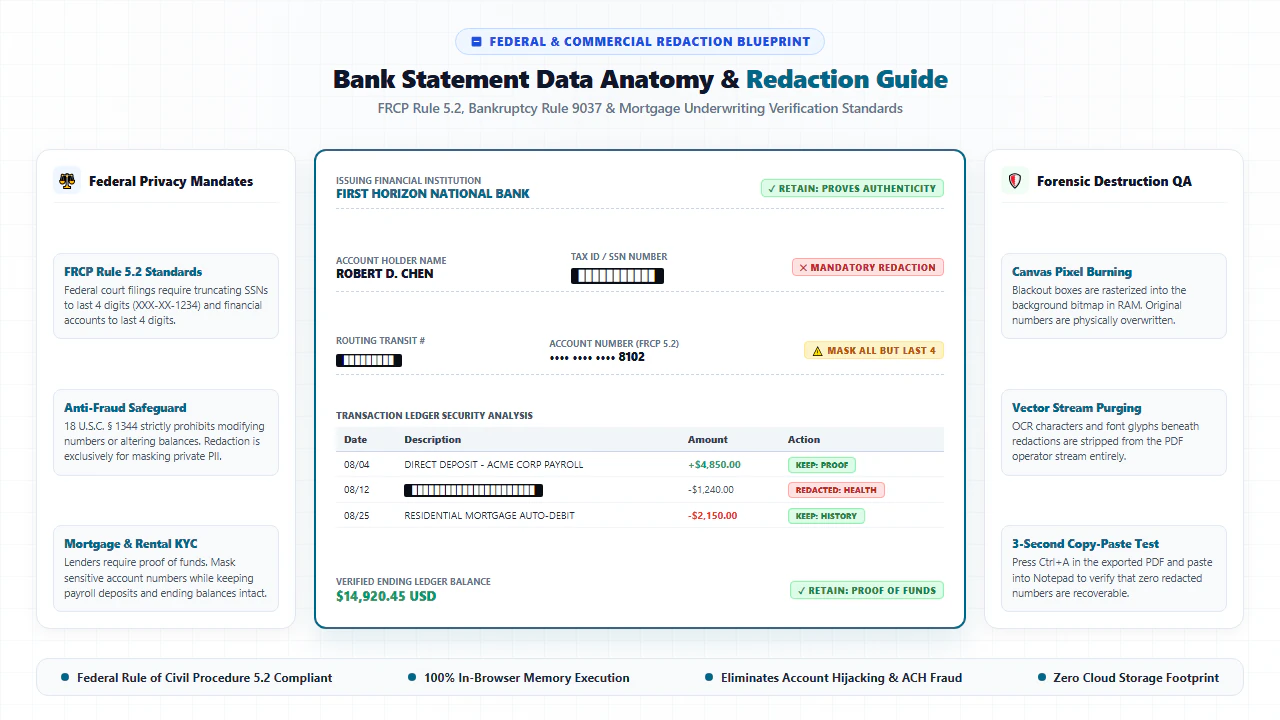
- Federal Rule of Civil Procedure 5.2(a): Mandates that court electronic filings must truncate personal data: Social Security numbers and Taxpayer Identification Numbers must be limited to the last four digits; financial account numbers must be limited to the last four digits; and minor children names must be limited to initials.
- The Gramm-Leach-Bliley Act (GLBA) & FTC Red Flags Rule (16 CFR Part 681): Require financial institutions and transaction intermediaries to implement reasonable data security measures to prevent identity theft resulting from unauthorized exposure of financial records.
lightbulb Engineering Pro Tip: Master the "Last 4 Digits" Verification Protocol
When redacting an SSN or bank account number for mortgage underwriters or property managers, do not blackout the entire sequence. Draw your marquee redaction box over the first 5 digits of your SSN, leaving the last 4 digits visible (e.g., XXX-XX-1234). This provides the recipient with sufficient verifiable cross-reference data to confirm the account matches your credit application without exposing your identity to breach risks.
gavel Statutory Anti-Fraud & Lawful Privacy Redaction Notice
Lawful Redaction vs. Criminal Fraud: Redacting Social Security numbers, routing codes, and private transaction rows to protect against identity theft is legally protected and encouraged under the Privacy Act of 1974 and FRCP 5.2. However, using editing tools to modify account balances, alter transaction amounts, fabricate deposits, or alter bank headers submitted to financial institutions violates 18 U.S.C. § 1014 (Bank Fraud, punishable by up to 30 years imprisonment and $1,000,000 fines) and 18 U.S.C. § 1028 (Identity Fraud). Users are strictly authorized to redact only documents they own.
- Never Use Black Highlighters: Cosmetic boxes leave underlying copyable text and OCR streams completely intact.
- Follow the Truncation Rule: Redact the first 5 digits of your SSN and account numbers, leaving the last 4 digits for verification.
- Destructive Inpainting: EditScannedPDF.com destroys both pixel buffers and text operators upon export.
- 100% In-Browser Privacy: WebAssembly processing guarantees your sensitive financial files are never uploaded to cloud servers.
Redacting Social Security numbers and account routing codes on scanned bank statements prevents catastrophic identity theft and satisfies federal court privacy mandates under FRCP 5.2. By utilizing client-side WebAssembly, EditScannedPDF.com permanently overwrites pixel buffers, deletes underlying OCR text streams, and flattens documents directly in your browser—guaranteeing 100% confidential financial data privacy.
Redact Your Bank Statements Privately Online
Permanently black out Social Security numbers, routing codes, and private transaction lines in seconds. 100% in-browser WebAssembly security with zero cloud uploads.
lock_person Redact Bank Statement FreeFrequently Asked Questions on SSN Redaction
Why is drawing a simple black box or using a highlighter unsafe for redacting SSNs?
Drawing a simple black rectangle or using a digital highlighting tool merely creates a cosmetic graphic overlay. In standard PDF viewers, the underlying text characters and OCR search streams remain completely intact underneath the black box. Anyone can highlight the text with a cursor, copy it to their clipboard, or remove the rectangle in a vector editor.
Does redacting a bank statement on EditScannedPDF upload my financial data to cloud servers?
No. EditScannedPDF.com runs 100% client-side in your local web browser using WebAssembly. All pixel manipulation, text excision, and document flattening execute strictly within your computer's RAM. Your confidential financial numbers and bank statements never travel across the internet or touch remote servers.
Can forensic data-recovery software or opposing counsel recover text redacted with your tool?
No. When you export using our redaction tool, the WebAssembly engine performs destructive raster inpainting. The underlying characters, font operators, and pixel values are permanently expunged from the file's binary stream. No forensic software or hex inspection can recover the destroyed information.
Why does Federal Rule of Civil Procedure 5.2 permit showing the last 4 digits of an SSN?
Federal Rule of Civil Procedure 5.2(a) and state court rules establish the 'Truncation Rule' for court filings and commercial verification. Retaining the last 4 digits (e.g., XXX-XX-1234) allows loan underwriters, court clerks, and landlords to match the document against your credit profile while preventing third parties from stealing your full 9-digit identity.
Can I use whiteout (opaque paper match) instead of black bars to redact my financial statement?
Yes. Our tool offers both blackout (solid black rectangles) and ambient whiteout. Whiteout samples the surrounding paper texture and color tone to seamlessly blend over sensitive text, creating a clean document without aggressive black ink bars.
What specific financial items should be redacted on bank statements for mortgage or rental applications?
You should generally redact your 9-digit Social Security Number (leave the last 4 digits), ACH bank routing numbers, full account numbers (leave the last 4 digits), and any sensitive personal expenditures unrelated to your income verification (such as medical copays, prescription details, or legal fees).
Is it legal to redact sensitive personal information from bank statements requested by third parties?
Yes. Redacting private personal identifiers (PII) to protect against identity theft is not only legal but strongly recommended by the FTC, CFPB, and federal courts. However, altering deposit amounts, modifying transaction balances, or fabricating dates is illegal and constitutes criminal bank fraud under 18 U.S.C. § 1014.