
Why Scanned Invoices & Thermal Receipts Lock Text
Commercial invoices, point-of-sale thermal receipts, and vendor statements are central to business accounting. Whether photographed on a phone, scanned at an office workstation, or received by mail, physical billing documents often require administrative handling before entry into bookkeeping software like QuickBooks or Xero.
Opening these files in standard PDF readers reveals a common limitation: the document is a locked image. Standard readers treat scanned receipts as flat photographs without editable text, making it impossible to add internal ledger stamps, billing reference codes, or mask confidential payment digits.
- Raster Image Encapsulation: Scanners and mobile cameras capture grids of pixels. Without digital character codes, the file is a picture rather than selectable text.
- Thermal Paper Fading: Point-of-sale register slips use heat-sensitive coatings that fade over time. Exposure to sunlight, heat, or humidity turns characters faint and yellowed.
- Skew & Camera Distortion: Smartphone photos often capture curled edges or slight angles, making numbers and line items harder to read without contrast adjustment and deskewing.
- Privacy on Shared Records: Invoices often display taxpayer IDs (EIN), banking routing codes, and credit card numbers that should be masked before expense reports are forwarded.
Built with client-side WebAssembly, EditScannedPDF.com provides an in-browser utility to restore faded receipt contrast, add internal tracking notes, mask sensitive digits, and attach official approval stamps—100% locally in browser memory without cloud uploads.
Step-by-Step Guide to Cleaning & Annotating Invoices Online
Cleaning and annotating billing documentation in your web browser requires no desktop accounting software installation, no administrative workstation privileges, and no cloud uploads. Follow these four straightforward steps to perform complete, audit-ready adjustments on your desktop, laptop, or mobile workstation:
Open Invoice or Receipt in Browser
Navigate to EditScannedPDF.com in Chrome, Edge, Safari, or Firefox. Drag and drop your scanned vendor invoice, fuel receipt, or billing statement directly into the editor canvas.
Run Local Contrast Optimization
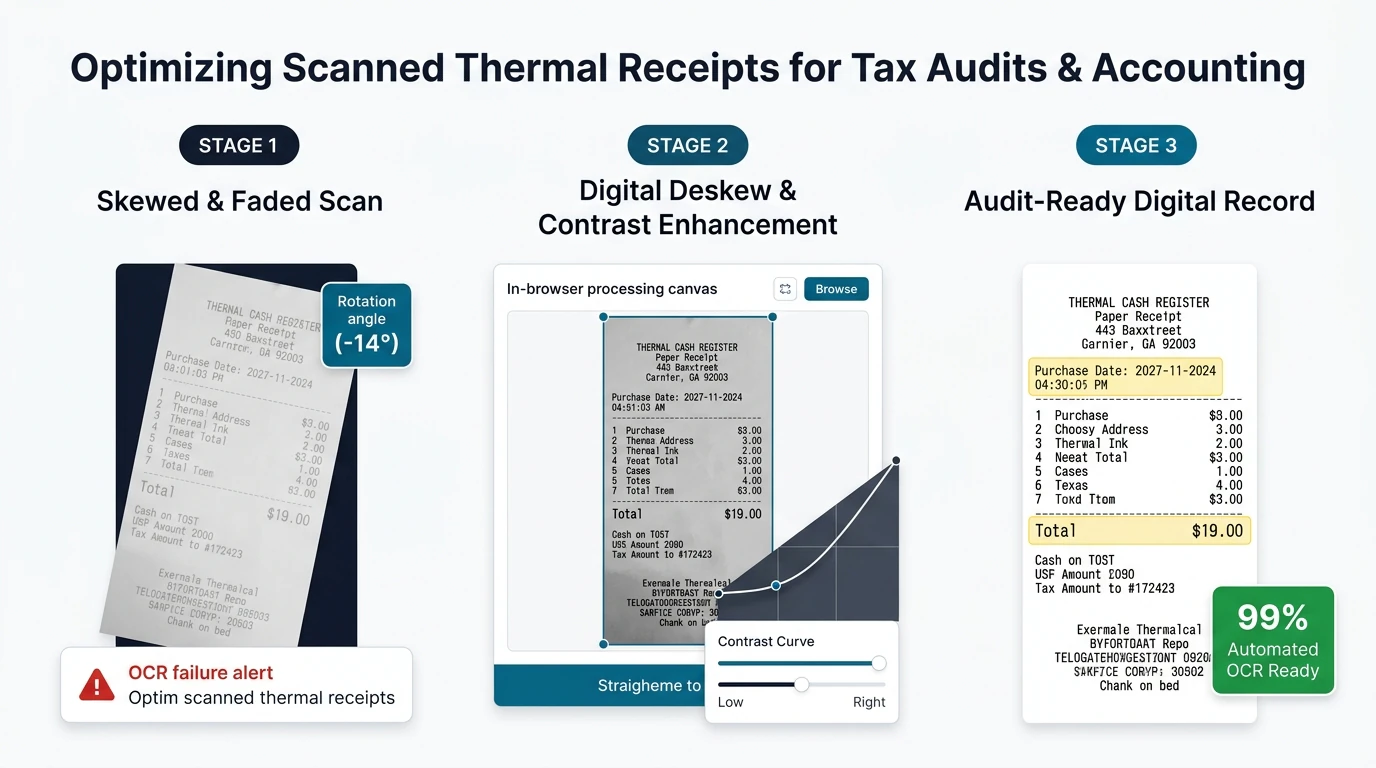
Our in-browser WebAssembly engine applies adaptive contrast optimization to faded thermal paper and sharpens faint register ink directly in local browser RAM without server uploads.
Mask Card Digits & Apply Stamps
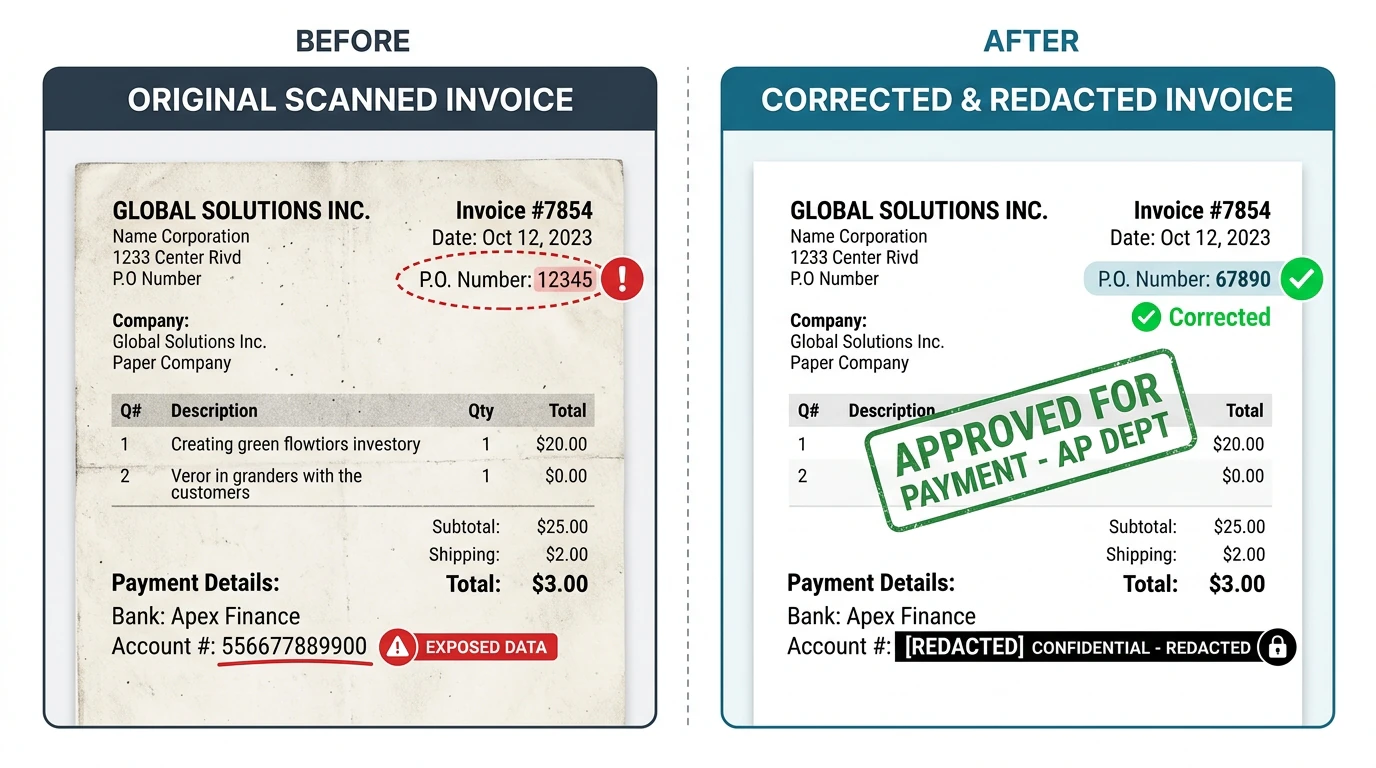
Select the Redact PDF tool to mask sensitive card numbers for expense reporting, and overlay official 'PAID' or 'AP APPROVED' status verification stamps.
Export Flattened 300 DPI PDF
Click Export to bake all modifications permanently into an ISO 32000-1 compliant PDF. Edits are flattened directly to your local storage, ready for ERP reconciliation or tax filing.
Technical Architecture: Thermal Receipt Contrast, Deskewing & Platform Workflows
Degraded paper slips and camera captures present specific visual challenges that standard text tools cannot handle. EditScannedPDF includes purpose-built processing for scanned paperwork:
- Adaptive Contrast Optimization: Enhances the tonal difference between faded register ink and background paper, restoring legible text without introducing harsh digital artifacts.
- Automatic Document Straightening: Identifies text baselines and table rules to level tilted phone snapshots back to horizontal alignment.
- Fixed-Pitch Typography Alignment: Monospace fonts (Courier, Consolas) match traditional register print, allowing clean positioning of audit notes and reference stamps.
- Open Invoice: Drag your scanned invoice or receipt into the browser canvas.
- Align Annotations: Use keyboard arrow keys for fine placement of approval stamps and tracking codes.
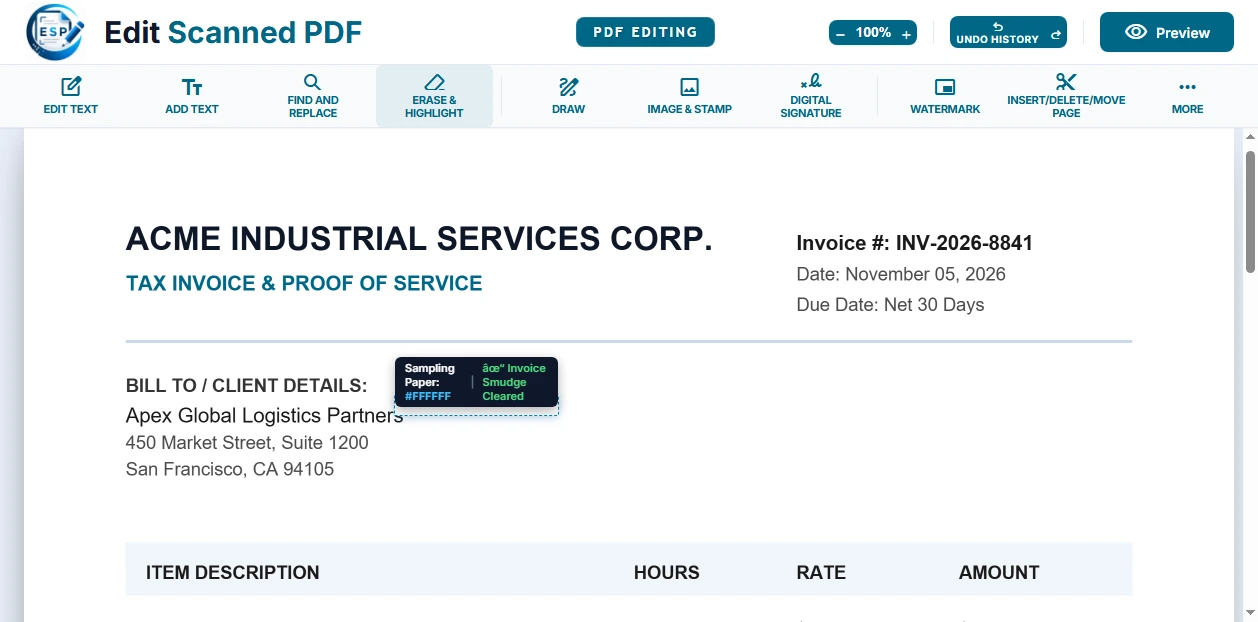
- Color-Match Whiteout: Use the Eyedropper tool to match paper hue before covering scanner speckles or marks.
- Export PDF: Click Export to generate a flattened 300 DPI PDF ready for accounting archives.
- Capture Receipt: Tap upload in Safari or Chrome to photograph the receipt with your camera.
- Enhance Contrast: Apply adaptive contrast to sharpen faint thermal characters.
- Mask Card Numbers: Drag a clean mask box over personal payment digits, leaving the last 4 digits visible.
- Save to Device: Download the sanitized PDF directly to your device storage.
Enterprise Accounting Use Cases & Zero-Upload Privacy Guarantee
Commercial finance departments and independent certified public accountants handle complex document corrections across a wide variety of legitimate operational scenarios. Our local browser architecture resolves crucial operational bottlenecks:
Accounts Payable Routing & Verification
Accounts payable teams frequently need to append internal routing codes, cost center allocations, and general ledger account numbers directly onto incoming vendor bills. AP staff can add archival reference notes, attach payment authorization vouchers, and apply department sign-off stamps cleanly before forwarding documents for final disbursement.
Freelance & Contractor Expense Billing
Consultants and remote contractors billing clients for project expenses must provide proof of purchase without exposing personal banking details. Our editor allows contractors to black out personal card account numbers, highlight allowable client billable meals, and insert contract reference codes onto receipt scans.
CPA Tax Preparation & IRS Audit Defense
Certified public accountants preparing corporate tax returns in accordance with IRS Publication 583 standards regularly receive shoe-boxes of faded, illegible thermal fuel and supply slips from small business clients. Accountants use our contrast enhancement and annotation tools to legibly document business purpose, date, and project allocations required under Internal Revenue Code Section 274.
Invoice & Receipt Editing Methods: Technical Comparison
Selecting the right workflow for managing scanned financial documentation requires evaluating data security risks, software bloat, recurring subscription fees, and regulatory audit compliance:
| Comparison Dimension | EditScannedPDF In-Browser | Cloud Upload Converters | Commercial Desktop Suites | Manual Vendor Re-Issuance |
|---|---|---|---|---|
| Financial Data Privacy & Custody | 100% On-Device RAM: Zero cloud upload; financial data never leaves your hardware. | High Security Risk: Files uploaded to multi-tenant servers, risking regulatory breaches. | Local Workstation Storage: Files stay local, but background telemetry tracks usage. | Low Technical Risk: Transmitted via email, but relies on vendor administrative queues. |
| Installation & System Footprint | Zero Installation: Runs instantly in any standard desktop or mobile web browser. | Zero Installation: Browser-based, but requires uploading files over internet connections. | Heavy Footprint: Requires 2GB+ disk space, background daemons, and updater agents. | None: Handled entirely through communications and manual bookkeeping entries. |
| Cost & Subscription Model | 100% Free Forever: No subscriptions, credit card requirements, or page limits. | Freemium Paywalls: Restricts document volume, file size, or daily conversion counts. | Expensive Subscriptions: Costs $240+ per user per year in ongoing licensing fees. | Indirect Labor Cost: Consumes administrative hours chasing suppliers and accounting reps. |
| Thermal Receipt Contrast Restoration | Adaptive Contrast Enhancement: Recovers faded thermal receipt text and levels tilted camera angles. | Basic Conversion: Lacks dedicated thermal receipt contrast restoration algorithms. | Advanced Filters Available: Powerful tools, but buried behind complex menus and dialogs. | Not Applicable: Does not solve the problem of already faded physical receipts. |
| Permanent Raster Flattening | Permanent ISO 32000-1 Flattening: Edits are baked into pixel data, preventing reverse extraction. | Superficial Overlays: Often leaves underlying text streams intact and accessible. | Supported via Print to PDF: Requires manual multi-step configuration to flatten layers. | Original File Generated: Generates a clean new PDF directly from the supplier ERP. |
| Processing Latency & Speed | Sub-Second Execution: Instant WebAssembly execution in local browser RAM. | Network Dependent: Upload and download speeds throttle processing on large scans. | Slow Launch Time: Heavy application launch times delay fast single-page edits. | Days to Weeks Delay: Awaiting accounts receivable rep to reprint and email corrected bill. |
Recommended Companion Tools for Accounts Payable & Bookkeepers
Complete your accounting and document preparation workflows using our modular suite of private, client-side PDF utilities:
| Accounting Objective | Recommended In-Browser Tool | Primary Technical Capability | Bookkeeping & Tax Use Case |
|---|---|---|---|
| Blackout Confidential Account Digits | Redact PDF | Permanent pixel redaction that eliminates underlying raster and text streams. | Redacting SSNs, tax identifiers, and credit card digits before sharing expense reports. |
| Overlay Approval & Payment Stamps | Image & Stamp Tool | Inserts transparent PNG approval stamps, corporate seals, and audit verification blocks. | Marking vendor bills as 'PAID', 'ENTERED IN ERP', or 'APPROVED FOR DISBURSEMENT'. |
| Execute Digital Signatures | Digital Signature Tool | Smooth mouse, trackpad, or touchscreen inking with legal ESIGN and UETA validity. | Signing managerial expense reimbursement authorizations and contractor approvals. |
| Convert Invoices to Editable Word Tables | Scanned PDF to Word | Transforms non-selectable scanned invoice tables into fully editable Word tables. | Extracting detailed multi-page line items into Excel or Word for financial modeling. |
| Compress High-Resolution Receipt Batches | Compress PDF Free | Applies smart Flate compression to shrink 25MB scanner files down below 1MB. | Meeting email gateway attachment restrictions and ERP upload limits. |
| Fix Inverted or Upside-Down Scans | Rotate PDF Tool | Instantly rotates upside-down or sideways pages by 90, 180, or 270 degrees in memory. | Correcting orientation errors on scanner feeder batches before running OCR. |
Deep Architecture, Pro Engineering Tips & Statutory Compliance
When handling corporate financial documents, technical precision and legal compliance must be strictly observed. Under ISO 32000-1 specifications, a PDF is an object hierarchy separating raster backgrounds, vector paths, and font dictionaries. EditScannedPDF preserves the native 300 DPI background photograph while overlaying an exact typographic layer mapped with sub-pixel coordinates. When you export, the engine performs permanent raster flattening, baking redaction rectangles and text overlay annotations into the base image stream so that third-party viewers cannot peel back edits or reveal previous data.
To ensure that paper receipts withstand IRS audit scrutiny under Internal Revenue Code Section 274, follow this two-step engineering practice:
- Apply Contrast Thresholding Before Archiving: Thermal paper receipts naturally degrade over 2 to 5 years. Always pass smartphone receipt photos through our adaptive contrast tool upon receipt. Converting faint grayish text into sharp black-and-white pixels ensures permanent legibility when archived in your company's cloud document store.
- Contemporaneous Audit Tagging: The IRS strictly requires business expense documentation to establish: (1) Business Purpose, (2) Business Relationship, (3) Date, (4) Location, and (5) Amount. Use our Add Text tool to type an audit header directly in the white margin of the receipt (e.g., "Client Strategy Dinner with Acquired Tech Leadership regarding Q3 Cloud Migration"). Having this metadata permanently burned into the PDF file eliminates disallowance penalties during IRS audits.
- check_circle Internal Bookkeeping Stamps: Apply crisp 'PAID', 'APPROVED', or accounts payable status stamps directly onto invoices.
- check_circle Payment Privacy Masking: Black out sensitive customer or employee account numbers before sharing expense reports.
- check_circle Thermal Receipt Enhancement: Boost contrast on faded thermal register receipts to make line items legible for audits.
- check_circle 100% In-Browser Privacy: Financial ledger data and vendor details execute strictly in your local device RAM.
Ready to Clean & Annotate Your Invoices Privately?
Enhance faded thermal receipts, mask private card digits, apply status stamps, and export flattened PDFs with 100% local privacy.
receipt_long Annotate Invoice Free OnlineFrequently Asked Questions About Annotating Scanned Invoices & Receipts
How do I safely annotate receipts and invoices for bookkeeping?
For internal accounting, tax preparation, and corporate expense reports, standard bookkeeping procedures include annotating invoices with internal tracking codes, stamping documents as 'PAID' or 'APPROVED', and redacting sensitive personal credit card digits (leaving only the last 4 digits for verification). EditScannedPDF lets you perform these annotations locally in your browser while preserving authentic receipt integrity.
Can I safely annotate and redact invoices with confidential banking and tax details without cloud exposure?
Yes, 100% safely when using EditScannedPDF.com. Unlike traditional cloud converter websites that transmit documents to remote multi-tenant servers, our entire OCR detection, text editing, and PDF rendering engine compiles into WebAssembly and runs locally in your device's browser memory. Your taxpayer IDs, employer identification numbers (EIN), bank wire routing codes, and billing balances never touch external servers.
How do I fix faded or unreadable text on scanned thermal paper receipts?
Thermal paper receipts fade rapidly due to heat, light, and aging. EditScannedPDF utilizes client-side adaptive contrast enhancement and background normalization. When you load a faded receipt scan, the engine dynamically isolates faint ink characters from yellowed paper background, boosting contrast and sharpening character outlines before you apply edits or save the document for audit archiving.
Can I add a company 'PAID' or 'APPROVED' stamp and digital signature to an invoice?
Yes! You can use our built-in Image & Stamp tool to insert transparent PNG company seals, 'PAID' rubber stamps, or accounts payable verification boxes. You can also utilize our Digital Signature tool to ink an authentic executive authorization signature directly using your mouse, trackpad, or touchscreen stylus.
How do I add archival text or date stamps that align cleanly with invoice columns?
Scanned invoices frequently use classic monospace or standard sans-serif layouts. Our browser editor lets you choose matching typeface families, adjust font size, and use keyboard arrow keys for sub-pixel nudge alignment to position archival notes, tracking codes, or verification text neatly alongside existing ledger columns.
Can I redact my personal credit card number or bank account before submitting an expense report?
Yes. When submitting meal, travel, or fuel receipts for corporate employee expense reimbursement, company policies often require masking personal card numbers. Use our Whiteout & Paper Cleaner or Redact PDF tool to draw permanent black or whiteout blocks over the first 12 digits of your card number or personal checking routing codes. Our engine performs irreversible raster flattening, preventing anyone from removing the mask.
Does annotating or redacting an invoice preserve document resolution for accounting archives?
Yes. The exported PDF is rendered at standard 300 DPI print fidelity conforming strictly to ISO 32000-1 specifications. It imports directly into bookkeeping software like QuickBooks, Xero, FreshBooks, or SAP, and meets standard electronic record-keeping requirements with crisp, legible quality.