
USCIS Online Filing Mandates: The Technical Upload Challenge
Transitioning from traditional paper-based immigration petitions to the modern myUSCIS electronic filing portal represents a significant efficiency leap for applicants, legal representatives, and accredited immigration specialists. Submitting forms online—such as Form N-400 (Application for Naturalization), Form I-130 (Petition for Alien Relative), Form I-90 (Application to Replace Permanent Resident Card), or Form I-765 (Application for Employment Authorization)—provides immediate receipt notices, direct case tracking, and accelerated intake processing. With our scan PDF editor, everything runs locally in your browser with zero file uploads.
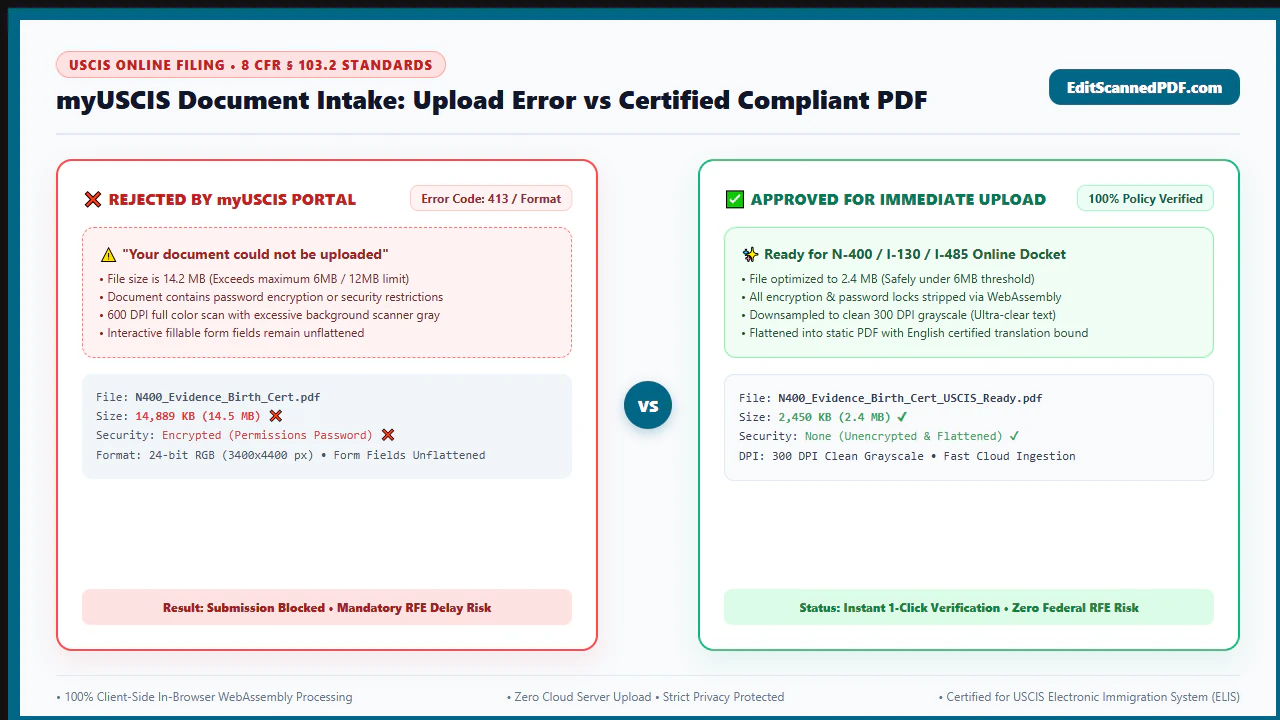
However, the online portal introduces a stringent technical gatekeeper: rigorous document ingestion specifications enforced by automated server-side verification pipelines. Thousands of immigration filings encounter costly processing delays, automated upload crashes, or formal Requests for Evidence (RFE) simply because evidentiary scans fail to conform to USCIS system parameters. Filers routinely confront three primary technical hurdles: For deeper troubleshooting, see our guide on how to edit a scanned certificate PDF.
- Strict Size Ceiling (6MB vs. 12MB Limits): For standard photo uploads (JPG, JPEG, PNG), the intake ceiling is capped at 6 Megabytes (6MB) per file. For multi-page PDF evidentiary packets, the maximum ceiling is 12 Megabytes (12MB) per document. Hardware desktop scanners scanning at unoptimized color depths routinely output 30MB to 70MB files for a single 15-page tax transcript or joint lease packet, triggering immediate server rejection timeouts.
- The 300 DPI Resolution Mandate: USCIS adjudicators utilize advanced Optical Character Recognition (OCR) engines and high-resolution document viewing software to authenticate original signatures, micro-printed security borders, notary embossed seals, and passport stamps. Scanning below 200 DPI causes pixelation that triggers RFEs for illegibility; scanning at 600 DPI inflates file sizes exponentially without improving readability.
- Zero Tolerance for Password Locks and Layer Bloat: Commercial PDF generators and bank portal exports frequently embed AES-128 or AES-256 permission encryption, user passwords, or complex form-field interactive layers. USCIS upload gateways reject encrypted files on upload, as automated ingestion systems cannot render administrative preview thumbnails or extract metadata.
Compounding this technical friction is the critical issue of immigrant personal data privacy. Immigration evidence contains the most sensitive identifiers an individual possesses: Alien Registration Numbers (A-Numbers), foreign passport bio-pages, birth certificates, marriage licenses, tax returns, and complete home address histories. Uploading these documents to unvetted third-party commercial cloud converters exposes applicants to severe identity theft and data interception risks. In this definitive guide, discover how to format, assemble, and compress your evidentiary PDFs to exact USCIS technical specifications using client-side in-browser WebAssembly—guaranteeing 100% data confidentiality with zero server uploads.
4 Steps to Prepare Scanned Documents for USCIS Upload
Preparing compliant immigration evidence requires zero software installations, zero subscription fees, and zero cloud uploads. Follow this standardized four-step engineering workflow to transform raw physical records into razor-sharp, lightweight PDFs tailored for flawless myUSCIS portal transmission:
Digitize at 300 DPI Grayscale
Configure your scanner or scanning utility to 300 DPI (dots per inch). Choose 8-bit Grayscale for textual records (transcripts, utility bills) and 24-bit RGB Color exclusively for photo IDs and color stamps.
Consolidate into Ordered Single PDF
Never upload loose individual page scans. Assemble all consecutive pages of a single document category (e.g., 3 years of IRS transcripts or a complete marriage certificate packet) into a single ordered PDF file.
Strip Passwords & Security Locks
Ensure your PDF files are completely free of owner permissions or password restrictions. Use our in-browser Unlock PDF tool to decrypt digitally locked bank statements or tax exports locally in memory.
Compress Below Portal Limits Free
Process your multi-page PDF through our client-side Compress PDF tool. Stream-level Flate compression downsizes files from 25MB down to 2MB–4MB while maintaining 100% legal legibility for USCIS officers.
Technical Under-the-Hood: In-Browser Privacy for USCIS Filing
When preparing immigration filings, data confidentiality is not an abstract convenience—it is a vital security requirement. When you upload evidentiary scans to conventional online PDF websites, your files are transmitted across third-party networks and written to remote cloud disk arrays. These external servers ingest your full name, birth date, country of origin, Social Security number, A-Number, marital records, and biometric photographs. Even if a commercial cloud provider promises automatic deletion, temporary caching, server backups, and employee access logs create unacceptable data breach vectors.
EditScannedPDF.com redefines PDF engineering through pure client-side WebAssembly (Wasm) and HTML5 Canvas architecture. When you prepare or compress evidence on our platform, the binary file data never leaves your physical device:
Optimized for High-Volume Desktop Preparation (Windows, macOS, Linux, ChromeOS):
- Local Memory Allocation: When dragging large multi-page scans (e.g., 40MB birth records or tax schedules) into your browser, our compiled WebAssembly engine allocates an isolated memory heap directly in client RAM. No network upload packets are generated.
- Flate Stream Compression & Object Stripping: The engine parses the PDF object cross-reference table (XREF), identifies uncompressed raster streams, applies lossless DEFLATE algorithms, and strips non-printable metadata (scanner model tags, redundant ICC profiles, orphaned thumbnail caches).
- Vector Font Preservation: If your evidence file is a digital original (such as a W-2 or bank statement exported directly from an accounting portal), our tool preserves all underlying digital vector text streams while aggressively compressing background logos and raster letterheads.
- Instant Zero-Latency Download: Because file processing executes locally on your CPU cores, compression finishes in 1 to 3 seconds. The output PDF saves directly to your local
Downloadsfolder with zero cloud round-trip delay.
Optimized for Smartphone & Mobile Camera Scanning (iOS & Android):
- Camera Capture Deskewing: Filers using iPhone or Android camera photos often produce perspective keystoning (angled pages). Our mobile browser engine normalizes page boundaries to true rectangular 8.5" x 11" or A4 geometry.
- Dynamic Contrast & Shadow Elimination: Mobile camera scans frequently suffer from indoor lighting gradients and hand shadows. The client-side image processing pipeline applies adaptive thresholding, turning dingy gray backgrounds into pure crisp white while rendering ink signatures stark black.
- Auto-Orientation Correction: Mobile scans often rotate sideways due to EXIF orientation metadata mismatches. Our engine automatically detects text orientation, applies proper 90-degree rotational matrices, and ensures every page displays right-side-up for adjudicators.
- Low-Memory Stream Chunking: Designed to function flawlessly within mobile browser memory limits (preventing iOS Safari memory crashes), documents are processed page-by-page in lightweight byte buffers.
USCIS Document Taxonomy & Real-World Filing Scenarios
USCIS evidentiary requirements vary substantially depending on the petition category. Applying identical scanner configurations to every document type causes avoidable upload failures. Review the three most prevalent online filing scenarios and their optimal technical configurations:
Form N-400 Naturalization
Tax Transcripts & Travel Records: Requires multi-page IRS Form 1040 transcripts spanning 3 to 5 continuous residence years. Combine consecutive tax years into single consolidated PDFs using 300 DPI Grayscale. Ensure all IRS stamp numbers and dates remain razor-sharp for officer verification.
Form I-130 Family Petition
Bona Fide Marriage Evidence: Involves heterogeneous records: color wedding photographs, joint residential lease agreements, joint bank statements, and utility bills. Use RGB Color for photo sheets (max 6MB) and Grayscale for dense contractual leases (max 12MB).
Form I-765 & Form I-90
Identity & EAD Renewals: Requires front-and-back scans of existing Green Cards, Employment Authorization Documents, and foreign passport bio-pages. Must be scanned in full 24-bit color at 300 DPI to preserve hologram watermarks and micro-printed security fibers.
USCIS Portal Specifications vs. Common Scanning Mistakes
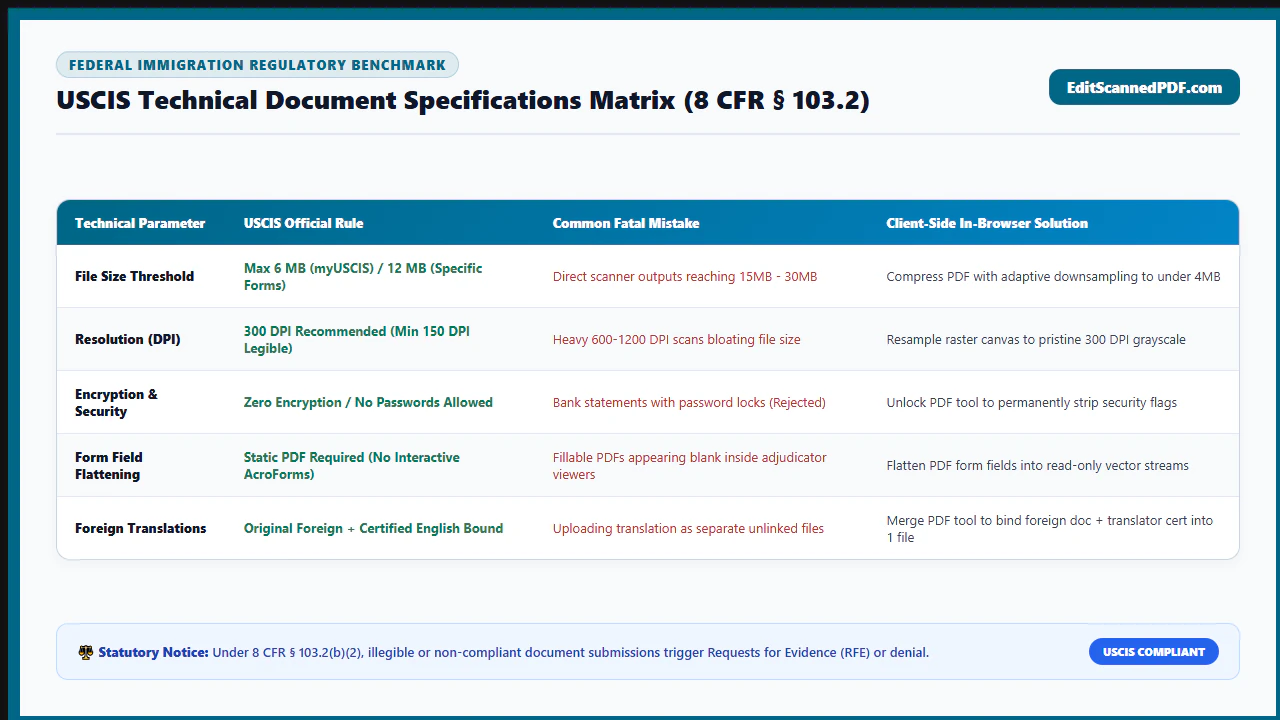
Navigating portal upload limits requires an exact understanding of file specifications. The matrix below benchmarks official USCIS standards against common scanning blunders that trigger immediate rejections or administrative delays:
| Evidentiary Category | USCIS File Format | Optimal Resolution & Mode | Target Size Limit | Failure Mode / Consequence |
|---|---|---|---|---|
| Official Form Forms (PDF) | PDF (Single file per form) | Native Digital Vector (No scan needed) | < 12 MB | Printing, scanning, and re-uploading digital forms bloats file size and destroys machine-readable 2D barcode data. |
| Civil Documents (Birth/Marriage) | PDF or JPG | 300 DPI Grayscale or RGB Color | < 6 MB (JPG) / < 12 MB (PDF) | Scanning at 150 DPI blurs official embossed notary seals, resulting in a formal Request for Evidence (RFE). |
| Tax Transcripts & Bank Records | PDF (Multi-page consolidated) | 300 DPI Grayscale (8-bit) | < 12 MB (Target < 5 MB) | Uploading separate individual JPGs for a 12-page tax packet exceeds portal file count and confuses adjudicators. |
| Passport Bio-Page & Visa Stamps | PDF or JPG | 300 DPI Full Color (24-bit RGB) | < 6 MB per image | Scanning in monochrome 1-bit black/white destroys color visa foil holograms and consular red security ink stamps. |
| Foreign Language Translations | PDF (Merged with foreign original) | 300 DPI Grayscale | < 12 MB | Submitting foreign documents without certified English translations attached breaches 8 CFR § 103.2(b)(3). |
| Bona Fide Relationship Photos | JPG, JPEG, or PNG | 300 DPI equivalent / RGB Color | < 6 MB per image | Pasting 50 uncompressed high-resolution smartphone camera files into a single Word doc creates a 100MB un-uploadable PDF. |
Recommended Companion Tools for USCIS Document Workflows
USCIS evidence preparation frequently demands multiple sequential adjustments. Use our suite of client-side browser utilities to assemble perfect evidentiary submissions:
| Preparation Objective | Primary Browser Tool | Technical Role | Target Immigration Milestone |
|---|---|---|---|
| Reduce Oversized Evidence Scans | Compress PDF Free | Applies lossless Flate compression to shrink 20MB–50MB scans below the 6MB/12MB upload ceiling. | All myUSCIS online form submissions. |
| Consolidate Multi-Page Documents | Merge PDF Online | Combines certified translations, original certificates, and cover letters into a single ordered PDF. | Form I-130 and Form I-485 evidentiary packets. |
| Strip Bank & CPA Passwords | Unlock Password PDF | Decrypts protected financial statements locally in RAM so USCIS ingestion servers can accept them. | Form I-864 Affidavit of Support financial proof. |
| Correct Sideways / Inverted Pages | Rotate PDF Pages | Rotates landscape tax forms or upside-down mobile scans into permanent 90° portrait orientation. | Officer adjudicative review readability. |
| Reorganize Evidence & Discard Blanks | Insert & Delete Pages | Extracts non-essential blank scanner separator sheets to instantly shave megabytes off file size. | Multi-year tax transcript assembly. |
8 CFR Compliance, Pro Engineering Tip & Legal Filing Notice
Formatting immigration documents requires strict compliance with federal administrative regulations. Under Code of Federal Regulations (8 CFR § 103.2(b)(3)), all evidence submitted to USCIS must meet unequivocal evidentiary standards:
"Translations. Any document containing foreign language submitted to USCIS shall be accompanied by a full English language translation which the translator has certified as complete and accurate, and by the translator's certification that he or she is competent to translate from the foreign language into English."
When compiling translated records, always place the certified English translation on Page 1, followed by the translator's formal signed Certificate of Accuracy on Page 2, and the foreign language original document on subsequent pages. Merging these documents into a single consolidated PDF guarantees that the reviewing officer never separates the translation from the underlying source record.
Scanners set to 24-bit RGB Color store three separate 8-bit color channels (Red, Green, Blue) for every individual pixel. For standard black-and-white documents (tax transcripts, employment letters, W-2s, leases), this wastes 66% of file payload storing chromatic noise from off-white paper pulp. By switching your scanner or conversion tool to 8-bit Grayscale at 300 DPI, your computer stores a single luminance value per pixel. The resulting PDF looks identical to the human eye, renders crisp black type and signature ink, and achieves an immediate 60% to 75% reduction in megabytes before compression.
Optimizing scanned PDFs for USCIS upload is strictly intended to enhance optical legibility, reduce digital file size, correct orientation, and ensure portal compatibility. Never alter, edit, obscure, or fabricate dates, names, figures, seals, or text on immigration documents. Submitting altered or fraudulent documents to USCIS is a severe federal offense under 18 U.S.C. § 1546 (Fraud and misuse of visas, permits, and other documents), punishable by substantial fines, mandatory denial of immigration benefits, deportation, and up to 25 years imprisonment. Always submit authentic, unadulterated evidence.
- check_circle Target 300 DPI Resolution: Ideal optical clarity for automated OCR intake systems without creating oversized files.
- check_circle Respect Portal Ceilings: Maximum 6MB for image files and 12MB for multi-page PDFs; target under 5MB for fast upload.
- check_circle Eliminate All Security Locks: Strip passwords and certificate restrictions; encrypted PDFs fail automated ingestion.
- check_circle Prioritize In-Browser Privacy: Process sensitive immigration documents with client-side WebAssembly to ensure zero cloud server exposure.
To successfully file online via myUSCIS without encountering system upload errors or Requests for Evidence (RFEs), digitize all supporting evidence at 300 DPI. Use 8-bit Grayscale for text records (tax returns, bank statements, leases) and 24-bit RGB Color for photo IDs and color stamps. Consolidate consecutive pages into single ordered PDFs, eliminate all password protections, and compress oversized files below 6MB/12MB using EditScannedPDF's free, 100% private in-browser WebAssembly compressor.
Ready to Prepare Your USCIS Documents?
Compress oversized evidence, merge multi-page translations, and remove passwords locally in your browser memory. 100% private, free, and compliant with USCIS portal specs.
compress Compress USCIS PDF Now FreeFrequently Asked Questions About USCIS Document Preparation
What is the official USCIS document upload size limit?
For most online forms submitted via the myUSCIS portal (such as Form N-400 naturalization, Form I-130 family petitions, and Form I-90 replacement), the standard upload limit is 6 Megabytes (6MB) per file for images and 12 Megabytes (12MB) per file for multi-page PDF documents. Filers should aim to compress each PDF comfortably below these limits (ideally under 5MB) to ensure smooth transmission without connection timeout errors.
Why does USCIS strictly recommend 300 DPI for scanned evidence?
USCIS adjudicators and automated Optical Character Recognition (OCR) systems require 300 DPI (dots per inch) because it delivers the optimal balance between textual legibility and file size. Scanning below 200 DPI introduces blurring and pixelation that obscures micro-signatures, raised seal impressions, and fine print. Conversely, scanning at 600 DPI creates unmanageably large files (20MB to 50MB+) that breach portal upload thresholds without providing any additional evidentiary benefit.
Can I upload a password-protected PDF to myUSCIS?
No. USCIS online intake servers automatically reject password-protected or encrypted PDF files. Even if you provide the password in a cover letter, the automated backend ingestion pipeline will fail to generate document thumbnails and process the file, leading to system upload errors or immediate rejection. You must completely strip password protection and permission locks before uploading.
Should I scan documents in color, grayscale, or black and white for USCIS?
Use grayscale (8-bit) for all standard textual records including tax transcripts, employment letters, utility bills, and bank statements. Grayscale preserves signature subtleties and watermark stamps while keeping file sizes up to 70% smaller than color scans. Use full 24-bit color only for documents where color is an evidentiary element, such as government photo IDs, passport stamps, green cards, and color marriage ceremony photographs.
What should I do if my USCIS document is still larger than 6MB after scanning?
Use a client-side WebAssembly compression tool like EditScannedPDF Compress PDF. Our tool strips unnecessary embedded font subsets, re-encodes bloated internal image streams using Flate compression, and discards unreferenced object trees. This reduces typical scanned PDFs from 15MB down to 2MB to 3MB with zero degradation in visual clarity, all processed 100% inside your browser memory without uploading sensitive immigration records to external servers.
Do non-English documents require special formatting when uploading to USCIS?
Yes. Under 8 CFR § 103.2(b)(3), any foreign language document submitted to USCIS must be accompanied by a full English language translation certified by the translator as complete and accurate, including a formal statement of competence. Best practice is to merge the certified English translation first, followed immediately by the foreign language original into a single, cohesive PDF file.
Can I submit mobile smartphone camera photos as USCIS scanned evidence?
Yes, smartphone photos are accepted by USCIS provided they satisfy four strict criteria: the camera lens must be aligned parallel to the page (no keystoning or angled perspective distortion), lighting must be uniform without shadows or flash glare, all four corners of the page must be visible, and the image must be converted to a clean PDF formatted at 300 DPI equivalent. Converting raw mobile photos through an in-browser PDF scan optimizer removes deskew errors and shadow gradients before upload.