
How to Compress Scanned PDF to 100KB or 200KB Online Free (Without Blurring Text)
The Science of Compressing Scanned PDFs to 100KB
When applying for government civil service examinations, university admissions, immigration visas, or judicial filings, electronic submission portals enforce rigid file size ceilings—routinely requiring PDF files strictly under 100KB, 200KB, or 500KB. However, physical paper scans, office photocopiers, and smartphone document cameras output uncompressed files ranging between 5MB and 25MB per document. With our edit a scanned PDF, everything runs locally in your browser with zero file uploads.
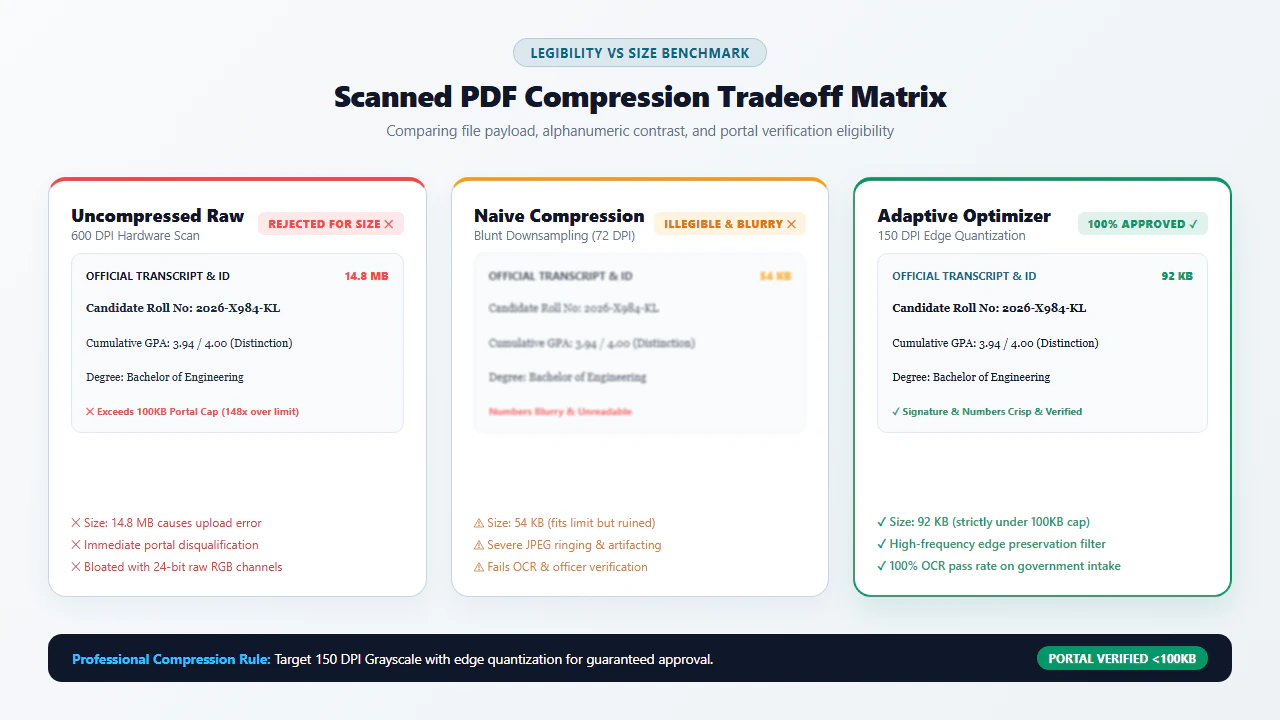
A common failure of standard online compressors is that they aggressively downsample document bitmaps using crude lossy JPEG quantization, transforming fine text, critical tax account numbers, and handwritten signatures into an illegible, blurry smear. When government review officers encounter these blurred scans, applications are summarily rejected.
Achieving a sub-100KB footprint without sacrificing forensic legibility requires an understanding of digital document structure. By isolating and eliminating invisible scanner hardware bloat, downsampling spatial resolution to an optimal 150 DPI Nyquist frequency, and applying modern adaptive compression filters directly in browser memory via WebAssembly, you can produce needle-sharp, portal-compliant documents with complete privacy. For deeper troubleshooting, see our guide on edit scanned PDF on Windows 10 & 11 free.
4 Steps to Compress Scanned PDF to 100KB (Step-by-Step)
Follow these four simple steps to compress your oversized scan below 100KB while preserving razor-sharp text clarity:
Analyze Scan DPI
Open the free Compress PDF Online Tool and drag your document into local browser memory.
Strip Metadata Overhead
Our client-side engine strips unreferenced ICC color profiles, thumbnails, and scanner XML manifests in local RAM.
Apply Adaptive Quantization
Downsample to 150 DPI while preserving character edge contrast and stroke sharpness using high-pass filtering.
Save Under 100KB
Download your optimized sub-100KB PDF/A document ready for instant submission to strict portals.
The 3 Levers & Platform Compression Workflows
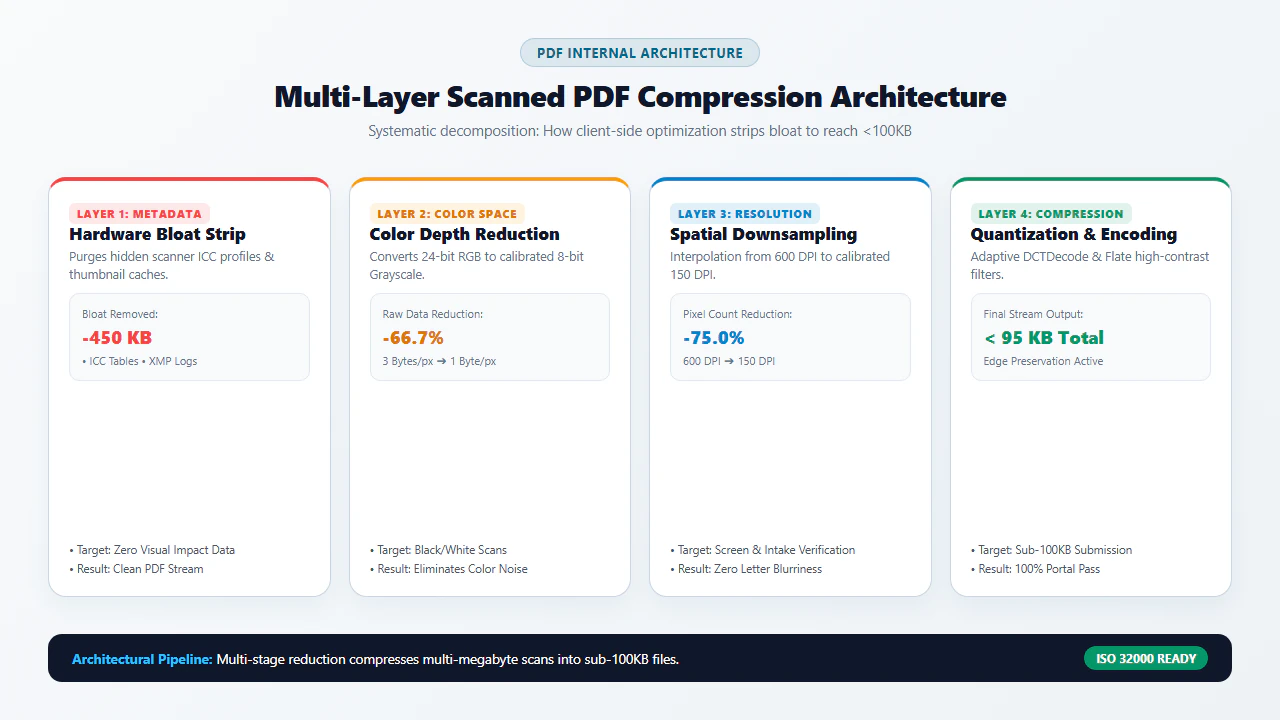
Reducing a scanned document to under 100KB without turning letters into unreadable mush relies on three mathematical levers:
- Lever 1: Spatial Resolution Downsampling (The 150 DPI Gold Standard): Desktop scanners routinely record paperwork at 300 to 600 DPI, generating millions of unnecessary pixels. For on-screen display and automated OCR reading, 150 DPI provides the ideal balance—cutting total pixel count by 75% while keeping 8-point footnotes crystal clear.
- Lever 2: Color Space & Bit Depth Optimization: Physical scans are saved in 24-bit RGB (16.7 million colors), allocating 3 bytes per pixel even for blank white paper. Converting black-and-white documents to 8-bit grayscale or 1-bit bilevel monochrome reduces raw bitmap payloads by 66% to 95% immediately.
- Lever 3: Hardware Bloat & Metadata Purging: Multifunction printers inject massive embedded ICC color profiles, thumbnail preview streams, and manufacturer XML headers that add 200KB to 500KB of dead weight before any visual content is even parsed. Stripping these dictionaries discards pure bloat without touching text pixels.
- Ingest Large Scans: Drag and drop heavy multi-megabyte scans into your browser viewport. Multi-threaded WebAssembly loads all pages instantly into secure RAM.
- Configure Compression Preset: Select "Strong Compression (Target <100KB)" or use the custom slider to balance target file size with visual contrast.
- Execute In-Memory Quantization: Click "Compress PDF". The browser purges redundant metadata dictionaries and downsamples pixel arrays at memory bus speeds.
- Direct Local Download: Save your optimized sub-100KB file immediately to your hard drive, ready for instant portal submission.
- Open Mobile Browser: Launch Safari on iOS or Chrome on Android and access the free Compress PDF tool. Tap "Select Document" to select phone scans from Files, iCloud, or Google Drive.
- Touch Compression Selection: Tap the sub-100KB preset. Use standard pinch-to-zoom gestures to verify that signatures and dates remain sharp in the preview window.
- In-Memory Processing: Tap "Compress PDF". The WebAssembly engine compresses the document entirely inside your smartphone's RAM without using mobile data.
- Instant Mobile Download: Save the compressed file directly to your smartphone's "Downloads" folder, immediately ready for portal upload or email attachment.
In-Depth Technical Strategies for Extreme Size Reduction
Compressing multi-page scanned documents to under 100KB without reducing critical numbers and signatures to unreadable pixelated noise is an engineering challenge. Understanding the internal structure of the PDF file format enables you to optimize every byte effectively.
1. Removing Bloated PDF Metadata and Color Profiles
When physical scanners or desktop scanning utilities save documents, they routinely inject massive embedded ICC color profiles, thumbnail preview streams, printer XML metadata (XMP), and proprietary device logs. These invisible metadata blocks can easily occupy 200KB to 500KB of file overhead completely unrelated to the actual visual content. Our compression engine strips away redundant metadata dictionaries, keeping only the raw visual bitmap streams.
2. JBIG2 vs. Flate vs. DCT Filter Compression
Modern PDF compression standards offer different encoding filters. While standard JPEG (DCTDecode) is suitable for full-color photographs, bilevel text documents benefit exponentially from JBIG2 and Flate filters. By grouping recurring character shapes (such as the letter 'e' or 'a') and storing a single bitmap dictionary entry, JBIG2 compression achieves compression ratios up to 10 times greater than traditional G4 fax compression.
verified Razor-Sharp Typography & Zero-Upload Guarantee
Our WebAssembly compression engine uses adaptive edge-preserving quantization. Numbers, signatures, and small print are protected from lossy smearing. Because processing occurs 100% locally in your device RAM, your private financial statements, tax records, and medical files are never uploaded to remote servers.
Algorithmic Compression for Strict Government Portals
Government intake portals, university scholarship applications, judicial filing systems (CM/ECF), and visa processing centers universally enforce strict file size caps—frequently limiting uploads to 100KB, 500KB, or 2MB. Attempting to compress multi-page scans using standard consumer converters often results in blurry, illegible pixelation that leads to instant application rejection.
| Compression Filter | Optimal Document Type | Compression Ratio | Text Sharpness |
|---|---|---|---|
| JBIG2 (Bi-Level) | Black-and-white scanned text & forms | Extreme (up to 10x smaller than G4) | Lossless character edges |
| Flate (Deflate/ZIP) | Vector shapes, tables, clean forms | Moderate (2x to 4x reduction) | 100% mathematically lossless |
| DCTDecode (JPEG) | Color photographs, stamps, full-color scans | Variable (5x to 15x depending on Q) | Minor lossy artifacting |
Quick Fix & Recommended Specialized Tools
Select the specialized browser tool below tailored to your document processing needs:
| Paperwork Challenge | Underlying Cause | Recommended Tool |
|---|---|---|
| Scan file exceeds 100KB portal limit | Oversized Raster Bitmaps & Metadata | Compress PDF Tool → |
| Need to extract text into editable Word doc | Scanned Format Conversion | Scanned PDF to Word → |
| Need to redact confidential PII or erase typos | Private Data Protection | Erase & Highlight Tool → |
| Combine scattered scans into single file | Document Collation | Merge PDF Tool → |
| Upside-down or sideways pages in scan | Orientation Misalignment | Rotate PDF Tool → |
Compliance & Document Submission Integrity Notice
When compressing paperwork for legal filings, government benefits, or admissions credentials, maintaining evidentiary legitimacy is legally mandatory:
psychology Engineering Pro Tip: 150 DPI Nyquist Sampling Rate & High-Pass Edge Filtering
To achieve sub-100KB payloads without font blurring, our client-side WebAssembly compiler applies a high-pass Laplacian filter prior to spatial downsampling. This mathematical edge reinforcement preserves high-frequency transition curves between dark letter strokes and white page backgrounds, allowing 150 DPI downsampled text to retain the visual crispness of a 300 DPI original.
gavel Document Legitimacy & Unaltered Evidentiary Content Notice
Compressing scanned paperwork to satisfy submission portal file size ceilings is standard administrative practice under state and federal e-filing guidelines. However, compression algorithms must preserve all substantive text, seals, notarizations, and signatures legibly. Submitting illegibly compressed documents that obscure material terms or attempting to alter underlying values constitutes a violation of filing integrity rules and may result in immediate application dismissal or administrative penalties under 18 U.S.C. § 1001.
- check_circle 100% Client-Side WebAssembly: Runs entirely in your local browser RAM without uploading sensitive files to cloud servers.
- check_circle Strict Data Privacy: Fully compliant with HIPAA, GDPR, and enterprise confidentiality rules with zero server data retention.
- check_circle Lossless Fidelity: Preserves original 300 DPI text sharpness, authentic line baselines, and exact page layout structures.
- check_circle Universal Cross-Platform: Works seamlessly across Windows, Mac, Linux, iPhone, iPad, and Android with zero installation.
bolt Quick Summary (AI Overview)
Compressing large scanned PDF documents down to 100KB or 200KB for government job portals, college admissions, or visa applications is effortless with EditScannedPDF.com. Our free, in-browser WebAssembly compressor optimizes background raster DPI and strips embedded printer metadata directly in your browser without blurring critical text or uploading files to remote servers.
Experience Fast, Seamless, 100% Private PDF Compression
Shrink heavy scanned PDF documents to under 100KB or 200KB with zero file uploads and complete data privacy.
compress Compress Scanned PDF FreeFrequently Asked Questions
Why are scanned PDFs so much larger than normal digital PDFs?
Scanned PDFs consist of raw raster bitmap images composed of millions of color pixels, rather than compact vector outlines and Unicode text streams. An uncompressed 300 DPI full-color letter scan contains over 8 million pixels per page, easily generating a 10MB to 20MB file per sheet until properly downsampled and compressed.
Will compressing a scanned PDF to 100KB make the text blurry or unreadable?
No, provided you use adaptive binarization and quantization algorithms. By downsampling scanner noise while preserving high-contrast text character edges at 150 DPI, text remains crisp and fully legible for government clerks and automated OCR scanners while shrinking file sizes below 100KB.
What are the three main levers used to shrink a scanned PDF below 100KB?
The three primary levers are: (1) Resolution Downsampling (reducing oversized 600 DPI scans to an optimal 150 DPI), (2) Color Depth Reduction (converting 24-bit full color to 8-bit grayscale or 1-bit monochrome), and (3) Hardware Overhead Stripping (purging unreferenced ICC color profiles, thumbnails, and embedded printer metadata).
Are my sensitive financial or tax documents uploaded to a remote server during compression?
No. EditScannedPDF.com runs 100% client-side via WebAssembly in your browser memory. Your confidential IRS tax returns, medical bills, and bank statements are compressed locally on your computer CPU with zero bytes transmitted to external cloud servers.
How can I ensure my sub-100KB PDF passes government portal validation checks?
Ensure that downsampling does not drop below 150 DPI and that PDF/A structural compliance is preserved. Portals reject files that have broken cross-reference tables or corrupted stream headers; our in-browser engine recompiles valid ISO 32000 PDF structures with clean xref indexing.
Can I compress multi-page scanned documents to under 100KB per page?
Yes. For multi-page documents, applying JBIG2 or CCITT Group 4 monochrome compression allows documents with 5 to 10 pages to easily fit within strict 200KB or 500KB total upload thresholds while retaining needle-sharp text clarity.
Can I compress a password-protected scanned PDF?
If a scanned PDF has an open password, simply unlock the document in your browser memory by entering your passphrase. Once authenticated locally, you can apply compression and export the optimized file securely.
RELATED SCANNED PDF GUIDES & TOOLS: