
How to Add Bates Numbering & Stamping to Legal PDFs Free
The Evidentiary Foundation of Bates Stamping in Legal Discovery
In modern civil litigation, commercial arbitration, and regulatory investigations, an unpaginated document is an unmitigated liability. When trial counsel presents a deposition exhibit or cites documentary evidence before a federal judge, citing "page 14 of the scanned accounting records" is legally insufficient. Exhibits must be uniquely identified by an indelible alphanumeric tracking code—universally recognized in jurisprudence as a Bates Stamp. For deeper troubleshooting, see our guide on add a confidential watermark to scanned PDFs.
Originally invented in the late nineteenth century as a mechanical hand-stamp by Edwin G. Bates, digital Bates stamping serves as the operational backbone of legal document integrity:
- Unambiguous Record Identification: Every single page across thousands of disclosed emails, contracts, bank statements, and scanned invoices receives a sequential identifier (such as
PLTF_000412orDEF_EX_B_001890). This ensures that every party, deposition witness, judge, and law clerk refers to the exact same evidentiary sheet. - Unbroken Evidentiary Chain of Custody: When opposing counsel produces documents pursuant to Rule 26 of the Federal Rules of Civil Procedure (FRCP), Bates numbering proves that pages were not inserted, omitted, or reordered post-production.
- Automated E-Discovery Indexing: Modern litigation databases and court docketing systems (such as PACER and Relativity) rely on standardized Bates numbers to cross-reference witness depositions, motion exhibits, and trial briefs.
The Privilege Risk of Commercial Cloud Converters: Law firms and corporate legal departments face strict ethical obligations under ABA Model Rule 1.6 to protect client confidences. Uploading confidential discovery productions, proprietary trade secret disclosures, or sealed settlement communications to external cloud conversion websites risks waiving attorney-client privilege. With EditScannedPDF.com (edit scanned PDF free), Bates stamping is executed 100% inside your local web browser via WebAssembly. Your confidential litigation bundles never cross the internet or touch an external server.
4 Steps to Add Bates Numbers to Scanned PDFs Online (Step-by-Step)
You do not need to pay thousands of dollars for complex desktop litigation suites or install unverified workstation utilities. With EditScannedPDF Add Page Numbers & Bates Tool, you can securely stamp any scanned or native PDF in four simple steps:
Open the Add Page Numbers tool and drag your multi-page legal brief or scanned exhibit bundle into the workspace. Files decode in local RAM with zero cloud upload.
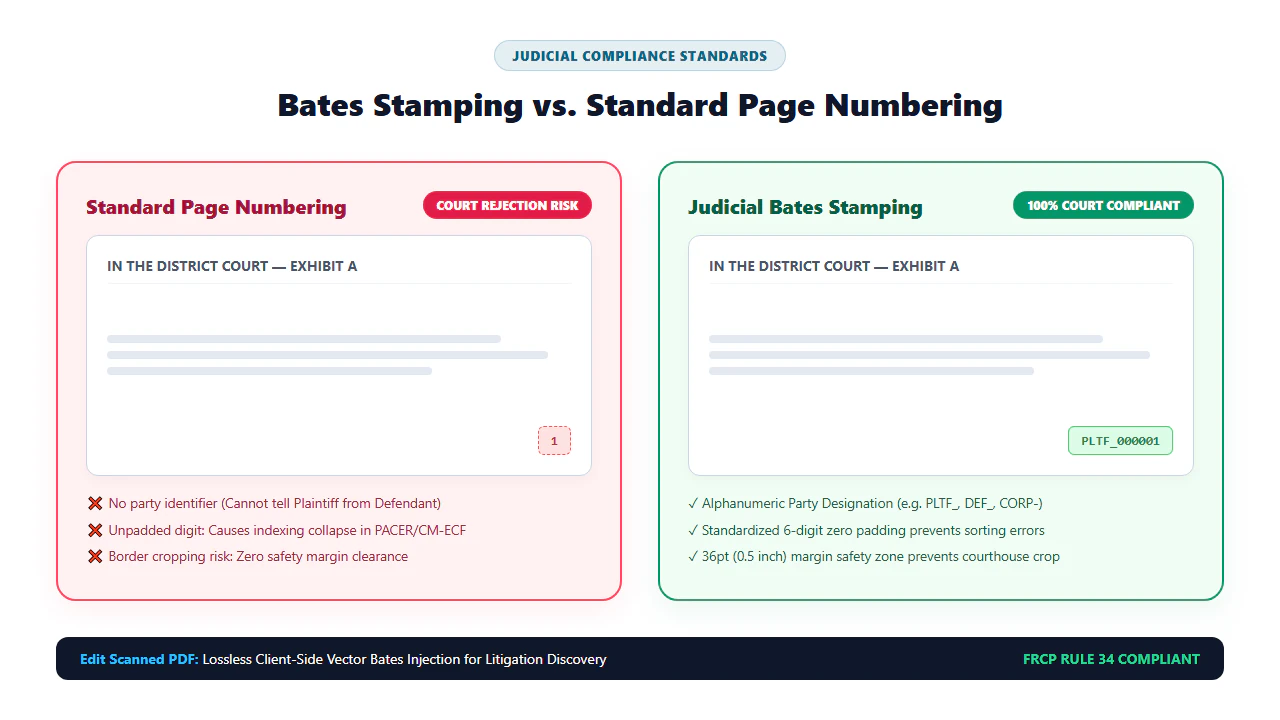
Enter your party identifier prefix (e.g., PLTF_ or DEF_), specify the starting index number, and set standard 6-digit zero padding (e.g., 000001).
Choose bottom-right or top-right placement, select legal monospace font styling (10 pt), and adjust margins to ensure stamps never obscure signatures or evidence.
Click Download to bake the Bates sequence permanently into the document graphics stream across all pages. The exported PDF is tamper-evident and court-ready.
Technical Bates Mechanics & Platform Workflows
Bates stamping is distinct from ordinary book pagination. In standard documents, page numbers represent simple cosmetic indicators (e.g., "Page 1"). In litigation productions, each Bates identifier represents a strictly tracked, non-repeating cryptographic record. The stamp must remain legible on both 300 DPI high-resolution scans and degraded historical faxes without bleeding into underlying contract clauses.
Our WebAssembly rendering pipeline handles Bates serialization through direct Content Stream Form XObject Overlay. Rather than inserting floating annotation markers that opposing counsel can select and delete in desktop viewers, our engine writes the rendered alphanumeric glyphs into the page's structural content stream at exact PostScript coordinate offsets (defaulting to 36 points from the right margin and 36 points from the bottom edge).
- Multi-Gigabyte Local Discovery Ingestion: Launch Google Chrome, Mozilla Firefox, Microsoft Edge, or Apple Safari on Windows, macOS, or Linux. Drag your multi-page discovery bundle into the workspace. The WebAssembly engine decodes hundreds of pages smoothly at 300 DPI without cloud latency.
- Precision Offset Calibration & Layout Audit: Preview pages across both portrait and landscape orientations. Use the visual positioning grid to lock the Bates sequence into the bottom-right margin with 36-point margin clearance.
- Prefix, Padding & Case Docket Serialization: Enter case identifiers (e.g.,
CASE-2026-CV-001_DEF_). Enable 6-digit zero padding to guarantee that automated e-discovery platforms sort entries in true chronological order. - High-Throughput Content Stream Fusion: Execute batch stamping. The engine compiles the Bates sequence into each page's
/Contentsstream via Form XObjects in under two seconds, exporting a submission-ready legal archive.
- Emergency Courtroom Mobile Access: Open EditScannedPDF.com in Safari on iOS/iPadOS or Chrome on Android. No app installation, Apple ID, or paid licenses required during urgent courtroom or deposition recesses.
- Touch-Optimized File Import: Tap to import supplemental affidavits, exhibits, or scanned motion attachments directly from Files, iCloud Drive, or Google Drive.
- Rapid Preset Numbering & Pinch-Zoom: Select quick numbering presets, set starting index offsets, and pinch-to-zoom to verify that stamped numbers do not overlap notary seals or signatures.
- Instant Local PDF Export & E-Filing Delivery: Generate the Bates-stamped document entirely in mobile RAM with zero cellular data consumption, ready to email to the clerk or upload to court portals.
Enterprise Legal Discovery Scenarios & Privilege Guarantee
Standardized Bates numbering is universally required across modern judicial and corporate legal proceedings. Below are three mission-critical enterprise discovery environments:
1. Federal Civil Litigation Discovery Productions (FRCP Rule 34)
Under Rule 34 of the Federal Rules of Civil Procedure, parties responding to requests for production of documents must produce them "as they are kept in the usual course of business or must organize and label them to correspond to the categories in the request." Stamping production batches with unique prefix sequences (e.g., SMITH_PROD_000001 through SMITH_PROD_014500) ensures that discovery dispute hearings before magistrate judges can address exact page discrepancies without confusion.
2. Deposition Marking & Trial Exhibit Bundles
During witness depositions and jury trials, counsel must introduce documentary exhibits into the official record. Court reporters mark exhibits with standardized Bates ranges. If an exhibit contains missing or unnumbered pages, opposing counsel will object on authenticity and chain of custody grounds under Federal Rule of Evidence 901.
3. Regulatory Audits & Government Inquiries (SEC, DOJ, FTC)
When financial institutions or corporations respond to Civil Investigative Demands (CIDs) or subpoenas from the Securities and Exchange Commission (SEC) or Department of Justice (DOJ), production specifications mandate strict Bates numbering rules, including mandatory 6-digit zero padding and comprehensive cross-reference production logs.
At EditScannedPDF.com, attorney-client privilege and work-product confidentiality are protected by mathematical browser isolation. Your litigation bundles never cross the internet.
- Zero Cloud Uploads: Files remain on your local hardware; processing executes via in-memory WebAssembly.
- Strict Ethical Compliance: Meets ABA Model Rule 1.6 confidentiality standards and judicial protective order requirements.
- Tamper-Evident Graphics Fusion: Bates stamps are baked directly into the PDF content stream, resisting superficial deletion.
Bates Stamping & Legal Pagination Technologies Comparison Matrix
Law firms and corporate legal teams have several methods available for paginating discovery productions. Below is an engineering and evidentiary comparison of the primary options:
Judicial Precedents & Recommended Companion Legal Tools
Courts have repeatedly affirmed that proper document pagination is not a mere technicality. In landmark discovery sanctions cases, judges have penalized litigants who produced unpaginated or disorganized files:
- Prohibition on Document Dumping: In cases interpreting FRCP Rule 34, federal courts have held that producing thousands of unpaginated, disorganized PDF scans constitutes an improper "document dump," justifying monetary sanctions and mandatory re-production with sequential Bates stamping.
- Evidentiary Authentication Under FRE 901: When introducing historical business records at trial, an unambiguous Bates reference allows counsel to lay an immediate foundation without disputes over whether a specific attachment was part of the original production.
- Deposition Transcript Cross-Referencing: When examining hostile witnesses, citing an exact Bates page number (e.g., "Directing your attention to PLTF-000418, paragraph 3...") prevents evasive witness responses and creates a clear transcript for appellate review.
Multi-Volume Production Checklist, Pro Tip & Evidentiary Notice
Prior to serving a finalized discovery production on opposing counsel or filing trial exhibits with the court clerk, run through this comprehensive legal pre-flight checklist:
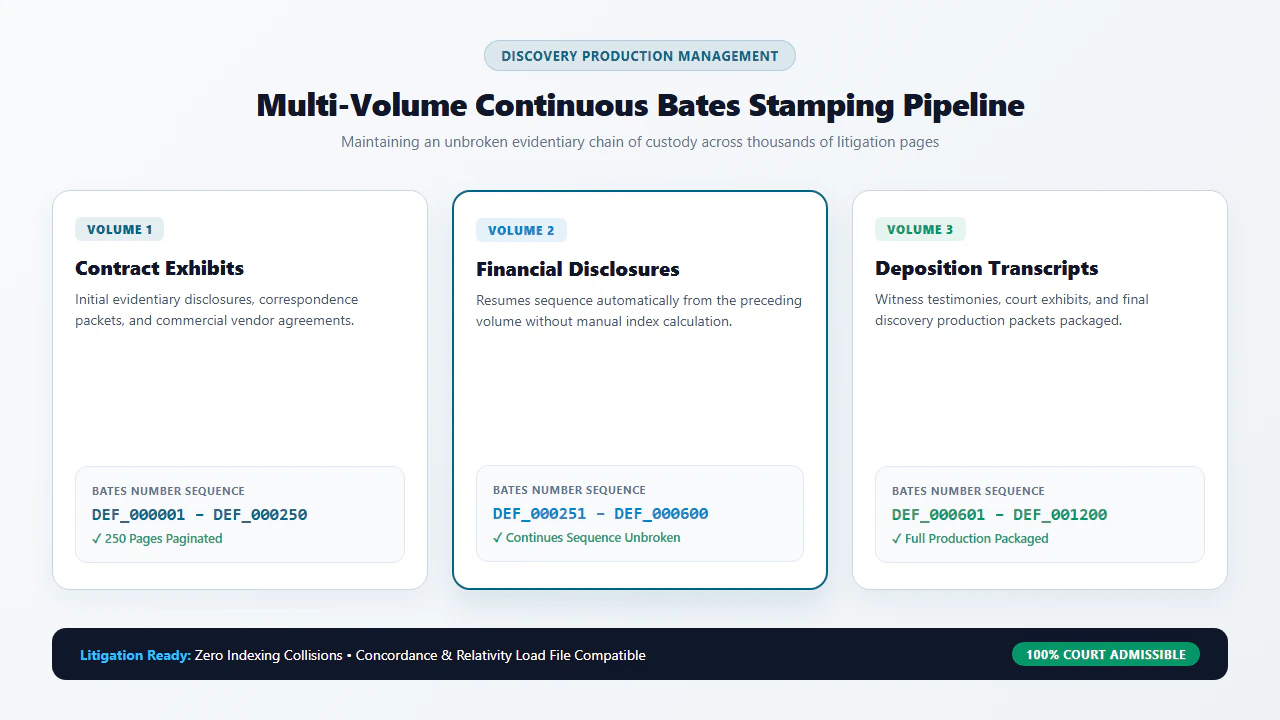
- Unbroken Sequence Verification: Audit the final Bates number of Volume 1 and ensure Volume 2 begins with the exact next consecutive integer (e.g., Volume 1 ends at
000500; Volume 2 begins at000501). - Landscape Page Orientation Check: Ensure that landscape pages (such as financial spreadsheets and blueprints) position the Bates stamp in a uniform location (typically bottom-right relative to page rotation) so readers do not have to invert their screens.
- No Text Obscuration Audit: Spot-check the lowest lines of text on scanned pages to ensure the Bates stamp does not overlap signatures, notary seals, or statutory disclaimer footnotes.
- Privilege Log Cross-Reference: Confirm that any documents withheld or redacted under attorney-client privilege or work-product doctrine are accurately noted with their designated Bates ranges on the master Privilege Log.
Never format Bates numbers without leading zeros (e.g., avoiding DEF_1, DEF_2). Standard database query engines and filesystem directory listings sort strings lexicographically rather than numerically. Without zero-padding, page DEF_10 will sort immediately after page DEF_1 and before page DEF_2! Always configure at least six digits of zero-padding (e.g., DEF_000001 through DEF_000010) to ensure proper chronological and database ordering across all litigation software.
Failing to produce documents in an organized, paginated format compliant with court discovery orders can result in severe judicial sanctions under Rule 37 of the Federal Rules of Civil Procedure. Sanctions can include striking pleadings, precluding the introduction of critical evidence, and assessing substantial attorneys' fees against non-compliant parties. Utilizing standardized in-browser Bates serialization protects your firm from non-compliance claims while maintaining absolute evidentiary integrity.
- check_circle 100% Client-Side WebAssembly: Apply Bates stamps directly in your local browser RAM without uploading privileged litigation files to cloud servers.
- check_circle Litigation-Ready Formatting: Full support for alphanumeric party prefixes, 6-to-8 digit zero-padding, and custom starting index offsets.
- check_circle Content Stream Fusion: Bakes Bates identifiers directly into document graphics layers, preventing accidental or malicious deletion.
- check_circle Court & E-Discovery Compliance: Fully compliant with FRCP Rule 26/34 discovery standards, PACER filing limits, and ABA Model Rule 1.6 ethics.
To add sequential Bates numbering and legal page stamps to scanned PDF documents online for free, use the private EditScannedPDF Add Page Numbers Tool. It fuses customizable alphanumeric prefixes and zero-padded sequence numbers directly into document content streams inside your web browser—protecting attorney-client privilege, satisfying court discovery rules, and keeping your litigation files 100% confidential.
Add Bates Numbers to Your Legal PDFs Now
Prepare litigation-ready discovery productions and preserve attorney-client privilege. Apply custom Bates sequences privately with zero installation and zero cloud exposure.
gavel Start Bates Stamping PDF Online FreeFrequently Asked Questions on Legal Bates Stamping
What is Bates Stamping in legal scanned PDFs?
Bates Stamping (or Bates numbering) is the standardized method used by legal professionals, courts, and corporate counsel to sequentially number and identify documents during litigation, discovery, and trial. Each page receives a unique, sequential alphanumeric code (such as 'DEF-000124' or 'PLTF-EXHIBIT-A-000001') permanently burned into the margin, ensuring an unbroken evidentiary chain of custody.
Can I paginate and Bates stamp scanned image-based PDFs?
Yes. EditScannedPDF.com handles both scanned, image-only documents and vector PDFs. The client-side engine overlays your custom prefix, starting number, and zero-padded sequence directly onto the document's content stream, allowing you to paginate multi-page discovery bundles with consistent margins across portrait and landscape pages.
How does in-browser Bates stamping protect attorney-client privilege?
Standard cloud-based converters require you to upload confidential litigation bundles to external servers, exposing non-public filings to server-side logging and potential privilege waivers. EditScannedPDF.com runs 100% locally in your web browser via WebAssembly. Your files never leave your computer, preserving absolute attorney-client privilege and complying with ABA Model Rule 1.6 confidentiality standards.
What is the standard format for Bates numbers in federal and state litigation?
While specific local court rules may dictate preferences, the universal legal standard comprises a 2-to-4 character party identifier prefix (e.g., 'PLTF' for Plaintiff or 'DEF' for Defendant), an optional volume or exhibit code, and a 6-to-8 digit zero-padded sequential number (e.g., 'DEF_000001' through 'DEF_005230'). Zero padding guarantees that electronic database searches sort pages correctly.
Where should Bates stamps be placed to avoid obscuring evidence?
Bates numbers are traditionally stamped in the bottom-right footer margin (approximately 0.5 inches from the bottom edge and 0.5 inches from the right margin). If evidence, dates, or signatures extend into the bottom margin, stamps can be placed in the top-right header. Avoid placing stamps across the center or within active text bodies.
Can I Bates stamp a multi-volume production across multiple separate PDF files?
Yes. You can manage multi-volume productions by establishing a master Bates tracking index. When stamping Volume 1 (pages 1 to 500), set the range from 'PROD-000001' to 'PROD-000500'. When loading Volume 2, set the starting index to '501' ('PROD-000501'). Alternatively, you can use our Merge PDF tool to assemble all volumes into a single continuous bundle before applying sequential numbering.
Are Bates stamps permanent, or can opposing counsel delete them?
On EditScannedPDF.com, Bates stamps are not placed as flimsy, selectable annotation notes. The engine renders each alphanumeric sequence directly into the page graphics stream as a Form XObject and flattens the output. The resulting numbers become an indelible, permanent part of the document canvas that cannot be trivially stripped or altered.