
How to Add Exhibit Stickers to Court PDFs for E-Filing
Anatomy of a Compliant Court Exhibit Sticker & E-Filing Rules
In federal and state litigation, documentary evidence is only as effective as its identification on the judicial record. When trial attorneys file a summary judgment motion or examine a witness during a high-stakes deposition, presenting an unstamped, loose PDF document invites procedural chaos. Court clerks, opposing counsel, and trial judges demand unambiguous, standardized identification—universally provided by an electronic Court Exhibit Sticker. For deeper troubleshooting, see our guide on add a confidential watermark to scanned PDFs.
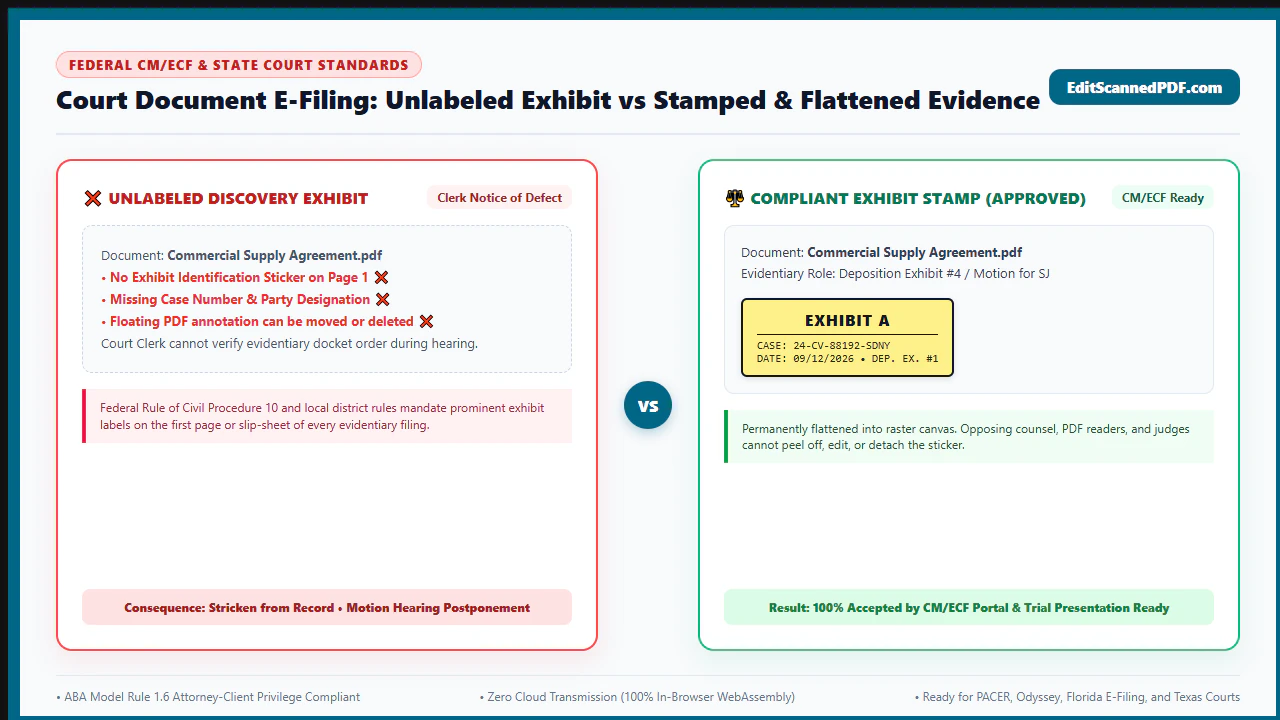
For decades, paralegals physically affixed colored, adhesive peel-and-stick labels to paper records before feeding them into office scanners. In today's digital courts, however, paper stickers are obsolete. Judicial portals—such as the federal CM/ECF (Case Management/Electronic Case Files) network, California Superior Courts, NYSCEF, and Texas eFile—require clean, electronically applied, and permanently flattened exhibit labels:
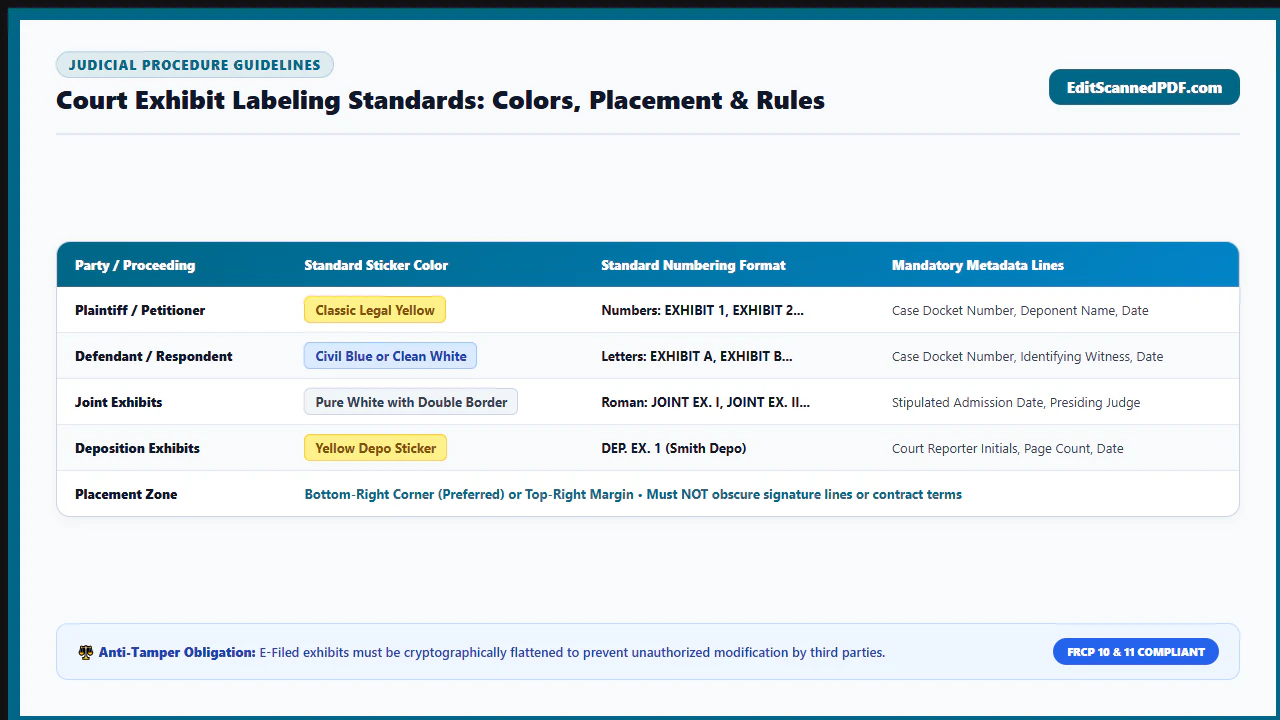
- Party Designation Standards: Standard court rules mandate distinct designations. In federal courts, plaintiffs traditionally use letters ("Exhibit A", "Exhibit B") or blue digital stickers, while defendants utilize numbers ("Exhibit 1", "Exhibit 2") or yellow stickers.
- Case Metadata Inclusion: A compliant exhibit sticker must clearly state the court case number, party identifier, deposition exhibit number, witness name, and introduction date.
- CM/ECF Rejection Prevention: Automated court intake scanners reject documents containing unflattened annotation layers or interactive form widgets. A digital exhibit sticker must be permanently baked into the underlying PDF content stream.
The Privilege Risk of Cloud PDF Editors: Law firms cannot casually upload confidential exhibits, sealed trade secret documents, or sensitive client depositions to cloud-based PDF websites. Doing so risks violating ABA Model Rule 1.6 and waiving evidentiary privilege. With EditScannedPDF.com (online scanned PDF editor free), digital exhibit stamping runs 100% locally in your web browser via WebAssembly. Your legal documents never leave your machine.
4 Steps to Add Exhibit Stickers to Court PDFs (Step-by-Step)
You do not need an expensive commercial desktop software license or specialized litigation suites to prepare court exhibits. With EditScannedPDF Image & Stamp Tool, you can securely stamp any legal PDF in four simple steps:
Open the Image & Stamp tool and drag your legal exhibit PDF into the workspace. The file decodes inside browser memory with zero cloud transmission.
Choose from standardized court sticker templates (Blue for Plaintiff, Yellow for Defendant, White for Deposition) with customized border styling.
Fill in the case docket number, exhibit designation, and date. Position the sticker in the lower-right margin, ensuring no substantive evidence is obscured.
Click Download to bake the exhibit sticker permanently into the page graphics stream. The output PDF is flattened and 100% compliant with CM/ECF e-filing.
Technical Sticker Mechanics & Platform Workflows
Applying an electronic exhibit sticker requires a careful balance of visual prominence and evidentiary preservation. The label must be sharp and immediately noticeable to judges and court reporters, yet it must never occlude critical dates, monetary amounts, or author signatures on the underlying scanned evidence.
Our WebAssembly rendering engine compiles each exhibit label as an encapsulated Form XObject injected directly into the PDF content stream. Unlike basic PDF viewers that generate temporary annotation callouts, our engine flattens the vector box, legal border rules, and crisp sans-serif text into the page canvas. This eliminates the risk of floating annotations detaching or rendering as blank grey boxes when processed by court portal ingestion filters.
- High-Resolution Multi-Page Ingestion: Launch Google Chrome, Mozilla Firefox, Microsoft Edge, or Apple Safari on Windows, macOS, or Linux. Drag your exhibit PDF into the workspace. The file renders at full 300 DPI clarity.
- Sub-Pixel Sticker Positioning: Select the Exhibit Sticker preset. Drag the sticker box to the bottom-right corner of page 1. Use fine-tuning controls to maintain a 36-point margin clearance from page edges.
- Case Docket & Deposition Customization: Type your formal case number (e.g.,
1:26-cv-01450-JGK), party designation ("PLAINTIFF EXHIBIT A"), and current date. Check that no underlying signatures are obscured. - Lossless In-Memory Flattening & Export: Download your finished exhibit PDF in under two seconds. The sticker is permanently baked into the content stream, completely ready for PACER/ECF upload.
- Urgent Courtroom Mobile Access: Open EditScannedPDF.com in Safari on iOS/iPadOS or Chrome on Android. No app installation or paid registration is required during fast-paced depositions or hearing recesses.
- Touch-Optimized File Import: Tap to import witness documents, exhibits, or scanned motion attachments directly from Files, iCloud Drive, or Google Drive.
- Touch Drag & Drop Sticker Placement: Tap to place an exhibit sticker, use one-finger drag to position it over a blank margin, and pinch-to-zoom to verify text legibility.
- Instant Local PDF Export & E-Filing Delivery: Generate the permanently stamped court PDF directly inside mobile RAM without burning cellular data bandwidth, ready for instant email distribution.
Enterprise Litigation Scenarios & Privilege Guarantee
Digital exhibit stickers are essential across all phases of modern civil and criminal litigation. Below are three primary judicial applications:
1. Federal Court Motion Practice & E-Filing (CM/ECF)
When filing motions for summary judgment, preliminary injunctions, or motions to dismiss, local court rules require each supporting affidavit attachment to be marked with a clear exhibit sticker. Stamping documents with standardized letter or number designations ensures that citations in the legal brief (e.g., "See Pl. Ex. C at ¶ 12") match the filed docket record precisely.
2. Live Video Witness Depositions (Remote Litigation)
In modern remote depositions conducted over Zoom, Webex, or Microsoft Teams, counsel and court reporters must introduce, mark, and distribute exhibits in real time. Rather than emailing messy, unlabelled scans, counsel can electronically stamp the document in ten seconds and share a court-compliant exhibit immediately.
3. Arbitration & Trial Exhibit Binders
In bench trials and commercial arbitrations (AAA, JAMS, ICC), counsel must submit joint exhibit lists and unified pre-marked exhibit binders. Electronically applying uniform exhibit stickers prevents discrepancies between plaintiff and defense binders.
At EditScannedPDF.com, your confidential court exhibits, trade secret documents, and deposition files never touch a cloud server. All stamping is performed directly within browser memory.
- Zero Cloud Uploads: Files remain on your local hardware; processing executes via in-memory WebAssembly.
- Strict Ethical Compliance: Meets ABA Model Rule 1.6 confidentiality standards and protective order requirements.
- Permanent Graphic Fusion: Exhibit stickers are flattened into the PDF content stream, resisting accidental stripping.
Court Exhibit Labeling Standards Across Major Jurisdictions
Court rules vary by jurisdiction regarding exhibit labeling formatting, colors, and placement. Below is a practical guide to the procedural mandates in leading federal and state courts:
Procedural Objectives & Recommended Companion Legal Tools
Preparing courtroom exhibits requires more than just affixing stickers. Legal practitioners must coordinate redaction, Bates tracking, and document merging to create audit-proof litigation bundles:
Judicial Precedents, Pro Engineering Tip & Evidentiary Notice
Federal and state procedural rules strictly enforce document formatting. In landmark discovery and evidentiary rulings, courts have affirmed that proper exhibit identification is mandatory for admissibility:
- Incorporation by Reference Under FRCP 10(c): Under Rule 10(c), "a copy of a written instrument that is an exhibit to a pleading is a part of the pleading for all purposes." Without unambiguous electronic exhibit labels, appellate courts cannot determine which specific document supported the trial court's ruling.
- Foundation and Authentication Under FRE 901: Affixing an official exhibit sticker creates an unequivocal reference point during testimony, allowing counsel to ask: "Showing you what has been marked as Plaintiff's Exhibit A for identification, do you recognize this document?"
- CM/ECF Document Rejection Rules: Federal district courts strictly enforce PDF standards. Uploads containing interactive annotations or form dictionaries are rejected by automated intake filters, risking blown filing deadlines.
Never leave digital exhibit stickers as floating annotation elements (e.g., standard PDF sticky notes or unflattened image overlays). Court e-filing systems (like federal CM/ECF and appellate filing portals) run automated PDF validation scripts that strip unflattened annotation layers upon upload. When the judge or clerk opens the filed document, the exhibit sticker may be completely missing! Always ensure your exhibit stamps are flattened directly into the document content stream.
While adding an identifying exhibit sticker is legally permissible and required, placing the sticker over pre-existing substantive evidence—such as contract clauses, monetary figures, timestamps, or execution signatures—violates evidentiary spoliation and anti-tampering rules under Federal Rule of Evidence 1002 (Best Evidence Rule). Always inspect page margins and calibrate placement to ensure 100% of the underlying original record remains visible.
- check_circle 100% Client-Side WebAssembly: Apply court exhibit stickers directly in your local browser RAM without uploading privileged litigation files to cloud servers.
- check_circle Standardized Court Styling: Color-coded templates (Blue for Plaintiff, Yellow for Defendant, White for Deposition) with custom case docket details.
- check_circle CM/ECF Ready Flattening: Bakes exhibit stickers permanently into page graphics streams, preventing labels from detaching in court portals.
- check_circle Evidentiary Compliance: Preserves original document integrity under FRE 901 and complies with ABA Model Rule 1.6 confidentiality standards.
To add digital court exhibit stickers, deposition stamps, and evidence labels to legal PDF documents online for free, use the private EditScannedPDF Image & Stamp Tool. It fuses color-coded party labels, case docket numbers, and dates directly into document content streams inside your web browser—ensuring CM/ECF e-filing acceptance, preserving attorney-client privilege, and keeping your litigation files 100% confidential.
Add Exhibit Stickers to Your Legal PDFs Now
Prepare court-compliant exhibits and preserve attorney-client privilege. Apply custom exhibit stickers privately with zero installation and zero cloud exposure.
gavel Start Adding Exhibit Stickers FreeFrequently Asked Questions on Court Exhibit Stickers
Where on the page should a court exhibit sticker be placed?
In federal and state court filings, the universal standard is to position the exhibit sticker in the bottom-right margin of the first page. If substantive text, signatures, or existing Bates numbers fill that space, the sticker should be positioned in the top-right margin. Always ensure the sticker does not obscure any underlying evidentiary content.
What is the naming standard for plaintiff vs. defendant exhibits in federal court?
In most U.S. District Courts, Plaintiff exhibits are designated alphabetically (Exhibit A, Exhibit B, through Exhibit Z, followed by Exhibit AA, BB), while Defendant exhibits are designated numerically (Exhibit 1, Exhibit 2, Exhibit 3). Some courts also use color coding: blue stickers for plaintiff and yellow for defendant.
Why do federal CM/ECF filing systems reject unflattened exhibit stickers?
Federal CM/ECF automated ingestion scripts parse uploaded files to ensure document stability. Unflattened exhibit stickers exist as floating PDF annotations that can easily detach or render blank in judicial viewers. Flattening merges the sticker into the document graphics stream, guaranteeing identical display on every screen.
Do I need to put an exhibit sticker on every page of a multi-page exhibit?
No. Under standard federal and state court practice, the formal court exhibit sticker is affixed only to page 1 of the exhibit. The remaining pages of the exhibit should be tracked using sequential Bates numbering (e.g., 'EX-A-000001' through 'EX-A-000045') to maintain document integrity.
Does adding an exhibit sticker to a PDF violate rules against evidence alteration?
No. Affixing an identifying exhibit label in a blank margin for court or deposition tracking is universally recognized as permissible administrative marking under Federal Rule of Evidence 901, provided the sticker does not conceal or alter any original substantive text, dates, or signatures.
Can I stamp confidential litigation files without violating attorney-client privilege?
Yes, when using EditScannedPDF.com. Our editor operates 100% locally in your browser memory via WebAssembly. Confidential litigation bundles never leave your device or travel over the internet, preserving absolute attorney-client privilege and complying with ABA Model Rule 1.6.
How do I stamp an exhibit during a live remote deposition?
During remote video depositions (via Zoom, Teams, or Webex), counsel or the court reporter can open EditScannedPDF.com in their browser, drag in the witness document, type the exhibit designation (e.g., 'Deposition Exhibit 4 - Smith Depo'), position the sticker, and download the stamped file in seconds to share via chat or screen-share.