
How to Flatten Scanned PDF Forms Free (Lock Form Fields)
The Mystery of Disappearing Form Text & PDF Layer Architecture
Have you ever spent hours meticulously filling out an intricate multi-page government PDF form—such as an IRS tax return, court evidentiary disclosure, commercial lease agreement, or USCIS immigration petition—only to receive an alarming email from the recipient stating: "The PDF you sent is completely blank! None of your answers or signatures are visible." For deeper troubleshooting, see our guide on why you cannot edit text in a scanned PDF.
Or perhaps you attempted to upload a completed visa or municipal permit application to an automated e-filing portal, only for the submission engine to abruptly reject your file with an error message: "Document submission rejected: Unflattened interactive form fields detected. Please flatten your PDF before uploading."
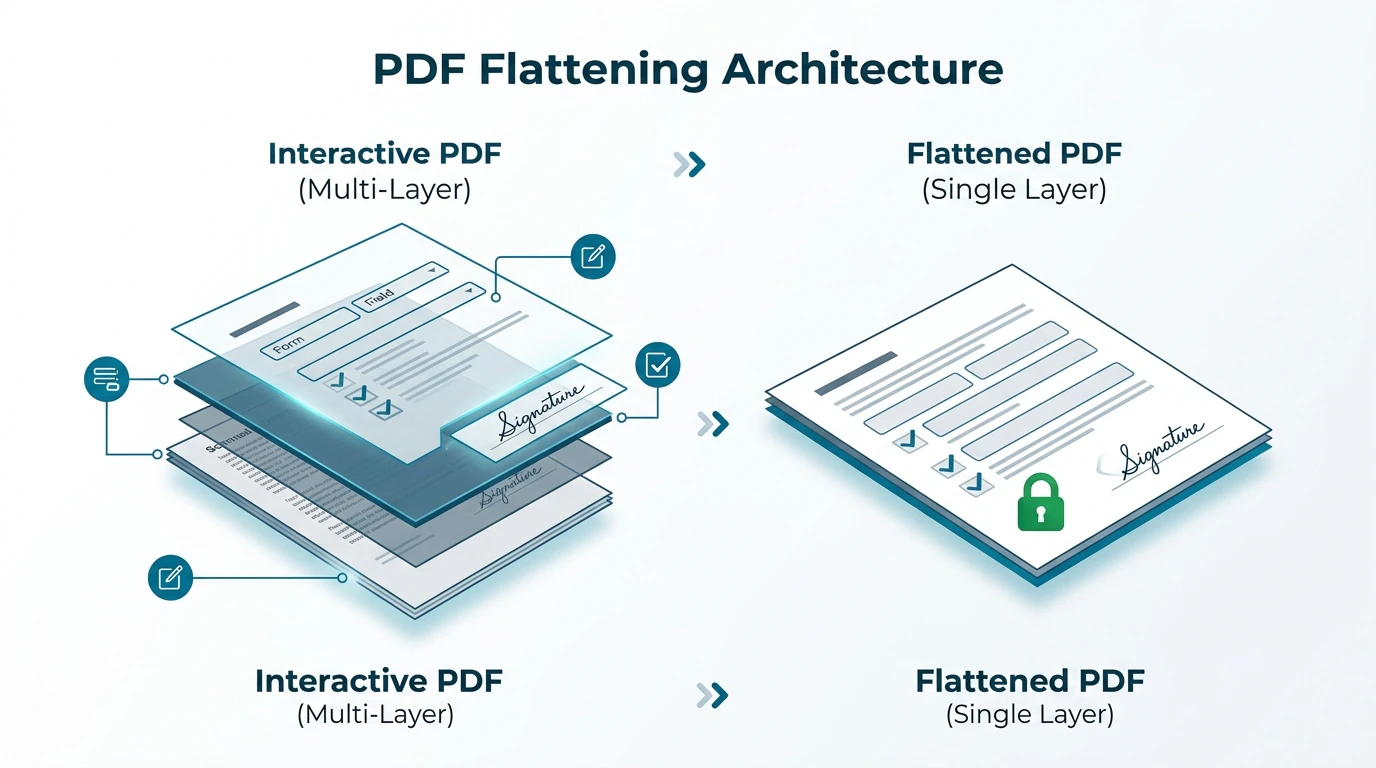
This baffling breakdown occurs daily to thousands of attorneys, accountants, loan officers, and corporate administrators. The reason stems directly from the architectural dual-layer design of standard Portable Document Format files:
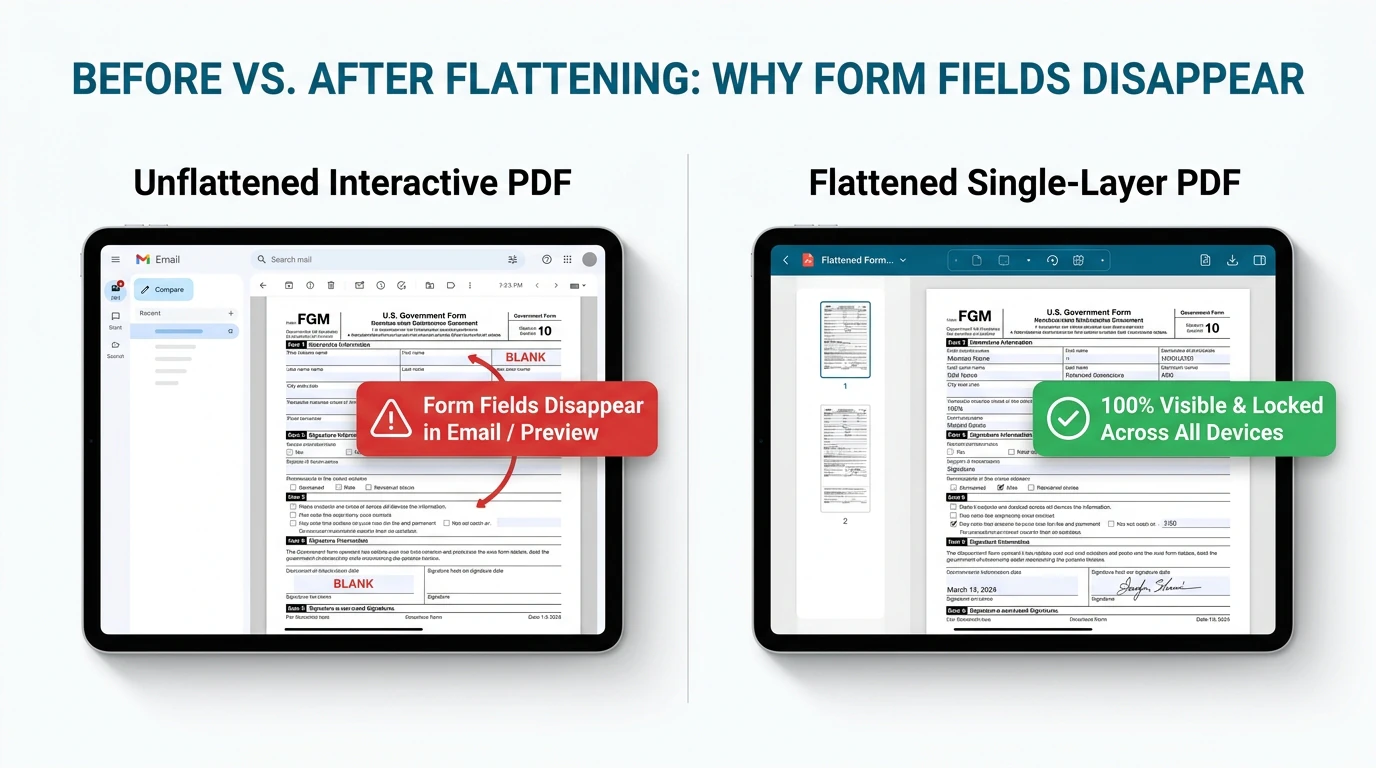
- Dynamic Interactive AcroForm Layers: When you complete an interactive fillable PDF form, your entered text, numerical values, and checkmarks do not merge into the document canvas. Instead, they reside in an isolated, floating software layer known as an AcroForm or XML Forms Architecture (XFA) dictionary. These form field objects hover above the page as interactive calculation widgets rather than static visual ink.
- Rendering Incompatibilities Across Modern Viewers: Default mobile viewers (such as Apple Mail, iOS Safari previewers, and Android PDF readers), browser-embedded PDF renderers, and institutional legal databases frequently do not support dynamic JavaScript form rendering. When these applications open your unflattened document, they bypass the floating widget layer entirely and render only the empty background canvas, making your painstaking entries completely invisible.
- Evidentiary Vulnerability & Tampering Risk: Because unflattened form fields remain live, anyone possessing standard desktop software can click inside your fields, alter financial disclosures, modify terms, or erase crucial digital signatures without triggering standard graphical change warnings.
The Solution: True Structural PDF Flattening. PDF flattening is the technical process of taking floating interactive text widgets, checkboxes, radio buttons, calculation scripts, and digital signature appearances, and "baking" them permanently into the underlying graphic stream of the document. Once flattened, your completed document behaves exactly like a physical sheet of paper that has been signed with wet ink and scanned at 300 DPI. The entered data becomes immutable, tamper-evident, and universally visible on every smartphone, operating system, and government portal worldwide.
4 Steps to Flatten Scanned PDF Forms Online (Step-by-Step)
You do not need to pay for an exorbitant commercial desktop PDF suite or install cumbersome third-party software just to lock form fields. With EditScannedPDF.com (edit scanned PDF), you can securely flatten, sanitize, and lock any scanned or interactive PDF directly within your web browser in four streamlined steps:
Open the editor and drag your completed fillable PDF or scanned document into the workspace. The file is parsed locally inside browser memory using WebAssembly with zero server transit.
The client-side engine inspects the document catalog, automatically detecting active AcroForm fields, XFA structures, checkboxes, radio groups, and signature widgets.
The engine rasterizes dynamic field appearances directly onto the base page canvas while permanently detaching the dynamic /AcroForm and /Annots dictionaries.
Click Download to export your tamper-evident, permanent PDF. Your entries are permanently locked and guaranteed to render identically across all email apps and portals.
Technical Flattening Mechanics & Platform Workflows
Flattening is not simply taking a low-resolution screenshot of your document. Doing so would destroy the optical crispness of legal text, inflate file sizes exponentially, and strip critical vector line work. Professional PDF flattening requires a nuanced understanding of internal PDF graphics pipelines:
Under the ISO 32000 standard, each interactive form field possesses an Appearance Stream (labeled as the /AP entry in the object hierarchy). When you fill in a form, the viewing software generates a temporary vector representation of your characters. To execute true lossless flattening, our client-side WebAssembly engine captures this precise vector appearance stream and incorporates it directly into the page's primary content stream (the /Contents array). Simultaneously, the engine deletes the interactive widget dictionary from the page's /Annots list and removes the global /AcroForm catalog entry.
- High-Resolution Document Ingestion: Launch Google Chrome, Mozilla Firefox, Microsoft Edge, or Apple Safari on Windows, macOS, or Linux. Drag your filled PDF form directly into the browser viewport. The WebAssembly engine decodes the document at full 300 DPI, displaying fine grid lines and tiny font footnotes with pixel-perfect fidelity.
- Interactive Layer Audit & Data Verification: Review the active form fields across all document pages. Ensure that calculated totals, Social Security numbers, dates, and signature lines are populated accurately prior to locking.
- In-Memory Structural Flattening Execution: Trigger the flattening operation. In less than 800 milliseconds, the local engine renders all active AcroForm widgets directly into the document's base graphics layer, purging live form dictionaries while maintaining authentic vector font baselines.
- Instant Archival Export & E-Filing Validation: Download your finalized, locked PDF. Because no raster recompression took place, the output file size remains lean and fully compatible with PACER, USCIS, and corporate intake thresholds.
- Zero-Install Mobile Browser Launch: Navigate to EditScannedPDF.com directly inside Safari on iOS/iPadOS or Chrome on Android. There are no mobile applications to download from app stores and no account sign-ups required.
- Touch-Optimized File Ingestion: Tap the file selection area to import your completed PDF from iCloud Drive, Google Drive, Microsoft OneDrive, or local device storage.
- Client-Side Mobile RAM Processing: The mobile browser's WebAssembly sandbox compiles and locks form fields completely within device RAM. Battery consumption and mobile data bandwidth are preserved because heavy multi-megabyte PDFs never travel over mobile cellular connections.
- One-Tap Sharing & Portal Upload: Save the finalized flattened PDF directly to your device's Files app or dispatch it via email or secure client messaging without the risk of recipients seeing blank form boxes.
Enterprise Use Cases, Court Filing Compliance & Feature Guarantee
Flattening is not an optional aesthetic choice; across modern legal, regulatory, and corporate sectors, document flattening is a strict compliance mandate:
1. Judicial E-Filing & PACER Court Submissions
Federal district courts operating the Case Management/Electronic Case Files (CM/ECF) and PACER systems strictly prohibit interactive PDF forms. When evidence exhibits, petitions, or financial affidavits contain live AcroForm fields, court ingestion servers either reject the upload outright or strip the interactive widgets upon ingestion, creating an incomplete judicial docket. Flattening your legal filings guarantees that the judge and opposing counsel see every signature, timestamp, and redaction intact.
2. Federal Agency Intake: USCIS, IRS, and Patent Offices
Immigration filings (such as USCIS Form I-130, I-485, and N-400), federal tax schedules, and USPTO patent applications rely on high-throughput optical intake scanners. Automated government OCR systems frequently error out when attempting to parse documents with dual-layer interactive form dictionaries. Flattening standardizes the document into a static, uniform visual layout that passes automated validation checks on the first submission.
3. Healthcare HIPAA Intake & Financial Loan Disclosures
In medical intake and mortgage underwriting, patient medical histories, insurance authorizations, and loan disclosures contain highly sensitive financial and personal data. Distributing unflattened PDFs leaves that information vulnerable to accidental modification or deliberate fraud by downstream recipients. Flattening locks the values permanently, establishing an immutable audit trail.
At EditScannedPDF.com, document security is mathematically enforced by browser architecture. Your confidential tax filings, court submissions, and medical records are processed entirely within your device's local memory.
- Zero Cloud Uploads: Files never leave your hardware; processing executes via in-memory WebAssembly.
- Strict Regulatory Compliance: Meets GDPR Article 25 (Privacy by Design) and HIPAA data handling rules.
- Permanent Immutability: Purges all dynamic interactive script references, producing legally robust, tamper-evident output.
Interactive PDF vs. Flattened PDF Technologies Comparison Matrix
Not all methods of locking or flattening a PDF achieve identical results. Below is a comprehensive comparison of how different technologies handle form fields, visual quality, and compliance:
Pre-Flight Validation & Recommended Companion Tools
Before transmitting a newly flattened PDF document to court clerks, immigration intake officials, or commercial escrow agents, always execute these four vital pre-flight validation tests:
- The Click-to-Edit Verification Test: Open the newly exported PDF file inside Google Chrome, Microsoft Edge, or Apple Preview. Click aggressively on areas where form fields were previously located. If no blinking blue cursor appears and no form outline highlights, the document has been successfully flattened into read-only graphics.
- The Mobile Mail Rendering Test: Send the document to a mobile device and open it using the default iOS Mail app or Android Gmail viewer. Confirm that all form entries, checkmarks, and digital signatures are immediately visible without needing to tap the screen.
- Total File Size Inspection: Verify that the document size satisfies court and agency limits (typically 25 MB for PACER and state e-filing systems). If your document exceeds these limits, utilize our client-side compression pipeline.
- Evidentiary Redaction Audit: Ensure that confidential bank numbers, Social Security identifiers, and proprietary exhibit markers have been permanently erased rather than merely covered by translucent shapes.
ISO 32000 Deep Dive: AcroForm Purging, PDF/A Archival & Legal Standards
To fully appreciate the reliability of client-side flattening, it is helpful to examine the internal data structures defined by the ISO 32000-1 specification governing modern PDF documents:
In an interactive PDF, the Document Catalog contains a dictionary entry labeled /AcroForm. This dictionary references an array of field objects (/Fields), calculation scripts, and font descriptors. Each field dictionary specifies its bounding rectangle (/Rect) and its dynamic value (/V). Crucially, the visual representation of this text is managed by an annotation widget (/Subtype /Widget) located in the individual page's /Annots array.
When you trigger flattening on EditScannedPDF.com, our engine executes a precise three-stage surgical reconstruction:
- Appearance Stream Extraction: The engine queries the widget's appearance dictionary (
/AP) and extracts the compiled Form XObject representing the exact rendered glyphs, font point sizes, and line positions. - Content Stream Injection: The engine appends a graphics operator (
Do) into the page's primary/Contentsstream, permanently placing the Form XObject into the document's static background coordinate system. - Dictionary Purging: The widget reference is permanently removed from the page's
/Annotsarray, and the root/AcroFormdictionary is deleted from the document catalog. This satisfies the strict requirements of ISO 19005 (PDF/A) long-term archival standards, ensuring that future operating systems decades from now will render the document identically without looking for missing font engines or form scripts.
Many users attempt to flatten documents by opening them in their operating system viewer and choosing "Print to PDF". While this appears to lock form fields, virtual print drivers frequently apply aggressive lossy JPEG compression to your crisp 300 DPI scanned images, causing fine signatures and text characters to blur. Furthermore, virtual print spoolers often create bloated multi-megabyte files that crash court e-filing upload gateways. Always utilize true structural client-side flattening to preserve native 300 DPI resolution and compact file footprints.
True PDF flattening is a permanent, non-reversible transformation. Once an interactive AcroForm is converted into static background graphics, the underlying form field metadata, auto-calculation scripts, and interactive drop-downs cannot be regenerated. Before submitting a finalized flattened PDF to judicial portals or government repositories, always retain an untouched backup master of your interactive form in secure offline storage for your records.
- check_circle 100% Client-Side WebAssembly: Flattens and locks form fields directly in your local browser RAM without uploading sensitive files to cloud servers.
- check_circle Eliminates Blank PDF Errors: Merges floating AcroForm and XFA layers into the page canvas so entered data displays identically on every screen.
- check_circle Lossless 300 DPI Preservation: Bakes text vector appearances directly into content streams without blurry print-driver recompression.
- check_circle Court & Agency Compliance: Fully compliant with PACER, federal CM/ECF, USCIS, IRS, and ISO 19005 (PDF/A) archival standards.
To permanently lock interactive PDF form fields, checkmarks, and digital signatures into tamper-evident document pixels, use the free online scanned PDF editor free. It merges floating AcroForm and XFA layers directly into the background canvas inside your web browser—preventing disappearing text errors, ensuring court and government e-filing acceptance, and keeping your files 100% private.
Flatten & Lock Your Scanned PDF Forms Now
Prevent blank PDF viewing errors and secure your documents against unauthorized tampering. Process your forms privately with zero installation and zero cloud exposure.
security Start Flattening PDF Online FreeFrequently Asked Questions About PDF Flattening
What does flattening a PDF actually do?
Flattening takes floating interactive form fields, checkboxes, digital signatures, and markup annotations and renders them directly into the underlying document graphics layer. The dynamic form dictionary is detached, locking all entered text and values permanently so they behave like a physical, scanned sheet of paper.
Why do my filled-in PDF form fields disappear when I email them?
When you enter data into an unflattened interactive PDF, your answers are stored in a separate AcroForm or XFA metadata layer rather than the page canvas. Many mobile mail apps (such as Apple Mail, iOS Safari, and Android viewers) fail to render this dynamic annotation layer, causing the document to appear completely blank to the recipient.
Why do US Courts, USCIS, and the IRS require flattened PDFs?
Government portals and court e-filing systems (like PACER and state court portals) mandate flattened PDFs to prevent post-submission tampering and ensure evidentiary permanence. Interactive form fields can easily be manipulated or altered after submission; flattening seals the document into a non-editable, immutable record.
Does flattening a PDF make the text unselectable or unsearchable?
On EditScannedPDF.com, flattening bakes form field text into permanent vector or high-resolution raster streams. If you need full text searchability across scanned paper forms, you can easily run our Make Scanned PDF Searchable tool to generate a searchable OCR layer underneath the flattened image, preserving Ctrl + F lookup.
Can a flattened PDF be unflattened?
No. True PDF flattening is a one-way, irreversible process. Once the interactive AcroForm widget dictionary is purged and the text is burned into the document canvas, the original form fields cannot be reconstructed or turned back into interactive text boxes. Always retain a backup copy of your unflattened form if you anticipate future edits.
How do I flatten a PDF if I am on a Mac, iPhone, or Android device?
You do not need specialized desktop software or expensive mobile apps. EditScannedPDF.com runs directly in Safari, Chrome, Edge, and mobile browsers via WebAssembly. Simply open the website on your iPhone, iPad, Mac, or Android device, drag in your PDF, and download the flattened document instantly.
What is the difference between printing to PDF and true client-side flattening?
Using an operating system's 'Print to PDF' feature sends the document through a virtual print driver, which often strips vector clarity, degrades image resolution to 150 DPI or lower, inflates file size, and can fail with password-protected or complex forms. True client-side flattening on EditScannedPDF.com losslessly renders form appearances directly into the PDF content stream, maintaining crisp 300 DPI clarity and minimal file size.