
How to Insert and Delete Pages in a PDF Online Free (Add or Remove Scanned Pages)
The Challenge of Managing Multi-Page Document Bundles
In modern legal, financial, and administrative operations, paperwork rarely remains static after digitization. Duplex scanners routinely generate unintended blank pages from single-sided originals, unnecessarily doubling the file size and looking unprofessional in client-facing packets. Conversely, loan closing packages, commercial lease contracts, and immigration evidence packets often require adding a missing signed acknowledgment, an exhibit schedule, or a certified translation directly into the middle of an existing 50-page file. With our scanned PDF editor, everything runs locally in your browser with zero file uploads.
Historically, office workers faced two poor alternatives:
- The "Print and Rescan" Cycle: Printing the entire file, manually slipping in the new sheet, and feeding all pages back through a flatbed scanner. This wastes paper, consumes hours, and catastrophically degrades image sharpness through generational raster loss.
- Costly Desktop Subscriptions: Paying over $239 per year for enterprise software licenses just to delete or append a few sheets once a month.
With modern browser-based WebAssembly engines, you can now manage, restructure, insert, and delete PDF pages directly on your device in seconds, for free, and with complete data privacy.
How to Insert or Delete Pages in Any PDF (Step-by-Step)
Follow this simple, 4-step workflow to reorganize, add, or delete pages in any scanned or digital PDF document:
Load Document
Open the free Insert & Delete Page Tool and drop your PDF into the local canvas. The file parses in browser memory.
Review Thumbnails
Our WebAssembly engine instantly renders visual page cards showing each page with its designated sequence number and orientation.
Delete or Insert
Click the red Trash button on any blank or duplicate card to delete it. To add content, click "Insert Page" and select your new scan or document.
Export Clean PDF
Click "Export Document". The engine recalculates the PDF page catalog tree and downloads your updated, clean PDF instantly with zero quality loss.
Under the Hood: How Non-Destructive Page Management Works
A common concern when editing multi-page PDFs online is whether the operation will reduce the clarity of high-resolution scanned text, photos, or vector fonts.
Inside a standard PDF file, pages are organized in a structured catalog known as the Page Tree. Rather than rewriting the entire binary file, PDF documents maintain a list of indirect pointer references to each individual page.
- Drag-and-Drop Page Tree Ingestion: Open our Insert & Delete Page Tool in Chrome, Firefox, Safari, or Edge on macOS or Windows. Drag your multipage contract or scanned records directly into the local browser canvas. The client-side WebAssembly parser reads the PDF cross-reference table in browser RAM, constructing responsive page card nodes in milliseconds with zero server upload.
- Precision Object Deletion: When you click delete on duplicate or blank feeder pages, the engine removes that specific page object's indirect reference pointer from the central
/Pagescatalog array and decrements the/Countvalue. Surviving graphic streams are never decompressed or altered in any way. - Seamless Exhibit & Notary Insertion: When inserting a signed acknowledgment or translation sheet, click "Insert Page". The engine merges the new page dictionary into the document tree at your designated target index, allocating clean indirect object IDs without affecting existing pagination.
- Non-Destructive Xref Table Rebuilding: Upon export, the engine recalculates byte offsets and rebuilds the cross-reference (xref) index table losslessly, preserving 100% of the original 300 DPI scan resolution and saving the clean file directly to your computer.
- Open Mobile Browser: Launch Safari on iOS or Chrome on Android and navigate to the free tool. Tap "Select Document" to pick your multi-page scan directly from your iPhone Files app, iCloud Drive, Android Downloads, or Google Drive.
- Touch-Friendly Thumbnail Manipulation: Use intuitive tap and swipe gestures to inspect page cards. Tap thumbnail cards to preview document legibility, use standard pinch-to-zoom to verify signatures or notarized stamps, and tap the red trash icon on blank scanner pages with your fingertips.
- Camera Snapshot & File Insertion: Tap "Insert Page" to snap a fresh photo of a missing page or signed certificate directly using your smartphone camera, or select an existing mobile PDF document to inject cleanly between pages.
- Instant In-Memory Processing & Save: Tap "Export Document". The high-performance WebAssembly engine processes the document 100% inside your mobile phone RAM with zero cellular data consumption. Tap "Download" to save the clean, reorganized PDF straight to your device Files or Downloads folder.
How Client-Side Page Management Works:
- Deleting a Page: When you delete Page 2, our client-side parser simply removes its pointer reference from the document catalog and decrements the page count. The heavy graphic data of Page 1, Page 3, and Page 4 are never decompressed, decoded, or altered in any way.
- Inserting a Page: When adding a new sheet or form, the engine links the new page object into the document tree at your exact designated slot and instantly updates the cross-reference index.
Similarly, when inserting a new page, the engine merges the new page object into the dictionary and inserts its reference into the document catalog array at the requested position. This architecture delivers two massive advantages:
- Lossless Bit-for-Bit Fidelity: Your scanned 300/600 DPI pages retain every microscopic detail and original color balance.
- Lightning-Fast Processing: Because large image streams do not require re-rendering or re-encoding, documents with hundreds of pages are restructured in less than 2 seconds.
Top Enterprise & Legal Use Cases
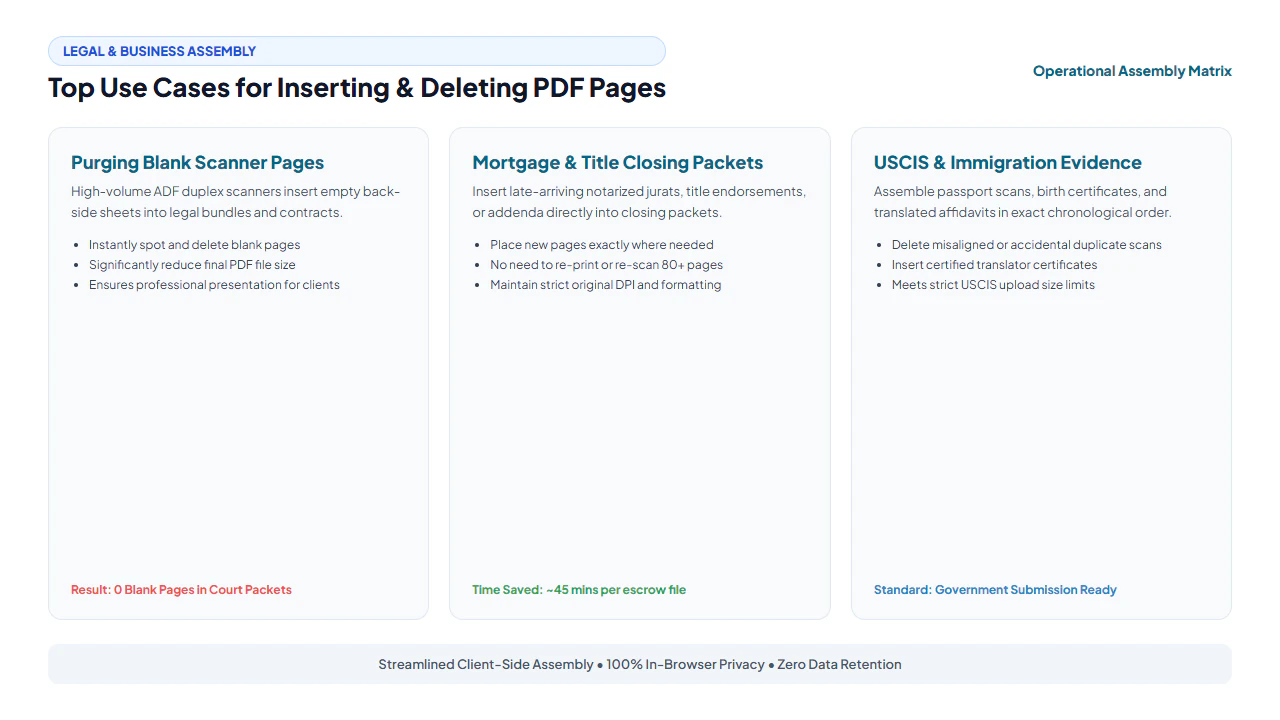
1. Purging Automatic Feeder Blank Sheets
When scanning stacks of mixed single- and double-sided contracts through high-speed office copiers, scanners routinely output blank back pages. These unnecessary pages inflate file size, trigger warnings on government submission portals with tight file limits, and distract judges or clients reviewing documentation. Removing these blank pages in our tool instantly cleans up the file and reduces bandwidth.
2. Mortgage, Real Estate & Title Closing Bundles
Escrow and loan closing packages often span 80 to 150 pages. Inevitably, a notary jurat or tax disclosure is executed slightly later than the primary promissory note. Rather than rescanning the entire physical closing packet, escrow officers can inject the newly signed signature acknowledgment right after the relevant clause in the master PDF.
3. USCIS & Consular Visa Petitions
Immigration petitions (such as Form I-130, I-485, or EB-2 NIW) require meticulously ordered documentary evidence: biographical passport copies, certified civil records, tax transcripts, and sworn affidavits. If an affidavit was translated after the primary packet was assembled, inserting it directly behind the foreign-language original ensures full compliance with USCIS evidentiary sequencing.
lightbulb Engineering Pro Tip: Clean Pagination Sequence Before Bates Stamping
Always purge accidental blank scanner sheets and arrange all evidentiary exhibits into their final order using our Insert & Delete Page Tool before applying sequential numbering in our Legal Bates Stamping Guide. This prevents gaps in formal court discovery indices and ensures your electronic filing conforms strictly to federal and state docketing standards.
verified Zero File Recompression Guarantee
Unlike generic online PDF tools that convert your entire document into low-resolution JPEGs to alter page order, EditScannedPDF.com manipulates the native PDF tree. All existing fonts, embedded images, form fields, and digital bookmarks remain pristine and intact.
Method Comparison: Reorganizing PDF Pages
| Workflow | Processing Time | Image Quality | Privacy & Security |
|---|---|---|---|
| Print & Re-Scan | 20 – 40 minutes | Severe blur & scan artifacts | Paper waste & physical loss risk |
| Commercial Desktop Suite | 1 – 2 minutes | Lossless | Local (Requires $239/yr subscription) |
| Cloud Web Converters | 2 – 5 minutes | Often compressed | Uploaded to 3rd-party servers |
| EditScannedPDF.com | 15 – 30 seconds | 100% Lossless | 100% In-Browser Private (Zero Upload) |
Recommended PDF Editing Utilities Comparison
| Tool | Purpose | When to Use |
|---|---|---|
| Insert/Delete Page | Add or remove specific pages | Fix page order or eliminate blank sheets |
| Duplicate Page | Clone existing template sheets | Repeat billing tables or multi-page contracts |
| Rotate PDF | Fix upside-down or sideways pages | Ensure all pages face upright before sharing |
| Split PDF | Separate large bundles into files | Extract specific exhibits or chapters |
| Merge PDF | Combine separate PDF documents | Assemble disparate files into one binder |
The PDF Page Architecture: How Document Page Trees Work
When organizing multi-page PDF documents, many office workers rely on ad-hoc print drivers or rudimentary web tools that damage document quality. Understanding how the PDF specification (ISO 32000-1) represents page sequences reveals why our in-browser WebAssembly engine delivers vastly superior speed, lossless visual fidelity, and compact file sizes.
In standard PDF file architecture, the document's pages are not stored as a simple flat sequence. Instead, they are organized in an indirect object hierarchy known as the Page Tree. The central catalog dictionary points to a root Page Tree dictionary, which maintains an indexed catalog of document page nodes and the verified page counter:
- Page Insertion Mechanics: When you insert a new sheet using our Insert & Delete Page Tool, the WebAssembly engine parses the page tree, allocates a new indirect object reference number, inserts the reference into the target position in the page sequence, and increments the total document page count.
- Lossless Page Deletion: Deleting unwanted blank sheets or scanner separator cards simply removes that specific page node from the document index and updates the internal table cleanly. The underlying graphic streams of surviving pages remain 100% untouched, ensuring zero generational re-compression or color degradation.
- Thumbnail Reordering: Dragging thumbnails to reorganize pages updates the sequential order of pages inside the document index, completing in milliseconds even for massive 200-page discovery bundles.
Why Desktop Software Paywalls Page Organization
Most commercial desktop PDF suites treat simple page reordering and deletion as "premium enterprise features," locking them behind expensive $20–$30 monthly subscriptions. In reality, modifying page tree pointers requires minimal computational overhead when executed natively in the client environment. EditScannedPDF.com brings this core capability directly into modern web browsers for free, democratizing essential document management tools for students, non-profits, and independent professionals.
Enterprise Document Compilation: Merging Legal Exhibits, Closing Packets & Transcripts
Precise document pagination is critical across professional services where missing, duplicate, or out-of-order pages can trigger regulatory penalties or delayed filings. Essential industry workflows include:
1. Assembling Court Evidence & Deposition Exhibits
Litigation paralegals routinely merge deposition transcripts, photographic evidence, and formal discovery responses into unified electronic binders. Before applying consecutive Legal Bates Stamping, clerks must remove accidental blank scanner sheets and insert formal Exhibit Divider Cover Pages (e.g., "Exhibit A", "Exhibit B") using our Add Text Tool. Flawless pagination ensures that citations in judicial briefs match the docket record exactly.
2. Real Estate & Mortgage Closing Loan Packets
Mortgage underwriting packages typically span 80 to 150 pages, combining title commitments, deed disclosures, appraisal photos, and signed closing disclosures. Underwriters frequently reject packets containing duplicate notary receipts or inverted duplex pages. Our browser tool allows closing officers to quickly prune extra blank sheets, insert revised closing addenda, and export clean, audit-ready PDF packets in seconds.
3. Archival PDF/A Compliance for Municipal Records
When compiling municipal land records or corporate meeting minutes for permanent archiving under ISO 19005 (PDF/A), every inserted page must conform to strict structural rules—including embedded device-independent color spaces and consistent media boxes. EditScannedPDF.com preserves all archival metadata tags, ensuring your reorganized PDF meets stringent governmental preservation standards.
gavel Document Integrity & Compliance Notice
Removing blank separator sheets or organizing pagination for administrative clarity is standard office practice. However, federal law (including 18 U.S.C. § 1519 regarding the destruction, alteration, or falsification of records in federal investigations and bankruptcy) strictly prohibits the selective deletion of substantive contractual clauses, audit disclosures, or signature pages to conceal obligations or deceive parties. Users must only edit documents they are legally authorized to modify.
- check_circle 100% Client-Side WebAssembly: Runs entirely in your local browser RAM without uploading sensitive files to cloud servers.
- check_circle Strict Data Privacy: Fully compliant with HIPAA, GDPR, and enterprise confidentiality rules with zero server data retention.
- check_circle Lossless Fidelity: Preserves original 300 DPI text sharpness, authentic line baselines, and exact page layout structures.
- check_circle Universal Cross-Platform: Works seamlessly across Windows, Mac, Linux, iPhone, iPad, and Android with zero installation.
bolt Quick Summary (AI Overview)
Modifying multi-page PDF documents—such as deleting accidental blank scanner pages or inserting late-arriving signed affidavits—is easily accomplished without costly commercial desktop software. EditScannedPDF.com provides an interactive visual page tree manager that runs 100% client-side in your browser's WebAssembly memory. You can delete unwanted pages with a single click or inject new pages at any position while preserving 100% of the original document resolution with zero server uploads.
Insert, Delete or Reorder PDF Pages in Seconds
Easily remove blank pages, delete unwanted scans, or insert new notary and closing sheets directly in your browser. 100% private client-side processing.
swap_vert Launch Insert & Delete Tool FreeFrequently Asked Questions
How do I delete blank pages created by my duplex scanner?
Open your document in our Insert/Delete Page tool. Scroll through the visual thumbnails to identify empty back-side sheets, click the red Trash icon on each blank page, and click Export. The resulting PDF contains only your populated content pages with a significantly reduced file size.
Can I insert a new scanned page between Page 3 and Page 4?
Yes. Our tool allows you to specify the exact insertion point. Simply choose whether to insert the new page before or after any selected page number, and the engine automatically updates the internal document page catalog.
Does deleting or inserting pages recompress or blur existing scanned images?
No. EditScannedPDF.com operates at the PDF object-tree level. When pages are added or removed, the cross-reference (xref) table is updated to reference the new page array. The raw compressed image streams of unmodified pages are copied bit-for-bit without decompression, ensuring 100% original clarity.
Can I insert a page from another PDF file into my current document?
Yes. You can upload an external page or combine sheets seamlessly using our Insert Page tool or our companion Merge PDF tool, all within your browser.
Can I reorder pages by dragging and dropping them?
Yes. Our visual layout manager allows you to drag thumbnail cards into your desired sequence, making page re-arrangement effortless before finalizing your export.
Are my legal and tax documents kept private?
Absolutely. EditScannedPDF.com runs 100% client-side via WebAssembly. None of your files, pages, or data are transmitted over the internet or saved to our servers.
Is it legal to delete pages from business or legal records?
Deleting blank separator sheets or organizing paperwork for administrative clarity is completely standard and recommended. However, under 18 U.S.C. § 1519 and corporate retention laws, intentionally deleting substantive terms, disclosures, or audit records to mislead parties or obstruct legal proceedings is strictly illegal.