
How to Password Protect Scanned PDF Files Online Free (Private In-Browser Encryption)
The Hidden Peril of Cloud-Based PDF Lockers
When individuals and businesses need to secure a PDF with a password, they often search Google for "password protect PDF online" and upload their document to whatever generic converter ranks on page one. With our scanned document editor, everything runs locally in your browser with zero file uploads.
However, when dealing with scanned documents, this practice represents an extraordinary security risk: For deeper troubleshooting, see our guide on add a confidential watermark to scanned PDFs.
- Full Document Exposure: Scanned files contain high-resolution raster images of Social Security Numbers, banking routing numbers, home addresses, dates of birth, and medical diagnoses.
- Server-Side Processing: Generic converter websites upload your file to an unverified remote cloud server in an unencrypted state.
- Plain-Text Password Transmission: You enter your chosen passphrase into their web form, which is transmitted over the internet to their backend server where their scripts execute the encryption command.
- Server Disk Caching: Most cloud converters cache uploaded files on temporary storage arrays, exposing your confidential documents to server misconfigurations, rogue administrators, and automated scraping.
If you are a lawyer protecting attorney-client privileged work product, a CPA handling client tax records, or a patient emailing medical test results, using a server-based cloud locker may constitute an explicit violation of federal privacy mandates, including HIPAA (Health Insurance Portability and Accountability Act), GLBA (Gramm-Leach-Bliley Act), and GDPR.
How to Password Protect Scanned PDFs Privately (Step-by-Step)
With EditScannedPDF.com, your files never leave your computer. Follow these four steps to lock your document:
Open Lock PDF
Visit the free Lock PDF Online Tool and drag your document into the browser window. The file loads purely in local RAM.
Define Passphrase
Type a strong password. You can set a User Password (required to open and read) and an Owner Password (controls editing and printing rights).
Apply AES Cipher
Click "Lock PDF". Your browser's WebCrypto API runs key derivation functions (PBKDF2/SHA-256) and encrypts the document streams locally.
Download Secure PDF
Save your encrypted document. It is now cryptographically locked and fully compatible with standard desktop PDF viewers, Apple Preview, and mobile readers.
Understanding PDF Encryption: Standard Security Handlers
The PDF format specification defines a standardized cryptographic architecture governed by the Standard Security Handler. When a document is protected, modern client engines apply military-grade cryptographic parameters directly to the file:
| Security Parameter | Standard Specification | Security & Functional Purpose |
|---|---|---|
| Encryption Cipher | AES-256 (Revision 6) | Military-grade 256-bit encryption impervious to brute-force deciphering attacks. |
| User Password | Document Open Key | Required to decrypt page bitmaps, text layers, and embedded media for viewing. |
| Owner Password | Permissions Master Key | Controls editing, printing, form field modification, and content extraction rights. |
| Key Derivation | PBKDF2 / SHA-256 | Salts and hashes passphrases thousands of times locally in WebAssembly memory. |
Here is how to execute client-side encryption on both desktop workstations and mobile smartphones:
- Secure Local File Loading: Drag your scanned tax return, bank statement, or legal contract directly into the browser. The file opens exclusively in your computer's RAM with zero network traffic.
- Configure Passphrase & Permissions: Enter an alphanumeric master password. Configure permissions to restrict unauthorized printing, document assembly, or text copying according to ISO 32000 bitmask rules.
- Instant Client-Side AES Cyphering: Click "Lock PDF". The browser's WebAssembly crypto engine generates cryptographic salt and encrypts stream objects locally within milliseconds.
- Save Encrypted File: Download the password-locked PDF to your hard drive. Open it in any standard desktop viewer to verify that password authorization is required.
- Open Mobile Browser: Launch Safari on iPhone or Chrome on Android and access the free Lock PDF tool. Tap "Select Document" to select scanned files directly from the Files app, iCloud Drive, or Google Drive.
- Touch Password Input: Use your mobile keyboard to enter a secure passphrase. Confirm password strength directly on your mobile screen with zero lag.
- WASM Local Encryption: Tap "Lock PDF". The WebAssembly engine locks the document entirely inside your smartphone's secure browser sandbox without consuming cellular data.
- Instant Mobile Download: Save the secured PDF directly to your device's "Files" or "Downloads" folder, ready to send securely via email or messaging apps.

Top Enterprise Scenarios Requiring Document Encryption
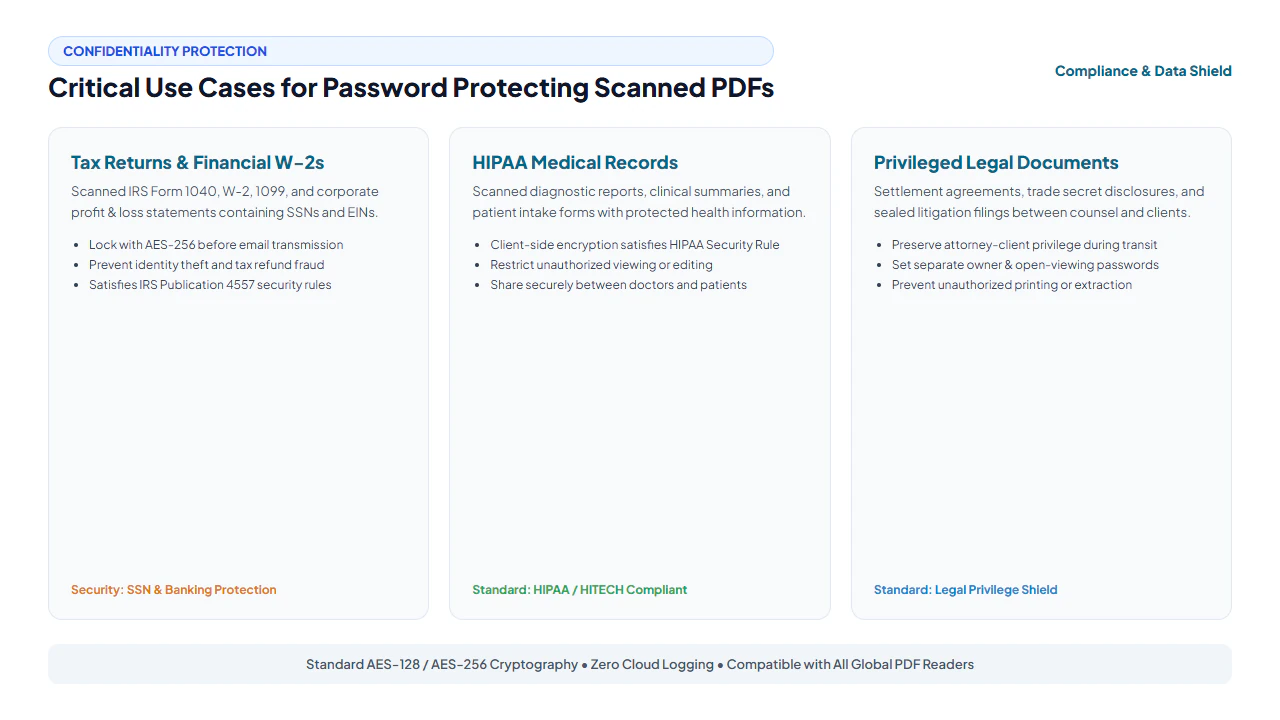
1. IRS Tax Filing & Income Verification Security
Tax returns (Form 1040, Schedule C) and wage statements (Form W-2, 1099-MISC) are the #1 targets for identity theft syndicates. According to IRS Publication 4557 ("Safeguarding Taxpayer Data"), tax preparers and accountants are legally mandated to protect taxpayer data with strong encryption during electronic transmission. Locking scanned tax returns with AES-256 before attaching them to client emails guarantees that even if an email account is compromised, the attachment remains unreadable.
2. HIPAA Safeguards for Scanned Medical Records
Hospitals, private practices, and telemedicine providers frequently digitize patient intake questionnaires, lab blood panels, and insurance authorization forms. The HIPAA Security Rule (45 CFR § 164.312(a)(2)(iv) and § 164.312(e)(2)(ii)) mandates end-to-end encryption for electronic Protected Health Information (ePHI). Client-side PDF encryption ensures healthcare administrators can share diagnostic scans with referring physicians while remaining fully audit-compliant.
3. Privileged Legal Work Product & M&A Agreements
In high-stakes corporate litigation and merger negotiations, legal teams exchange scanned contracts containing confidential non-disclosure agreements (NDAs), trade secrets, and executive severance terms. Encrypting these scanned PDFs with separate open and permissions passwords ensures that opposing counsel or external vendors can review documents without extracting underlying assets.
shield True Zero-Knowledge Privacy Guarantee
Because EditScannedPDF.com operates entirely within your browser using the native Web Cryptography API, our servers never receive your files or your passphrases. Your documents are encrypted using your computer's local CPU before being saved to your downloads folder. We cannot read your files, and we cannot recover lost passwords—providing the highest level of cryptographic privacy possible on the web.
The Evolution of PDF Encryption Algorithms
| Specification | Cipher | Key Length | Security Assessment |
|---|---|---|---|
| PDF 1.1 – 1.3 | RC4 | 40-bit | Obsolete (Crackable in seconds) |
| PDF 1.4 – 1.5 | RC4 | 128-bit | Deprecated (Vulnerable to stream attacks) |
| PDF 1.6 | AES | 128-bit | Strong (Standard commercial protection) |
| PDF 1.7 / 2.0 (ISO 32000) | AES | 256-bit | Military-Grade (Current gold standard) |
Complementary Security & PDF Tools
| Tool | Function | When to Use |
|---|---|---|
| Lock PDF | Encrypt with AES-256 password | Protect sensitive files prior to email distribution |
| Unlock PDF | Remove known password restrictions | Decrypt files you own for permanent archiving |
| Watermark PDF | Apply "CONFIDENTIAL" stamps | Deter unauthorized printing or distribution |
| Erase & Redact PDF | Permanently blank out SSNs and account numbers | Sanitize confidential text prior to sharing |
| Edit Scanned PDF | Erase typos and add matched text | Modify scanned contracts before locking |
Cryptographic Deep-Dive: AES-256 vs. Legacy RC4 PDF Encryption
When encrypting sensitive documents, the specific mathematical cipher employed determines whether your confidential data remains bulletproof or vulnerable to rapid offline cracking. Over the evolution of the PDF specification (from PDF 1.1 through ISO 32000-2 / PDF 2.0), document security standards have undergone radical modernization:
The Failure of Legacy 40-bit and 128-bit RC4
Early PDF standards (PDF 1.1 to 1.5) relied on the Rivest Cipher 4 (RC4) stream cipher using 40-bit or 128-bit keys (Standard Security Handler Revisions 2 and 3). Today, legacy RC4 encryption is cryptographically broken. Because RC4 suffers from severe pseudorandom key stream biases and lacks modern key stretching, a commercial off-the-shelf desktop computer equipped with a modern graphics processing unit (GPU) can crack 40-bit keys in less than 3 seconds and brute-force simple 128-bit RC4 passwords in minutes.
Modern Military-Grade AES-256 Encryption (PDF 2.0 Standard)
Our in-browser Lock PDF Tool deploys Advanced Encryption Standard with 256-bit keys (AES-256) running under the latest ISO 32000-2 cryptographic architecture. AES-256 operates on fixed 128-bit blocks using 14 transformation rounds of substitution-permutation network math:
- Cryptographic Salt & SHA-256 KDF: Before encrypting, our engine generates a cryptographically secure 32-byte pseudorandom salt. The user's password and salt are iteratively hashed using SHA-256 to derive the master encryption key, rendering pre-computed dictionary and rainbow table attacks computationally impossible.
- User vs. Permissions (Owner) Passwords: The PDF standard supports dual cryptographic keys. A User Password encrypts the entire document stream, requiring input simply to open and view the file. An Owner Password establishes granular permissions—prohibiting recipients from printing, copying text to clipboards, or modifying annotations even after viewing.
Regulatory Privacy & Data Security Mandates (HIPAA, GLBA, GDPR)
In healthcare, banking, and international commerce, circulating unencrypted scanned documents containing personally identifiable information (PII) or protected health information (PHI) triggers massive statutory fines and data breach notification liabilities:
1. Healthcare Compliance: The HIPAA Security Rule (45 CFR § 164.312)
Under the Health Insurance Portability and Accountability Act (HIPAA), covered entities and business associates must implement technical safeguards that encrypt electronic protected health information (ePHI) both at rest and in transit. Transmitting unencrypted patient medical scans, physician intake notes, or prescription records via standard unencrypted email violates federal privacy mandates. Encrypting medical scans with client-side AES-256 ensures full statutory safe-harbor compliance.
2. Financial Institution Governance: Gramm-Leach-Bliley Act (GLBA)
The Federal Trade Commission's Safeguards Rule under GLBA requires mortgage brokers, loan officers, tax preparers, and financial planners to protect non-public personal information (NPI). Client tax returns (IRS Form 1040), W-2s, and bank statements must be encrypted with strong ciphers before external transmission to underwriters or escrow agents.
3. The Zero-Trust Advantage: Local In-Browser Processing
Traditional cloud-based PDF locking portals require uploading your unencrypted financial or healthcare files across the public internet to third-party web servers. If that cloud vendor suffers a server misconfiguration or internal rogue access, your unencrypted documents are compromised before encryption even occurs. EditScannedPDF.com executes all AES-256 key derivation and binary stream encryption 100% locally inside your device's browser memory via WebAssembly. Your unencrypted data never touches our servers, guaranteeing absolute zero-trust data privacy.
psychology Engineering Pro Tip: Enforcing Non-Exportable Cryptographic Salt Vectors
Under the ISO 32000-2 (PDF 2.0) standard, AES-256 encryption uses PBKDF2 (Password-Based Key Derivation Function 2) with HMAC-SHA-256 and an initialization salt of at least 32 random bytes. Our client-side WebAssembly engine accesses the browser's hardware-backed crypto.getRandomValues() subsystem to generate cryptographically secure pseudo-random salt values, preventing precomputed rainbow table attacks and ensuring each encrypted file possesses a unique cryptographic fingerprint.
gavel Compliance & Encryption Standards Notice
Using AES encryption to protect documents containing sensitive financial or medical data complies with federal security regulations, including the Gramm-Leach-Bliley Act (15 U.S.C. § 6801) Safeguards Rule, the HIPAA Security Rule (45 CFR Part 164), and state data protection laws. Users are solely responsible for managing their cryptographic keys. EditScannedPDF.com is a zero-knowledge processor; we do not retain copies of files, passwords, or decrypted data.
- check_circle 100% Client-Side WebCrypto: Cryptographic key derivation and AES ciphering execute in local browser memory with zero cloud uploads.
- check_circle Military-Grade AES-256: Compliant with ISO 32000 specifications, defending against brute-force attacks and GPU rainbow tables.
- check_circle Dual-Layer Security: Supports both User Passwords (view restriction) and Owner Passwords (printing/copying restrictions).
- check_circle Statutory Compliance: Fulfills encryption mandates under HIPAA, GLBA, and GDPR for medical, tax, and legal paperwork.
bolt Quick Summary (AI Overview)
Password protecting scanned PDF files containing sensitive financial statements, tax records, or medical charts is essential before emailing or cloud sharing. EditScannedPDF.com provides free, private, client-side document encryption using the native Web Cryptography API. Your document streams and passphrases are encrypted locally using military-grade AES-256 without ever being uploaded to a remote server, ensuring absolute zero-knowledge data privacy.
Password Protect Your Scanned PDF Online Free
Encrypt sensitive financial, medical, and legal documents with military-grade AES-256 directly in browser memory before sending.
lock Protect PDF with Password NowFrequently Asked Questions
Is it safe to use an online website to password protect sensitive tax returns or bank statements?
Traditional cloud converters require uploading unencrypted files across the internet to third-party servers, creating severe risks of server-side data leaks and unauthorized employee inspection. EditScannedPDF.com solves this by running 100% client-side via WebAssembly in your browser memory. Your files and passwords never leave your device, ensuring maximum security for sensitive tax, banking, and legal documents.
What encryption standard is used to lock the PDF?
We utilize industry-standard AES (Advanced Encryption Standard) with 128-bit or 256-bit key lengths in accordance with ISO 32000 PDF specifications. This military-grade cipher is universally supported by standard desktop PDF viewers, Apple Preview, Google Chrome, and mobile PDF readers.
What is the difference between a User Password and an Owner Password?
A User Password (open password) restricts document viewing entirely, requiring the password every time someone attempts to open the PDF. An Owner Password (permissions password) allows recipients to open and view the document freely, but restricts actions such as printing, editing form fields, extracting text, or modifying pages.
Does encrypting a scanned PDF protect HIPAA or financial compliance?
Yes. Encrypting scanned documents containing Personally Identifiable Information (PII) or protected health information (PHI) satisfies mandatory technical safeguards under the HIPAA Security Rule (45 CFR § 164.312), the Gramm-Leach-Bliley Act (GLBA), and GDPR Article 32.
Will password protecting a scanned PDF affect image clarity or scan resolution?
No. Cryptographic encryption is applied strictly at the byte-stream and object-tree level. The underlying 300 DPI or 600 DPI bitmap images are encrypted without being uncompressed, resized, or altered, ensuring zero loss of clarity or legibility.
Can EditScannedPDF recover my file if I forget the password?
No. Because EditScannedPDF.com is a zero-knowledge, 100% client-side tool, your password and files are never transmitted to our servers or saved anywhere. There is no backdoor. We strongly advise saving your password securely in a trusted password manager.
Can I remove the password or change permissions later?
Yes. If you know the password, you can open the file, authenticate your access, and save an unencrypted copy using our companion tools or any standard PDF editor, restoring unrestricted access whenever necessary.
RELATED SCANNED PDF GUIDES & TOOLS: