
How to Merge Scanned PDF Documents into One File Online Free (Combine Multi-Page Scans)
The Multi-Scan Fragmentation Problem
In modern business, legal, and academic workflows, paperwork rarely arrives as a single, neatly organized file. When digitizing physical documents with flatbed scanners, automatic document feeders (ADF), or smartphone scanning apps (like CamScanner or Apple Notes), each sheet is frequently saved as an independent single-page file (e.g., Scan_001.pdf, Scan_002.pdf, Receipt_March.pdf).
With our online scanned PDF editor free, everything runs locally in your browser with zero file uploads.
When preparing these records for submission, sending 15 separate attachments via email looks unprofessional and clutters communication. More critically, official electronic submission systems—including USCIS immigration portals, court electronic filing (PACER), and mortgage underwriting systems—strictly mandate that all multi-page evidence be submitted as a single, unified PDF document. For deeper troubleshooting, see our guide on clean up scanned PDF documents.
Until recently, merging these files required purchasing an expensive commercial desktop PDF software subscription or uploading sensitive tax returns and medical records to dubious cloud converter websites. With modern client-side WebAssembly technology, you can now combine and reorder unlimited scanned documents directly in your browser with complete data privacy.
How to Merge Scanned PDFs into One File (Step-by-Step Guide)
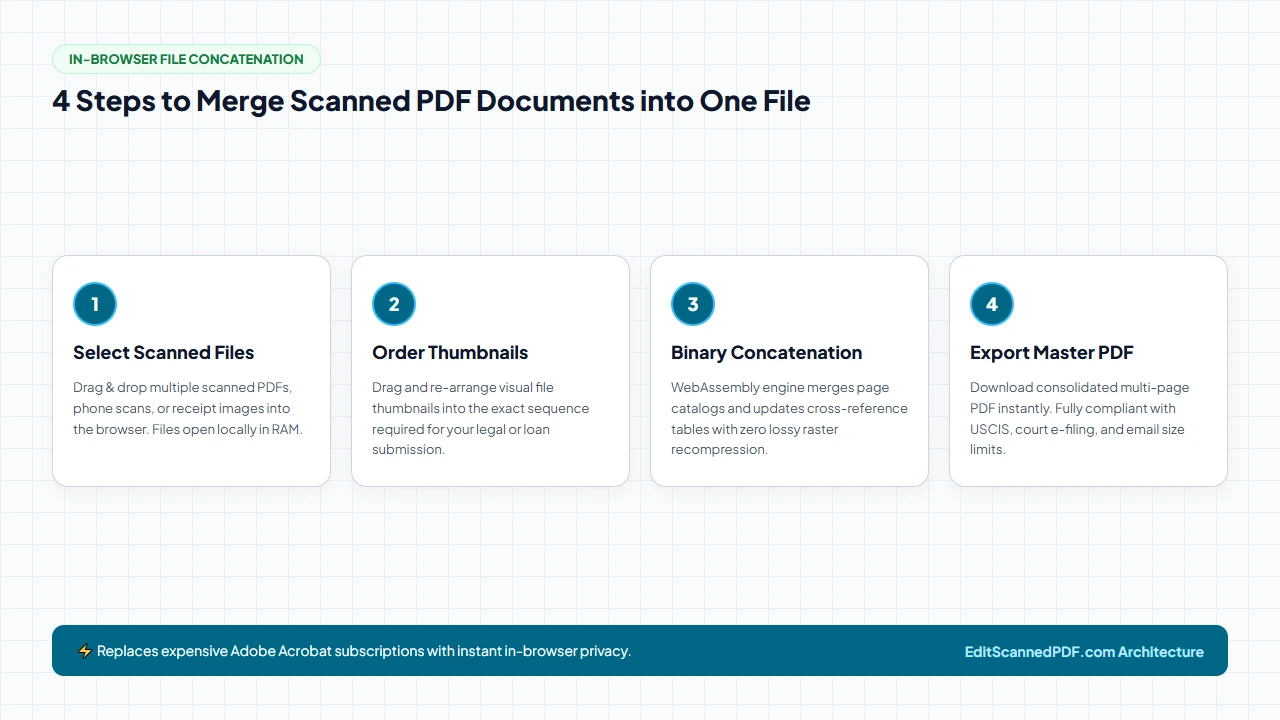
Follow these four simple steps to combine your scattered scans into a single polished document:
Select Scans
Open the free Merge PDF Online Tool and drag all your individual scan files or receipts into the browser window.
Order Pages
Review the visual thumbnail cards. Drag and re-arrange pages into the exact chronological or logical order required for your filing.
Binary Stream Merge
Click "Merge PDF". The browser's WebAssembly engine joins the underlying PDF page catalogs and updates cross-reference tables locally.
Download Master PDF
Save your consolidated multi-page PDF instantly. All original 300 DPI scan resolutions, colors, and margins remain 100% intact.
Under the Hood: Why Bit-for-Bit Merging Prevents Quality Loss
A common complaint with generic online PDF mergers is that combining files causes scanned text to become blurry or fuzzier. This occurs because low-quality tools convert every page into a low-resolution JPEG canvas, re-compressing the image before saving it into a new PDF.
EditScannedPDF.com takes a fundamentally different, lossless approach. Rather than decoding and re-compressing high-resolution scanner images, our client-side WebAssembly merger performs clean structural combining:
When our WebAssembly merger combines two or more files:
- Zero Bitmap Decompression: The raw compressed image data streams (whether FlateDecode, DCTDecode, or JBIG2) are copied bit-for-bit into the output buffer. No pixel is re-encoded.
- Independent Page Geometry: If Document 1 is a portrait letter (8.5x11 inches) and Document 2 is a wide landscape financial spreadsheet (11x17 inches), each page maintains its exact
/MediaBoxspecifications. - OCR Searchable Layer Preservation: If one of your scanned PDFs already underwent Optical Character Recognition (OCR), its invisible font bounding boxes and text position matrix remain 100% search-enabled in the merged output.
- Zero Server Data Footprint: All memory allocation, object dictionary linking, and binary stream serialization occur strictly in local client memory within your web browser. Neither your original scanned files nor the consolidated master PDF are ever transmitted over the network, providing complete compliance with HIPAA, GDPR, and enterprise NDA requirements.
- Multi-File Ingestion: Drag and drop multi-page ADF scans, single-page flatbed TIFF/PDFs, or invoice receipts directly into your browser window. All files load simultaneously into protected browser memory.
- Grid-Based Reordering: Use full-screen thumbnail previews to drag document cards into chronological or numbered sequence. Re-arrange pages across different files with instant visual feedback.
- Lossless Stream Concatenation: Click "Merge PDF". The WebAssembly engine splices the underlying PDF page tree dictionaries and updates xref byte offsets locally at RAM speeds without re-compressing high-res 300 DPI images.
- Instant Local Save: Save the unified master PDF directly to your local drive. No waiting for server queues, no file size caps, and 100% offline data security.
- Open Mobile Browser: Launch Safari on iOS or Chrome on Android and access the free Merge PDF tool. Tap "Select Scans" to select files from the iOS Files app, iCloud Drive, Google Drive, or camera document scans.
- Touch Sequence Arrangement: Tap and drag page cards on your smartphone screen to adjust submission order. Inspect small receipt thumbnails with standard touch pinch-to-zoom.
- In-Memory WASM Processing: Tap "Merge PDF". The binary engine compiles the master PDF entirely inside your mobile device RAM, consuming zero cellular bandwidth for cloud uploads.
- Direct Device Export: Save the merged master file directly to your smartphone's "Downloads" folder, immediately ready for email attachment, WhatsApp sharing, or portal upload.
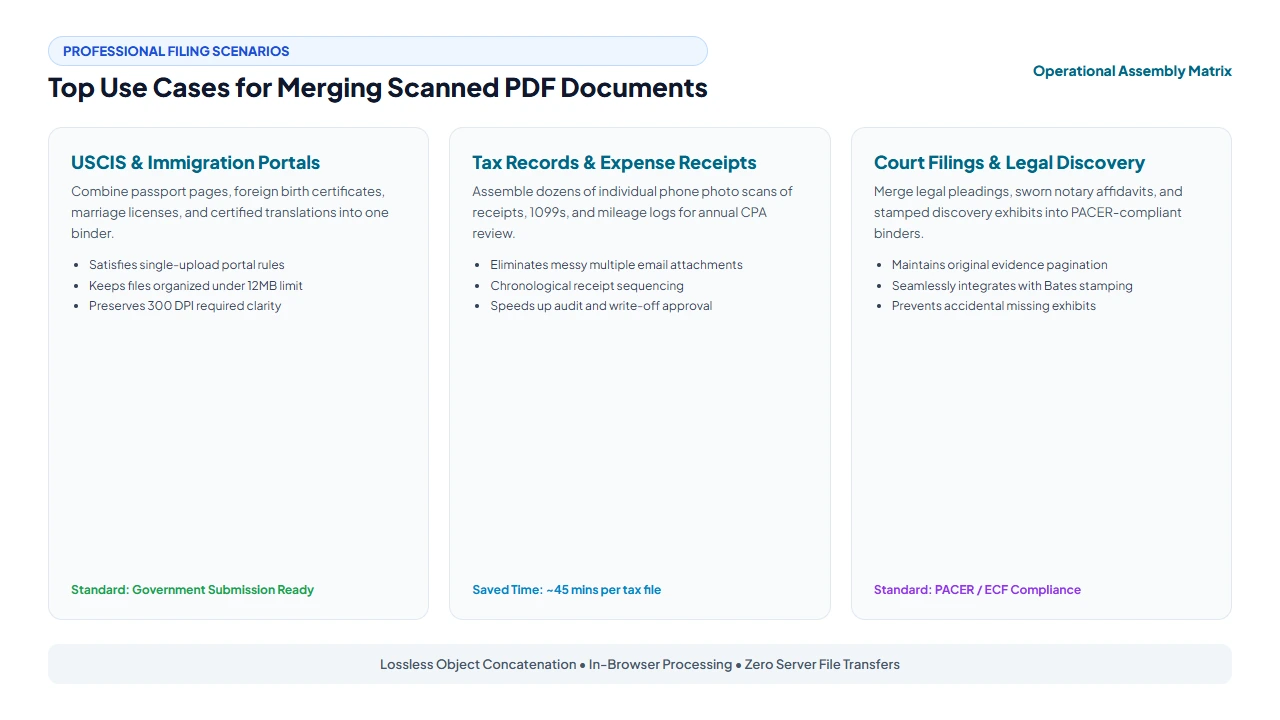
Top Enterprise & Professional Use Cases
1. USCIS & Consular Visa Petitions
Immigration filings (e.g., Form I-130, I-485, N-400) require massive quantities of supporting civil documentation. Applicants often scan passports, foreign birth certificates, marriage certificates, and certified English translations at different times. Merging all evidence into one logically sequenced dossier under 12MB guarantees immediate compliance with USCIS electronic submission standards.
2. Tax Records & Expense Receipts
Small business owners and freelancers regularly photograph business expense receipts, fuel stubs, and supplier invoices on their smartphones. Instead of sending an accountant 40 individual JPEG attachments, merging them into a single chronological PDF streamlines audit verification and speeds up tax deductions.
3. Legal Pleadings & Discovery Exhibits
Litigation attorneys and paralegals must assemble master trial binders consisting of the initial complaint, sworn witness affidavits, and dozens of stamped exhibits. Merging these documents ensures no crucial page is misplaced during trial preparation.
verified Zero Re-Compression Quality Guarantee
Our WebAssembly merging engine operates exclusively at the PDF object catalog level. Existing 300 DPI and 600 DPI scan resolutions are never downsampled, compressed, or blurred. Your combined multi-page document retains the exact microscopic clarity, forensic legibility, and color balance of your original scans.
Method Comparison: Merging Scanned Documents
| Workflow | Processing Speed | Image Resolution | Privacy & Security |
|---|---|---|---|
| Print & Rescan Combined Stack | 20 – 45 minutes | Severe generational blur | Paper waste & physical misplacement |
| Commercial Desktop Suite | 1 – 2 minutes | Lossless | Requires $239.88 / year subscription |
| Generic Cloud PDF Mergers | 2 – 5 minutes | Frequently re-compressed | Uploaded to 3rd-party remote servers |
| EditScannedPDF.com | Instant (1 – 3 seconds) | 100% Bit-for-Bit Lossless | 100% In-Browser RAM (Zero Upload) |
Companion PDF Organization Utilities
After merging your files, optimize and organize your multi-page document with these free tools:
| Tool | Primary Function | Recommended Next Step |
|---|---|---|
| Merge PDF | Combine multiple scan files into one | Assemble scattered sheets into a single binder |
| Split PDF | Separate large bundles into files | Extract specific chapters or sections |
| Rotate PDF | Fix upside-down or sideways pages | Orient all combined sheets upright |
| Compress PDF | Reduce file size under upload limits | Shrink 50-page scanned binders under 10MB |
| Insert/Delete Page | Purge blank sheets or insert notary jurats | Clean up accidental feeder blanks |
ISO 32000 Architecture & Filing Compliance
In-Depth ISO 32000 Architecture: Direct Object Graphing & Binary Stream Concatenation
Standard operating system PDF export routines frequently bloat files during merging because they duplicate shared resource dictionaries, recreate embedded font catalogs, and re-encode existing bitmap streams into redundant raster formats. EditScannedPDF.com eliminates this bloat through a direct ISO 32000-1 object graph grafting pipeline:
- Indirect Object Re-Indexing: In PDF specifications, every structural component—from the
/Catalogroot dictionary to individual/Pageleaf nodes—is assigned an indirect object identifier (e.g.,12 0 obj). When merging File A and File B, our WebAssembly compiler reads the cross-reference tables (xref), computes the maximum object number in File A, and linearly offsets the object identifiers in File B. This prevents object collisions while maintaining zero alterations to internal stream data. - Trailer Dictionary Harmonization: The engine synthesizes a unified root catalog dictionary, grafting File B's
/Kidsarray into File A's document page tree while updating the cumulative/Countvalue. Metadata arrays, encryption flags, and optional structural tags are normalized to conform strictly to PDF/A archival guidelines. - Zero-Copy Stream Concatenation: Compressed image streams (such as CCITT Fax Group 4 for black-and-white forms, or DCTDecode/JBIG2 for photographic color scans) are transferred directly between memory pointers via byte-slice references. The CPU never uncompresses the image raster data, enabling 100-page document combinations in under 2 seconds while preserving every microscopic dot of legal text.
psychology Engineering Pro Tip: Optimizing Page Tree Hierarchies for 100+ Page Binders
When merging large volumes of scans (e.g. 100+ exhibit pages), linear flat arrays in the /Pages catalog can increase reader loading latency. Our client-side WebAssembly compiler balances the page tree into structured intermediate nodes with balanced /Kids branch factors. This ensures ultra-fast page seek times and instant thumbnail rendering in judicial viewers like PACER and desktop readers without triggering memory exhaustion.
gavel Filing Standards & Record Integrity Notice
Assembling multiple scanned records into a single consolidated file is an approved administrative procedure under federal court electronic filing guidelines (FRCP 5.2 / PACER) and administrative agency regulations. Merging documents does not alter legal signatures, dates, or terms. However, users are strictly reminded that assembling documents must only be performed on paperwork you have lawful authority to compile; intentionally interleaving misleading or falsified pages into official records is strictly prohibited under 18 U.S.C. § 1519.
- check_circle 100% Client-Side WebAssembly: Runs entirely in your local browser RAM without uploading sensitive files to cloud servers.
- check_circle Strict Data Privacy: Fully compliant with HIPAA, GDPR, and enterprise confidentiality rules with zero server data retention.
- check_circle Lossless Fidelity: Preserves original 300 DPI text sharpness, authentic line baselines, and exact page layout structures.
- check_circle Universal Cross-Platform: Works seamlessly across Windows, Mac, Linux, iPhone, iPad, and Android with zero installation.
bolt Quick Summary (AI Overview)
Merging separate scanned PDF files, mobile phone scan captures, and multi-page paperwork into a single cohesive document is effortless with EditScannedPDF.com. Our free, in-browser WebAssembly merger concatenates native PDF page dictionaries and cross-reference (xref) tables directly in local RAM. Unmodified 300 DPI scan bitmaps are copied bit-for-bit with zero re-encoding, preserving 100% original clarity with complete privacy and zero server uploads.
Merge Scanned PDF Documents Instantly
Combine multi-page scans, paper receipts, and contracts into one clean, organized master PDF directly in your browser with zero data uploads.
merge_type Merge Scanned PDFs FreeFrequently Asked Questions
Does merging separate scanned PDFs degrade image clarity or resolution?
No. When using EditScannedPDF.com, merging is executed as a non-destructive binary stream concatenation. The raw 300 DPI or 600 DPI bitmap images are copied bit-for-bit into the unified page catalog without re-encoding, preserving 100% of the original scan quality.
Can I reorder pages from different files before merging?
Yes. Our visual layout manager allows you to freely drag and drop individual document cards to establish the exact chronological sequence needed for your court submission or visa dossier.
Is there a file limit or page count restriction when merging scanned PDFs?
Because processing takes place locally inside your computer's browser memory via WebAssembly, there are no artificial server file size limits or paywalls. You can merge large documents with dozens of pages effortlessly.
Are my sensitive financial or legal scans uploaded to a cloud server?
No. EditScannedPDF.com operates entirely client-side. Your files never touch a remote cloud server or external database, making it 100% safe for HIPAA medical charts, confidential legal discovery, and tax paperwork.
Can I combine both portrait and landscape scanned pages in one PDF?
Yes. Each page retains its independent /MediaBox dimensions and /Rotate attributes. Portrait correspondence sheets and wide landscape spreadsheets merge seamlessly into a single file without distortion.
Will the merged PDF be accepted by government portals like USCIS and PACER?
Yes. The output PDF strictly adheres to ISO 32000 standards. It is flattened, cleanly indexed, and fully compatible with government e-filing portals, court systems, and all universal PDF viewers.
Can I merge password-protected scanned PDF files?
If a scanned PDF has an open password, you simply enter the password to unlock the document within your browser memory. Once unlocked locally, its pages can be sequenced, combined, and saved into the final unified master document alongside your other files.
RELATED SCANNED PDF GUIDES & TOOLS: